


Disk
予備知識
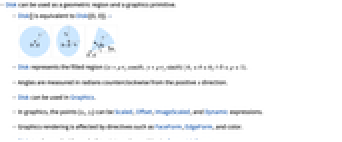
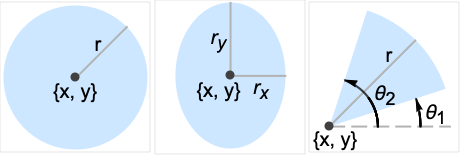
- Diskは,平面上の円形円板,楕円形円板,あるいは扇形を表すグラフィックスおよび幾何のプリミティブである.Disk[{x,y},r]は
における{x,y}を中心とした半径 r の円板を,Disk[{x,y},{rx,ry}]は
における{x,y}を中心とした半軸の長さが rxと ryの軸に平行な塗り潰された楕円を,Disk[{x,y},…,{θ1,θ2}]は(楕円である可能性が高い){x,y}を中心とした正の
軸から時計回りにラジアン単位で測った角度が θ1から θ2までの扇形を表す.略記形式のDisk[{x,y}]はDisk[{x,y},1],に等しく,Disk[]を評価すると自動的にDisk[{0,0},1]になる. - DiskオブジェクトはGraphics式の中に置いてフォーマットすることができる.グラフィックス内のDiskオブジェクトの外観は,辺指示子EdgeForm,面指示子FaceForm,Redのような色指示子,不透明度/透明度の指示子Opacity,スタイルオプションAntialiasingを指定して変更することができる.
- Diskは,計算を行うべき領域指定としても使うことができる.例えば,Integrate[1,{x,y}∈Disk[{0,0},r]]とArea[Disk[{0,0},r]]はどちらも半径
の円板の面積
を返し,Perimeter[Disk[{x,y},r]]は円周
を返す. - Diskは他の数多くのシンボルに関係している.Circleは円板の境界を表し,RegionBoundary[Disk[{x,y},r]]を使って計算することができる.BallとEllipsoidは円板のより高次元における相似形と考えることができる.Annulusは大きい円板の内側から同心の小さい円板を除いた領域を与える.Disk[{x,y},r]は,Ball[{x,y},r],ImplicitRegion[(x-u)2+(y-v)2≤r2,{u,v}],あるいはParametricRegion[a{Cos[θ],Sin[θ]}-{x,y},{{θ,0,2π},{a,0,r}}]を使って表すことができる.LaminaData["entity","property"]あるいはEntityValue[Entity["Lamina","entity"],"property"]を使って標準位置にある円板およびその異形の計算済みの特性を得ることができる."entity"には,"CircularSector","Disk","FilledEllipse","FilledHalfEllipse","HalfDisk"等の一つを使う.
例題
すべて開く すべて閉じる例 (5)
Graphics[Disk[]]Graphics[{Orange, Disk[{0, 0}, 1, {Pi / 4, 3Pi / 4}]}]Graphics[{Orange, Disk[{0, 0}, {3, 4}]}]{Graphics[{Pink, Disk[]}], Graphics[{EdgeForm[Thick], Pink, Disk[]}], Graphics[{EdgeForm[Dashed], Pink, Disk[]}], Graphics[{EdgeForm[Directive[Thick, Dashed, Blue]], Pink, Disk[]}]}円板のAreaを得る:
Area[Disk[]]Area[Disk[{0, 0}, {Subscript[r, 1], Subscript[r, 2]}]]スコープ (23)
グラフィックス (13)
指定 (7)
Graphics[{Red, Disk[{0, 0}, 5], Green, Disk[{0, 0}, 3], Blue, Disk[{0, 0}, 1]}]Graphics[{Red, Disk[{0, 0}, 1], Green, Disk[{1, 1}, 1], Blue, Disk[{2, 2}, 1]}]Graphics[Disk[{0, 0}, 1, {0, 4Pi / 3}]]Graphics[Disk[{0, 0}, 1, {4Pi / 3, 2Pi}]]Graphics[Disk[{0, 0}, {3, 2}]]Graphics[Disk[{0, 0}, {3, 2}, {0, 4Pi / 3}]]Graphics[Disk[], Frame -> True]Graphics[Disk[{{1, 1}, {5, 5}, {8, 2}}]]スタイリング (2)
Table[Graphics[{c, Disk[]}], {c, {Red, Green, Blue, Yellow}}]FaceFormおよびEdgeFormを使って内部や境界のスタイルが指定できる:
Graphics[{FaceForm[Pink], EdgeForm[Directive[Dashed, Thick, Blue]], Disk[]}]Graphics[{Yellow, EdgeForm[Directive[Thick, Blue]], Disk[{0, 0}, {3, 2}, {0, 4Pi / 3}]}]座標 (4)
スケールされた(Scaled)座標と半径を使う:
Graphics[Disk[Scaled[{.2, .2}], .2], Frame -> True]Graphics[Disk[{0, 0}, Scaled[.25]], Frame -> True]Graphics[Disk[{0, 0}, Scaled[{.5, .25}]], Frame -> True]画像がスケールされた(ImageScaled)座標と半径を使う:
Graphics[Disk[ImageScaled[{.2, .2}], .2], Frame -> True]Graphics[Disk[{0, 0}, ImageScaled[{.5, .25}]], Frame -> True]Offset座標を使う:
Graphics[Disk[Offset[{10, 10}, {0, 0}], .5], Frame -> True]Offsetを使って半径を印刷用ポイント数で指定する:
Graphics[Disk[{0, 0}, Offset[{10, 40}]], Frame -> True]領域 (10)
RegionEmbeddingDimension[Disk[{x, y}, r]]RegionDimension[Disk[{x, y}, r]]{RegionMember[Disk[], {0, 0}], RegionMember[Disk[], {0, 2}]}RegionMember[Disk[{Subscript[x, 0], Subscript[y, 0]}, {Subscript[r, 1], Subscript[r, 2]}], {x, y}]ℛ = Disk[];{Area[ℛ], RegionMeasure[ℛ]}c = RegionCentroid[ℛ]Graphics[{{Pink, ℛ}, {Black, Point[c]}}]ℛ = Disk[];{RegionDistance[ℛ, {1, 2}], RegionDistance[ℛ, {0, 0}]}{Plot3D[Evaluate@RegionDistance[ℛ, {x, y}], {x, -2, 2}, {y, -2, 2}, MeshFunctions -> {#3&}, Mesh -> 5, Exclusions -> Norm[{x, y}] == 1], ContourPlot[Evaluate@RegionDistance[ℛ, {x, y}], {x, -3, 3}, {y, -3, 3}, Contours -> {{0.5, Red}, {1, Green}, {1.5, Blue}}]}ℛ = Disk[];{SignedRegionDistance[ℛ, {1, 2}], SignedRegionDistance[ℛ, {0, 0}]}Plot3D[SignedRegionDistance[ℛ, {x, y}], {x, -2, 2}, {y, -2, 2}, MeshFunctions -> {#3&}, Mesh -> {{0}}, MeshShading -> {Red, Green}, Exclusions -> Norm[{x, y}] == 1]ℛ = Disk[{1, 2}, {3, 4}];RegionNearest[ℛ, {5, 6}]pts = Table[{1, 2} + 5{Cos[k 2 π / 16], Sin[k 2π / 16]}, {k, 0., 15}];
nst = RegionNearest[ℛ, #]& /@ pts;Legended[Graphics[{{Gray, ℛ}, {Thin, Gray, Line[Transpose[{pts, nst}]]}, {Red, Point[pts]}, {Blue, Point[nst]}}], PointLegend[{Red, Blue}, {"start", "nearest"}]]ℛ = Disk[{0, 0}, {2, 1}];BoundedRegionQ[ℛ]rr = RegionBounds[ℛ]Graphics[{Gray, ℛ, {EdgeForm[{Dashed, Red}], Opacity[0.1, Yellow], Cuboid@@Transpose[rr]}}]ℛ = Disk[{Subscript[x, 0], Subscript[y, 0]}, {Subscript[r, 1], Subscript[r, 2]}];Integrate[x y, {x, y}∈ℛ]ℛ = Disk[];{MinValue[{x y - x, {x, y}∈ℛ}, {x, y}], ArgMin[{x y - x, {x, y}∈ℛ}, {x, y}]}ℛ = Disk[{1, 2}, {3, 4}];Solve[x^2 + y^2 == 7 && x y == 1 && {x, y}∈ℛ, {x, y}]Show[{Graphics[{{Green, ℛ}, {Blue, Circle[{0, 0}, Sqrt[7]]}}], Plot[1 / x, {x, -3, 5}, PlotRange -> {{-3, 5}, {-3, 6}}], Graphics[{PointSize[Large], Red, Point[{x, y}] /. %}]}, Axes -> True]アプリケーション (11)
Graphics[{Disk[{0, 0}, 2, {Pi / 3, 2Pi}], Disk[{6, 0}, 2, {-Pi, 2Pi / 3}], Disk[{3, 5}, 2, {4Pi / 3, -Pi / 3}]}]Diskを使って三角関数のプロットに注釈を付ける:
Plot[Sin[x], {x, 0, 4Pi}, Epilog -> {Opacity[0.5], EdgeForm[Opacity[.7]], Red, Table[Disk[{x, Sin[x]}, Offset[{8, 8}], {0, Mod[x, 2Pi]}], {x, 0, 4Pi, Pi / 2}]}, PlotRangePadding -> .2]data = Reverse[Sort[RandomReal[1, 5]]];Module[{t = 0, len = Length[data], sum = Total[data]}, Graphics[Table[{Hue[i / len], EdgeForm[Opacity[.8]], Disk[{0, 0}, 1, {t, t += 2 Pi data[[i]] / sum}]}, {i, len}]]]円の面積についてのアルキメデス(Archimedes)の近似:
Table[Graphics[{EdgeForm[Opacity[.8]], Table[{Hue[i / n, .5], Disk[{i Sin[Pi / n ], ((-1) ^ (i + 1) + 1)Cos[Pi / n] / 2}, 1, Pi{(-1) ^ i / 2 - 1 / n, (-1) ^ i / 2 + 1 / n}]}, {i, n}]}], {n, 4, 12}]Graphics[{EdgeForm[Blue], LightYellow, Table[Disk[{i, j}, 1 / 2], {i, 7}, {j, 5}]}]Graphics[{EdgeForm[Blue], LightYellow, Table[Disk[{i + Boole[EvenQ[j]] / 2, Sqrt[3] / 2j}, 1 / 2], {i, 7}, {j, 5}]}]Animate[Module[{a = 4, b = 3, f, r}, f = Sqrt[a ^ 2 - b ^ 2];r = b ^ 2 / (a + f Cos[θ]);Graphics[{Lighter[Red], Rotate[Disk[{-f, 0}, {a, b}], θ, {0, 0}], Lighter[Blue], Translate[Rotate[Disk[{-f, 0}, {a, b}], -ArcTan[ 2 f + r Cos[θ], r Sin[θ]], {0, 0}], {2a, 0}], Black, Point[{{0, 0}, {2a, 0}}]}, PlotRange -> {{-2a, 4a}, {-2a, 2a}}, ImageSize -> 250]], {θ, 0, 2Pi}, AnimationRunning -> False]環帯とは,中心が等しい2枚の円板のRegionDifferenceである:
d1 = Disk[{0, 0}, 5];
d2 = Disk[{0, 0}, 3];
annulus = RegionDifference[d1, d2]Region[annulus]d = Disk[{0, 0}, {Subscript[r, x], Subscript[r, y]}];NMaximize[{Area[d], ArcLength[RegionBoundary[d]] == 2π && Subscript[r, x] > 0 && Subscript[r, y] > 0}, {Subscript[r, x], Subscript[r, y]}]Region[d /. Last[%]]y[x_] := Sin[x ^ 2];
r[x_] := ((1 + y'[x] ^ 2) ^ (3 / 2)) / y''[x];
d[x_] := Disk[{x, y[x]} + r[x] * Normalize[{-y'[x], 1}], Abs[r[x]]];Show[{Plot[y[x], {x, -2, 2}], Graphics[{Gray, Opacity[0.5], d[-1.2], d[0], d[1.4], Red, PointSize[Medium], Point[{-1.2, y[-1.2]}], Point[{0, y[0]}], Point[{1.4, y[1.4]}]}]}, AspectRatio -> Automatic]多くの円板のRegionUnionを取ることで,メッシュの膨張を近似することができる:
mr = BoundaryDiscretizeGraphics[Graphics[Text[""]], _Text]rad = 0.25;
pts = MeshCoordinates[mr];
disks = BoundaryDiscretizeRegion[Disk[#, rad]]& /@ pts;RegionUnion[RegionUnion@@disks, mr]多くの円板のRegionUnionを取り除くことで,メッシュの収縮を近似することができる:
mr = BoundaryDiscretizeGraphics[Graphics[Text[""]], _Text]rad = 0.1;
pts = AnnotationValue[{mr, 1}, MeshCellCentroid];
disks = BoundaryDiscretizeRegion[Disk[#, rad]]& /@ pts;RegionDifference[mr, RegionUnion@@disks]特性と関係 (9)
Rotateを使って可能なすべての楕円板を求める:
Graphics[{Pink, Rotate[Disk[{0, 0}, {4, 2}], Pi / 6]}, Axes -> True]{Graphics[Circle[]], Graphics[{FaceForm[], EdgeForm[Gray], Disk[]}]}円板の陰的な指定はRegionPlotを使って生成できる:
RegionPlot[x ^ 2 + y ^ 2 < 1, {x, -1, 1}, {y, -1, 1}]円板のパラメータ的な指定はParametricPlotを使って生成できる:
ParametricPlot[{r Cos[θ], r Sin[θ]}, {r, 0, 1}, {θ, 0, 2π}, Mesh -> 15]Subscript[ℛ, 1] = Ball[{x, y}, r];
Subscript[ℛ, 2] = Disk[{x, y}, r];RegionEqual[Subscript[ℛ, 1], Subscript[ℛ, 2]]Subscript[ℛ, 1] = Ellipsoid[{x, y}, {r1, r2}];
Subscript[ℛ, 2] = Disk[{x, y}, {r1, r2}];RegionEqual[Subscript[ℛ, 1], Subscript[ℛ, 2]]ParametricRegionは任意のDiskを表すことができる:
Subscript[ℛ, 1] = ParametricRegion[{{r Cos[θ], 2r Sin[θ]}, 0 ≤ r ≤ 1 && 0 ≤ θ ≤ 2π}, {r, θ}];
Subscript[ℛ, 2] = Disk[{0, 0}, {1, 2}];RegionEqual[Subscript[ℛ, 1], Subscript[ℛ, 2]]ImplicitRegionは任意のDiskを表すことができる:
Subscript[ℛ, 1] = ImplicitRegion[x^2 + y^2 ≤ 1, {x, y}];
Subscript[ℛ, 2] = Disk[{0, 0}, 1];RegionEqual[Subscript[ℛ, 1], Subscript[ℛ, 2]]Diskはユークリッドノルムのノルム球である:
ℛ = Disk[{0, 0}, 1];Reduce[{x, y}∈ℛ⧦Norm[{x, y}] ≤ 1, {x, y}, Reals]考えられる問題 (2)
スケールされた(Scaled)半径の使用はPlotRangeに依存する:
Table[Graphics[Disk[{0, 0}, Scaled[.25]], PlotRange -> {{-n, n}, {-1, 1}}, Frame -> True, FrameTicks -> {{{-1, 1}, None}, {{-n, n}, None}}], {n, {1, 2, 3}}]ImageScaledのサイズの使用はImageSizeとAspectRatioに依存する:
Table[Graphics[Disk[ImageScaled[{.5, .5}], ImageScaled[{.25, .25}]], Frame -> True, FrameTicks -> {{{-1, 1}, None}, {{-1, 1}, None}}, ImageSize -> n], {n, {50, 70, 100}}]Table[Graphics[Disk[ImageScaled[{.5, .5}], ImageScaled[{.25, .25}]], Frame -> True, FrameTicks -> {{{-1, 1}, None}, {{-1, 1}, None}}, ImageSize -> 100, AspectRatio -> n], {n, {1, 1 / 2, 1 / 3}}]おもしろい例題 (4)
Graphics[Table[{EdgeForm[Black], Hue[RandomReal[]], Disk[RandomReal[4, {2}], RandomReal[1]]}, {40}]]Graphics[Table[{Hue[t / 15, 1, .9, .3], Disk[{Cos[2Pi t / 15], Sin[2Pi t / 15]}]}, {t, 15}]]Graphics[Table[{EdgeForm[Opacity[.6]], Hue[(-11 + q + 10 r) / 72], Disk[(8 - r){Cos[2Pi q / 12], Sin[2Pi q / 12]}, (8 - r) / 3]}, {r, 6}, {q, 12}]]Animate[Graphics[{Red, Disk[{0, 0}, 2, {0, Pi}], Blue, Disk[{0, 0}, 2, {Pi, 2Pi}], Red, Disk[{-1, 0}, 1], Blue, Disk[{1, 0}, 1]}, PlotRange -> 2.1, ImageSize -> 150] /. Disk[x__] :> Rotate[Disk[x], d Degree, {0, 0}], {d, 0, 360}, AnimationRunning -> False]関連するガイド
-
▪
- グラフィックスオブジェクト ▪
- 基本的な特殊領域 ▪
- 地図と地図製作 ▪
- 偏微分方程式 ▪
- 系のモデル化 ▪
- 記号的なグラフィックス言語 ▪
- 総合幾何学 ▪
- 立体幾何学 ▪
- 平面幾何学
履歴
1991 で導入 (2.0) | 2014 で更新 (10.0) ▪ 2023 (13.3)
テキスト
Wolfram Research (1991), Disk, Wolfram言語関数, https://reference.wolfram.com/language/ref/Disk.html (2023年に更新).
CMS
Wolfram Language. 1991. "Disk." Wolfram Language & System Documentation Center. Wolfram Research. Last Modified 2023. https://reference.wolfram.com/language/ref/Disk.html.
APA
Wolfram Language. (1991). Disk. Wolfram Language & System Documentation Center. Retrieved from https://reference.wolfram.com/language/ref/Disk.html
BibTeX
@misc{reference.wolfram_2026_disk, author="Wolfram Research", title="{Disk}", year="2023", howpublished="\url{https://reference.wolfram.com/language/ref/Disk.html}", note=[Accessed: 16-September-2026]}
BibLaTeX
@online{reference.wolfram_2026_disk, organization={Wolfram Research}, title={Disk}, year={2023}, url={https://reference.wolfram.com/language/ref/Disk.html}, note=[Accessed: 16-September-2026]}