


Disk
背景
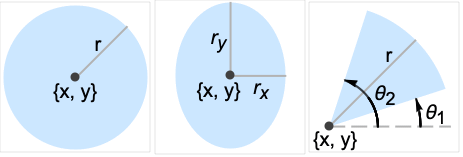
- Disk 是一个图形和几何图元,表示一个圆盘、椭圆盘或平面的扇区. 并且,Disk[{x,y},r] 表示中心在 {x,y} 的
中半径为 r 的圆盘,Disk[{x,y},{rx,ry}] 表示
中,轴对齐填充的椭圆,中心为 {x,y},半轴长为 rx 和 ry,Disk[{x,y},…,{θ1,θ2}] 表示(潜在椭圆)扇区,中心在 {x,y},范围在正
轴逆时针弧度度量的 θ1 与 θ2 之间. 缩短形式 Disk[{x,y}] 等同于 Disk[{x,y},1],其中 Disk[] 自动等同于 Disk[{0,0},1]. - Disk 对象的格式化可以通过把他们放在 Graphics 表达式中进行. 图形中 Disk 对象的外观的修改可通过制定边和面指令 EdgeForm 和 FaceForm,颜色指令,例如 Red,透明指令 Opacity 以及样式选项 Antialiasing 进行.
- Disk 还可用于执行计算的区域规范. 例如,Integrate[1,{x,y}∈Disk[{0,0},r]] 和 Area[Disk[{0,0},r]] 均返回半径为
的圆盘面积
,以及,Perimeter[Disk[{x,y},r]] 返回周长
. - Disk 也与其他符号相关. Circle 表示圆盘的边界,可使用 RegionBoundary[Disk[{x,y},r]] 计算. Ball 和 Ellipsoid 被认为是圆盘的更高维度的类似. Annulus 给出通过从较大的同心圆盘的内部除去小圆盘而获得的区域. Disk[{x,y},r] 也可以用 Ball[{x,y},r]、ImplicitRegion[(x-u)2+(y-v)2≤r2,{u,v}] 或 ParametricRegion[a{Cos[θ],Sin[θ]}-{x,y},{{θ,0,2π},{a,0,r}}] 表示. 圆盘的预计算属性以及标准位置中的变体可使用 LaminaData["entity","property"] 或 EntityValue[Entity["Lamina","entity"],"property"],其中,"entity" 是 "CircularSector"、"Disk"、"FilledEllipse"、"FilledHalfEllipse"、"HalfDisk" 等其中之一.
范例
打开所有单元 关闭所有单元基本范例 (5)
Graphics[Disk[]]Graphics[{Orange, Disk[{0, 0}, 1, {Pi / 4, 3Pi / 4}]}]Graphics[{Orange, Disk[{0, 0}, {3, 4}]}]{Graphics[{Pink, Disk[]}], Graphics[{EdgeForm[Thick], Pink, Disk[]}], Graphics[{EdgeForm[Dashed], Pink, Disk[]}], Graphics[{EdgeForm[Directive[Thick, Dashed, Blue]], Pink, Disk[]}]}获得圆盘的 Area:
Area[Disk[]]Area[Disk[{0, 0}, {Subscript[r, 1], Subscript[r, 2]}]]范围 (23)
图形 (13)
规范 (7)
Graphics[{Red, Disk[{0, 0}, 5], Green, Disk[{0, 0}, 3], Blue, Disk[{0, 0}, 1]}]Graphics[{Red, Disk[{0, 0}, 1], Green, Disk[{1, 1}, 1], Blue, Disk[{2, 2}, 1]}]Graphics[Disk[{0, 0}, 1, {0, 4Pi / 3}]]Graphics[Disk[{0, 0}, 1, {4Pi / 3, 2Pi}]]Graphics[Disk[{0, 0}, {3, 2}]]Graphics[Disk[{0, 0}, {3, 2}, {0, 4Pi / 3}]]Graphics[Disk[], Frame -> True]Graphics[Disk[{{1, 1}, {5, 5}, {8, 2}}]]样式化 (2)
Table[Graphics[{c, Disk[]}], {c, {Red, Green, Blue, Yellow}}]FaceForm 和 EdgeForm 可用于指定内部和边界的样式:
Graphics[{FaceForm[Pink], EdgeForm[Directive[Dashed, Thick, Blue]], Disk[]}]Graphics[{Yellow, EdgeForm[Directive[Thick, Blue]], Disk[{0, 0}, {3, 2}, {0, 4Pi / 3}]}]坐标 (4)
使用 Scaled 坐标和半径:
Graphics[Disk[Scaled[{.2, .2}], .2], Frame -> True]Graphics[Disk[{0, 0}, Scaled[.25]], Frame -> True]Graphics[Disk[{0, 0}, Scaled[{.5, .25}]], Frame -> True]使用 ImageScaled 坐标和半径:
Graphics[Disk[ImageScaled[{.2, .2}], .2], Frame -> True]Graphics[Disk[{0, 0}, ImageScaled[{.5, .25}]], Frame -> True]使用 Offset 坐标:
Graphics[Disk[Offset[{10, 10}, {0, 0}], .5], Frame -> True]使用 Offset 指定打印机点的半径:
Graphics[Disk[{0, 0}, Offset[{10, 40}]], Frame -> True]区域 (10)
RegionEmbeddingDimension[Disk[{x, y}, r]]RegionDimension[Disk[{x, y}, r]]{RegionMember[Disk[], {0, 0}], RegionMember[Disk[], {0, 2}]}RegionMember[Disk[{Subscript[x, 0], Subscript[y, 0]}, {Subscript[r, 1], Subscript[r, 2]}], {x, y}]ℛ = Disk[];{Area[ℛ], RegionMeasure[ℛ]}c = RegionCentroid[ℛ]Graphics[{{Pink, ℛ}, {Black, Point[c]}}]ℛ = Disk[];{RegionDistance[ℛ, {1, 2}], RegionDistance[ℛ, {0, 0}]}{Plot3D[Evaluate@RegionDistance[ℛ, {x, y}], {x, -2, 2}, {y, -2, 2}, MeshFunctions -> {#3&}, Mesh -> 5, Exclusions -> Norm[{x, y}] == 1], ContourPlot[Evaluate@RegionDistance[ℛ, {x, y}], {x, -3, 3}, {y, -3, 3}, Contours -> {{0.5, Red}, {1, Green}, {1.5, Blue}}]}ℛ = Disk[];{SignedRegionDistance[ℛ, {1, 2}], SignedRegionDistance[ℛ, {0, 0}]}Plot3D[SignedRegionDistance[ℛ, {x, y}], {x, -2, 2}, {y, -2, 2}, MeshFunctions -> {#3&}, Mesh -> {{0}}, MeshShading -> {Red, Green}, Exclusions -> Norm[{x, y}] == 1]ℛ = Disk[{1, 2}, {3, 4}];RegionNearest[ℛ, {5, 6}]pts = Table[{1, 2} + 5{Cos[k 2 π / 16], Sin[k 2π / 16]}, {k, 0., 15}];
nst = RegionNearest[ℛ, #]& /@ pts;Legended[Graphics[{{Gray, ℛ}, {Thin, Gray, Line[Transpose[{pts, nst}]]}, {Red, Point[pts]}, {Blue, Point[nst]}}], PointLegend[{Red, Blue}, {"start", "nearest"}]]ℛ = Disk[{0, 0}, {2, 1}];BoundedRegionQ[ℛ]rr = RegionBounds[ℛ]Graphics[{Black, ℛ, {EdgeForm[{Dashed, Red}], Opacity[0.1, Yellow], Cuboid@@Transpose[rr]}}]ℛ = Disk[{Subscript[x, 0], Subscript[y, 0]}, {Subscript[r, 1], Subscript[r, 2]}];Integrate[x y, {x, y}∈ℛ]ℛ = Disk[];{MinValue[{x y - x, {x, y}∈ℛ}, {x, y}], ArgMin[{x y - x, {x, y}∈ℛ}, {x, y}]}ℛ = Disk[{1, 2}, {3, 4}];Solve[x^2 + y^2 == 7 && x y == 1 && {x, y}∈ℛ, {x, y}]Show[{Graphics[{{Green, ℛ}, {Blue, Circle[{0, 0}, Sqrt[7]]}}], Plot[1 / x, {x, -3, 5}, PlotRange -> {{-3, 5}, {-3, 6}}], Graphics[{PointSize[Large], Red, Point[{x, y}] /. %}]}, Axes -> True]应用 (11)
Graphics[{Disk[{0, 0}, 2, {Pi / 3, 2Pi}], Disk[{6, 0}, 2, {-Pi, 2Pi / 3}], Disk[{3, 5}, 2, {4Pi / 3, -Pi / 3}]}]使用 Disk 注释三角函数图形:
Plot[Sin[x], {x, 0, 4Pi}, Epilog -> {Opacity[0.5], EdgeForm[Opacity[.7]], Red, Table[Disk[{x, Sin[x]}, Offset[{8, 8}], {0, Mod[x, 2Pi]}], {x, 0, 4Pi, Pi / 2}]}, PlotRangePadding -> .2]data = Reverse[Sort[RandomReal[1, 5]]];Module[{t = 0, len = Length[data], sum = Total[data]}, Graphics[Table[{Hue[i / len], EdgeForm[Opacity[.8]], Disk[{0, 0}, 1, {t, t += 2 Pi data[[i]] / sum}]}, {i, len}]]]Table[Graphics[{EdgeForm[Opacity[.8]], Table[{Hue[i / n, .5], Disk[{i Sin[Pi / n ], ((-1) ^ (i + 1) + 1)Cos[Pi / n] / 2}, 1, Pi{(-1) ^ i / 2 - 1 / n, (-1) ^ i / 2 + 1 / n}]}, {i, n}]}], {n, 4, 12}]Graphics[{EdgeForm[Blue], LightYellow, Table[Disk[{i, j}, 1 / 2], {i, 7}, {j, 5}]}]Graphics[{EdgeForm[Blue], LightYellow, Table[Disk[{i + Boole[EvenQ[j]] / 2, Sqrt[3] / 2j}, 1 / 2], {i, 7}, {j, 5}]}]Animate[Module[{a = 4, b = 3, f, r}, f = Sqrt[a ^ 2 - b ^ 2];r = b ^ 2 / (a + f Cos[θ]);Graphics[{Lighter[Red], Rotate[Disk[{-f, 0}, {a, b}], θ, {0, 0}], Lighter[Blue], Translate[Rotate[Disk[{-f, 0}, {a, b}], -ArcTan[ 2 f + r Cos[θ], r Sin[θ]], {0, 0}], {2a, 0}], Black, Point[{{0, 0}, {2a, 0}}]}, PlotRange -> {{-2a, 4a}, {-2a, 2a}}, ImageSize -> 250]], {θ, 0, 2Pi}, AnimationRunning -> False]圆环是具有相同圆心的两个圆盘的 RegionDifference:
d1 = Disk[{0, 0}, 5];
d2 = Disk[{0, 0}, 3];
annulus = RegionDifference[d1, d2]Region[annulus]d = Disk[{0, 0}, {Subscript[r, x], Subscript[r, y]}];NMaximize[{Area[d], ArcLength[RegionBoundary[d]] == 2π && Subscript[r, x] > 0 && Subscript[r, y] > 0}, {Subscript[r, x], Subscript[r, y]}]Region[d /. Last[%]]y[x_] := Sin[x ^ 2];
r[x_] := ((1 + y'[x] ^ 2) ^ (3 / 2)) / y''[x];
d[x_] := Disk[{x, y[x]} + r[x] * Normalize[{-y'[x], 1}], Abs[r[x]]];Show[{Plot[y[x], {x, -2, 2}], Graphics[{Gray, Opacity[0.5], d[-1.2], d[0], d[1.4], Red, PointSize[Medium], Point[{-1.2, y[-1.2]}], Point[{0, y[0]}], Point[{1.4, y[1.4]}]}]}, AspectRatio -> Automatic]通过取多个圆盘的 RegionUnion,可近似网状扩张:
mr = BoundaryDiscretizeGraphics[Graphics[Text[""]], _Text]rad = 0.25;
pts = MeshCoordinates[mr];
disks = BoundaryDiscretizeRegion[Disk[#, rad]]& /@ pts;RegionUnion[RegionUnion@@disks, mr]通过去除多个圆盘的 RegionUnion,可近似网格侵蚀:
mr = BoundaryDiscretizeGraphics[Graphics[Text[""]], _Text]rad = 0.1;
pts = AnnotationValue[{mr, 1}, MeshCellCentroid];
disks = BoundaryDiscretizeRegion[Disk[#, rad]]& /@ pts;RegionDifference[mr, RegionUnion@@disks]属性和关系 (9)
用 Rotate 来获得所有可能的椭圆盘:
Graphics[{Pink, Rotate[Disk[{0, 0}, {4, 2}], Pi / 6]}, Axes -> True]{Graphics[Circle[]], Graphics[{FaceForm[], EdgeForm[Black], Disk[]}]}圆盘的隐式指定可以使用 RegionPlot 生成:
RegionPlot[x ^ 2 + y ^ 2 < 1, {x, -1, 1}, {y, -1, 1}]圆盘的参数式指定可以使用 ParametricPlot 生成:
ParametricPlot[{r Cos[θ], r Sin[θ]}, {r, 0, 1}, {θ, 0, 2π}, Mesh -> 15]Subscript[ℛ, 1] = Ball[{x, y}, r];
Subscript[ℛ, 2] = Disk[{x, y}, r];RegionEqual[Subscript[ℛ, 1], Subscript[ℛ, 2]]Subscript[ℛ, 1] = Ellipsoid[{x, y}, {r1, r2}];
Subscript[ℛ, 2] = Disk[{x, y}, {r1, r2}];RegionEqual[Subscript[ℛ, 1], Subscript[ℛ, 2]]ParametricRegion 可以表示任何 Disk:
Subscript[ℛ, 1] = ParametricRegion[{{r Cos[θ], 2r Sin[θ]}, 0 ≤ r ≤ 1 && 0 ≤ θ ≤ 2π}, {r, θ}];
Subscript[ℛ, 2] = Disk[{0, 0}, {1, 2}];RegionEqual[Subscript[ℛ, 1], Subscript[ℛ, 2]]ImplicitRegion 可以表示任何 Disk:
Subscript[ℛ, 1] = ImplicitRegion[x^2 + y^2 ≤ 1, {x, y}];
Subscript[ℛ, 2] = Disk[{0, 0}, 1];RegionEqual[Subscript[ℛ, 1], Subscript[ℛ, 2]]Disk 对于欧几里德范数是一个范数球:
ℛ = Disk[{0, 0}, 1];Reduce[{x, y}∈ℛ⧦Norm[{x, y}] ≤ 1, {x, y}, Reals]可能存在的问题 (2)
Table[Graphics[Disk[{0, 0}, Scaled[.25]], PlotRange -> {{-n, n}, {-1, 1}}, Frame -> True, FrameTicks -> {{{-1, 1}, None}, {{-n, n}, None}}], {n, {1, 2, 3}}]使用 ImageScaled 大小将取决于 ImageSize 和 AspectRatio:
Table[Graphics[Disk[ImageScaled[{.5, .5}], ImageScaled[{.25, .25}]], Frame -> True, FrameTicks -> {{{-1, 1}, None}, {{-1, 1}, None}}, ImageSize -> n], {n, {50, 70, 100}}]Table[Graphics[Disk[ImageScaled[{.5, .5}], ImageScaled[{.25, .25}]], Frame -> True, FrameTicks -> {{{-1, 1}, None}, {{-1, 1}, None}}, ImageSize -> 100, AspectRatio -> n], {n, {1, 1 / 2, 1 / 3}}]巧妙范例 (4)
Graphics[Table[{EdgeForm[Black], Hue[RandomReal[]], Disk[RandomReal[4, {2}], RandomReal[1]]}, {40}]]Graphics[Table[{Hue[t / 15, 1, .9, .3], Disk[{Cos[2Pi t / 15], Sin[2Pi t / 15]}]}, {t, 15}]]Graphics[Table[{EdgeForm[Opacity[.6]], Hue[(-11 + q + 10 r) / 72], Disk[(8 - r){Cos[2Pi q / 12], Sin[2Pi q / 12]}, (8 - r) / 3]}, {r, 6}, {q, 12}]]Animate[Graphics[{Red, Disk[{0, 0}, 2, {0, Pi}], Blue, Disk[{0, 0}, 2, {Pi, 2Pi}], Red, Disk[{-1, 0}, 1], Blue, Disk[{1, 0}, 1]}, PlotRange -> 2.1, ImageSize -> 150] /. Disk[x__] :> Rotate[Disk[x], d Degree, {0, 0}], {d, 0, 360}, AnimationRunning -> False]历史
1991年引入 (2.0) | 在以下年份被更新:2014 (10.0) ▪ 2023 (13.3)
文本
Wolfram Research (1991),Disk,Wolfram 语言函数,https://reference.wolfram.com/language/ref/Disk.html (更新于 2023 年).
CMS
Wolfram 语言. 1991. "Disk." Wolfram 语言与系统参考资料中心. Wolfram Research. 最新版本 2023. https://reference.wolfram.com/language/ref/Disk.html.
APA
Wolfram 语言. (1991). Disk. Wolfram 语言与系统参考资料中心. 追溯自 https://reference.wolfram.com/language/ref/Disk.html 年
BibTeX
@misc{reference.wolfram_2026_disk, author="Wolfram Research", title="{Disk}", year="2023", howpublished="\url{https://reference.wolfram.com/language/ref/Disk.html}", note=[Accessed: 08-September-2026]}
BibLaTeX
@online{reference.wolfram_2026_disk, organization={Wolfram Research}, title={Disk}, year={2023}, url={https://reference.wolfram.com/language/ref/Disk.html}, note=[Accessed: 08-September-2026]}