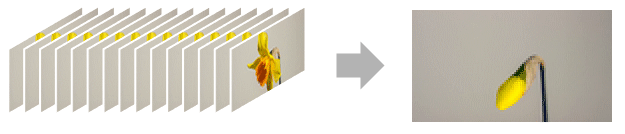
AnimatedImage[{image1,image2,…}]
各フレームが連続する imageiであるアニメーションを生成する.
AnimatedImage[file]
file からのアニメーション画像を表す.
AnimatedImage
AnimatedImage[{image1,image2,…}]
各フレームが連続する imageiであるアニメーションを生成する.
AnimatedImage[file]
file からのアニメーション画像を表す.
詳細とオプション
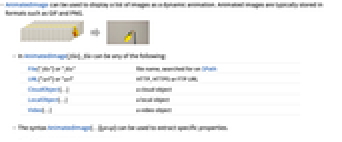
- AnimatedImageは,画像のリストを動的なアニメーションとして表示できる.アニメーション画像は,一般に,GIFやPNG等の形式で保存される.
- AnimatedImage[file]の file は以下のいずれでもよい.
-
File["file"] または "file" $Pathで検索されるファイル名 URL["url"] または "url" HTTP,HTTPS,FTP URL CloudObject[…] クラウドオブジェクト LocalObject[…] ローカルオブジェクト Video[…] 動画オブジェクト - AnimatedImage[…][prop]というシンタックスで特定の特性が取り出せる.
- 次は,サポートされる特性である.
-
"AnimationRepetitions" アニメーションを繰り返す回数 "Channels" 画像チャンネル数 "ColorSpace" データについて仮定する色空間 "DataType" もとになっているデータ型 "FrameRate" 使用するフレームレート "ImageCount" 画像の数 "ImageList" すべての画像 "Interleaving" データがインターリーブされて保存されているかどうか "RasterSize" 画像の画素次元 "TotalDuration" 合計時間 "Transparency" 画像に透明(アルファ)チャンネルがあるかどうか - 次は,使用可能なオプションである.
-
AnimationRepetitions Infinity 停止までの実行回数 AnimationRunning True アニメーションが実行中かどうか DefaultDuration Automatic デフォルトの継続時間(単位:秒) FrameRate Automatic 画像を表示するレート ImageSize Inherited 使用する全体的な画像サイズ RasterSize Automatic 画像フレームの次元 RefreshRate Automatic デフォルトの1秒あたりのリフレッシュ回数 - AnimatedImageのInformationには次の特性が含まれる.
-
"AnimationRepetitions" アニメーションを繰り返す回数 "Channels" 画像チャンネル数 "ColorSpace" データについて仮定する色空間 "DataType" もとになっているデータ型 "FrameRate" 使用するフレームレート "ImageCount" 画像の数 "ImageDimensions" 画素次元 "Interleaving" データがインターリーブされて保存されているかどうか "RasterSize" 画像の画素次元 "TotalDuration" 合計時間 "Transparency" 画像に透明(アルファ)チャンネルがあるかどうか - AnimatedImageをサポートする基本的な画像編集関数には,ColorConvert,ImageCrop,ImagePad,ImageReflect,ImageResize,ImageRotate,ImageTake,ImageTrimがある.
- VideoとListAnimateを使ってアニメーションにした画像を対応するオブジェクトに変換する.
例題
すべて開く すべて閉じる例 (3)
AnimatedImage["ExampleData/wave.gif"]AnimatedImage[Rasterize[Style[#, 40]]& /@ Range[0, 9], FrameRate -> 6]t = Table[With[{h = h}, LinearGradientImage[Hue[# + h, .5]&, 50]], {h, 0, 1, .1}]AnimatedImage[t, FrameRate -> 6]スコープ (7)
データ (4)
list = Table[Image[Hue[h, .8, .9]], {h, 0, 1, 1 / 40}]AnimatedImage[list, ImageSize -> 50]AnimatedImage["ExampleData/pearls.png"]Information[%]ファイルからインポートされた画像のリストをアニメーションにする:
AnimatedImage[Import["ExampleData/pearls.png", ImageSize -> 100]]メタデータの中には,フレームの継続時間のようにアニメーション画像の作成時には使われないものもあるので注意のこと:
Information[%]AnimatedImage[Video["ExampleData/fish.mp4"]]特性 (3)
list = AnimatedImage["ExampleData/wave.gif"]["ImageList"];Downsample[list, 5]AnimatedImage["ExampleData/wave.gif"]["FrameRate"]AnimatedImage["ExampleData/wave.gif"]["TotalDuration"]AnimatedImage["ExampleData/wave.gif", FrameRate -> 5]["TotalDuration"]オプション (6)
AnimationRepetitions (1)
AnimationRepetitionsn を使ってアニメーションを n 回だけ再生する:
AnimatedImage["ExampleData/wave.gif", AnimationRepetitions -> 3]AnimationRepetitions∞を使ってアニメーションを連続的に再生する:
AnimatedImage["ExampleData/wave.gif", AnimationRepetitions -> ∞]AnimationRunning (1)
AnimationRunningを使ってデフォルトでアニメーションを実行するかどうかを指定する:
AnimatedImage["ExampleData/pearls.png", AnimationRunning -> True]AnimatedImage["ExampleData/pearls.png", AnimationRunning -> False]DefaultDuration (2)
DefaultDurations を使って1回のアニメーションサイクルの継続時間を制御する:
AnimatedImage[Import["ExampleData/wave.gif"], DefaultDuration -> 2]5秒以上の動画からアニメーション画像を作成するときは,スニペット動画からアニメーションが作成される:
AnimatedImage[Video["ExampleData/bullfinch.mkv"]]%["TotalDuration"]Duration@Video["ExampleData/bullfinch.mkv"]FrameRate (1)
FrameRaten を使って1秒間に最高で n フレーム表示する:
AnimatedImage["ExampleData/wave.gif", FrameRate -> 40]RefreshRate (1)
RefreshRaten を使って1秒間に最高で n 回リフレッシュする:
AnimatedImage["ExampleData/wave.gif", RefreshRate -> 3]アプリケーション (2)
g = ExampleData[{"Geometry3D", "Cow"}][[1, 2]];list = Table[Rasterize[Graphics3D[{EdgeForm[], GeometricTransformation[g, RotationTransform[a Degree, {0, 0, 1}]]}, SphericalRegion -> True, Boxed -> False], RasterSize -> 100], {a, 0, 360, 5}];AnimatedImage[list]a = AnimatedImage["ExampleData/wave.gif"]AnimatedImage[ColorNegate /@ a["ImageList"]]特性と関係 (4)
構造的な画像操作をAnimatedImageに対して直接行う:
a = AnimatedImage["ExampleData/pearls.png"]ImagePad[a, 10]ImageResize[a, 100]ListAnimateを使ってアニメーションのコントロールを表示する:
ListAnimate[AnimatedImage["ExampleData/wave.gif"]]Videoを使ってアニメーションを動画オブジェクトに変換する:
Video[AnimatedImage["ExampleData/wave.gif"]]Informationを使ってAnimatedImageオブジェクトについての情報を可視化する:
Information[AnimatedImage["ExampleData/wave.gif"]]Information[AnimatedImage["ExampleData/wave.gif"], "ImageCount"]インタラクティブな例題 (1)
Manipulateを使ってアニメーションの設定をインタラクティブに制御する:
Manipulate[AnimatedImage["ExampleData/pearls.png", FrameRate -> fr, RefreshRate -> rr, ImageSize -> size],
{{fr, 16, "FrameRate"}, 10, 50}, {{rr, 20, "RefreshRate"}, 2, 20},
{{size, 100, "ImageSize"}, 50, 150}]関連するガイド
テキスト
Wolfram Research (2020), AnimatedImage, Wolfram言語関数, https://reference.wolfram.com/language/ref/AnimatedImage.html (2021年に更新).
CMS
Wolfram Language. 2020. "AnimatedImage." Wolfram Language & System Documentation Center. Wolfram Research. Last Modified 2021. https://reference.wolfram.com/language/ref/AnimatedImage.html.
APA
Wolfram Language. (2020). AnimatedImage. Wolfram Language & System Documentation Center. Retrieved from https://reference.wolfram.com/language/ref/AnimatedImage.html
BibTeX
@misc{reference.wolfram_2026_animatedimage, author="Wolfram Research", title="{AnimatedImage}", year="2021", howpublished="\url{https://reference.wolfram.com/language/ref/AnimatedImage.html}", note=[Accessed: 10-August-2026]}
BibLaTeX
@online{reference.wolfram_2026_animatedimage, organization={Wolfram Research}, title={AnimatedImage}, year={2021}, url={https://reference.wolfram.com/language/ref/AnimatedImage.html}, note=[Accessed: 10-August-2026]}