AstroGraphics[primitives,options]
表示太空和天球的二维视图.
AstroGraphics
AstroGraphics[primitives,options]
表示太空和天球的二维视图.
更多信息和选项
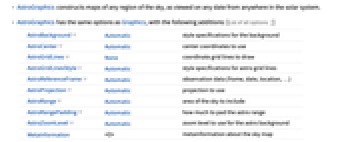
- AstroGraphics 可构建任意日期在太阳系任何地方所观察到的任意天空区域图.
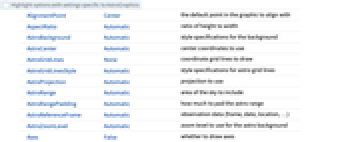
- AstroGraphics 与 Graphics 有相同的选项,但增加了以下内容: [所有选项的列表]
-
AstroBackground Automatic 背景样式指定 AstroCenter Automatic 使用的中心坐标 AstroGridLines None 要绘制的坐标网格线 AstroGridLinesStyle Automatic 天文网格线的样式指定 AstroReferenceFrame Automatic 观测数据(参考系、日期、位置、…) AstroProjection Automatic 要使用的投影 AstroRange Automatic 要包括的天空区域 AstroRangePadding Automatic 对范围添加多少填充 AstroZoomLevel Automatic 天文背景的缩放级别 MetaInformation <||> 天空图的元信息 PerformanceGoal Automatic 试图优化的性能指标 - AstroGraphics[] 给出你当前地理位置的地平线上方的天空图.
- AbsoluteOptions 可明确给出天文图设置的值.
- 使用 AstroGraphics 要求有互联网.
- AstroGraphics 会下载太阳系天体的星历数据文件,并将它们永久存储在 FileNameJoin[{$UserAddOnsDirectory,"ApplicationData","Astro"}] 中.
所有选项的列表
范例
打开所有单元 关闭所有单元基本范例 (5)
显示你所在位置当前的天空图,显示赤道、黄道、银河和地平线平面:
AstroGraphics[]AstroGraphics[AstroReferenceFrame -> {"Horizon", DateObject[{2022, 10, 23, 15, 0, 0}]}, AstroBackground -> "GalacticSky"]AstroGraphics[Entity["Star", "Betelgeuse"], AstroRange -> Quantity[20, "AngularDegrees"], AstroReferenceFrame -> "Equatorial"]AstroGraphics[Entity["Star", "Betelgeuse"], AstroRange -> Quantity[30, "AngularDegrees"], AstroReferenceFrame -> "Equatorial", AstroBackground -> AstroStyling[{"BlackSky", "ShowConstellationIllustrations" -> True, "ShowMainPlanes" -> False}]]AstroGraphics[Entity["Star", "Shaula"], AstroRange -> Quantity[20, "AngularDegrees"], AstroBackground -> "GalacticSky", AstroReferenceFrame -> "Ecliptic"]计算火星从 2022 年 1 月到 2023 年 7 月每周的位置:
mars = AstroPosition[Entity["Planet", "Mars"], {"Equatorial", #}]& /@ DateRange["1 Jul 2022", "1 July 2023", "Week"];AstroGraphics[{White, Point[mars]}, AstroReferenceFrame -> "Equatorial"]选项 (16)
AstroBackground (3)
默认情况下,AstroGraphics 使用 "BlackSky" 样式:
AstroGraphics[AstroBackground -> "BlackSky"]使用 "WhiteSky" 样式,背景为白色,用暗色显示恒星:
AstroGraphics[AstroBackground -> "WhiteSky"]style = {
"ShowConstellationIllustrations" -> True,
"ShowConstellationRegions" -> True, "ConstellationRegionStyle" -> Darker[Blue, .2], "ConstellationLineStyle" -> Opacity[0.6, LightBlue],
"ShowConstellationBoundaries" -> True, "ConstellationBoundaryStyle" -> Directive[Dashing[{0, Tiny}], Yellow], "ConstellationNameStyle" -> GrayLevel[0.7]
};AstroGraphics[Entity["Constellation", "Scorpius"], AstroBackground -> AstroStyling[{"GalacticSky", "ShowConstellations" -> {Entity["Constellation", "Scorpius"]}, style, "HideObjects" -> Automatic}], AstroReferenceFrame -> "J2000"]AstroCenter (1)
AstroGridLines (2)
AstroGraphics[AstroGridLines -> Automatic]除了用于构建天文图的参考系,同时显示其他参考系的天文网格线:
AstroGraphics[AstroGridLines -> {"Galactic" -> Quantity[15, "AngularDegrees"]}]AstroGraphics[AstroGridLines -> {"Equatorial" -> Quantity[{45, 10}, "AngularDegrees"]}]AstroGridLinesStyle (1)
AstroProjection (1)
AstroGraphics[AstroProjection -> "LambertAzimuthal", AstroRangePadding -> None, AstroReferenceFrame -> {"Equatorial", Now, Here}, AstroRange -> {All, All}]AstroGraphics[AstroProjection -> "WinkelTripel", AstroRangePadding -> None, AstroRange -> {All, All}]AstroRange (1)
AstroRangePadding (1)
AstroReferenceFrame (5)
默认情况下,AstroGraphics 使用本地地平线参考系和 "Stereographic" 投影:
AstroGraphics[]使用赤道参考系和 "Equirectangular" 投影显示全部天空:
AstroGraphics[AstroReferenceFrame -> {"Equatorial", Now, Here}]使用黄道参考系和 "Equirectangular" 投影显示全部天空:
AstroGraphics[AstroReferenceFrame -> {"Ecliptic", Now, Here}]使用银河参考系和 "Mollweide" 投影显示全部天空:
AstroGraphics[AstroReferenceFrame -> {"Galactic", Now, Here}]计算在过去的 14000 年中每 1000 年北天极的位置:
NCPs = Table[AstroPosition[{0, 90}, {"Equatorial", DateObject[{y, 1, 1, 0, 0, 0}]}], {y, 2022, -12000, -1000}];AstroGraphics[{Red, Point@NCPs}, AstroReferenceFrame -> {"Ecliptic", "Epoch" -> Now}, AstroGridLines -> Automatic]AstroZoomLevel (1)
Table[AstroGraphics[Entity["Nebula", "M8"], AstroReferenceFrame -> "J2000", AstroBackground -> AstroStyling[{"GalacticSky", "HideObjects" -> Automatic}], AstroRange -> Quantity[15, "AngularDegrees"], AstroZoomLevel -> zoom, ImageSize -> 250], {zoom, 1, 4}]应用 (6)
loc = Entity["City", {"NewYork", "NewYork", "UnitedStates"}];
hour = 12;suns = Table[AstroPosition[Entity["Star", "Sun"], {"Horizon", DateObject[{2022, 1, d, hour}], loc}], {d, 1, 365}];绘制每周的位置,此处显示在接近春分点的某一天的天空上的位置:
AstroGraphics[{White, Point[Take[suns, {1, -1, 7}]]}, AstroReferenceFrame -> {"Horizon", DateObject[{2022, 3, 19, hour}], loc}, AstroProjection -> {"Stereographic", "Centering" -> {0, 180}}, AstroRange -> {{115, 245}, {-5, 80}}]AstroGraphics[{White, Point[Take[suns, {1, -1, 7}]]}, AstroReferenceFrame -> {"Horizon", DateObject[{2022, 6, 18, hour}], loc}, AstroProjection -> {"Stereographic", "Centering" -> {0, 180}}, AstroRange -> {{115, 245}, {-5, 80}}]loc = GeoPosition[{40, -90}];
hour = 12;
tz = -5;venus = Table[AstroPosition[Entity["Planet", "Venus"], {"Horizon", DateObject[{2000, 1, d, 12}, TimeZone -> tz], loc}], {d, 1, 8 365}];AstroGraphics[{White, PointSize[Tiny], Point[venus]}, AstroReferenceFrame -> {"Horizon", DateObject[{2004, 7, 1, hour}, TimeZone -> tz], loc}, AstroProjection -> {"Stereographic", "Centering" -> {0, 180}}, AstroRange -> {{90, 240}, {-5, 80}}]AstroGraphics[AstroRange -> {{85, 275}, {-1, 55}}, AstroReferenceFrame -> {"Horizon", DateObject[{2022, 10, 24, 14, 0, 0}], Here}, AstroProjection -> {"Stereographic", "Centering" -> {0, 180}}, AstroGridLines -> Quantity[15, "AngularDegrees"], AstroGridLinesStyle -> Opacity[.2, White]]观察 2065 年 11 月 22 日金星在木星前方的凌日,在南极附近观察效果更佳:
Manipulate[AstroGraphics[Entity["Planet", "Jupiter"], AstroReferenceFrame -> {"Equatorial", DateObject[{2065, 11, 22, h, 0, 0}, TimeZone -> 0], GeoPosition[{-90, 0}]}, AstroRange -> Quantity[0.02, "AngularDegrees"]], {h, 12.5, 13}, SynchronousUpdating -> False]
| |
Manipulate[AstroGraphics[Entity["Star", "Sun"], AstroReferenceFrame -> {"Equatorial", date, Entity["City", {"Eugene", "Oregon", "UnitedStates"}]}, AstroRange -> Quantity[1, "AngularDegrees"], PlotLabel -> date], {{date, DateObject[{2023, 10, 14, 9, 20, 0}, "Instant", "Gregorian", "America/Los_Angeles"]}, DateObject[{2023, 10, 14, 8, 0, 0}, "Instant", "Gregorian", "America/Los_Angeles"], DateObject[{2023, 10, 14, 11, 0, 0}, "Instant", "Gregorian", "America/Los_Angeles"], Quantity[1, "Minutes"]}, SynchronousUpdating -> False]Manipulate[
AstroGraphics[Entity["Star", "Sun"], AstroReferenceFrame -> {"Equatorial", DateObject[{1919, 5, 29, h}, "Instant"], Entity["Island", "PrincipeIsland"]}, AstroRange -> Quantity[1, "AngularDegrees"]], {h, 7, 12}, SynchronousUpdating -> False]可能存在的问题 (1)
date = DateObject[{2024, 7, 12, 3, 30, 0}, TimeZone -> "America/Chicago"];mars = AstroPosition[Entity["Planet", "Mars"], {"Horizon", date}]默认情况下,AstroGraphics 的背景显示的是与计算出的火星坐标相对应的当前天空区域,而不是观测日期火星所在的天空区域:
AstroGraphics[{Red, Point[mars]}]指定观测日期,以显示该日期火星所在黄道附近天空的正确区域,并显示火星的自动背景标签:
AstroGraphics[{Red, Point[mars]}, AstroReferenceFrame -> {"Horizon", date}]文本
Wolfram Research (2022),AstroGraphics,Wolfram 语言函数,https://reference.wolfram.com/language/ref/AstroGraphics.html (更新于 2024 年).
CMS
Wolfram 语言. 2022. "AstroGraphics." Wolfram 语言与系统参考资料中心. Wolfram Research. 最新版本 2024. https://reference.wolfram.com/language/ref/AstroGraphics.html.
APA
Wolfram 语言. (2022). AstroGraphics. Wolfram 语言与系统参考资料中心. 追溯自 https://reference.wolfram.com/language/ref/AstroGraphics.html 年
BibTeX
@misc{reference.wolfram_2026_astrographics, author="Wolfram Research", title="{AstroGraphics}", year="2024", howpublished="\url{https://reference.wolfram.com/language/ref/AstroGraphics.html}", note=[Accessed: 13-August-2026]}
BibLaTeX
@online{reference.wolfram_2026_astrographics, organization={Wolfram Research}, title={AstroGraphics}, year={2024}, url={https://reference.wolfram.com/language/ref/AstroGraphics.html}, note=[Accessed: 13-August-2026]}