Files, Streams, and External Operations
Files, Streams, and External Operations
Storing Wolfram Language Expressions in External Files
You can use files on your computer system to store definitions and results from the Wolfram Language. The most general approach is to store everything as plain text that is appropriate for input to the Wolfram Language. With this approach, a version of the Wolfram Language running on one computer system produces files that can be read by a version running on any computer system. In addition, such files can be manipulated by other standard programs, such as text editors.
| <<file or Get["file"] |
read in a file of Wolfram Language input, and return the last expression in the file
|
| FilePrint["file"] | display the contents of a file |
| expr>>file or Put[expr,"file"] | write an expression to a file |
| expr>>>file or PutAppend[expr,"file"] | append an expression to a file |



If the Wolfram Language cannot find the file you ask it to read, it prints a message, then returns the symbol $Failed:

When you read in a file with <<file, the Wolfram Language returns the last expression it evaluates in the file. You can avoid getting any visible result from reading a file by ending the last expression in the file with a semicolon, or by explicitly adding Null after that expression.
If the Wolfram Language encounters a syntax error while reading a file, it reports the error, skips the remainder of the file, then returns $Failed. If the syntax error occurs in the middle of a package that uses BeginPackage and other context manipulation functions, then the Wolfram Language tries to restore the context to what it was before the package was read.
Saving Multiple Wolfram Language Expressions
The Wolfram Language input files can contain any number of expressions. Each expression, however, must start on a new line. The expressions may continue for as many lines as necessary. Just as in a standard interactive Wolfram Language session, the expressions are processed as soon as they are complete. Note that in a file, unlike an interactive session, you can insert a blank line at any point without effect.
When you use expr>>>file, the Wolfram Language appends each new expression you give to the end of your file. If you use expr>>file, however, then the Wolfram Language instead wipes out anything that was in the file before, and then puts expr into the file.


If you are familiar with command‐line operating systems, you will recognize the Wolfram Language redirection operators >>, >>>, and << as being analogous to the command‐line operators >, >>, and <.
Saving Wolfram Language Expressions in Different Formats
When you use either >> or >>> to write expressions to files, the expressions are usually given in Wolfram Language input format, so that you can read them back into the Wolfram Language. Sometimes, however, you may want to save expressions in other formats. You can do this by explicitly wrapping a format directive such as OutputForm around the expression you write out.

Saving Definitions of Wolfram Language Objects
One of the most common reasons for using files is to save definitions of Wolfram Language objects, to be able to read them in again in a subsequent Wolfram Language session. The operators >> and >>> allow you to save Wolfram Language expressions in files. You can use the function Save to save complete definitions of Wolfram Language objects in a form suitable for execution in subsequent Wolfram Language sessions.
| Save["file",symbol] | save the complete definitions for a symbol in a file |
| Save["file","form"] | save definitions for symbols whose names match the string pattern form |
| Save["file","context`"] | save definitions for all symbols in the specified context |
| Save["file",{object1,object2,…}] | save definitions for several objects |
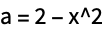
The file contains not only the definition of f itself, but also the definition of the symbol a on which f depends:
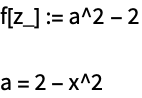
The function Save makes use of the output forms Definition and FullDefinition, which print as definitions of Wolfram Language symbols. In some cases, you may find it convenient to use these output forms directly.
When you define a new object in the Wolfram Language, your definition will often depend on other objects that you defined before. If you are going to be able to reconstruct the definition of your new object in a subsequent Wolfram Language session, it is important that you store not only its own definition, but also the definitions of other objects on which it depends. The function Save looks through the definitions of the objects you ask it to save, and automatically also saves all definitions of other objects on which it can see that these depend. However, in order to avoid saving a large amount of unnecessary material, Save never includes definitions for symbols that have the attribute Protected. It assumes that the definitions for these symbols are also built in. Nevertheless, with such definitions taken care of, it should always be the case that reading the output generated by Save back into a new Wolfram Language session will set up the definitions of your objects exactly as you had them before.
Saving Wolfram Language Definitions in Encoded Form
When you create files for input to the Wolfram Language, you usually want them to contain only "plain text", which can be read or modified directly. Sometimes, however, you may want the contents of a file to be "encoded" so that they cannot be read or modified directly as plain text, but can be loaded into the Wolfram Language. You can create encoded files using the Wolfram Language function Encode.
| Encode["source","dest"] | write an encoded version of the file source to the file dest |
| <<dest | read in an encoded file |
| Encode["source","dest","key"] | encode with the specified key |
| Get["dest","key"] | read in a file that was encoded with a key |
| Encode["source","dest",MachineID->"ID"] | create an encoded file that can only be read on a machine with a particular ID |
Here are the contents of the encoded file. The only recognizable part is the special Wolfram Language comment at the beginning:
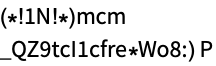
Even though the file is encoded, you can still read it into the Wolfram Language using the << operator:
| DumpSave["file.mx",symbol] | save definitions for a symbol in internal Wolfram Language format |
| DumpSave["file.mx","context`"] | save definitions for all symbols in a context |
| DumpSave["file.mx",{object1,object2,…}] | save definitions for several symbols or contexts |
| DumpSave["package`",objects] | save definitions in a file with a specially chosen name |
If you have to read in very large or complicated definitions, you will often find it more efficient to store these definitions in internal Wolfram System format, rather than as text. You can do this using DumpSave.
<< recognizes when a file contains definitions in internal Wolfram System format, and operates accordingly. One subtlety is that the internal Wolfram System format differs from one computer system to another. As a result, .mx files created on one computer cannot always be read on another.
If you use DumpSave["package`",…] then the Wolfram Language will write out definitions to a file with a name like package.mx/system/package.mx, where system identifies your type of computer system.
On most computer systems, you can execute external programs or commands from within the Wolfram Language. Often you will want to take expressions you have generated in the Wolfram Language, and send them to an external program, or take results from external programs, and read them into the Wolfram Language.
The Wolfram Language supports two basic forms of communication with external programs: structured and unstructured.
Structured communication | use WSTP to exchange expressions with WSTP‐compatible external programs |
Unstructured communication | use file reading and writing operations to exchange ordinary text |
The idea of structured communication is to exchange complete Wolfram Language expressions to external programs which are specially set up to handle such objects. The basis for structured communication is the Wolfram Symbolic Transfer Protocol (WSTP) system, discussed in "WSTP and External Program Communication".
Unstructured communication consists in sending and receiving ordinary text from external programs. The basic idea is to treat an external program very much like a file, and to support the same kinds of reading and writing operations.
| <<file | read in a file |
| <<"!command" |
run an external command, and read in the output it produces
|
| expr>>"!command" | feed the textual form of expr to an external command |
| ReadList["!command",Number] |
run an external command, and read in a list of the numbers it produces
|
In general, wherever you might use an ordinary file name, the Wolfram Language allows you instead to give a pipe, written as an external command, prefaced by an exclamation point. When you use the pipe, the Wolfram Language will execute the external command, and send or receive text from it.
This sends the result from FactorInteger to the external program lpr. On many Unix systems, this program generates a printout:
With a text‐based interface, putting ! at the beginning of a line causes the remainder of the line to be executed as an external command. squares is an external program which prints numbers and their squares.
In[1]:= !squares 4

1  1
2  4
3  9
4  16
One point to notice is that you can get away with dropping the double quotes around the name of a pipe on the right‐hand side of << or >> if the name does not contain any spaces or other special characters.
Pipes in the Wolfram Language provide a very general mechanism for unstructured communication with external programs. On many computer systems, Wolfram Language pipes are implemented using pipe mechanisms in the underlying operating system; in some cases, however, other interprocess communication mechanisms are used. One restriction of unstructured communication in the Wolfram Language is that a given pipe can only be used for input or for output, and not for both at the same time. In order to do genuine two‐way communication, you need to use WSTP.
Even with unstructured communication, you can nevertheless set up somewhat more complicated arrangements by using "temporary files". The basic idea is to write data to a file, then to read it as needed.
| OpenWrite[] | open a new file with a unique name in the default area for temporary files on your computer system |
Particularly when you work with temporary files, you may find it useful to be able to execute external commands which do not explicitly send or receive data from the Wolfram Language. You can do this using the Wolfram Language function Run.
| Run["command",arg1,…] | run an external command from within the Wolfram Language |
This executes the external Unix command date. The returned value is an "exit code" from the operating system:
Note that when you use Run, you must not preface commands with exclamation points. Run simply takes the textual forms of the arguments you specify, then joins them together with spaces in between, and executes the resulting string as an external shell command.
It is important to realize that Run never "captures" any of the output from an external command. As a result, where this output goes is purely determined by your operating system. Similarly, Run does not supply input to external commands. This means that the commands can get input through any mechanism provided by your operating system. Sometimes external commands may be able to access the same input and output streams that are used by the Wolfram Language itself. In some cases, this may be what you want. But particularly if you are using the Wolfram Language with a front end, this can cause considerable trouble.
| RunThrough["command",expr] | run command, using expr as input, and reading the output back into the Wolfram Language |
As discussed above, << and >> cannot be used to both send and receive data from an external program at the same time. Nevertheless, by using temporary files, you can effectively both send and receive data from an external program while still using unstructured communication.
The function RunThrough writes the text of an expression to a temporary file, then feeds this file as input to an external program, and captures the output as input to the Wolfram Language. Note that in RunThrough, like Run, you should not preface the names of external commands with exclamation points.
This feeds the expression 789 to the external program cat, which in this case simply echoes the text of the expression. The output from cat is then read back into the Wolfram Language:
| SystemOpen["target"] |
opens the specified file, URL or other target with the associated program on your computer system
|
SystemOpen uses settings in your operating system to determine how to open a URI or file. When opening files, it typically uses the same program that would be used if you double-clicked the file's icon.
Files and pipes are both examples of general Wolfram System objects known as streams. A stream in the Wolfram System is a source of input or output. There are many operations that you can perform on streams.
You can think of >> and << as "high‐level" Wolfram System input‐output functions. They are based on a set of lower‐level input‐output primitives that work directly with streams. By using these primitives, you can exercise more control over exactly how the Wolfram System does input and output. You will often need to do this, for example, if you write Wolfram System programs which store and retrieve intermediate data from files or pipes.
The basic low‐level scheme for writing output to a stream in the Wolfram System is as follows. First, you call OpenWrite or OpenAppend to "open the stream", telling the Wolfram System that you want to write output to a particular file or external program, and in what form the output should be written. Having opened a stream, you can then call Write or WriteString to write a sequence of expressions or strings to the stream. When you have finished, you call Close to "close the stream".
| "name" |
a file, specified by name
|
| "!name" |
a command, specified by name
|
| InputStream["name",n] | an input stream |
| OutputStream["name",n] | an output stream |
When you open a file or a pipe, the Wolfram System creates a "stream object" that specifies the open stream associated with the file or pipe. In general, the stream object contains the name of the file or the external command used in a pipe, together with a unique number.
The reason that the stream object needs to include a unique number is that in general you can have several streams connected to the same file or external program at the same time. For example, you may start several different instances of the same external program, each connected to a different stream.
Nevertheless, when you have opened a stream, you can still refer to it using a simple file name or external command name so long as there is only one stream associated with this object.
Since you only have one stream associated with file tmp, you can refer to it simply by giving the name of the file:

| OpenWrite["file"] |
open an output stream to a file, wiping out the previous contents of the file
|
| OpenWrite[] | open an output stream to a new temporary file |
| OpenAppend["file"] |
open an output stream to a file, appending to what was already in the file
|
| OpenWrite["!command"] | open an output stream to an external command |
| Write[stream,expr1,expr2,…] |
write a sequence of expressions to a stream, ending the output with a newline (line feed)
|
| WriteString[stream,str1,str2,…] |
write a sequence of character strings to a stream, with no extra newlines
|
| Close[stream] | tell the Wolfram System that you are finished with a stream |
When you call Write[stream,expr], it writes an expression to the specified stream. The default is to write the expression in Wolfram System input form. If you call Write with a sequence of expressions, it will write these expressions one after another to the stream. In general, it leaves no space between the successive expressions. However, when it has finished writing all the expressions, Write always ends its output with a newline.
All the expressions are written in input form. The expressions from a single Write are put on the same line:
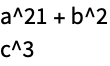
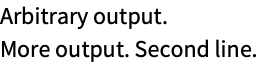
Write provides a way of writing out complete Wolfram Language expressions. Sometimes, however, you may want to write out less structured data. WriteString allows you to write out any character string. Unlike Write, WriteString adds no newlines or other characters.
Here are the contents of the file. The strings were written exactly as specified, including only the newlines that were explicitly given:
| Write[{stream1,stream2},expr1,…] | write expressions to a list of streams |
| WriteString[{stream1,stream2},str1,…] | write strings to a list of streams |
An important feature of the functions Write and WriteString is that they allow you to write output not just to a single stream, but also to a list of streams.
In using the Wolfram System, it is often convenient to define a channel which consists of a list of streams. You can then simply tell the Wolfram System to write to the channel, and have it automatically write the same object to several streams.
In a standard interactive Wolfram System session, there are several output channels that are usually defined. These specify where particular kinds of output should be sent. Thus, for example, $Output specifies where standard output should go, while $Messages specifies where messages should go. The function Print then works essentially by calling Write with the $Output channel. Message works in the same way by calling Write with the $Messages channel. "The Main Loop" lists the channels used in a typical Wolfram System session.
Note that when you run the Wolfram System through the Wolfram Symbolic Transfer Protocol (WSTP), a different approach is usually used. All output is typically written to a single WSTP link, but each piece of output appears in a "packet" which indicates what type it is.
In most cases, the names of files or external commands that you use in the Wolfram System correspond exactly with those used by your computer’s operating system. On some systems, however, the Wolfram System supports various streams with special names.
The special stream "stdout" allows you to give output to the "standard output" provided by the operating system. Note however that you can use this stream only with simple text‐based interfaces to the Wolfram System. If your interaction with the Wolfram System is more complicated, then this stream will not work, and trying to use it may cause considerable trouble.
option name | default value | |
| FormatType | InputForm | the default output format to use |
| PageWidth | 78 | the width of the page in characters |
| NumberMarks | $NumberMarks | whether to include ` marks in approximate numbers |
| CharacterEncoding | $CharacterEncoding | encoding to be used for special characters |
You can associate a number of options with output streams. You can specify these options when you first open a stream using OpenWrite or OpenAppend.
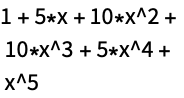
This opens a stream, specifying that the default output format used should be OutputForm:
The expressions were written to the stream in OutputForm:

Note that you can always override the output format specified for a particular stream by wrapping a particular expression you write to the stream with an explicit Wolfram System format directive, such as OutputForm or TeXForm.
The option PageWidth gives the width of the page available for textual output from the Wolfram System. All lines of output are broken so that they fit in this width. If you do not want any lines to be broken, you can set PageWidth->Infinity. Usually, however, you will want to set PageWidth to the value appropriate for your particular output device. On many systems, you will have to run an external program to find out what this value is. Using SetOptions, you can make the default rule for PageWidth be, for example, PageWidth:><<"!devicewidth", so that an external program is run automatically to find the value of the option.
The option CharacterEncoding allows you to specify a character encoding that will be used for all strings which are sent to a particular output stream, whether by Write or WriteString. You will typically need to use CharacterEncoding if you want to modify an international character set, or prevent a particular output device from receiving characters that it cannot handle.
| Options[stream] | find the options that have been set for a stream |
| SetOptions[stream,opt1->val1,…] | reset options for an open stream |
This changes the FormatType option for the open stream:
Options shows the options you have set for the open stream:
| Options[$Output] | find the options set for all streams in the channel $Output |
| SetOptions[$Output,opt1->val1,…] | set options for all streams in the channel $Output |
At every point in your session, the Wolfram System maintains a list Streams[] of all the input and output streams that are currently open, together with their options. In some cases, you may find it useful to look at this list directly. The Wolfram System will not, however, allow you to modify the list, except indirectly through OpenRead and so on.
Directory Operations
The precise details of the naming of files differ from one computer system to another. Nevertheless, the Wolfram System provides some fairly general mechanisms that work on all systems.
The Wolfram System assumes that all your files are arranged in a hierarchy of directories. To find a particular file, the Wolfram System must know both what the name of the file is, and what sequence of directories it is in.
At any given time, however, you have a current working directory, and you can refer to files or other directories by specifying where they are relative to this directory. Typically you can refer to files or directories that are actually in this directory simply by giving their names, with no directory information.
| Directory[] | your current working directory |
| SetDirectory["dir"] | set your current working directory |
| ResetDirectory[] | revert to your previous working directory |
When you call SetDirectory, you can give any directory name that is recognized by your operating system. Thus, for example, on Unix‐based systems, you can specify a directory one level up in the directory hierarchy using the notation .., and you can specify your "home" directory as ~.
Whenever you go to a new directory using SetDirectory, the Wolfram Language always remembers what the previous directory was. You can return to this previous directory using ResetDirectory. In general, the Wolfram Language maintains a stack of directories, given by DirectoryStack[]. Every time you call SetDirectory, it adds a new directory to the stack, and every time you call ResetDirectory it removes a directory from the stack.
| ParentDirectory[] | the parent of your current working directory |
| $InitialDirectory | the initial directory when the Wolfram System was started |
| $HomeDirectory |
your home directory, if this is defined
|
| $BaseDirectory | the base directory for systemwide files to be loaded by the Wolfram System |
| $UserBaseDirectory | the base directory for user‐specific files to be loaded by the Wolfram System |
| $InstallationDirectory | the top‐level directory in which your Wolfram System installation resides |
Finding a File
Whenever you ask for a particular file, the Wolfram Language in general goes through several steps to try and find the file you want. The first step is to use whatever standard mechanisms exist in your operating system or shell.
The Wolfram Language scans the full name you give for a file, and looks to see whether it contains any of the "metacharacters" *, $, ~, ?, [, ", ∖, and '. If it finds such characters, then it passes the full name to your operating system or shell for interpretation. This means that if you are using a Unix‐based system, then constructions like name* and $VAR will be expanded at this point. But in general, the Wolfram Language takes whatever was returned by your operating system or shell, and treats this as the full file name.
For output files, this is the end of the processing that the Wolfram Language does. If the Wolfram Language cannot find a unique file with the name you specified, then it will proceed to create the file.
If you are trying to get input from a file, however, then there is another round of processing that the Wolfram Language does. What happens is that the Wolfram Language looks at the value of the Path option for the function you are using to determine the names of directories relative to which it should search for the file. The default setting for the Path option is the global variable $Path.
| Get["file",Path->{"dir1","dir2",…}] |
get a file, searching for it relative to the directories
diri
|
| $Path | default list of directories relative to which to search for input files |
In general, the global variable $Path is defined to be a list of strings, with each string representing a directory. Every time you ask for an input file, what the Wolfram Language effectively does is temporarily to make each of these directories in turn your current working directory, and then from that directory to try and find the file you have requested.
Here is a typical setting for $Path. The current directory (.) and your home directory (~) are listed first:
You can also use FindFile to locate a file.
| FindFile["name"] | find the file with the specified name that would be loaded by Get and related functions |
| FileExistsQ["name"] | determine whether the file exists |
Finding a file on the $Path.
FindFile searches all directories in $Path and returns the absolute name of the file that would be loaded by Get, Needs, and other functions. FileExistsQ tests whether the file with the given name exists.
FindFile applied to a package name returns the absolute name of the init.m file from that package.
Listing Contents of Directories
| FileNames[] | list all files in your current working directory |
| FileNames["form"] | list all files in your current working directory whose names match the string pattern form |
| FileNames[{"form1","form2",…}] | list all files whose names match any of the formi |
| FileNames[forms,{"dir1","dir2",…}] | give the full names of all files whose names match forms in any of the directories diri |
| FileNames[forms,dirs,n] | include files that are in subdirectories up to n levels down |
| FileNames[forms,dirs,Infinity] | include files in all subdirectories |
| FileNames[forms,$Path,Infinity] | give all files whose names match forms in any subdirectory of the directories in $Path |
FileNames returns a list of strings corresponding to file names. When it returns a file that is not in your current directory, it gives the name of the file relative to the current directory. Note that all names are given in the format appropriate for the particular computer system on which they were generated.
This lists files whose names start with a in the current directory, and in subdirectories with names that start with P:
The file name form you give to FileNames can use any of the Wolfram Language's string pattern objects, typically combined with the ~~ operator.
This gives a list of all files in your current working directory whose names match the form Test*.m:
This lists only those files with names of the form Test d.m, where d is a sequence of one or more digits:
Composing a File Name
| DirectoryName["file"] | extract the directory name from a file name |
| FileNameJoin[{"directory","name"}] | assemble a full file name from a directory name and a file name |
| ParentDirectory["directory"] | give the parent of a directory |
| FileNameJoin[{"dir1","dir2",…,"name"}] | assemble a full file name from a hierarchy of directory names |
| FileNameJoin[{"dir1","dir2",…}] | assemble a single directory name from a hierarchy of directory names |
You should realize that different computer systems may give file names in different ways. Thus, for example, Windows systems typically give names in the form dir:∖dir∖dir∖name and Unix systems give names in the form dir/dir/name. The function FileNameJoin assembles file names in the appropriate way for the particular computer system you are using.
| FileNameSplit["name"] | split the file name into a list of directory and file names |
| FileNameTake["name",…] | extract part of the file name |
| FileNameDrop["name",…] | drop parts of the file name |
| FileNameDepth["name"] | get the number of path elements in the file name |
| $PathnameSeparator | path name separator used in your operating system |
Functions like FileNameSplit and FileNameJoin provide additional operations on file names. They respect the file name separator used by your operating system and will split the file name appropriately. FileNameJoin will by default use the $PathnameSeparator to produce the name in a canonical form suitable for your operating system.
If you want to set up a collection of related files, it is often convenient to be able to refer to one file when you are reading another one. The global variable $InputFileName gives the name of the file from which input is currently being taken. Using DirectoryName and FileNameJoin you can then conveniently specify the names of other related files.
| $InputFileName | the name of the file from which input is currently being taken |
One issue in handling files in the Wolfram Language is that the form of file and directory names varies between computer systems. This means, for example, that names of files that contain standard Wolfram Language packages may be quite different on different systems. Through a sequence of conventions, it is however possible to read in a standard Wolfram Language package with the same command on all systems. The way this works is that each package defines a so‐called Wolfram Language context, of the form name`name`. On each system, all files are named in correspondence with the contexts they define. Then when you use the command <<name`name`, the Wolfram Language automatically translates the context name into the file name appropriate for your particular computer system.
Standard File Name Extensions
| file.m | Wolfram Language expression file in plain text format |
| file.nb | Wolfram System notebook file |
| file.mx | Wolfram Language definitions in DumpSave format |
If you use a notebook interface to the Wolfram System, then the Wolfram System front end allows you to save complete notebooks, including not only Wolfram Language input and output, but also text, graphics, and other material.
It is conventional to give Wolfram System notebook files names that end in .nb, and most versions of the Wolfram System enforce this convention.
| FileBaseName["name"] | the name for a file without its extension |
| FileExtension["name"] | the file extension for a file name |
When you open a notebook in the Wolfram System front end, the Wolfram System will immediately display the contents of the notebook, but it will not normally send any of these contents to the kernel for evaluation until you explicitly request this to be done.
Within a Wolfram System notebook, however, you can use the Cell menu in the front end to identify certain cells as initialization cells, and if you do this, then the contents of these cells will automatically be evaluated whenever you open the notebook.
The I in the cell bracket indicates that the second cell is an initialization cell that will be evaluated whenever the notebook is opened.
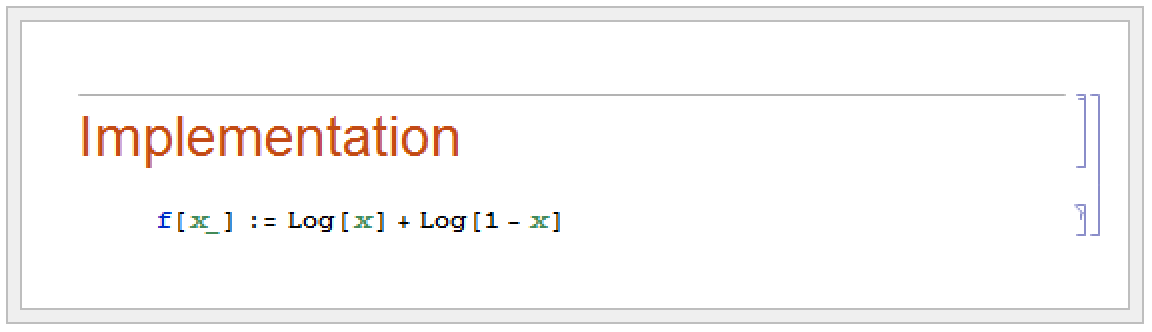
It is sometimes convenient to maintain Wolfram System material both in a notebook which contains explanatory text, and in a package which contains only raw Wolfram Language definitions. You can do this by putting the Wolfram Language definitions into initialization cells in the notebook. Every time you save the notebook, the front end will then allow you to save an associated .m file that contains only the raw Wolfram Language definitions.
| CopyFile["file1","file2"] | copy file1 to file2 |
| RenameFile["file1","file2"] | give file1 the name file2 |
| DeleteFile["file"] | delete a file |
| FileByteCount["file"] | give the number of bytes in a file |
| FileDate["file"] | give the modification date for a file |
| SetFileDate["file"] | set the modification date for a file to be the current date |
| FileType["file"] |
Different operating systems have different commands for manipulating files. The Wolfram Language provides a simple set of file manipulation functions, intended to work in the same way under all operating systems.
Notice that CopyFile and RenameFile give the final file the same modification date as the original one. FileDate returns modification dates in the {year,month,day,hour,minute,second} format used by DateList.
| CreateDirectory["name"] | create a new directory |
| DeleteDirectory["name"] | delete an empty directory |
| DeleteDirectory["name",DeleteContents->True] | delete a directory and all files and directories it contains |
| RenameDirectory["name1","name2"] | rename a directory |
| CopyDirectory["name1","name2"] | copy a directory and all the files in it |
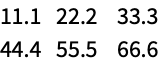
With <<, you can read files that contain Wolfram Language expressions given in input form. Sometimes, however, you may instead need to read files of data in other formats. For example, you may have data generated by an external program which consists of a sequence of numbers separated by spaces. This data cannot be read directly as Wolfram Language input. However, the function ReadList can take such data from a file or input stream, and convert it to a Wolfram Language list.
| ReadList["file",Number] |
read a sequence of numbers from a file, and put them in a Wolfram Language list
|
| ReadList["file",{Number,Number}] |
read numbers from a file, putting each successive pair into a separate list
|
| ReadList["file",Table[Number,{n}]] | put each successive block of n numbers in a separate list |
| ReadList["file",Number,RecordLists->True] | |
put all the numbers on each line of the file into a separate list | |
ReadList can handle numbers that are given in Fortran‐like "E" notation. Thus, for example, ReadList will read 2.5E+5 as 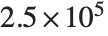 . Note that ReadList can handle numbers with any number of digits of precision.
. Note that ReadList can handle numbers with any number of digits of precision. 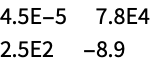
ReadList can handle numbers in this form:
| ReadList["file",type] | read a sequence of objects of a particular type |
| ReadList["file",type,n] | read at most n objects |
ReadList can read not only numbers, but also a variety of other types of object. Each type of object is specified by a symbol such as Number.
| Byte |
single byte of data, returned as an integer
|
| Character | single character, returned as a one‐character string |
| Real | approximate number in Fortran‐like notation |
| Number | exact or approximate number in Fortran‐like notation |
| Word | sequence of characters delimited by word separators |
| Record | sequence of characters delimited by record separators |
| String | string terminated by a newline |
| Expression | complete Wolfram Language expression |
| Hold[Expression] | complete Wolfram Language expression, returned inside Hold |
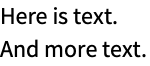
ReadList allows you to read "words" from a file. It considers a "word" to be any sequence of characters delimited by word separators. You can set the option WordSeparators to specify the strings you want to treat as word separators. The default is to include spaces and tabs, but not to include, for example, standard punctuation characters. Note that in all cases successive words can be separated by any number of word separators. These separators are never taken to be part of the actual words returned by ReadList.
option name | default value | |
| RecordLists | False | whether to make a separate list for the objects in each record |
| RecordSeparators | {"\r\n", "\n","\r"} | separators for records |
| WordSeparators | {" ","∖t"} | separators for words |
| NullRecords | False | whether to keep zero‐length records |
| NullWords | False | whether to keep zero‐length words |
| TokenWords | {} | words to take as tokens |
Options for ReadList.
This reads the text in the file strings as a sequence of words, using the letter e and . as word separators:
The Wolfram Language considers any data file to consist of a sequence of records. By default, each line is considered to be a separate record. In general, you can set the option RecordSeparators to give a list of separators for records. Note that words can never cross record separators. As with word separators, any number of record separators can exist between successive records, and these separators are not considered to be part of the records themselves.
| ReadList["file",Record,RecordSeparators->{}] | |
read the whole of a file as a single string | |
| ReadList["file",Record,RecordSeparators->{{"lsep1",…},{"rsep1",…}}] | |
make a list of those parts of a file that lie between the lsepi and the rsepi | |
Settings for the RecordSeparators option.
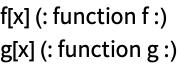
The Wolfram Language usually allows any number of appropriate separators to appear between successive records or words. Sometimes, however, when several separators are present, you may want to assume that a "null record" or "null word" appears between each pair of adjacent separators. You can do this by setting the options NullRecords->True or NullWords->True.

In most cases, you want words to be delimited by separators that are not themselves considered as words. Sometimes, however, it is convenient to allow words to be delimited by special "token words", which are themselves words. You can give a list of such token words as a setting for the option TokenWords.

You can use ReadList to read Wolfram Language expressions from files. In general, each expression must end with a newline, although a single expression may go on for several lines.

ReadList can insert the objects it reads into any Wolfram Language expression. The second argument to ReadList can consist of any expression containing symbols such as Number and Word specifying objects to read. Thus, for example, ReadList["file",{Number,Number}] inserts successive pairs of numbers that it reads into lists. Similarly, ReadList["file",Hold[Expression]] puts expressions that it reads inside Hold.
If ReadList reaches the end of your file before it has finished reading a particular set of objects you have asked for, then it inserts the special symbol EndOfFile in place of the objects it has not yet read.
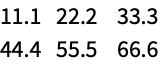
The symbol EndOfFile appears in place of numbers that were needed after the end of the file was reached:
| ReadList["!command",type] |
execute a command, and read its output
|
| ReadList[stream,type] | read any input stream |
| OpenRead["file"] | open a file for reading |
| OpenRead["!command"] | open a pipe for reading |
| Read[stream,type] | read an object of the specified type from a stream |
| Skip[stream,type] | skip over an object of the specified type in an input stream |
| Skip[stream,type,n] | skip over n objects of the specified type in an input stream |
| Close[stream] | close an input stream |
ReadList allows you to read all the data in a particular file or input stream. Sometimes, however, you want to get data a piece at a time, perhaps doing tests to find out what kind of data to expect next.
When you read individual pieces of data from a file, the Wolfram Language always remembers the "current point" that you are at in the file. When you call OpenRead, the Wolfram Language sets up an input stream from a file, and makes your current point the beginning of the file. Every time you read an object from the file using Read, the Wolfram Language sets your current point to be just after the object you have read. Using Skip, you can advance the current point past a sequence of objects without actually reading the objects.
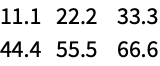
You can use the options WordSeparators and RecordSeparators in Read and Skip just as you do in ReadList.
| FindList["file","text"] | get a list of all the lines in the file that contain the specified text |
| FindList["file","text",n] | get a list of the first n lines that contain the specified text |
| FindList["file",{"text1","text2",…}] | get lines that contain any of the texti |
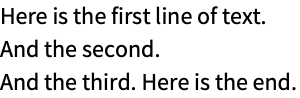
By default, FindList scans successive lines of a file, and returns those lines which contain the text you specify. In general, however, you can get FindList to scan successive records, and return complete records which contain specified text. As in ReadList, the option RecordSeparators allows you to tell the Wolfram Language what strings you want to consider as record separators. Note that by giving a pair of lists as the setting for RecordSeparators, you can specify different left and right separators. By doing this, you can make FindList search only for text which is between specific pairs of separators.
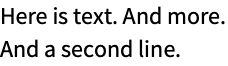
This finds all "sentences" ending with a period which contain And:
option name | default value | |
| RecordSeparators | {"∖n"} | separators for records |
| AnchoredSearch | False | whether to require the text searched for to be at the beginning of a record |
| WordSeparators | {" ","∖t"} | separators for words |
| WordSearch | False | whether to require that the text searched for appear as a word |
| IgnoreCase | False | whether to treat lowercase and uppercase letters as equivalent |
Options for FindList.
This finds only the occurrence of Here which is at the beginning of a line in the file:
In general, FindList finds text that appears anywhere inside a record. By setting the option WordSearch->True, however, you can tell FindList to require that the text it is looking for appears as a separate word in the record. The option WordSeparators specifies the list of separators for words.
| FindList[{"file1","file2",…},"text"] | search for occurrences of the text in any of the filei |
| FindList["!command",…] |
run an external command, and find text in its output
|

| OpenRead["file"] | open a file for reading |
| OpenRead["!command"] | open a pipe for reading |
| Find[stream,text] | find the next occurrence of text |
| Close[stream] | close an input stream |
FindList works by making one pass through a particular file, looking for occurrences of the text you specify. Sometimes, however, you may want to search incrementally for successive occurrences of a piece of text. You can do this using Find.
In order to use Find, you first explicitly have to open an input stream using OpenRead. Then, every time you call Find on this stream, it will search for the text you specify, and make the current point in the file be just after the record it finds. As a result, you can call Find several times to find successive pieces of text.
This finds the first line containing And:
Once you have an input stream, you can mix calls to Find, Skip, and Read. If you ever call FindList or ReadList, the Wolfram Language will immediately read to the end of the input stream.
This finds the first line which contains second, and leaves the current point in the file at the beginning of the next line:
Read can then read the word that appears at the beginning of the line:
| StreamPosition[stream] | find the position of the current point in an open stream |
| SetStreamPosition[stream,n] | set the position of the current point |
| SetStreamPosition[stream,0] | set the current point to the beginning of a stream |
| SetStreamPosition[stream,Infinity] | set the current point to the end of a stream |
Functions like Read, Skip, and Find usually operate on streams in an entirely sequential fashion. Each time one of the functions is called, the current point in the stream moves on.
Sometimes, you may need to know where the current point in a stream is, and be able to reset it. On most computer systems, StreamPosition returns the position of the current point as an integer giving the number of bytes from the beginning of the stream.
Now Read returns the remainder of the first line:
Functions like Read and Find are most often used for processing text and data from external files. In some cases, however, you may find it convenient to use these same functions to process strings within the Wolfram Language. You can do this by using the function StringToStream, which opens an input stream that takes characters not from an external file, but instead from a Wolfram Language string.
| StringToStream["string"] | open an input stream for reading from a string |
| Close[stream] | close an input stream |
Input streams associated with strings work just like those with files. At any given time, there is a current position in the stream, which advances when you use functions like Read. The current position is given as the number of characters from the beginning of the string by the function StreamPosition[stream]. You can explicitly set the current position using SetStreamPosition[stream,n].
If you now try to read from the stream, you will always get EndOfFile:
Particularly when you are processing large volumes of textual data, it is common to read fairly long strings into the Wolfram Language, then to use StringToStream to allow further processing of these strings within the Wolfram Language. Once you have created an input stream using StringToStream, you can read and search the string using any of the functions discussed for files.
Functions like Read and Write handle ordinary printable text. But in dealing with external data files or devices it is sometimes necessary to go to a lower level, and work directly with raw binary data. You can do this using BinaryRead and BinaryWrite.
| BinaryRead[stream] | read one byte |
| BinaryRead[stream,type] | read an object of the specified type |
| BinaryRead[stream,{type1,type2,…}] | read a list of objects |
| BinaryWrite[stream,b] | write one byte |
| BinaryWrite[stream,{b1,b2,…}] | write a sequence of bytes |
| BinaryWrite[stream,"string"] | write the characters in a string |
| BinaryWrite[stream,x,type] | write an object of the specified type |
| BinaryWrite[stream,{x1,x2,…},type] | write a sequence of objects |
| BinaryWrite[stream,{x1,x2,…},{type1,type2,…}] | |
write objects of different types | |
| "Byte" | 8‐bit unsigned integer |
| "Character8" | 8‐bit character |
| "Character16" | 16‐bit character |
| "Complex64" | IEEE single‐precision complex number |
| "Complex128" | IEEE double‐precision complex number |
| "Complex256" | IEEE quad‐precision complex number |
| "Integer8" | 8‐bit signed integer |
| "Integer16" | 16‐bit signed integer |
| "Integer32" | 32‐bit signed integer |
| "Integer64" | 64‐bit signed integer |
| "Integer128" | 128‐bit signed integer |
| "Real32" | IEEE single‐precision real number |
| "Real64" | IEEE double‐precision real number |
| "Real128" | IEEE quad‐precision real number |
| "TerminatedString" | null‐terminated string of 8‐bit characters |
| "UnsignedInteger8" | 8‐bit unsigned integer |
| "UnsignedInteger16" | 16‐bit unsigned integer |
| "UnsignedInteger32" | 32‐bit unsigned integer |
| "UnsignedInteger64" | 64‐bit unsigned integer |
| "UnsignedInteger128" | 128‐bit unsigned integer |
BinaryWrite automatically opens a stream for the file. This closes it:
Like Read and Write, BinaryRead and BinaryWrite work with streams. But if you give a file name, they automatically open the specified file as a stream. To create a stream directly you can use OpenRead or OpenWrite. On some computer systems, the option setting BinaryFormat->True is required for any stream to be used with BinaryRead and BinaryWrite, in order to prevent possible corruption from such issues as newline translation.
In using the Wolfram Language you are normally completely insulated from the raw representation of data inside your computer. But with BinaryRead and BinaryWrite this is no longer so. One of the subtleties that then arises is that different computers may take the bytes that make up numbers to be in different orders, as specified by their setting for $ByteOrdering.
| BinaryReadList["file"] | read all the bytes in a file |
| BinaryReadList["file",type] |
read all the data, treating it as objects of a certain type
|
| BinaryReadList["file",{type1,type2,…}] | treat the data as objects of a sequence of types |
| BinaryReadList["file",types,n] | read only the first n objects |
BinaryRead and BinaryWrite allow complete flexibility in reading and writing raw binary data. But in many practical applications one instead wants to work only with particular predefined formats. You can do this using Import and Export.
In addition to many complex formats, Import and Export support files containing sequences of identical data elements, of the same types as in BinaryRead and BinaryWrite. They also support the "Bit" format, consisting of individual binary bits, represented as 0 or 1.
If you have special‐purpose programs written in C or Fortran, you may want to take formulas you have generated in the Wolfram Language and insert them into the source code of your programs. The Wolfram Language allows you to convert mathematical expressions into C and Fortran expressions.
| CForm[expr] | write out expr so it can be used in a C program |
| FortranForm[expr] | write out expr for Fortran |
| Export[file,expr,"C"] | write out a C function that computes expr |
Here is the same expression in C form. Macros for objects like Power are defined in the C header file mdefs.h that comes with most versions of the Wolfram Language:
Here an entire C function is computed from a Wolfram Language CompiledFunction expression:
One of the common motivations for converting Wolfram Language expressions into C or Fortran is to try to make them faster to evaluate numerically. But the single most important reason that C and Fortran can potentially be more efficient than the Wolfram Language is that in these languages the user always specifies up front what type each variable will be—integer, real number, array, and so on.
The Wolfram Language function Compile makes such assumptions within the Wolfram Language, and generates highly efficient internal code. This can be made to run even faster by setting the CompilationTarget to "C".
| Compile[x,expr] | compile an expression into efficient internal code |
| Compile[x,expr,CompilationTarget->"C"] | compile into C code and link back into the Wolfram Language |
Script Files
A Wolfram Language script is simply a file containing Wolfram Language commands that you would normally evaluate sequentially in a Wolfram Language session. Writing a script is useful if the commands need to be repeated many times. Collecting these commands together ensures that they are evaluated in a particular sequence with no command omitted. This is important if you run complex and long calculations.
When you use the Wolfram Language interactively, the commands contained in the script file can be evaluated using Get. This function can also be used programmatically in your code or other .wl files.
There is no requirement concerning the structure of the script file. Any sequence of Wolfram Language commands given in the file will be read and evaluated sequentially. If your code is more complex than a plain list of commands, you may want to consider writing a more structured package, as described in "Setting Up Wolfram Language Packages".
The Wolfram Language script is more useful when there is no need for an interactive session; that is, when your script encapsulates a single calculation that needs to be performed—for example, if your calculation involves heavy computational tasks, such as linear algebra, optimization, numerical integration, or solution of differential equations, and when you do not use typesetting, dynamic interactivity, or notebooks.
Scripts may be stored either in normal .wl package files or in dedicated .wls script files. The contents of both files are the same: a series of Wolfram Language expressions, with an optional "shebang" line at the start for use on Unix-like operating systems (see Unix Script Executables). The only difference between the file types is their double-click behavior. Double-clicking a package file will open the file in the notebook package editor, while double-clicking a script file will execute it when supported by the operating system. This is particularly advantageous on Windows, where it is not possible to associate a program with a particular file, only a file extension. A script file can be edited in the notebook interface but must be opened using File ▶ Open.
Running the Script in a Local Kernel
The script file can be used when invoking the Wolfram Language kernel from the command line, using the following typical locations for the kernel executable.
$ "%ProgramFiles%\Wolfram Research\Mathematica\14.3\wolfram" -script file.wl
$ /Applications/Mathematica.app/Contents/MacOS/wolfram -script file.wl
$ wolfram -script file.wl
The -script command line option specifies that the Wolfram Language kernel is to be run in a special script, or batch, mode. In this mode, the kernel reads the specified file and sequentially evaluates its commands. The kernel turns off the default linewrapping by setting the PageWidth option of the output functions to Infinity and prints no In[] and Out[] labels. When run in this mode, the standard input and output channels  ,
,  , and
, and  are not redirected, and numbers are formatted in InputForm.
, , and are not redirected, and numbers are formatted in InputForm.Running wolfram with the -script option is equivalent to reading the file using the Get command, with a single difference: after the last command in the file is evaluated, the kernel terminates. This behavior may have an effect on the Wolfram Symbolic Transfer Protocol (WSTP) connections or external processes that were created by running the script.
Running the Script Using WolframScript
$ wolframscript -file file.wl
WolframScript will find the best local kernel it can to run the script. If it fails to find any local kernels, it will connect to the cloud and run the script there. The program accepts various flags in order to control which local or cloud kernel is used for evaluation. It also sets Script Parameters, which allow the script to change its behavior based on how it was launched or what input in receives. Another advantage of using WolframScript is that input and output are fully buffered, allowing various transforms to be applied to them. All of these additional options are described along with examples on the WolframScript page.
On Windows and Linux, WolframScript is typically installed along with the Wolfram System. On Mac, it is necessary to run the "Extras" installer bundled with the Wolfram System in order to obtain WolframScript. These installers will place wolframscript on the PATH by default.
Unix Script Executables
Unix-like operating systems—as well as Unix environments for Windows such as cygwin and MinGW—allow writing scripts that can be made executable and run as regular executable programs. This is done by putting an "interpreter" line at the beginning of the file. The same can be done with the script containing Wolfram Language commands.
The "interpreter" line consists of two characters, #!, which must be the first two characters in the file, followed by the absolute path to an executable, followed by other arguments. For maximum compatibility across platforms and machines, it is recommended that WolframScript be launched via the helper /usr/bin/env as shown below. The env program will find wolframscript on the PATH and then launch it correctly.
#!/usr/bin/env wolframscript

(* generate high-precision samples of a mixed distribution *)
Print /@ RandomVariate[MixtureDistribution[
    {1,2},
    {NormalDistribution[1,2/10],
     NormalDistribution[3,1/10]}],
    10,  WorkingPrecision -> 50]
To make the script executable, you need to set executable permissions. After that, the script can be run simply by typing its name at a shell prompt.
$ chmod a+x script.wls
$ ./script.wls
The interpreter line may additionally contain other parameters for the interpreter. Possible parameters are specified on the WolframScript page.
#!/usr/bin/env wolframscript -linewise -format XML
The Wolfram Language script does not need to have the .wl or .wls extensions. An executable script is a full-featured program equivalent to any other program in a Unix operating system, so it can be used in other scripts, in pipes, subject to job control, etc. Each Wolfram Language script launches its own copy of the WolframKernel, which does not share variables or definitions. Note that running Wolfram Language scripts concurrently may be affected by the licensing restriction on how many kernels you may run simultaneously.
Executable script files can be transparently read and evaluated in an interactive Wolfram Language session. The Get command will normally ignore the first line of the script if it starts with the #! characters.
It is possible to avoid the use of the env program, but then the path to wolframscript must be an absolute path. The operating system mechanism used to launch the script does not use PATH or other means to find the file. Moreover, the path to the interpreter may not contain spaces.
Scripts on Windows
Standalone scripts can also be used on Windows. Unlike Unix-like operating systems, these scripts must have the extension .wls to be recognized as Wolfram Language scripts. They can be launched from Windows Explorer by double-clicking them, and from Command Prompt by simply typing in their name. The Unix interpreter line, if present, is ignored by this mechanism.
> file.wls
In Command Prompt, additional arguments can be passed after the file name. These arguments are not seen by WolframScript itself, but are instead passed to the script as parameters, as explained in the next section.
> file.wls arg1 arg2
Script Parameters
When running a Wolfram Language script, you may often want to modify the behavior of the script by specifying parameters on the command line. It is possible for the Wolfram Language code to access parameters passed to the Wolfram Language script via $ScriptCommandLine. Additionally, the contents of standard input are available to be processed as a string in the variable $ScriptInputString.
| $ScriptCommandLine | the command line that launched the script |
| $ScriptInputString | the contents of standard input given to the script |
#!/usr/bin/env wolframscript

(* generate "num" samples of a mixed distribution *)
num  = ToExpression[$ScriptCommandLine[[2]]];
Print /@ RandomVariate[
  MixtureDistribution[
    {1, 2},
    {NormalDistribution[1, 0.2],
     NormalDistribution[3, 0.1]}
  ], num,  WorkingPrecision -> 50]
$ ./file.wls 10
> file.wls 10
When accessed in the script, the $ScriptCommandLine is a list containing the name of the script as the first element and the rest of the command line arguments. $ScriptCommandLine follows the standard argv[] convention. Notice that this completely hides the path to the interpreter or any arguments passed to it on the #! line.
Due to the way the Unix-like operating systems execute scripts, the $ScriptCommandLine is set to a non-empty list only if the Wolfram Language kernel is invoked via wolframscript. If the script is intended to be run both in a batch mode and as a standalone Unix script, the current execution mode can be determined by evaluating $ScriptCommandLine==={}. Then, either $ScriptCommandLine or $CommandLine should be used to access the command-line arguments.