---
title: "ImageRotate"
language: "en"
type: "Symbol"
summary: "ImageRotate[image] rotates image by 90° about its center in the x-y plane. ImageRotate[image, \\[Theta]] rotates image by \\[Theta] radians. ImageRotate[image, {\\[Theta], w}] rotates a 3D image around the 3D vector w. ImageRotate[image, ..., size] gives an image of the specified size. ImageRotate[video, ...] rotate frames of video."
keywords: 
- image rotate
- flip image
- image manipulation
- rotation
- aspect ratio
- image orientation
- photo processing
- shearing
- affine transform
- imrotate
canonical_url: "https://reference.wolfram.com/language/ref/ImageRotate.html"
source: "Wolfram Language Documentation"
related_guides: 
  - 
    title: "Basic Image Manipulation"
    link: "https://reference.wolfram.com/language/guide/BasicImageManipulation.en.md"
  - 
    title: "Image Processing & Analysis"
    link: "https://reference.wolfram.com/language/guide/ImageProcessing.en.md"
  - 
    title: "3D Images"
    link: "https://reference.wolfram.com/language/guide/3DImages.en.md"
  - 
    title: "Geometric Operations"
    link: "https://reference.wolfram.com/language/guide/ImageGeometry.en.md"
  - 
    title: "Video Computation: Update History"
    link: "https://reference.wolfram.com/language/guide/VideoComputation-UpdateHistory.en.md"
  - 
    title: "Video Editing"
    link: "https://reference.wolfram.com/language/guide/VideoEditing.en.md"
  - 
    title: "Computational Photography"
    link: "https://reference.wolfram.com/language/guide/ComputationalPhotography.en.md"
  - 
    title: "Angles and Polar Coordinates"
    link: "https://reference.wolfram.com/language/guide/AnglesAndPolarCoordinates.en.md"
related_functions: 
  - 
    title: "ImageReflect"
    link: "https://reference.wolfram.com/language/ref/ImageReflect.en.md"
  - 
    title: "ImageResize"
    link: "https://reference.wolfram.com/language/ref/ImageResize.en.md"
  - 
    title: "ImagePerspectiveTransformation"
    link: "https://reference.wolfram.com/language/ref/ImagePerspectiveTransformation.en.md"
  - 
    title: "RotationTransform"
    link: "https://reference.wolfram.com/language/ref/RotationTransform.en.md"
  - 
    title: "ImageAdjust"
    link: "https://reference.wolfram.com/language/ref/ImageAdjust.en.md"
  - 
    title: "ImageCrop"
    link: "https://reference.wolfram.com/language/ref/ImageCrop.en.md"
  - 
    title: "Rotate"
    link: "https://reference.wolfram.com/language/ref/Rotate.en.md"
related_tutorials: 
  - 
    title: "Image Processing"
    link: "https://reference.wolfram.com/language/tutorial/ImageProcessing.en.md"
---
# ImageRotate

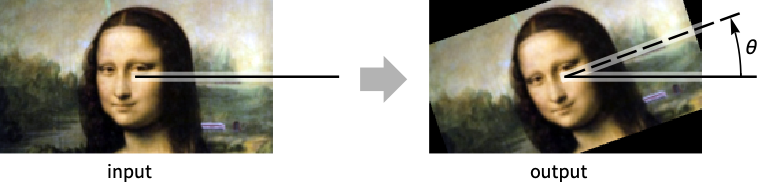
ImageRotate[image] rotates image by 90° about its center in the $x$ - $y$ plane. 

ImageRotate[image, θ] rotates image by θ radians.

ImageRotate[image, {θ, w}] rotates a 3D image around the 3D vector w.

ImageRotate[image, …, size] gives an image of the specified size.

ImageRotate[video, …] rotate frames of video.

## Details and Options

* ``ImageRotate`` rotates an image about its center or any other point of rotation. It is commonly used to fix the image orientation or align it with the horizon.

* ``ImageRotate[image, …]`` rotates ``image`` about its center.

[image]

* For video inputs, the rotation specification can be a fixed specification for all frames or a function of time (in seconds from the start).

* For 2D images and videos, ``ImageRotate[input, side]`` rotates ``input`` to make the top of the image be on the specified ``side``. ``ImageRotate[input, side1 -> side2]`` rotates ``input`` to make ``side1`` be on ``side2``. Possible side specifications are: ``Top``, ``Bottom``, ``Left``, ``Right``.

* ``ImageRotate[image, side]`` is equivalent to ``ImageRotate[image, Top -> side]``.

* Possible specifications for ``size`` include:

|                        |                                                                         |
| ---------------------- | ----------------------------------------------------------------------- |
| width                  | crop to width                                                           |
| {width, height}        | crop to {width, height}                                                 |
| {width, depth, height} | crop a 3D image to {width, depth, height}                               |
| Automatic              | smallest rectangle to enclose all of the rotated image                  |
| All                    | smallest square to accommodate the rotated image for any rotation angle |
| Full                   | use the dimensions of the input image                                   |
| "MaxAreaCropping"      | crop to include only input pixels while maximizing area                 |
| "SameRatioCropping"    | crop to include only input pixels while preserving ratios               |

* The following options are supported:

|             |           |                                  |
| ----------- | --------- | -------------------------------- |
| Background  | 0         | background color to use          |
| Masking     | All       | region of interest to be rotated |
| Padding     | 0         | padding of the original image    |
| Resampling  | Automatic | resampling method                |

* ``Masking`` option can be one of the following:

|      |                         |
| ---- | ----------------------- |
| All  | input image only        |
| Full | input image and padding |
| mask | any mask image          |

## Examples (20)

### Basic Examples (2)

Rotate an image counterclockwise by 90°:

```wl
In[1]:= ImageRotate[[image]]

Out[1]= [image]
```

---

Rotate an image counterclockwise by 20°:

```wl
In[1]:= ImageRotate[[image], 20 °]

Out[1]= [image]
```

### Scope (8)

#### Data (4)

Rotate a grayscale image:

```wl
In[1]:= ImageRotate[[image]]

Out[1]= [image]
```

---

Rotate a color image:

```wl
In[1]:= ImageRotate[[image]]

Out[1]= [image]
```

---

Rotate frames of a video:

```wl
In[1]:= ImageRotate[\!\(\*VideoBox["![Video Player: ExampleData/fish.mp4](video://content-83a60)"]\)]

Out[1]= [image]
```

---

Rotate a 3D image in the $x$ - $y$ plane:

```wl
In[1]:= ImageRotate[[image]]

Out[1]= [image]
```

#### Rotation Angle (3)

Turn a photo to the right:

```wl
In[1]:= ImageRotate[[image], Right]

Out[1]= [image]
```

Rotate the photo 180°:

```wl
In[2]:= ImageRotate[[image], Top -> Bottom]

Out[2]= [image]
```

Specify the amount of the rotation in radians:

```wl
In[3]:= ImageRotate[[image], π / 4]

Out[3]= [image]
```

Rotate the photo by 45°:

```wl
In[4]:= ImageRotate[[image], 45°]

Out[4]= [image]
```

---

Rotate frames of a video with a time-dependent rotation:

```wl
In[1]:= ImageRotate[\!\(\*VideoBox["![Video Player: ExampleData/fish.mp4](video://content-83a60)"]\), t \[Function] 2t, Full]

Out[1]= [image]
```

---

By default, the image is rotated around the $z$ axis:

```wl
In[1]:=
i = [image];
ImageRotate[i, π / 2]

Out[1]= [image]
```

Rotate 3D image around the $x$ axis:

```wl
In[2]:= ImageRotate[i, {π / 5, {1, 0, 0}}]

Out[2]= [image]
```

Rotate around the main diagonal:

```wl
In[3]:= ImageRotate[i, {π / 5, {1, 1, 1}}]

Out[3]= [image]
```

#### Output Size (1)

By default, padding is used to show the smallest rectangle that encloses all of the rotated image:

```wl
In[1]:= i = [image];

In[2]:= ImageRotate[i, 15 °]

Out[2]= [image]
```

Crop to the size of the original image:

```wl
In[3]:= ImageRotate[i, 15 °, Full]

Out[3]= [image]
```

Crop to the specified width:

```wl
In[4]:= ImageRotate[i, 15 °, 150]

Out[4]= [image]
```

Crop to the input image pixels while preserving aspect ratio:

```wl
In[5]:= ImageRotate[i, 15 °, "SameRatioCropping"]

Out[5]= [image]
```

Crop to the input image pixels while maximizing area:

```wl
In[6]:= ImageRotate[i, 15 °, "MaxAreaCropping"]

Out[6]= [image]
```

Crop to the smallest square that accommodates all rotation angles:

```wl
In[7]:= ImageRotate[i, #, All]& /@ {5 °, 45°}

Out[7]= {[image], [image]}
```

### Options (5)

#### Background (1)

By default, a black background is used:

```wl
In[1]:=
i = [image];
ImageRotate[i, 10 °]

Out[1]= [image]
```

Use a transparent background:

```wl
In[2]:= ImageRotate[i, 10 °, Background -> Transparent]

Out[2]= [image]
```

Use a specific color for the background:

```wl
In[3]:= ImageRotate[i, 10 °, Background -> Gray]

Out[3]= [image]
```

Images with an alpha channel use a transparent background by default:

```wl
In[4]:= ImageRotate[SetAlphaChannel[i], 10 °]

Out[4]= [image]
```

#### Masking (1)

By default, ``Masking -> All`` is used, and background value is used for pixels outside of the original image:

```wl
In[1]:= i = [image];

In[2]:= ImageRotate[i, 20 °, Masking -> All]

Out[2]= [image]
```

Use ``Masking -> Full`` to see padded values for pixels outside of the original image:

```wl
In[3]:= ImageRotate[i, 20 °, Masking -> Full]

Out[3]= [image]
```

Use arbitrary mask:

```wl
In[4]:= ImageRotate[i, 20 °, Masking -> Graphics[{White, Disk[]}, Background -> Black]]

Out[4]= [image]
```

#### Padding (1)

By default, ``"Fixed"`` padding is used:

```wl
In[1]:= i = [image];

In[2]:= ImageRotate[i, 20 °, Masking -> Full]

Out[2]= [image]
```

Specify the padding scheme:

```wl
In[3]:= ImageRotate[i, 20 °, Masking -> Full, Padding -> "Reversed"]

Out[3]= [image]
```

Use a constant padding:

```wl
In[4]:= ImageRotate[i, 20 °, Masking -> Full, Padding -> Gray]

Out[4]= [image]
```

#### Resampling (2)

By default, the rotated image is resampled with the most suitable method:

```wl
In[1]:= ImageRotate[[image], 20 °]

Out[1]= [image]
```

---

Rotate an image using a specific resampling algorithm:

```wl
In[1]:= ImageRotate[[image], 20 °, Resampling -> "Nearest"]

Out[1]= [image]
```

### Applications (2)

Switch photo to its natural orientation:

```wl
In[1]:= ImageRotate[[image], 90 °]

Out[1]= [image]
```

Rotate an image to correct for upside-down text:

```wl
In[2]:= ImageRotate[[image], Top -> Bottom]

Out[2]= [image]
```

---

Create a function to output a rotation amount as a function of time:

```wl
In[1]:= rotation = t \[Function] Piecewise[{{Left -> Right, t < 1}, {3*t, t >= 1}}];
```

Rotate the frames of a video using the function:

```wl
In[2]:= ImageRotate[\!\(\*VideoBox["![Video Player: ExampleData/fish.mp4](video://content-83a60)"]\), rotation, Full]

Out[2]= [image]
```

### Properties & Relations (2)

``ImageRotate`` performs a rotation about the center:

```wl
In[1]:= i = [image];

In[2]:= ImageRotate[i, 20 °, ImageDimensions[i]]

Out[2]= [image]
```

Use ``ImageTransformation`` and ``RotationTransform`` to rotate the image:

```wl
In[3]:= ImageTransformation[i, RotationTransform[-20 °, {0.5, 0.5}]]

Out[3]= [image]
```

Rotate about a different center using ``ImageTransformation`` :

```wl
In[4]:= ImageTransformation[i, RotationTransform[-20 °, {0, 0}]]

Out[4]= [image]
```

---

Rotate a 3D image around the x-axis:

```wl
In[1]:= i = [image];

In[2]:= ImageRotate[i, {π / 5, {1, 0, 0}}, Full]

Out[2]= [image]
```

Use ``ImageTransformation`` and ``RotationTransform`` to rotate the image:

```wl
In[3]:= ImageTransformation[i, RotationTransform[-π / 5, {1, 0, 0}, {0.5, 0.5, 0.5}]]

Out[3]= [image]
```

### Interactive Examples (1)

Interactive rotation around the image center with different size settings:

```wl
In[1]:= Manipulate[ImageRotate[[image], θ, size, Background -> White], {{θ, 0}, -π / 2, π / 2}, {size, {All, Full, "MaxAreaCropping"}}]

Out[1]= DynamicModule[«8»]
```

## See Also

* [`ImageReflect`](https://reference.wolfram.com/language/ref/ImageReflect.en.md)
* [`ImageResize`](https://reference.wolfram.com/language/ref/ImageResize.en.md)
* [`ImagePerspectiveTransformation`](https://reference.wolfram.com/language/ref/ImagePerspectiveTransformation.en.md)
* [`RotationTransform`](https://reference.wolfram.com/language/ref/RotationTransform.en.md)
* [`ImageAdjust`](https://reference.wolfram.com/language/ref/ImageAdjust.en.md)
* [`ImageCrop`](https://reference.wolfram.com/language/ref/ImageCrop.en.md)
* [`Rotate`](https://reference.wolfram.com/language/ref/Rotate.en.md)

## Tech Notes

* [Image Processing](https://reference.wolfram.com/language/tutorial/ImageProcessing.en.md)

## Related Guides

* [Basic Image Manipulation](https://reference.wolfram.com/language/guide/BasicImageManipulation.en.md)
* [Image Processing & Analysis](https://reference.wolfram.com/language/guide/ImageProcessing.en.md)
* [3D Images](https://reference.wolfram.com/language/guide/3DImages.en.md)
* [Geometric Operations](https://reference.wolfram.com/language/guide/ImageGeometry.en.md)
* [Video Computation: Update History](https://reference.wolfram.com/language/guide/VideoComputation-UpdateHistory.en.md)
* [Video Editing](https://reference.wolfram.com/language/guide/VideoEditing.en.md)
* [Computational Photography](https://reference.wolfram.com/language/guide/ComputationalPhotography.en.md)
* [Angles and Polar Coordinates](https://reference.wolfram.com/language/guide/AnglesAndPolarCoordinates.en.md)

## History

* [Introduced in 2008 (7.0)](https://reference.wolfram.com/language/guide/SummaryOfNewFeaturesIn70.en.md) \| [Updated in 2012 (9.0)](https://reference.wolfram.com/language/guide/SummaryOfNewFeaturesIn90.en.md) ▪ [2014 (10.0)](https://reference.wolfram.com/language/guide/SummaryOfNewFeaturesIn100.en.md) ▪ [2021 (13.0)](https://reference.wolfram.com/language/guide/SummaryOfNewFeaturesIn130.en.md)