Area
詳細とオプション
- Areaは,表面積としても知られている.
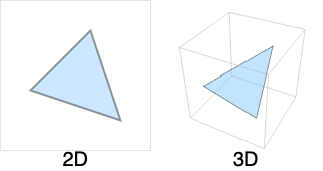
- 二次元領域は2以上の任意の次元に埋め込むことができる.
- Area[x,{s,smin,smax},{t,tmin,tmax}]では,x がスカラーならAreaはパラメトリック曲面{s,t,x}の面積を返す.
- Areaの第4引数の座標グラフは,CoordinateChartDataの第1引数と同じように{coordsys,metric,dim}の形で指定することができる.dim が省略された短縮形を使うこともできる.
- 次は,使用可能なオプションである.
-
AccuracyGoal Infinity 目標とする絶対確度の桁数 Assumptions $Assumptions パラメータについて行う仮定 GenerateConditions Automatic パラメータについての条件を生成するかどうか PerformanceGoal $PerformanceGoal パフォーマンスのどの局面について最適化するか PrecisionGoal Automatic 目標精度の桁数 WorkingPrecision Automatic 内部計算に使用する精度 - 積分の記号極限は実数かつ順序付けられていると仮定される.記号座標チャートのパラメータはCoordinateChartDataの"ParameterRangeAssumptions"特性で与えられる範囲内に収まるものと仮定される.
- Areaは,GeometricSceneの記号領域と一緒に使うことができる.
例題
すべて開く すべて閉じる例 (4)

スコープ (23)
特別な領域 (5)
Region[Rectangle[{0, 0}, {2, 1}]]Area[Rectangle[{Subscript[l, x], Subscript[l, y]}, {Subscript[u, x], Subscript[u, y]}]]Region[Parallelogram[{0, 0}, {{2, 0}, {1, 2}}]]Area[Parallelogram[{Subscript[p, x], Subscript[p, y]}, {{Subscript[u, x], Subscript[u, y]}, {Subscript[v, x], Subscript[v, y]}}]]Region[Simplex[2]]Area[Simplex[2]]Areaは,任意の次元に埋め込まれた2DSimplexについて定義される:
Area[Simplex[{{0, 0, 0, 0}, {0, 1, 1, 0}, {1, 0, 0, 1}}]]Polygonの面積:
ℛ = Polygon[{{0, 0}, {2, -1}, {1, 0}, {2, 1}}];Region[ℛ]Area[ℛ]ℛ = Polygon[{{0, 0, 0}, {(5/3), (2/3), -(4/3)}, {(2/3), (2/3), -(1/3)}, {1, 2, 0}}];Region[ℛ]Area[ℛ]Disk:
Region[Disk[{0, 0}, 1]]Area[Disk[{Subscript[c, x], Subscript[c, y]}, r]]Diskは楕円として使うことができる:
Region[Disk[{0, 0}, {3, 2}]]Area[Disk[{Subscript[c, x], Subscript[c, y]}, {Subscript[r, x], Subscript[r, y]}]]Region[Sphere[]]Area[Sphere[]]Area[Sphere[{Subscript[c, x], Subscript[c, y], Subscript[c, z]}, r]]数式定義領域 (2)
ImplicitRegionとして表された円板の面積:
Area[ImplicitRegion[x^2 + y^2 ≤ 1, {x, y}]]Area[ImplicitRegion[x^2 + y^2 + z^2 == 1, {x, y, z}]]ParametricRegionとして表された円板の面積:
Area[ParametricRegion[{r Cos[θ], r Sin[θ]}, {{r, 0, 1}, {θ, 0, 2π}}]]Area[ParametricRegion[{r(1 - t^2/1 + t^2), r(2t/1 + t^2)}, {t, {r, 0, 1}}]]Area[ParametricRegion[{Cos[θ]Cos[ϕ], Sin[θ]Cos[ϕ], Sin[ϕ]}, {{θ, 0, 2π}, {ϕ, -π / 2, π / 2}}]]メッシュ領域 (2)
MeshRegionの面積:
DelaunayMesh[RandomReal[1, {10, 2}]]Area[%]MeshRegion[{{0, 0, 0}, {0, 0, 1}, {0, 1, 0}, {1, 0, 0}}, {Polygon[{{1, 2, 3}, {1, 2, 4}, {1, 3, 4}}]}]Area[%]ConvexHullMesh[RandomReal[1, {10, 2}]]Area[%]派生領域 (3)
ℛ = RegionIntersection[Disk[{0, 0}, 1], Disk[{1, 0}, 1]];Show[Graphics[{LightBlue, EdgeForm[Gray], Disk[{0, 0}, 1], Disk[{1, 0}, 1]}], HighlightMesh[DiscretizeRegion[ℛ], 2]]Area[ℛ]ℛ = TransformedRegion[Disk[], ScalingTransform[{a, b}]];Region[ℛ /. {a -> 3, b -> 2}]Area[ℛ]RegionBoundaryの表面積:
ℛ = RegionBoundary[Ball[]]Region[ℛ]Area[ℛ]パラメータの式 (6)
Area[{2r Sin[θ], r Cos[θ]}, {r, 0, 1}, {θ, 0, 2Pi}]ParametricPlot[{2r Sin[θ], 1r Cos[θ]}, {r, 0, 1}, {θ, 0, 2Pi}]Area[{r, Pi / 4, t}, {r, 0, 1}, {t, 0, Pi} , "Spherical"]ParametricPlot3D[CoordinateTransform[ "Spherical" -> "Cartesian", {r, Pi / 4, t}]//Evaluate, {r, 0, 1}, {t, 0, Pi}]Area[{(5 + 2Sin[p])Cos[t], (5 + 2Sin[p])Sin[t], 2Cos[p]}, {t, 0, 2Pi}, {p, 0, 2Pi} ]ParametricPlot3D[{(5 + 2Sin[p])Cos[t], (5 + 2Sin[p])Sin[t], 2Cos[p]}, {t, 0, 2Pi}, {p, 0, 2Pi} ]Area[{5Sin[t], 5Cos[t], 2Sin[p], 2Cos[p]}, {t, 0, 2Pi}, {p, 0, 2Pi}]Area[x ^ 2 + y ^ 2, {x, -2, 2}, {y, -3, 3}]Plot3D[x ^ 2 + y ^ 2, {x, -2, 2.}, {y, -3, 3.}]Area[{t, s, s}, {t, 0, ∞}, {s, 0, 1}, {"Stereographic", {"Sphere", 2}}]地理的領域 (3)
GeoPositionを使った多角形の面積:
ℛ = Polygon[GeoPosition[{{{40.083441, -88.235716}, {40.083607, -88.257488}, {40.082603, -88.257149},
{40.076136999999996, -88.25740499999999}, {40.076178, -88.270888}, {40.076516, -88.271558},
{40.083686, -88.271512}, {40.083659999999995, -88.267046}, ... 33323}, {40.098112, -88.228687},
{40.095216, -88.228627}, {40.095179, -88.238547}, {40.094480999999995, -88.238546},
{40.094508999999995, -88.23267}, {40.094106, -88.232556}, {40.090666999999996, -88.232477},
{40.090741, -88.235745}}}]];Area[ℛ]GeoGridPositionを使った多角形の面積:
ℛ = Polygon[GeoGridPosition[{{{-0.9950503945490105, 1.2366760550756015},
{-0.9952074890903578, 1.2369207053693891}, {-0.9952196732768064, 1.2369073327446167},
{-0.9953160063787643, 1.236848436956935}, {-0.9954141759436825, 1.2369993898475449},
{-0. ... 197645333103}, {-0.9949098578570917, 1.2368130881428654},
{-0.9948663952535768, 1.2367477711687371}, {-0.9948714472169538, 1.2367426500757825},
{-0.9949211061652593, 1.2367089232486177}, {-0.9949439717990124, 1.236746107097628}}}, "Bonne"]];Area[ℛ]Areaは地理実体の多角形に使うことができる:
ℛ = Polygon[["france"]];Area[ℛ]CSG領域 (1)
線形CSGRegionの面積:
CSGRegion["Difference", {Rectangle[], Rectangle[{1 / 2, 1 / 2}]}]Area[%]CSGRegion["Difference", {Disk[], Disk[{1 / 2, 1 / 2}]}]Area[%]細分割領域 (1)
2DのSubdivisionRegionの面積:
SubdivisionRegion[Rectangle[]]Area[%]SubdivisionRegion[RegionBoundary[Cube[]]]Area[%]オプション (6)
AccuracyGoal (1)
Region[ℛ = ImplicitRegion[x ^ 2 + y ^ 2 <= Cos[x y], {x, y}]]area1 = Area[ℛ]AccuracyGoalオプションを使って絶対許容範囲を変えることができる.以下では,面積の計算は確度のゴール基準を超えると停止される:
area2 = Area[ℛ, AccuracyGoal -> 8]デフォルト設定での結果は,精度基準しか使っていないので,異なる:
area1 - area2Assumptions (1)
Area[{r, v}, {r, 0, ArcSech[Sqrt[1 - (b^2/a^2)]]}, {v, 0, 2Pi}, {{"Elliptic", Sqrt[a^2 - b^2]}}]Area[{r, v}, {r, 0, ArcSech[Sqrt[1 - (b^2/a^2)]]}, {v, 0, 2Pi}, {{"Elliptic", Sqrt[a^2 - b^2]}}, Assumptions -> a > 0 && b > 0]PrecisionGoal (1)
目標精度の有効桁数はPrecisionGoalで指定できる:
Table[Area[ImplicitRegion[x ^ 6 + y ^ 6 - x y <= 1, {x, y}], PrecisionGoal -> prec], {prec, 1, 14}]ListPlot[%, PlotRange -> All]PerformanceGoal (1)
Region[ℛ = ImplicitRegion[x ^ 2 + y ^ 2 <= Cos[x y], {x, y}]]PerformanceGoal"Speed"を使って面積を素早く計算しようとする:
(area1 = Area[ℛ, PerformanceGoal -> "Speed"])//TimingPerformanceGoal"Performance"を使って結果の有効桁数ができるだけ多くなるようにする:
(area2 = Area[ℛ, PerformanceGoal -> "Quality"])//TimingWorkingPrecision (2)
機械演算を使ってAreaを計算する:
Area[ImplicitRegion[x ^ 6 + y ^ 6 - x y <= 1, {x, y}], WorkingPrecision -> MachinePrecision]Area[ImplicitRegion[x ^ 6 + y ^ 6 - x y <= 1, {x, y}]]30桁精度でAreaを求める:
Area[{a Cos[t], a Sin[t], a Sin[t]}, {t, 0, 2Pi}, {a, 0, 1}, WorkingPrecision -> 30]無限精度でAreaを求める:
Area[{a Cos[t], a Sin[t], a Sin[t]}, {t, 0, 2Pi}, {a, 0, 1}, WorkingPrecision -> ∞]アプリケーション (4)
𝒮 = ParametricRegion[{x, y, x y}, {{x, 0, 1}, {y, 0, 1}}];RegionDimension[𝒮]Area[𝒮]Area[x y, {x, 0, 1}, {y, 0, 1}]ℛ = Simplex[2];Integrate[x^2y^3, {x, y}∈ℛ] / Area[ℛ]p = PolyhedronData["SnubDodecahedron"];ℛ = DiscretizeGraphics[p]PolyhedronDataは表面を与える.立体は与えない.したがってAreaを使うことができる:
RegionDimension[ℛ]Area[ℛ]g = Graphics3D[KnotData["SolomonSeal", "ImageData"]];ℛ = DiscretizeGraphics[g]RegionDimension[ℛ]Area[ℛ]特性と関係 (5)
Areaは非負の数量である:
Area[{Cos[φ]Sin[θ], Sin[φ]Sin[θ], Cos[θ]}, {θ, 0, π}, {φ, 0, 2Pi}]Area[{Cos[φ]Sin[θ], Sin[φ]Sin[θ], Cos[θ]}, {θ, 0, π}, {φ, 0, -2Pi}]Area[r]は,2D領域についてはRegionMeasure[r]と同じである:
ℛ = Simplex[2];
{Area[ℛ], RegionMeasure[ℛ]}ℛ = Polygon[{{0, 0, 1}, {0, 1, 0}, {1, 0, 0}}];
{Area[ℛ], RegionMeasure[ℛ]}Area[r]はRegionMeasure[r,2]と同じである:
Area[{s t ^ 2, Pi / 2, Pi / 4, s t}, {s, 0, 1}, {t, 0, 2Pi}, "Hyperspherical"]RegionMeasure[{s t ^ 2, Pi / 2, Pi / 4, s t}, {{s, 0, 1}, {t, 0, 2Pi}}, "Hyperspherical"]2D領域については,Areaは領域上での1の積分である:
ℛ = Disk[];
{Area[ℛ], Integrate[1, x∈ℛ]}ℛ = Sphere[];
{Area[ℛ], Integrate[1, x∈ℛ]}3D領域の表面積を得るためにRegionBoundaryを用いる:
ℛ = DelaunayMesh[RandomReal[1, {20, 3}]]Area[RegionBoundary[ℛ]]考えられる問題 (2)
Areaのパラメトリック形式は,多重被覆がある可能性のある面積を計算する:
Area[{Cos[φ]Sin[θ], Sin[φ]Sin[θ], Cos[θ]}, {θ, 0, π}, {φ, 0, 4Pi}]Area[ParametricRegion[{Cos[φ]Sin[θ], Sin[φ]Sin[θ], Cos[θ]}, {{θ, 0, π}, {φ, 0, 4Pi}}]]Area[Sphere[{0, 0, 0}, 1]]二次元以外の領域の面積はUndefinedである:
{Area[Point[{0, 0}]], Area[Line[{{0, 0}, {1, 1}}]], Area[Ball[]]}RegionDimension /@ {Point[{0, 0}], Line[{{0, 0}, {1, 1}}], Ball[]}テキスト
Wolfram Research (2014), Area, Wolfram言語関数, https://reference.wolfram.com/language/ref/Area.html (2019年に更新).
CMS
Wolfram Language. 2014. "Area." Wolfram Language & System Documentation Center. Wolfram Research. Last Modified 2019. https://reference.wolfram.com/language/ref/Area.html.
APA
Wolfram Language. (2014). Area. Wolfram Language & System Documentation Center. Retrieved from https://reference.wolfram.com/language/ref/Area.html
BibTeX
@misc{reference.wolfram_2026_area, author="Wolfram Research", title="{Area}", year="2019", howpublished="\url{https://reference.wolfram.com/language/ref/Area.html}", note=[Accessed: 17-August-2026]}
BibLaTeX
@online{reference.wolfram_2026_area, organization={Wolfram Research}, title={Area}, year={2019}, url={https://reference.wolfram.com/language/ref/Area.html}, note=[Accessed: 17-August-2026]}