

Authentication
クラウド,Web,SSHのアクセス関数のオプションで,認証パラメータの付与を許可する.
詳細
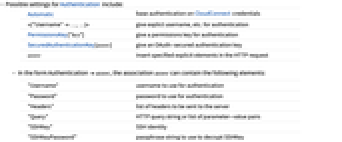
- Authenticationの可能な設定
-
Automatic CloudConnect信任についての基本認証 <|"Username"…,…|> 認証のために明示的なユーザ名等を与える PermissionsKey["key"] 認証のためのパーミッションキーを与える SecuredAuthenticationKey[assoc] OAuth-securedの認証鍵を与える assoc 指定された明示的要素をHTTPリクエストに入れる - Authenticationassoc の形式の assoc は次の要素を持つことができる.
-
"Username" 認証に使用するユーザ名 "Password" 認証に使うパスワード "Headers" サーバに送られるヘッダのリスト "Query" HTTPクエリ文字列またはパラメータと値のペアのリスト "SSHKey" SSH ID "SSHKeyPassword" SSHKeyを復号化するために使われるパスフレーズ文字列 - SSH IDは "SSHKey" File[ident]の形で与えることができる.この中の ident はSSH秘密鍵を含むファイルである.これは"SSHKey" "string" として与えることもできる."string"はSSH秘密鍵である.
例題
すべて開く すべて閉じる例 (3)
PermissionsKeyにパーミッションが与えられたクラウドオブジェクトを配備する:
co = CloudDeploy[ExportForm["Hello", "Text"], Permissions -> PermissionsKey["key"] -> "Read"]AuthenticationにPermissionsKeyを使ってクラウドオブジェクトのコンテンツを読む:
URLRead["https://www.wolframcloud.com/obj/d1362db4-d2b4-492e-bc60-090170c44d22", "Content", Authentication -> PermissionsKey["key"]]IDファイルを使ってリモートマシンからファイルをコピーする:
CopyFile[RemoteFile["sftp://host.example.com/tmp/test.m", Authentication -> <|"Username" -> "user", "SSHKey" -> File["/path/.ssh/id_rsa"]|>], "/tmp/test.m"]ServiceConnectを使用してカスタムRedditアプリの認証情報一式を提供することでRedditに接続する:
redditID = "myID";
redditSecret = "mySecret";redditKey = SecuredAuthenticationKey[<|"Name" -> "Reddit", "OAuthType" -> "AuthorizationCode", "OAuthVersion" -> "2.0", "ClientID" -> redditID, "ClientSecret" -> redditSecret, "Scopes" -> {"identity", "edit"}, "AccessTokenURL" -> "https://www.reddit.com/api/v1/access_token", "UserAuthorizationURL" -> "https://www.reddit.com/api/v1/authorize", "VerifierInputFunction" -> "WolframConnectorChannel"|>]reddit = ServiceConnect["Reddit", "New", Authentication -> redditKey]reddit["AccountData"]スコープ (2)
OAuth 2.0 SecuredAuthenticationKeyを用いて認証を行い,Reddit APIに接続する:
redditID = "myID";
redditSecret = "mySecret";redditKey = SecuredAuthenticationKey[<|"Name" -> "Reddit", "OAuthType" -> "AuthorizationCode", "OAuthVersion" -> "2.0", "ClientID" -> redditID, "ClientSecret" -> redditSecret, "Scopes" -> {"identity", "edit"}, "AccessTokenURL" -> "https://www.reddit.com/api/v1/access_token", "UserAuthorizationURL" -> "https://www.reddit.com/api/v1/authorize", "VerifierInputFunction" -> "WolframConnectorChannel"|>]URLExecute["https://oauth.reddit.com/api/v1/me", Authentication -> redditKey]//ShortAPIキーで認証してGoogle Translate APIに接続する:
googleAPIKey = "myGoogleAPIKey";URLExecute["https://translation.googleapis.com/language/translate/v2/languages", Authentication -> <|"Query" -> {"key" -> googleAPIKey}|>]//Short関連するガイド
-
▪
- URLの操作 ▪
- クラウドのパーミッションの制御 ▪
- HTTPの要求と応答 ▪
- Webの操作 ▪
- ファイル ▪
- ファイル操作 ▪
- 外部サービスとAPIへのアクセス ▪
- 大規模言語モデル関連機能
テキスト
Wolfram Research (2016), Authentication, Wolfram言語関数, https://reference.wolfram.com/language/ref/Authentication.html (2019年に更新).
CMS
Wolfram Language. 2016. "Authentication." Wolfram Language & System Documentation Center. Wolfram Research. Last Modified 2019. https://reference.wolfram.com/language/ref/Authentication.html.
APA
Wolfram Language. (2016). Authentication. Wolfram Language & System Documentation Center. Retrieved from https://reference.wolfram.com/language/ref/Authentication.html
BibTeX
@misc{reference.wolfram_2026_authentication, author="Wolfram Research", title="{Authentication}", year="2019", howpublished="\url{https://reference.wolfram.com/language/ref/Authentication.html}", note=[Accessed: 11-August-2026]}
BibLaTeX
@online{reference.wolfram_2026_authentication, organization={Wolfram Research}, title={Authentication}, year={2019}, url={https://reference.wolfram.com/language/ref/Authentication.html}, note=[Accessed: 11-August-2026]}