CellularAutomaton[rule,init,t]
セルオートマトンを指定した条件で初期条件 init から t ステップ実行した進化を表すリストを生成する.
CellularAutomaton[rule,init]
1ステップ分の init の進化の結果を返す.
CellularAutomaton[rule,init,{tspec,xspec,…}]
tspec,xspec 等で指定された進化の部分だけを返す.
CellularAutomaton[rule,init,{t,All,…}]
t ステップの間に影響を受けるであろうすべてのセルを各ステップに含む.
CellularAutomaton[rule]
進化の1ステップを表す,CellularAutomatonの演算子形である.
CellularAutomaton
CellularAutomaton[rule,init,t]
セルオートマトンを指定した条件で初期条件 init から t ステップ実行した進化を表すリストを生成する.
CellularAutomaton[rule,init]
1ステップ分の init の進化の結果を返す.
CellularAutomaton[rule,init,{tspec,xspec,…}]
tspec,xspec 等で指定された進化の部分だけを返す.
CellularAutomaton[rule,init,{t,All,…}]
t ステップの間に影響を受けるであろうすべてのセルを各ステップに含む.
CellularAutomaton[rule]
進化の1ステップを表す,CellularAutomatonの演算子形である.
詳細
- rule の可能な形
-
n
,
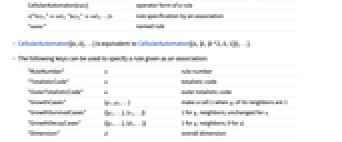
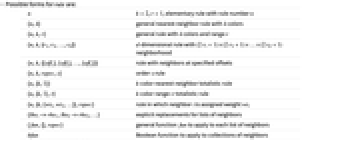
,ルール番号 n の初期ルール {n,k} k 色の一般的な最近傍ルール {n,k,r} k 色で範囲 r の一般ルール {n,k,{r1,r2,…,rd}} d 次元の

近傍ルール{n,k,{{off1},{off2},…,{offs}}} 指定のオフセットの近傍ルール {n,k,rspec,s} s 次ルール {n,{k,1}} k 色の最近傍の総和型ルール {n,{k,1},r} k 色で範囲 r の総和型ルール {n,{k,{wt1,wt2,…}},rspec} 近傍 i に重み wtiが割り当てられているルール {lhs1->rhs1,lhs2->rhs2,…} 近傍のリストの明示的置換え {fun,{},rspec} 各近傍のリストに適用する一般関数 f bfun 近傍集合に適用するブール関数 CellularAutomaton[rule] 規則の演算子形 <|"key1"val1,"key2"val2,…|> 連想によるルール指定 "name" 名前付きルール - CellularAutomaton[{n,k},…]はCellularAutomaton[{n,{k,{k^2,k,1}}},…]に等しい.
- 次のキーを使って連想として与えられるルールを指定することができる.
-
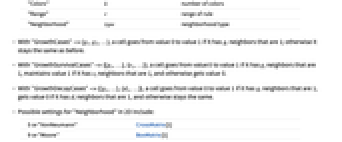
"RuleNumber" n ルール番号 "TotalisticCode" n 総和型コード "OuterTotalisticCode" n 外部総和型コード "GrowthCases" {g1,g2,…} 近傍の giが1の時,セル1を作る "GrowthSurvivalCases" {{g1,…},{s1,…}} giの近傍は1で siについては変更しない "GrowthDecayCases" {{g1,…},{d1,…}} giの近傍は1で diについては0 "Dimension" d 全体的な次元 "Colors" k 色の数 "Range" r ルールの範囲 "Neighborhood" type 近傍タイプ - "GrowthCases"->{g1,g2,…}のとき,セルに1である gi近傍がある場合は,そのセルは値0から値1に変化する.それ以外の場合は,そのセルは前と同じままである.
- "GrowthSurvivalCases"->{{g1,…},{s1,…}}のとき,セルに1である gi近傍がある場合は,そのセルは値0から値1に変化し,1である si近傍がある場合は値1を保持する.それ以外の場合は値が0になる.
- "GrowthDeathCases"->{{g1,…},{d1,…}}のとき,セルに1である gi近傍がある場合は,値0から値1に変化する.1である di近傍がある場合は値0を得る.それ以外の場合は同じ状態に止まる.
- 次は,2Dにおける"Neighborhood"の可能な設定である.
-
5 または "VonNeumann" CrossMatrix[1] 9 または "Moore" BoxMatrix[1] - 次元 d のとき,"Neighborhood"は整数
および
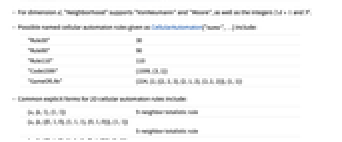
と同様に"VonNeumann"および"Moore"をサポートする. - 次は,CellularAutomaton["name",…]として与えることのできる名前付きセルオートマトンルールである.
-
"Rule30" 30 "Rule90" 90 "Rule110" 110 "Code1599" {1599,{3,1}} "GameOfLife" {224,{2,{{2,2,2},{2,1,2},{2,2,2}}},{1,1}} - 二次元のセルオートマトンルールのよくある明示的一般形
-
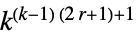
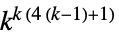
{n,{k,1},{1,1}} 9近傍の総和型ルール {n,{k,{{0,1,0},{1,1,1},{0,1,0}}},{1,1}}5近傍の総和型ルール {n,{k,{{0,k,0},{k,1,k},{0,k,0}}},{1,1}}5近傍の外部総和型ルール - セルオートマトンの可能な規則の数は次の通りである.
-
初期ルール 256 一次元一般ルール 
一次元総和型ルール 
二次元一般ルール 
二次元9近傍総和型ルール 
二次元5近傍総和型ルール 
二次元5近傍外部総和型ルール 
- 一般に,initと進化のリストの全要素はゼロから
までの整数である. - 一般関数または置換えリストが用いられる場合は,init と進化のリストの要素は任意の式でよい. »
- 明示的な置換規則の lhsi->rhsiにはパターンが含まれている.
- 一次元セルオートマトンの場合,置換規則や明示的な関数 fun は常に近傍の一次元リストに適用されると解釈される.近傍が明示的なオフセットで指定されている場合,その近傍はオフセットの順に与えられる.
- 多次元セルオートマトンにおける近隣が{r1,r2,…}のような範囲指定で定義されている場合,近傍のリストは次元が2{r1,r2,…}+1の完全配列であると解釈される.
- 多次元セルオートマトンの近傍がオフセットの明示的なリストで指定されている場合,その近傍は一次元のリストにオフセットの順序で与えられる.
- 明示的な関数 fun が与えられた場合,この関数の第1引数は近傍のリストである.第2引数は0から始まるステップ数である.
- 完全なルール指定は,BooleanVariables[bfun]が整数 v を返す場合は,純ブール関数 bfun であるとみなされる.この場合,bfun は各ステップの v 個のセルの近傍に適用される.近傍は左側のCeiling[v/2]個のセルまで拡張される.
- {rule,kspec,rspec,s}で指定される s 次のセルオートマトンでは,各ステップが s 個前のステップに依存する.
- 初期条件は以下のように init によって設定される.
-
{a1,a2,…} 周期的であると考えられる,値 ai の明示的なリスト {{a1,a2,…},b} 背景 b に重ねられた値 ai {{a1,a2,…},{b1,b2,…}} b1, b2, …の反復である背景に重ねられた値 ai {{{{a11,a12,…},off1}, {{a21,…},off2},…},bspec} 背景上のオフセット offi の値 aij {{a11,a12,…},{a21,…},…} 二次元の値の明示的リスト {aspec,bspec} d 次元で d 次元のパディングを伴う値 - aspec の第1要素は,各座標で原点に対して正の方向に最初の位置で背景に重ねられる.つまり,bspec[[1,1,…]]はaspec[[1,1,…]]と並ぶことになる.
- CellularAutomaton[rule,init,t]は,長さ
の進化リストを生成する. - s 次のセルオートマトンについては,init がシステムの進化における最初の s ステップを与えるリストである.
- {tspec,xspec,…}における時間指定 tspec は次のようにできる.
-
t 0から t までの全ステップ {t} t ステップしか含まないリスト {{t}} ステップ t のみ {t1,t2} t1 から t2 までのステップ {t1,t2,dt} ステップ t1, t1+dt, … - 初期条件はステップ0であると考えられる.
- CellularAutomaton[rule,init,{tspec}]は,xspec にデフォルトのAutomaticを使う.
- 空間指定 xspec は次のようにできる.
-
All 指定された初期条件に影響されるすべてのセル Automatic 領域内の背景と異なるすべてのセル 0 aspec の始めと並んでいるセル x 右側に最大 x のオフセットを持つセル -x 左側に最大 x のオフセットを持つセル {x} 右側に x のオフセットを持つセル {-x} 左側に最大 x のオフセットを持つセル {x1,x2} x1 から x2 までのオフセットを持つセル {x1,x2,dx} x1, x1+dx, …のセル - 一次元では aspec の最初の要素はデフォルトで空間オフセット0を持つとされる.
- 何次元であっても,aspec[[1,1,1,…]]はデフォルトで空間オフセット{0,0,0,…}を持つとされる.
- CellularAutomatonで作成される進化リストの各要素は常に同じサイズである.
- 幅
の aspec によって指定される初期条件により,領域
の規則を持つセルオートマトンの
ステップ後に影響を受ける領域は幅
になる. - 背景 bspec が指定されていなければ,AllとAutomatic空間オフセットは aspec にあるすべてのセルを含む.
- Allの空間オフセットは初期条件の影響を受けるすべてのセルを含む.
- Automaticの空間オフセットはセルオートマトンのパターンの側面から背景をカットするために使うことができる.
- どれくらいの領域を保持すればよいかを決める際,Automaticは offt で指定したステップの結果のみを使う.
- CellularAutomaton[rule][init]は,CellularAutomaton[rule,init]と等価である.
例題
すべて開く すべて閉じる例 (3)
スコープ (91)
一次元ルール (26)
CellularAutomaton[73, {{1}, 0}, 4]//GridArrayPlot[CellularAutomaton[73, {{1}, 0}, 50]]RulePlotを使って同じ結果を生成する:
RulePlot[CellularAutomaton[73], {{1}, 0}, 50]ArrayPlot[CellularAutomaton[{679458, 3}, {{1}, 0}, 50]]ArrayPlot[CellularAutomaton[{679458, 3}, {{1}, 0}, 50], ColorRules -> {1 -> Pink, 2 -> Blue}]RulePlot[CellularAutomaton[{679458, 3}], ColorRules -> {1 -> Pink, 2 -> Blue}]ArrayPlot[CellularAutomaton[{867, {3, 1}}, {{1}, 0}, 50]]ArrayPlot[CellularAutomaton[{23898, 2, 3 / 2}, {{1}, 0}, 40]]ArrayPlot[CellularAutomaton[{39421042, 2, 2}, {{1}, 0}, 40]]ArrayPlot[CellularAutomaton[{10, {2, 1}, 2}, {{1}, 0}, 40]]近隣のセルに明示的なオフセットを与えることによって指定されたルール30:
ArrayPlot[CellularAutomaton[{30, 2, {{-1}, {0}, {1}}}, {{1}, 0}, 50]]ArrayPlot[CellularAutomaton[{30, 2, {{-1}, {0}, {2}}}, {{1}, 0}, 50]]ArrayPlot[CellularAutomaton[{9, 2, {{-1}, {2}}}, {{1}, 0}, 50]]ArrayPlot[CellularAutomaton[{30, {2, {4, 2, 1}}}, {{1}, 0}, 50]]ArrayPlot[CellularAutomaton[{2049, {3, 1}}, {{1}, 0}, 50]]ArrayPlot[CellularAutomaton[{2049, {3, {1, 1, 1}}}, {{1}, 0}, 50]]ArrayPlot[CellularAutomaton[{50257, {3, {3, 1, 3}}}, {{1}, 0}, 50]]ArrayPlot[CellularAutomaton[{{1, _, 1} -> 0, {1, _, 0} -> 1, {0, _, 1} -> 1, {0, _, 0} -> 0}, {{1}, 0}, 50]]単一の「代数的な」置換規則を与えることでルール90を指定する:
ArrayPlot[CellularAutomaton[{{x_, _, y_} :> Mod[x + y, 2]}, {{1}, 0}, 50]]TrueおよびFalseという状態に作用する明示的なブール公式をルール30に適用する:
CellularAutomaton[{{p_, q_, r_} -> Xor[p, Or[q, r]]}, {{True}, False}, 2]ArrayPlot[Boole[%]]CellularAutomaton[{{a, _, b} -> a, {b, _, a} -> b, {x_, _, x_} -> a}, {{b}, a}, 4]CellularAutomaton[{f[#]&, {}, 1}, {a, b, c}, 1]CellularAutomaton[{f[#]&, {}, {{-1}, {0}}}, {{1}, 0}, 2]Grid[%]「パスカル(Pascal)の三角形のセルオートマトン」を設定する:
CellularAutomaton[{Total[#]&, {}, 1 / 2}, {{1}, 0}, 3]ArrayPlot[CellularAutomaton[{Mod[#[[1]] + #[[3]], 2]&, {}, 1}, {{1}, 0}, 50]]ArrayPlot[CellularAutomaton[{Mod[Total[#], 4]&, {}, 1}, {{1}, 0}, 50]]CellularAutomaton[{f[#1, #2]&, {}, 1}, {a, b, c}, 1]CellularAutomaton[{f, {}, 1}, {a, b, c}, 1]ArrayPlot[CellularAutomaton[{Mod[Total[#] + #2, 4]&, {}, 1}, {{1}, 0}, 30]]ArrayPlot[CellularAutomaton[{Mod[Total[#] / 2, 1]&, {}, 1}, {{1}, 0}, 50]]ArrayPlot[CellularAutomaton[{Mod[Total[#] / 2, 1]&, {}, 1}, {{1}, 0}, 50], ColorFunction -> Hue]ArrayPlot[CellularAutomaton[Xor[#1, #3]&, {{1}, 0}, 50]]ArrayPlot[CellularAutomaton[BooleanFunction[90, 3], {{1}, 0}, 50]]ArrayPlot[CellularAutomaton[Xor[#1, #5]&, {{1}, 0}, 50]]連想で指定されたルール (5)
ArrayPlot[CellularAutomaton[<|"RuleNumber" -> 30|>, {{1}, 0}, 30]]ArrayPlot[CellularAutomaton[<|"RuleNumber" -> 679458, "Colors" -> 3|>, {{1}, 0}, 40], ColorRules -> {1 -> Pink, 2 -> Blue}]ArrayPlot[CellularAutomaton[<|"RuleNumber" -> 23898, "Range" -> 3 / 2|>, {{1}, 0}, 40]]ArrayPlot[CellularAutomaton[<|"TotalisticCode" -> 867, "Colors" -> 3|>, {{1}, 0}, 50]]ArrayPlot[CellularAutomaton[<|"OuterTotalisticCode" -> 50257, "Colors" -> 3|>, {{1}, 0}, 50]]初期条件 (8)
CellularAutomaton[30, {1, 0, 0, 0, 0, 0}, 2]CellularAutomaton[30, {1, 0, 0, 0, 0, 0}, 2]//Grid最も左側のセルの左近傍は最も右側のセルであり,逆もまた真である:
CellularAutomaton[{f[#]&, {}, 1}, {a, b, c, d}, 1]ArrayPlot[CellularAutomaton[30, RandomInteger[1, 100], 50]]ArrayPlot[CellularAutomaton[126, {{1, 1, 1, 0, 1}, 0}, 20]]ArrayPlot[CellularAutomaton[150, {{0}, 1}, 20]]ArrayPlot[CellularAutomaton[22, {{1, 1, 1}, {1, 0}}, 20]]ArrayPlot[CellularAutomaton[150, {SparseArray[{1 -> 1, 10 -> 1}], 0}, 20]]SparseArrayを使って完全に循環的な初期条件を与える:
ArrayPlot[CellularAutomaton[150, SparseArray[{1 -> 1, 10 -> 1}, 50], 20]]オフセット
のブロック101とオフセット
のブロック
から始める:
ArrayPlot[CellularAutomaton[150, {{{{1, 0, 1}, {-8}}, {{1, 1}, {9}}}, 0}, 20]]タイムステップ (6)
CellularAutomaton[30, {{1}, 0}, 2]CellularAutomaton[30, {{1}, 0}, {2}]CellularAutomaton[30, {{1}, 0}, {{2}}]CellularAutomaton[30, {{1}, 0}, {{{2}}}]ArrayPlot[CellularAutomaton[30, {{1}, 0}, {{50, 80}}]]CellularAutomaton[30, {{1}, 0}, {{0, 2}}]ArrayPlot[CellularAutomaton[30, {{1}, 0}, {{0, 100, 3}}]]範囲指定 (11)
デフォルトで,CellularAutomatonはパターンでカバーされない範囲を自動的に削除する:
ArrayPlot[CellularAutomaton[110, {{1}, 0}, 50]]ArrayPlot[CellularAutomaton[110, {{1}, 0}, {50, Automatic}]]規則の枠組みを与えられると影響を受ける可能性があるすべてのセルを含む:
ArrayPlot[CellularAutomaton[110, {{1}, 0}, {50, All}]]ArrayPlot[CellularAutomaton[45, {{1}, 0}, 50]]ArrayPlot[CellularAutomaton[45, {{1}, 0}, {50, All}]]Table[ArrayPlot[CellularAutomaton[n, {{1}, 0}, 40], ImageSize -> {Automatic, 60}], {n, 57, 60}]Table[ArrayPlot[CellularAutomaton[n, {{1}, 0}, {40, All}], ImageSize -> {Automatic, 60}], {n, 57, 60}]ArrayPlot[CellularAutomaton[{10008, 2, 3 / 2}, {{1}, 0}, {50, All}]]ArrayPlot[CellularAutomaton[30, {{1}, 0}, {50, {0, 40}}]]ArrayPlot[CellularAutomaton[30, {{1}, 0}, {50, {-20, 40}}]]CellularAutomaton[30, {{1}, 0}, {15, {0}}]CellularAutomaton[30, {{1}, 0}, {15, {{0}}}]ArrayPlot[CellularAutomaton[45, {{1}, 0}, {{0, 100, 2}, {-100, 100, 2}}]]ArrayPlot[CellularAutomaton[30, {{1, 1, 0, 1}, 0}, {10, {0, 15}}], Mesh -> True]有限ブロックを反復して位置
から
までの初期条件の範囲を埋める:
ArrayPlot[CellularAutomaton[30, {1, 1, 0, 1, 0, 0, 1}, {30, {-40, 40}}]]多次元ルール (13)
範囲1の二次元(9近傍)総和型コード14を2ステップ実行する:
CellularAutomaton[{14, {2, 1}, {1, 1}}, {{{1}}, 0}, 2]CellularAutomaton[{14, {2, 1}, {1, 1}}, {{{1}}, 0}, {{{2}}}]ArrayPlot[CellularAutomaton[{14, {2, 1}, {1, 1}}, {{{1}}, 0}, {{{30}}}]]ArrayPlot[Mean[CellularAutomaton[{14, {2, 1}, {1, 1}}, {{{1}}, 0}, 30]]]ArrayPlot3D[CellularAutomaton[{14, {2, 1}, {1, 1}}, {{{1}}, 0}, 10]]Graphics3D[Cuboid /@ Position[CellularAutomaton[{14, {2, 1}, {1, 1}}, {{{1}}, 0}, 10], 1], ViewVertical -> {-1, 0, 0}]Graphics3D[{Opacity[.2], EdgeForm[], Cuboid /@ Position[CellularAutomaton[{14, {2, 1}, {1, 1}}, {{{1}}, 0}, 10], 1]}, ViewVertical -> {-1, 0, 0}]オフセット0で
におけるすべての
の値についての50ステップの時空スライス:
ArrayPlot[CellularAutomaton[{14, {2, 1}, {1, 1}}, {{{1}}, 0}, {50, All, {{0}}}]]ArrayPlot[Mean /@ CellularAutomaton[{14, {2, 1}, {1, 1}}, {{{1}}, 0}, 30]]RulePlotを使って総和型ルール指定を可視化する:
RulePlot[CellularAutomaton[{14, {2, 1}, {1, 1}}]]ArrayPlot[CellularAutomaton[{26, {2, {{0, 1, 0}, {1, 1, 1}, {0, 1, 0}}}, {1, 1}}, {{{1}}, 0}, {{{100}}}]]ArrayPlot[CellularAutomaton[{110, {2, {{0, 2, 0}, {2, 1, 2}, {0, 2, 0}}}, {1, 1}}, {{{1}}, 0}, {{{100}}}]]RulePlotを使って外部総和型ルール指定を可視化する:
RulePlot[CellularAutomaton[{110, {2, {{0, 2, 0}, {2, 1, 2}, {0, 2, 0}}}, {1, 1}}]]ArrayPlot[CellularAutomaton[{110, {2, {{0, 2, 0}, {2, 1, 2}, {0, 2, 0}}}, {1, 1}}, {SparseArray[{{1, 1}, {1, 100}} -> 1], 0}, {{{100}}}]]ArrayPlot3D[CellularAutomaton[{14, {2, 1}, {1, 1, 1}}, {{{{1}}}, 0}, {{{10}}}]]連想による多次元ルール指定 (8)
連想を使って2D総和型コード14を指定する(9セル近傍を仮定):
ArrayPlot[CellularAutomaton[<|"TotalisticCode" -> 14, "Dimension" -> 2|>, {{{1}}, 0}, {{{30}}}]]ArrayPlot[
CellularAutomaton[<|"TotalisticCode" -> 26, "Dimension" -> 2, "Neighborhood" -> 5|>, {{{1}}, 0}, {{{30}}}]]ArrayPlot[
CellularAutomaton[<|"TotalisticCode" -> 26, "Dimension" -> 2, "Neighborhood" -> "VonNeumann"|>, {{{1}}, 0}, {{{30}}}]]ArrayPlot[CellularAutomaton[<|"OuterTotalisticCode" -> 110, "Dimension" -> 2, "Neighborhood" -> 5|>, {{{1}}, 0}, {{{40}}}]]セルに値1の(9つのうち)1つまたは2つの近傍があるときにそのセルが値1を得る成長ルール:
ArrayPlot[CellularAutomaton[<|"Dimension" -> 2, "GrowthCases" -> {1, 2}|>, {{{1}}, 0}, {{{50}}}]]ArrayPlot3D[CellularAutomaton[<|"Dimension" -> 2, "GrowthCases" -> {1, 2}|>, {{{1}}, 0}, 50]]値1の近傍を1つまたは2つ持つセルに値1が与えられ,値1の近傍が6つまたは7持つセルには値0が与えられる成長崩壊ルール:
ArrayPlot[CellularAutomaton[<|"Dimension" -> 2, "GrowthDecayCases" -> {{1, 2}, {6, 7}}|>, {{{1}}, 0}, {{{50}}}]]値1の近傍が1つまたは2つあるセルに値1が与えられ,値1の近傍が6つまたは7つあるセルはそのままの状態に置かれ,その他の場合にはセルに値0が与えられるルール:
ArrayPlot[CellularAutomaton[<|"Dimension" -> 2, "GrowthSurvivalCases" -> {{1, 2}, {6, 7}}|>, {{{1}}, 0}, {{{50}}}]]7近傍のうちの1近傍の値が1のときにセルの値が1になるルール:
ArrayPlot3D[CellularAutomaton[
<|"GrowthCases" -> {1}, "Dimension" -> 3, "Neighborhood" -> 7|>, {{{{1}}}, 0}, {{{5}}}]]27の近傍のうち1近傍の値が1のときにセルの値が1になるルール:
ArrayPlot3D[CellularAutomaton[
<|"GrowthCases" -> {1}, "Dimension" -> 3, "Neighborhood" -> 27|>, {{{{1}}}, 0}, {{{6}}}]]高階ルール (6)
CellularAutomaton[{30, 2, 1, 1}, {{1, 0, 1, 1}}, 4]CellularAutomaton[{30, 2, 1, 2}, {{1, 0, 1, 1}, {1, 1, 0, 1}}, 4]CellularAutomaton[{30, 2, 1, 2}, {{1, 0, 1, 1}, {1, 1, 0, 1}}, {{-1, 4}}]二階ルール1008は,両方の初期条件ステップで単一の1から始まる:
ArrayPlot[CellularAutomaton[{1008, 2, 1, 2}, {{{1}, {1}}, 0}, 40]]ArrayPlot[CellularAutomaton[{1008, 2, 1, 2}, {{{1}, {1}}, 0}, {{-1, 10}}]]ArrayPlot[CellularAutomaton[{10, {2, 1}, 1, 2}, {{{1}, {1}}, 0}, 50]]ArrayPlot[CellularAutomaton[{10, {2, 1}, 1, 12}, {Table[{1}, {12}], 0}, 50]]ArrayPlot[CellularAutomaton[{Mod[Total[Flatten[#]], 2]&, {}, {{-1, 0}, {0, -1}, {0, 0}, {0, 1}}, 2}, {{{1}, {1}}, 0}, 127]]ArrayPlot[First /@ CellularAutomaton[{97852, {2, 1}, {1, 1}, 2}, {{{{1}}, {{1}}}, 0}, {50, {0}, All}]]ArrayPlot[First@CellularAutomaton[{97852, {2, 1}, {1, 1}, 2}, {{{{1}}, {{1}}}, 0}, {{50}, All, All}]]関数バージョン (6)
CellularAutomaton[30, {0, 0, 1, 0, 0}]CellularAutomaton[30][{0, 0, 1, 0, 0}]NestList[CellularAutomaton[30, #]&, {0, 0, 1, 0, 0}, 3]NestList[CellularAutomaton[30], {0, 0, 1, 0, 0}, 3]CellularAutomaton[30, {{1}, 0}, {{{3}}}]CellularAutomaton[30, {{1}, 0}]CellularAutomaton[45, {{1}, 0}]NestList[CellularAutomaton[45], {{1}, 0}, 3]CellularAutomaton[CellularAutomaton[30], {{1}, 0}, 3]アプリケーション (23)
ArrayPlot[CellularAutomaton[30, {{1}, 0}, 40], ColorRules -> {1 -> Red, 0 -> Yellow}]Table[ArrayPlot[CellularAutomaton[n, {{1}, 0}, {20, All}], ImageSize -> 50], {n, 0, 31}]2色で範囲が2の総和型コード20のセルオートマトンを一連の初期条件から示す:
Table[ArrayPlot[CellularAutomaton[{20, {2, 1}, 2}, {IntegerDigits[i, 2], 0}, {30, {-15, 15}}], ImageSize -> 40], {i, 150, 180}]異なる初期条件での3色で範囲が3の総和型コード1599の結果を示す:
Table[ArrayPlot[CellularAutomaton[{1599, {3, 1}}, {Table[1, {n}], 0}, 80], ImageSize -> {Automatic, 100}], {n, 10}]Table[ArrayPlot[Flatten[{0, 0, 0, #, 0, 0, 0}]& /@ CellularAutomaton[{1599, {3, 1}}, {Table[1, {n}], 0}, 80], ImageSize -> {Automatic, 100}], {n, 10}]Row[Table[ArrayPlot[CellularAutomaton[{1599, {3, 1}}, {{1}, 0}, {{t, t + 200}}], ImageSize -> {Automatic, 200}], {t, 0, 600, 200}]]ArrayPlot[CellularAutomaton[30, {{1}, 0}, 200]]ルール30の中央列のセルの値から「ランダム」ウォークを作成する:
ListLinePlot[Accumulate[(-1) ^ CellularAutomaton[30, {{1}, 0}, {500, {{0}}}]]]連続する幅の循環的領域におけるルール90の繰返し周期を求める:
Table[Length[NestWhileList[CellularAutomaton[90], SparseArray[1 -> 1, n], Unequal, All]], {n, 20}]GraphPlot[# -> CellularAutomaton[110, #]& /@ Tuples[{0, 1}, 7]]初期条件が1ビット異なる2つのセルオートマトンについて異なるパターンを生成する:
With[{u = RandomInteger[1, 100]}, ArrayPlot[Sum[(-1) ^ i CellularAutomaton[30, ReplacePart[u, 50 -> i], 50], {i, 0, 1}]]]With[{u = RandomInteger[1, 100]}, ArrayPlot[Sum[(0.1 + (-1) ^ i) CellularAutomaton[30, ReplacePart[u, 50 -> i], 50], {i, 0, 1}]]]外部総和型2Dセルオートマトンを使って迷路のような模様を生成する:
ArrayPlot[CellularAutomaton[<|"Dimension" -> 2, "OuterTotalisticCode" -> 746|>, {{Table[1, 7]}, 0}, {{{150}}}]]ArrayPlot[CellularAutomaton[<|"Dimension" -> 2, "GrowthCases" -> {3, 6}|>, {{Table[1, 5]}, 0}, {{{200}}}]]5近傍外部総和型2Dセルオートマトンの進化のステップを示す:
ArrayPlot /@ CellularAutomaton[{942, {2, {{0, 2, 0}, {2, 1, 2}, {0, 2, 0}}}, {1, 1}}, {{{1}}, 0}, {{10, 30, 10}}]ArrayPlot[#, ImageSize -> 40, Mesh -> True]& /@ CellularAutomaton["GameOfLife", {{{0, 1, 0}, {0, 0, 1}, {1, 1, 1}}, 0}, 8]Puffer = {{1, 4}, {2, 5}, {3, 1}, {3, 5}, {4, 2}, {4, 3}, {4, 4}, {4, 5}, {8, 1}, {9, 2}, {9, 3}, {10, 3}, {11, 3}, {12, 2}, {15, 1}, {15, 4}, {16, 5}, {17, 1}, {17, 5}, {18, 2}, {18, 3}, {18, 4}, {18, 5}};ArrayPlot[Mean[CellularAutomaton["GameOfLife", {SparseArray[Puffer -> 1], 0}, 200]]]ランダムな初期条件からの「ライフゲーム」,平均100ステップ:
ArrayPlot[Mean[CellularAutomaton["GameOfLife", RandomInteger[1, {100, 100}], 100]]]ArrayPlot[Mean /@ CellularAutomaton["GameOfLife", RandomInteger[1, {10, 200}], 100]]Table[ArrayPlot[CellularAutomaton[{i, {2, 1}, {1, 1}}, {{{1}}, 0}, {{{30}}}], ImageSize -> Tiny], {i, 2, 20, 4}]Table[ArrayPlot[Mean[CellularAutomaton[{i, {2, 1}, {1, 1}}, {{{1}}, 0}, 30]], ImageSize -> Tiny], {i, 2, 20, 4}]ArrayPlot3D[CellularAutomaton[{10, {2, 1}, {1, 1}}, {{{1}}, 0}, 20]]ArrayPlot3D /@ CellularAutomaton[{14, {2, 1}, {1, 1, 1}}, {{{{1}}}, 0}, 10]三次元セルオートマトンの高さの連続におけるスライスの時間平均を示す:
ArrayPlot[Mean[CellularAutomaton[{14, {2, 1}, {1, 1, 1}}, {{{{1}}}, 0}, {20, {{#}}}]], ImageSize -> Tiny]& /@ Range[0, 15, 5]CellularAutomaton[{Total[#]&, {}, 1 / 2}, {{1}, 0}, 5]//GridCellularAutomaton[{#[[1]] + #[[3]]&, {}, 1}, {{1}, 0}, 5]//GridCellularAutomaton[{{a_, b_} -> a b}, {{I}, 1}, 3]ArrayPlot[Arg[CellularAutomaton[{{a_, b_} -> a b}, {{I}, 1}, 50]]]FullSimplify[CellularAutomaton[{Mod[#[[1]] + #[[2]], 3]&, {}, 1 / 2}, {{a}, 0}, 6], a∈Integers && 0 <= a <= 2]//Grid特性と関係 (9)
ArrayPlot[CellularAutomaton[30, {{1}, 0}, 10], Mesh -> True]ArrayPlot[CellularAutomaton[30, {{1}, 0}, 50], FrameTicks -> True]ArrayPlot[MapAt[Blend[{#, Red}, .5]&, CellularAutomaton[30, {{1}, 0}, 10] /. {0 -> White, 1 -> Blue}, Table[{t, 11}, {t, 11}]]]RulePlotを使ってグラフィックスを生成する:
RulePlot[CellularAutomaton[30], {{1}, 0}, 50]Imageは各セルが1画素の画像を生成する:
Image[CellularAutomaton[30, {{1}, 0}, 50]]CellularAutomaton[30, {1, 0, 1, 1}, 3]明示的なリストとして与えられた初期条件は循環的であるとみなされる:
ArrayPlot[CellularAutomaton[170, {0, 0, 0, 1, 0, 0, 0, 0, 0}, 20]]可能なすべてのタプルから始まる中央セルはルール番号の桁数を与える:
CellularAutomaton[30, #][[2]]& /@ Tuples[{1, 0}, 3]IntegerDigits[30, 2, 8]ArrayPlot[CellularAutomaton[{110, {2, {{0, 2, 0}, {2, 1, 2}, {0, 2, 0}}}, {1, 1}}, {{{1}}, 0}, {{{50}}}]]このRulePlotを生成する:
RulePlot[CellularAutomaton[{110, {2, {{0, 2, 0}, {2, 1, 2}, {0, 2, 0}}}, {1, 1}}]]ArrayPlot[CellularAutomaton[<|"GrowthSurvivalCases" -> {{1, 3}, {0, 1, 2}}, "Neighborhood" -> "VonNeumann"|>, {{{1}}, 0}, {{{50}}}]]ArrayPlot[CellularAutomaton[<|"GrowthDecayCases" -> {{1, 3}, {3, 4}}, "Neighborhood" -> "VonNeumann"|>, {{{1}}, 0}, {{{50}}}]]考えられる問題 (7)
デフォルトでは,各進化のリストは必要な長さにしか作成されない:
CellularAutomaton[90, {{1}, 0}, 2]CellularAutomaton[170, {{1}, 0}, 2]CellularAutomaton[0, {{1}, 0}, 2]{t,All}を使って,特定の型のすべての規則について同じ長さのリストを得る:
CellularAutomaton[170, {{1}, 0}, {2, All}]背景と異なるセルがない場合は,自動的に選ばれた範囲は常に空白となる:
CellularAutomaton[30, {{0}, 0}, 20]代替となる背景を持つ規則は,0だけを含むリストを与えることができる:
CellularAutomaton[105, {{1}, 0}, 1]進化が2ステップ続けられた場合は,1ステップの結果に明示的な1が含まれる:
CellularAutomaton[105, {{1}, 0}, 2]CellularAutomaton[105, {{1}, 0}]Table[ArrayPlot[CellularAutomaton[n, {{1}, 0}, 20], ImageSize -> {50, 50}], {n, 20, 30}]{t,All}を使って一定の幅にする:
Table[ArrayPlot[CellularAutomaton[n, {{1}, 0}, {20, All}], ImageSize -> 50], {n, 20, 30}]CellularAutomaton[{19794, 3}, {{1}, 0}, 3]ArrayPlotで可視化すると,値1は黒く表示される:
ArrayPlot[CellularAutomaton[{19794, 3}, {{1}, 0}, 5]]RulePlotを使ってもとになっているルールに従って正しい色で表示する:
RulePlot[CellularAutomaton[{19794, 3}], {{1}, 0}, 5]明示的なColorRulesを使ってもArrayPlotのデフォルトの問題を避けることができる:
ArrayPlot[CellularAutomaton[{19794, 3}, {{1}, 0}, 5], ColorRules -> {0 -> White, 1 -> Gray, 2 -> Black}]RulePlotを使ってもとになっているルールを示す:
RulePlot[CellularAutomaton[{19794, 3}]]CellularAutomatonのセルとステップは,その部分番号によって番号を付けられる訳ではない:
ArrayPlot[CellularAutomaton[30, {{1}, 0}, 4], FrameTicks -> True]オフセットが異なる順番で指定されると,ルール番号も異なる意味を持つ:
ArrayPlot[CellularAutomaton[{30, 2, {{-1}, {0}, {1}}}, {{1}, 0}, 40]]ArrayPlot[CellularAutomaton[{30, 2, {{0}, {1}, {-1}}}, {{1}, 0}, 40]]テクニカルノート
関連するガイド
-
▪
- 計算系 ▪
- 反復写像とフラクタル ▪
- 暗号整数論 ▪
- 中学・高校における教育 ▪
- 離散数学 ▪
- ビット単位の演算 ▪
- ブール計算 ▪
- 3D画像 ▪
- 科学的モデル ▪
- 線形・非線形フィルタ ▪
- 物理学と化学のデータと計算
履歴
2002 で導入 (4.2) | 2007 で更新 (6.0) ▪ 2008 (7.0) ▪ 2016 (10.4) ▪ 2016 (11.0) ▪ 2017 (11.1)
テキスト
Wolfram Research (2002), CellularAutomaton, Wolfram言語関数, https://reference.wolfram.com/language/ref/CellularAutomaton.html (2017年に更新).
CMS
Wolfram Language. 2002. "CellularAutomaton." Wolfram Language & System Documentation Center. Wolfram Research. Last Modified 2017. https://reference.wolfram.com/language/ref/CellularAutomaton.html.
APA
Wolfram Language. (2002). CellularAutomaton. Wolfram Language & System Documentation Center. Retrieved from https://reference.wolfram.com/language/ref/CellularAutomaton.html
BibTeX
@misc{reference.wolfram_2026_cellularautomaton, author="Wolfram Research", title="{CellularAutomaton}", year="2017", howpublished="\url{https://reference.wolfram.com/language/ref/CellularAutomaton.html}", note=[Accessed: 07-August-2026]}
BibLaTeX
@online{reference.wolfram_2026_cellularautomaton, organization={Wolfram Research}, title={CellularAutomaton}, year={2017}, url={https://reference.wolfram.com/language/ref/CellularAutomaton.html}, note=[Accessed: 07-August-2026]}