

Image3D
Details and Options
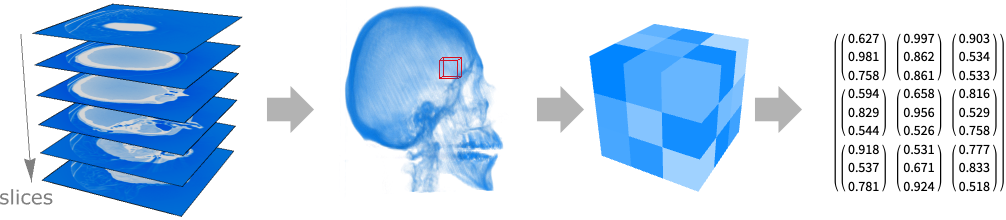
- Image3D, also known as a volumetric image or a 3D volume, is a regular 3-dimensional grid of voxels, typically generated from a sequence of 2D images acquired by MRI or CT scanners.
- Image3D displays in a notebook as a rendered volume.
- In Image3D[data], by default the first three dimensions correspond to slices, rows, and columns of the 3D image, respectively. Slices are enumerated from top to bottom, rows from back to front, and columns from left to right.
- An Image3D object with ImageDimensions of {width,depth,height} is placed in the 3D space so that in a position {x,y,z} given in the standard image coordinate system, x runs from 0 to width, y runs from 0 to depth, and z runs from 0 to height. The position {0,0,0} corresponds to the bottom-left front corner.
- Image3D[{image1,image2,…,imageheight}] will have ImageDimensions of {width,depth,height}, where ImageDimensions[imagej] is {width,depth} for each of the 2D images, stacked from top to bottom. »
- In Image3D[data], each element of data can specify values for any number of channels.
- Elements of data can be one of the following:
-
v rendered as gray level from 0 (black) to 1 (white) {r,g,b} rendered as red, green, blue values from 0 to 1 {c1,c2,c3,…} channel values rendered by equally spaced hues color specific color - The input array data can be given as a List, NumericArray, SparseArray, etc.
- Image3D[data] by default allows values in any range, but displays only values between 0 and 1.
- Image3D[data,"type"] can be used to create a 3D image of a specified data type. Values in data are coerced to the specified type by rounding or clipping. By default, "Real32" is assumed.
- Possible settings for "type" include:
-
"Bit" integer 0 or 1 "Byte" integer 0 through 255 "Bit16" integer 0 through 65535 "Real32" single-precision real (32-bit) "Real64" double-precision real (64-bit) - Image3D[image,"type"] can be used to convert between types.
- Image3D[{i1,i2,…}] converts all images to the largest type among the input images.
- Image3D[{i1,i2,…},"type"] converts all images to the specified type.
- Image3D takes the following options:
-
ColorSpace Automatic what color space to assume for the data ImageResolution Automatic the resolution to use when exporting ImageSize Automatic display size of the volume Interleaving True whether to assume channels are interleaved Magnification Automatic how to magnify the displayed volume MetaInformation {} meta-information associated with the volume - Image3D also accepts the following Raster3D options:
-
ClipRange None cut away a rectangular region from the view ColorFunction Automatic how to translate data values into colors Method Automatic options for rendering the color cells - Image3D also accepts the following Graphics3D options:
-
AlignmentPoint Center the default point in the graphic to align with Axes False whether to draw axes AxesEdge Automatic on which edges to put axes AxesLabel None axes labels AxesOrigin Automatic where axes should cross AxesStyle {} graphics directives to specify the style for axes Background None background color for the Image3D BaselinePosition Automatic how to align with a surrounding text baseline Boxed False whether to draw the bounding box BoxRatios Automatic bounding 3D box ratios BoxStyle {} style specifications for the box ClipPlanes None clipping planes ClipPlanesStyle Automatic style specifications for clipping planes RotationAction "Fit" how to render after interactive rotation SphericalRegion False whether to make the circumscribing sphere fit in the final display area ViewAngle Automatic angle of the field of view ViewCenter Automatic point to display at the center ViewMatrix Automatic explicit transformation matrix ViewPoint {1.3,-2.4,2.} viewing position ViewRange All range of viewing distances to include ViewVector Automatic position and direction of a simulated camera ViewVertical {0,0,1} direction to make vertical - With the setting BoxRatios->{sx,sy,sz}, the Image3D is rendered in a box of the given side-length ratios.
- With ColorFunction->cf, color and opacity of each voxel can be specified. An interactive color function editor is available via the Image3D contextual (right-click) menu.
- ColorSpace->"space" specifies that values in the data should be interpreted as coordinates in a particular color space. ColorSpace->Automatic treats values as arbitrary channel intensities.
- Bit images always have ColorSpace set to Automatic.
- With the setting ColorSpace->"RGB", data given as {r,g,b,a} is taken to include an opacity value a.
- With the default setting Interleaving->True, Image3D[data,…] takes data to be a 3D array of lists {c1,c2,…} of channel values.
- With Interleaving->False, Image3D[data,…] takes data to be a list {v1,v2, …} of 3D arrays of values for each channel.
- Explicit settings for ImageSize determine the absolute size at which Image3D should be displayed.
- With ImageSize->Automatic, the size at which the 3D image should be displayed is determined by the setting for Magnification.
- A setting Magnification->m specifies that each displayed voxel in Image3D is magnified by a factor of m.
- With Magnification->Automatic, smaller 3D images are typically displayed at larger magnifications, and large 3D images are reduced to fit within available notebook or other display areas.
- Image3D[Image3D[…],opts] effectively resets the options for an Image3D.
- ImageDimensions, ImageChannels, and ImageType find information on the structure of a 3D image.
- Image3D[Raster3D[…]] converts a Raster3D object to a 3D image.
- Arithmetic and statistical operations such as Log, Plus and Mean can work directly with images.
- Information for Image3D may include the following properties:
-
"Channels" number of image channels "ColorSpace" the color space to assume for data "DataType" underlying data type "ImageDimensions" pixel dimensions "Interleaving" whether data is stored interleaved "Transparency" whether the image has transparency (alpha) channel
Background & Context
- Image3D provides unified symbolic representation for a variety of digital 3D image formats. In particular, an Image3D object contains a three-dimensional array of values (or lists of values) that represent a 3D raster image. 3D images are commonly encountered in medical imaging, geographic mapping, and scientific visualization.
- The data inside a 3D image may take on a variety of values depending on if the image is binary, grayscale, RGB, etc. The first three dimensions of an Image3D correspond to slices, rows, and columns, respectively. Slices are enumerated from top to bottom, rows from back to front, and columns from left to right.
- Image3D objects are visualized using a set of techniques collectively known as volume rendering that display a projection of discretely sampled 3D data values. Given an Image3D containing a regular volumetric grid, each volume element is known as a voxel and is represented by a single value (or list of values).
- Upon output, a 3D image formats as a picture of a projection of the image (not as a 3D array of values). Image3D objects may be exported to a variety of standard image formats using Export, and images in a number of formats may be imported as Image3D objects using Import. Slices of a 3D image may be stored in separate images file formats or different frames of a file format that support multiple frames (e.g. TIFF, DICOM, etc.).
- Applying Image3D to a list of 2D images creates a 3D image. The function Show can be used to combine 3D vector graphics with Image3D objects. A Raster3D graphics expression may be converted to a 3D image by applying the function Image3D to it.
- The array of pixel values in a 3D image may be obtained using ImageData. ImageDimensions gives the pixel dimensions of the raster associated with an Image3D object. ImageType gives a label representing the number type used internally to represent each pixel of a 3D image. ImageChannels gives the number of channels the 3D image contains.
- Options useful for Image3D objects include ColorSpace, Interleaving, ImageSize, and Magnification. Other options useful for 3D rendering include BoxRatios, ColorFunction, ColorFunctionScaling, and Background.
Examples
open all close allBasic Examples (4)
Create a real-value 3D image from numbers in the range 0 to 1:
Image3D[RandomReal[1, {5, 10, 10}]]Create a three-channel 3D image:
Image3D[RandomReal[1, {5, 10, 10, 3}]]Create a 3D image from a stack of images:
Image3D[{[image], [image], [image]}]Import a list of images as a 3D volume:
Import["ExampleData/CTengine.tiff", "Image3D"]Scope (4)
Creating a 3D Image (2)
RegionImage[KnotData["Trefoil", "Region"]]Create a 3D volume from an elevation map:
everest = [image];
data = ImageData[ImageReflect[everest, Top -> Bottom]];
data3D = Map[# Table[UnitStep[50 # - k], {k, 50}]&, data, {-1}];Image3D[Reverse@Transpose[data3D, {3, 2, 1}], ColorFunction -> "DarkTerrainOpacity"]Arithmetic & Statistical Operations (2)
Multiply two volumes to highlight a region of interest:
[image]×[image]Compute statistical measures on images:
i = Import["ExampleData/CTengine.tiff", "Image3D"]stats = {Total, Min, Max, Mean, Median, StandardDeviation};Dataset[AssociationThread[Text /@ stats -> Through[stats[i]]]]Options (3)
Background (1)
BoxRatios (1)
ColorFunction (1)
Default rendering of a grayscale volume:
engine = ExampleData[{"TestImage3D", "CTengine"}]A gray color function with linear opacity is commonly used for rendering of grayscale volumes:
Image3D[engine, ColorFunction -> "GrayLevelOpacity"]Use a gray color function with constant opacity:
Image3D[engine, ColorFunction -> (GrayLevel[#, .005]&)]Use one of the predefined color functions:
Labeled[Image3D[engine, ColorFunction -> #], #]& /@ {"XRay", "HighRange", "LowRange", "WhiteBlackOpacity", "SunsetColorsOpacity", "RainbowOpacity"}Use a customized color function:
Image3D[engine, ColorFunction -> (Append[Blend[{LightBlue, Blue, Orange}, #], #]&)]With a fully opaque color function, only the box surface is visible:
Image3D[engine, ColorFunction -> GrayLevel]Applications (1)
Display a motion pattern by blurring an animation in the temporal dimension:
anim = {[image], [image], [image], [image], [image], [image], [image], [image], [image], [image], [image], [image], [image], [image], [image]};Convert the animation frames into an Image3D object:
image3D = Image3D[anim, ColorFunction -> "GrayLevelOpacity", BoxRatios -> {1, 1, 1 / 4}]Blur along the slices to get a temporal interpolation:
Image3DSlices[Blur[image3D, {3, 0, 0}], {10}][[1]]Properties & Relations (2)
Use Show to combine 3D vector graphics and Image3D objects:
i = [image];
{w, d, h} = ImageDimensions[i];
s = 20;
Show[i, Graphics3D[{RGBColor[0, 0, 1, 0.2], Polygon[{{0, 0, s}, {0, d, s}, {w, d, s}, {w, 0, s}}]}]]
ArrayPlot3D displays the data as discrete elements:
ca = CellularAutomaton[
<|"GrowthCases" -> {1}, "Dimension" -> 3, "Neighborhood" -> 7|>, {{{{1}}}, 0}, {{{5}}}];{Image3D[ca], ArrayPlot3D[ca]}Possible Issues (2)
Placing a grayscale image into an Image3D object will change the overall visualization:
i = [image];Image3D[{i}]Use GrayLevel color function to see similar gray values:
Image3D[{i}, ColorFunction -> GrayLevel]White background is not suitable when rendering binary images with a gray color function:
Image3D[DiskMatrix[{10, 10, 10}], "Bit", ColorFunction -> "GrayLevelOpacity"]Image3D[DiskMatrix[{10, 10, 10}], "Bit", ColorFunction -> "GrayLevelOpacity", Background -> Black]Adding a box can also help make the 3D object more visible:
Image3D[DiskMatrix[{10, 10, 10}], "Bit", ColorFunction -> "GrayLevelOpacity", Background -> Black, Boxed -> True]Neat Examples (3)
Evolution of a 3D cellular automaton:
Image3D[#, ImageSize -> 150] &  /@
 CellularAutomaton[{14, {2, 1}, {1, 1, 1}}, {{{{1}}}, 0}, 8]
Evolution of a Game of Life cellular automaton:
Image3D[CellularAutomaton[{224, {2, {{2, 2, 2}, {2, 1, 2}, {2, 2, 2}}}, {1, 1}}, {SeedRandom[1];RandomInteger[1, {15, 15}], 0}, 50]]Blurred evolution of a discrete 2D cellular automaton, reminiscent of diffusion processes in the continuous domain:
Blur[Image3D[CellularAutomaton[{52212111133224, {3, {{2, 2, 2}, {2, 1, 2}, {2, 2, 2}}}, {1, 1}}, {SeedRandom[1];RandomInteger[1, {15, 15}], 0}, 150], ImageSize -> 100], 3]
 An Elementary Introduction to the Wolfram Language
 An Elementary Introduction to the Wolfram Language
Text
Wolfram Research (2012), Image3D, Wolfram Language function, https://reference.wolfram.com/language/ref/Image3D.html (updated 2019).
CMS
Wolfram Language. 2012. "Image3D." Wolfram Language & System Documentation Center. Wolfram Research. Last Modified 2019. https://reference.wolfram.com/language/ref/Image3D.html.
APA
Wolfram Language. (2012). Image3D. Wolfram Language & System Documentation Center. Retrieved from https://reference.wolfram.com/language/ref/Image3D.html