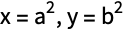
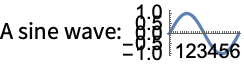
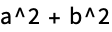
Output forms provide textual representations of Wolfram Language expressions. In some cases these textual representations are also suitable for input to the Wolfram Language. But in other cases they are intended just to be looked at, or to be exported to other programs, rather than to be used as input to the Wolfram Language.
TraditionalForm uses a large collection of ad hoc rules to produce an approximation to traditional mathematical notation:
Output forms not normally used for Wolfram Language input.
"Low-Level Input and Output Rules" discusses how you can create your own output forms. You should realize however that in communicating with external programs it is often better to use the Wolfram Symbolic Transfer Protocol (WSTP) to send expressions directly than to generate a textual representation for these expressions.
■ Exchange textual representations of expressions.
■ Exchange expressions directly via WSTP.
Two ways to communicate between the Wolfram System and other programs.
When you type something like x^2 what the Wolfram Language at first sees is just the string of characters x, ^, 2. But with the usual way that the Wolfram Language is set up, it immediately knows to convert this string of characters into the expression Power[x,2].
Then, after whatever processing is possible has been done, the Wolfram Language takes the expression Power[x,2] and converts it into some kind of textual representation for output.
The Wolfram Language reads the string of characters x, ^, 2 and converts it to the expression Power[x,2]:
This shows the expression in Fortran form:
FortranForm is just a "wrapper": the value of Out[2] is still the expression Power[x,2]:
It is important to understand that in a typical Wolfram Language session In[n] and Out[n] record only the underlying expressions that are processed, not the textual representations that happen to be used for their input or output.
If you explicitly request a particular kind of output, say by using TraditionalForm[expr], then what you get will be labeled with Out[n]//TraditionalForm. This indicates that what you are seeing is expr//TraditionalForm, even though the value of Out[n] itself is just expr.
The Wolfram Language also allows you to specify globally that you want output to be displayed in a particular form. And if you do this, then the form will no longer be indicated explicitly in the label for each line. But it is still the case that In[n] and Out[n] will record only underlying expressions, not the textual representations used for their input and output.
This sets t to be an expression with FortranForm explicitly wrapped around it:
The result on the previous line is just the expression:
Wherever t appears, it is formatted in FortranForm:
The Representation of Textual Forms
Like everything else in the Wolfram System, the textual forms of expressions can themselves be represented as expressions. Textual forms that consist of one‐dimensional sequences of characters can be represented directly as ordinary Wolfram System strings. Textual forms that involve subscripts, superscripts, and other two‐dimensional constructs, however, can be represented by nested collections of two‐dimensional boxes.
Here is the box structure corresponding to the expression in StandardForm:
Here is the InputForm of the box structure. In this form the structure is effectively represented by an ordinary string:
If you use the notebook front end for the Wolfram System, then you can see the expression that corresponds to the textual form of each cell by using the Show Expression menu item.
Here is a cell containing an expression in StandardForm.
Here is the underlying representation of that expression in terms of boxes, displayed using the Show Expression menu item.
create an expression by interpreting strings or boxes
Converting from strings or boxes to expressions.
This takes a string and interprets it as an expression:
Here is the box structure corresponding to the textual form of an expression in StandardForm:
ToExpression interprets this box structure and yields the original expression again:
In any Wolfram System session, the Wolfram System is always effectively using ToExpression to interpret the textual form of your input as an actual expression to evaluate.
If you use the notebook front end for the Wolfram System, then the interpretation only takes place when the contents of a cell are sent to the kernel, say for evaluation. This means that within a notebook there is no need for the textual forms you set up to correspond to meaningful Wolfram System expressions; this is only necessary if you want to send these forms to the kernel.
And here is the expression entered in StandardForm:
Built into the Wolfram System is a collection of standard rules for use by ToExpression in converting textual forms to expressions.
These rules define the grammar of the Wolfram System. They state, for example, that x+y should be interpreted as Plus[x,y], and that xy should be interpreted as Power[x,y]. If the input you give is in FullForm, then the rules for interpretation are very straightforward: every expression consists just of a head followed by a sequence of elements enclosed in brackets. The rules for InputForm are slightly more sophisticated: they allow operators such as +, =, and ->, and understand the meaning of expressions where these operators appear between operands. StandardForm involves still more sophisticated rules, which allow operators and operands to be arranged not just in a one‐dimensional sequence, but in a full two‐dimensional structure.
If you use a notebook front end for the Wolfram System, then you will typically want to use all the features of StandardForm. If you use a text‐based interface, however, then you will typically be able to use only features of InputForm.
When you use StandardForm in a Wolfram System notebook, you can enter directly two‐dimensional forms such as x2 or annotated graphics. But InputForm allows only one‐dimensional forms.
If you copy a StandardForm expression whose interpretation can be determined without evaluation, then the expression will be pasted into external applications as InputForm. Otherwise, the text is copied in a linear form that precisely represents the two-dimensional structure using ∖!∖(…∖). When you paste this linear form back into a Wolfram System notebook, it will automatically "snap" into two‐dimensional form.
attempt to create an expression assuming that input is given in the specified textual form
Importing from other textual forms.
StandardForm and its subsets FullForm and InputForm provide precise ways to represent any Wolfram System expression in textual form. And given such a textual form, it is always possible to convert it unambiguously to the expression it represents.
TraditionalForm is an example of a textual form intended primarily for output. It is possible to take any Wolfram System expression and display it in TraditionalForm. But TraditionalForm does not have the precision of StandardForm, and as a result there is in general no unambiguous way to go back from a TraditionalForm representation and get the expression it represents.
This takes a string and interprets it as TraditionalForm input:
In StandardForm the same string would mean a product of terms:
When TraditionalForm output is generated as the result of a computation, the actual collection of boxes that represent the output typically contains special Interpretation objects or other specially tagged forms that specify how an expression can be reconstructed from the TraditionalForm output.
The same is true of TraditionalForm that is obtained by explicit conversion from StandardForm. But if you edit TraditionalForm extensively, or enter it from scratch, then the Wolfram System will have to try to interpret it without the benefit of any additional embedded information.
Short and Shallow Output
When you generate a very large output expression in the Wolfram Language, you often do not want to see the whole expression at once. Rather, you would first like to get an idea of the general structure of the expression, and then, perhaps, go in and look at particular parts in more detail.
The functions Short and Shallow allow you to see "outlines" of large Wolfram Language expressions.
show the parts of expr to the specified depth and length
Showing outlines of expressions.
This generates a long expression. If the whole expression were printed out here, it would go on for 23 lines:
This gives a one‐line "outline" of t. The <<>> indicates the number of terms omitted:
When the Wolfram Language generates output in a textual format such as OutputForm, it first effectively writes the output in one long row. Then it looks at the width of text you have asked for, and it chops the row of output into a sequence of separate "lines". Each of the "lines" may of course contain superscripts and built‐up fractions, and so may take up more than one actual line on your output device. When you specify a particular number of lines in Short, the Wolfram Language takes this to be the number of "logical lines" that you want, not the number of actual physical lines on your particular output device.
Here is a four‐line version of t. More terms are shown in this case:
Short works in other formats too, such as StandardForm and TraditionalForm. When using these formats, linewrapping is determined by the notebook interface when displaying the output rather than by the kernel when creating the output. As a result, setting the number of lines generated by Short can only approximate the actual number of lines displayed onscreen.
You can use Short with other output forms, such as InputForm:
Short works by removing a sequence of parts from an expression until the output form of the result fits on the number of lines you specify. Sometimes, however, you may find it better to specify not how many final output lines you want, but which parts of the expression to drop. Shallow[expr,{depth,length}] includes only length arguments to any function, and drops all subexpressions that are below the specified depth.
This includes only 10 arguments to each function, but allows any depth:
Shallow is particularly useful when you want to drop parts in a uniform way throughout a highly nested expression, such as a large list structure returned by Trace.
Here is the recursive definition of the Fibonacci function:
This generates a large list structure:
You can use Shallow to see an outline of the structure:
Short gives you a less uniform outline, which can be more difficult to understand:
When generated outputs in the notebook interface are exceedingly large, the Wolfram Language automatically applies Short to the output. This user interface enhancement prevents the Wolfram Language from spending a lot of time generating and formatting the printed output for an evaluation which probably generated output you did not expect.
Typically, an assignment like this would have a semicolon at the end:
The buttons in the user interface allow you to control how much of the output you see. The size threshold at which this behavior takes effect is determined by the byte count of the output expression. That byte count can be set in the Preferences dialog of the notebook interface, which is opened by the Set Size Limit button.
String‐Oriented Output Formats
"text"
a string containing arbitrary text
Text strings.
The quotes are not included in standard Wolfram System output form:
In input form, the quotes are included:
You can put any kind of text into a Wolfram Language string. This includes non‐English characters, as well as newlines and other control information. "Strings and Characters" discusses in more detail how strings work.
output a string in which each `i` is replaced by the corresponding xi
Using format strings.
In many situations, you may want to generate output using a string as a "template", but "splicing" in various Wolfram Language expressions. You can do this using StringForm.
This generates output with each successive `` replaced by an expression:
You can use numbers to pick out expressions in any order:
The string in StringForm acts somewhat like a "format directive" in the formatted output statements of languages such as C and Fortran. You can determine how the expressions in StringForm will be formatted by wrapping them with standard output format functions.
You can specify how the expressions in StringForm are formatted using standard output format functions:
You should realize that StringForm is only an output format. It does not evaluate in any way. You can use the function ToString to create an ordinary string from a StringForm object.
StringForm generates formatted output in standard Wolfram System output form:
In input form, you can see the actual StringForm object:
This creates an ordinary string from the StringForm object:
StringForm allows you to specify a "template string", then fill in various expressions. Sometimes all you want to do is to concatenate together the output forms for a sequence of expressions. You can do this using Row.
give an output which displays as e, but evaluates as expr
Output of unevaluated expressions.
Using text strings and functions like Row, you can generate pieces of output that do not necessarily correspond to valid Wolfram Language expressions. Sometimes, however, you want to generate output that corresponds to a valid Wolfram Language expression, but only so long as the expression is not evaluated. The function Defer maintains its argument unevaluated, but allows it to be formatted in the standard Wolfram System output form.
The Defer prevents the actual assignment from being done:
When the output of Defer is evaluated again, which might happen by modifying the output or by using copy and paste, it will evaluate normally.
The following output was copied from the previous output cell into an input cell:
It is also possible to produce output whose appearance has no direct correlation to how it evaluates by using Interpretation. This method is effectively used by the Wolfram System when formatting some kinds of outputs where the most readable form does not correspond well to the internal representation of the object. For example, Series always generates an Interpretation object in its default output.
Although this output displays as y, it will evaluate as x:
Copying and pasting the previous output will reference the value earlier assigned to x:
All the options in the table except the last one apply to both integers and approximate real numbers.
All the options can be used in any of the functions NumberForm, ScientificForm, EngineeringForm, and AccountingForm. In fact, you can in principle reproduce the behavior of any one of these functions simply by giving appropriate option settings in one of the others. The default option settings listed in the table are those for NumberForm.
Setting DigitBlock->n breaks digits into blocks of length :
You can specify any string to use as a separator between blocks of digits:
This gives an explicit plus sign for positive numbers, and uses | in place of a decimal point:
When the Wolfram Language prints an approximate real number, it has to choose whether scientific notation should be used, and if so, how many digits should appear to the left of the decimal point. What the Wolfram Language does is first to find out what the exponent would be if scientific notation were used, and one digit were given to the left of the decimal point. Then it takes this exponent, and applies any function given as the setting for the option ExponentFunction. This function should return the actual exponent to be used, or Null if scientific notation should not be used.
The default is to use scientific notation for all numbers with exponents outside the range to :
This uses scientific notation only for numbers with exponents of 10 or more:
This forces all exponents to be multiples of 3:
Having determined what the mantissa and exponent for a number should be, the final step is to assemble these into the object to print. The option NumberFormat allows you to give an arbitrary function which specifies the print form for the number. The function takes as arguments three strings: the mantissa, the base, and the exponent for the number. If there is no exponent, it is given as "".
This gives the exponents in Fortran‐like "e" format:
You can use FortranForm to print individual numbers in Fortran format:
Whenever you print a collection of numbers in a column or some other definite arrangement, you typically need to be able to align the numbers in a definite way. Usually you want all the numbers to be set up so that the digit corresponding to a particular power of 10 always appears at the same position within the region used to print a number.
You can change the positions of digits in the printed form of a number by "padding" it in various ways. You can pad on the right, typically adding zeros somewhere after the decimal. Or you can pad on the left, typically inserting spaces in place of leading zeros.
This pads with spaces to make room for up to 7 digits in each integer:
This creates a column of integers:
This prints each number with room for a total of 7 digits, and with 4 digits to the right of the decimal point:
In NumberForm, the 7 specifies the maximum precision, but does not make the Wolfram Language pad with spaces:
If you set the option SignPadding->True, the Wolfram Language will insert leading spaces after the sign:
Only the mantissa portion is aligned when scientific notation is used:
With the default setting for the option NumberPadding, both NumberForm and PaddedForm insert trailing zeros when they pad a number on the right. You can use spaces for padding on both the left and the right by setting NumberPadding->{" "," "}.
This uses spaces instead of zeros for padding on the right:
Grid and Column are wrappers which do not evaluate, but typeset their contents into appropriate forms. They are typesetting constructs and require a front end to render correctly.
Grid takes a rectangular matrix as its first argument. Individual elements of the Grid can span across multiple rows, columns, or a rectangular subgrid by specifying the areas to be spanned. The spanning element is always specified in the upper left-hand corner of the spanning area, and the remaining area is filled in with the appropriate spanning symbols.
This shows a spanning row, where the spanning portion is filled in using SpanFromLeft:
Similarly, a column can be spanned using SpanFromAbove:
When specifying a rectangular spanning area, SpanFromBoth is used in every element which is both below and to the right of the spanning element:
Some options which affect the columns and rows of a Grid.
The options for Grid which affect individual rows and columns all share a similar syntax. The options can be specified as {x,y} , where x applies to all of the columns and y applies to all of the rows; x and y can be single values, or they can be a list of values which represent each column or row in turn.
With no Alignment setting, elements align to the center horizontally and on the baseline vertically:
This changes the horizontal alignment of columns to be on the right:
This sets the horizontal alignment of each column separately:
When Background or ItemStyle options specify distinct settings for rows and columns, the front end will attempt to combine the settings where the rows and columns overlap.
This shows how the green row combines with columns of various colors:
This example shows how ItemStyle can combine styles specified in both rows and columns:
To repeat an individual row or column specification over multiple rows or columns, wrap it in a list. The repeated element will be used as often as necessary. If you wrap multiple elements in a list, the entire list will be repeated in sequence.
The red divider is repeated:
Here, red and black dividers are repeated in sequence:
The ItemSize and Spacings options take their horizontal measurements in ems and their vertical measurements in line heights based upon the current font. Both options also can take a Scaled coordinate, where the coordinate specifies the fraction of the total cell width or window height. The ItemSize option also allows you to request as much space as is required to fit all of the elements in the given row or column by using the keyword Full.
This makes all of the items 3 ems wide and 1 line height tall:
The same example in a new font size will show at a different size:
The buttons in this example will always be sized to be a quarter of the width of the cell:
The first and last settings for Spacings specify one-half of the top and bottom space:
Many of the settings which can be applied to entire rows and columns can also be applied individually to the elements of a Grid or Column by using the Item wrapper. Item allows you to change these settings at the granularity of a single item. Settings which are specified at the Item level always override settings from the Grid or Column as a whole.
This sets item-specific options for the lower left-hand element:
Most of the options to Item take the same settings as their Grid counterparts. However, the Alignment and ItemSize options, which allow complex row and column settings in Grid, take only the {horizontal,vertical} setting in Item.
This specifies a larger item area and how the text should be aligned within it:
The width value of the ItemSize option is used to determine line breaking:
The ItemSize here specifies a minimum height of 2 line heights, but the item is larger:
Formatting Higher-Dimensional Data
Column supports one-dimensional data, and Grid supports two-dimensional data. To print arrays with an arbitrary number of dimensions, you can use TableForm.
Here is the format for a 2×2 array of elements a[i,j]:
Here is a 2×2×2 array:
And here is a 2×2×2×2 array:
In general, when you print an ‐dimensional table, successive dimensions are alternately given as columns and rows. By setting the option TableDirections->{dir1,dir2,…}, where the diri are Column or Row, you can specify explicitly which way each dimension should be given. By default, the option is effectively set to {Column,Row,Column,Row,…}.
The option TableDirections allows you to specify explicitly how each dimension in a multidimensional table should be given:
TableForm can handle arbitrary "ragged" arrays. It leaves blanks wherever there are no elements supplied.
With the option TableAlignments, you can specify how each entry in the table should be aligned with its row or column. For columns, you can specify Left, Center, or Right. For rows, you can specify Bottom, Center, or Top. If you set TableAlignments->Center, all entries will be centered both horizontally and vertically. TableAlignments->Automatic uses the default choice of alignments.
Entries in columns are by default aligned on the left:
This centers all entries:
You can use the option TableSpacing to specify how much horizontal space there should be between successive columns, or how much vertical space there should be between successive rows. A setting of 0 specifies that successive objects should abut.
This leaves 6 spaces between the entries in each row, and no space between successive rows:
This shows the word text in font sizes from 10 to 20 points:
This shows the text in the Helvetica font:
Style allows an abbreviated form of some options. For options such as FontSize, FontWeight, FontSlant, and FontColor, you can include merely the setting of the option.
If you use the notebook front end for the Wolfram System, then each piece of output that is generated will by default be in the style of the cell in which the output appears. By using Style[expr,"style"], however, you can tell the Wolfram System to output a particular expression in a different style.
Here is an expression output in the style normally used for section headings:
"Cells as Wolfram Language Expressions" describes in more detail how cell styles work. By using Style[expr,"style",options] you can generate output that is in a particular style, but with certain options modified.
Representing Textual Forms by Boxes
All textual and graphical forms in the Wolfram System are ultimately represented in terms of nested collections of boxes. Typically the elements of these boxes correspond to objects that are to be placed at definite relative positions in two dimensions.
Here are the boxes corresponding to the expression a+b:
DisplayForm shows how these boxes would be displayed:
StyleBox takes the same options as Style. The difference is that Style is a high-level function that applies to an expression to determine how it will be displayed, while StyleBox is the corresponding low-level function in the underlying box structure.
This shows the string "name" in italics:
This shows "name" in the style used for section headings in your current notebook:
This uses section heading style, but with characters shown in gray:
If you use a notebook front end for the Wolfram System, then you will be able to change the style and appearance of what you see on the screen directly by using menu items. Internally, however, these changes will still be recorded by the insertion of appropriate StyleBox objects.
indicate an error and do not attempt further interpretation of boxes
Controlling the interpretation of boxes.
This prints as x with a superscript:
It is normally interpreted as a power:
This again prints as x with a superscript:
But now it is interpreted as vec[x,2], following the specification given in the InterpretationBox:
If you edit the boxes given in an InterpretationBox, then there is no guarantee that the interpretation specified by the interpretation box will still be correct. As a result, the Wolfram Language provides various options that allow you to control the selection and editing of InterpretationBox objects.
TagBox objects are used to store information that will not be displayed but which can nevertheless be used by the rules that interpret boxes. Typically the tag in TagBox[boxes,tag] is a symbol which gives the head of the expression corresponding to boxes. If you edit only the arguments of this expression then there is a good chance that the interpretation specified by the TagBox will still be appropriate. As a result, Editable->True is effectively the default setting for a TagBox.
The rules that the Wolfram System uses for interpreting boxes are in general set up to ignore details of formatting, such as those defined by StyleBox objects. Thus, unless StripWrapperBoxes->False, a red x, for example, will normally not be distinguished from an ordinary black x.
A red x is usually treated as identical to an ordinary one:
String Representation of Boxes
The Wolfram Language provides a compact way of representing boxes in terms of strings. This is particularly convenient when you want to import or export specifications of boxes as ordinary text.
This corresponds to the power that the SuperscriptBox represents:
The expression generated here is a power:
∖(input∖)
raw boxes
∖!∖(input∖)
the meaning of the boxes
Distinguishing raw boxes from the expressions they represent.
If you copy the contents of a StandardForm cell into another program, such as a text editor, the Wolfram System will generate a ∖!∖(…∖) form where necessary. This is done so that if you subsequently paste the form back into the Wolfram System, the original contents of the StandardForm cell will automatically be re-created. Without the ∖!, only the raw boxes corresponding to these contents would be obtained.
With default settings for options, ∖!∖(…∖) forms pasted into Wolfram System notebooks are automatically displayed in two‐dimensional form.
"∖(input∖)"
a raw character string
"∖!∖(input∖)"
a string containing boxes
Embedding two‐dimensional box structures in strings.
The Wolfram Language will usually treat a ∖(…∖) form that appears within a string just like any other sequence of characters. But by inserting a ∖! you can tell the Wolfram Language instead to treat this form like the boxes it represents. In this way you can therefore embed box structures within ordinary character strings.
The Wolfram Language treats this as an ordinary character string:
The \! tells the Wolfram Language that this string contains boxes:
The Wolfram Language requires that any input forms you give for boxes be enclosed within ∖( and ∖). But within these outermost ∖( and ∖) you can use additional ∖( and ∖) to specify grouping.
Here ordinary parentheses are used to indicate grouping:
Without the parentheses, the grouping would be different:
∖( and ∖) specify grouping, but are not displayed as explicit parentheses:
The inner ∖( and ∖) lead to the construction of a RowBox:
When you type aa+bb as input to the Wolfram System, the first thing that happens is that aa, +, and bb are recognized as being separate "tokens". The same separation into tokens is done when boxes are constructed from input enclosed in ∖(…∖). However, inside the boxes each token is given as a string, rather than in its raw form.
The RowBox has aa, +, and bb broken into separate strings:
The same box structure is formed even when the string given does not correspond to a complete Wolfram Language expression:
Within ∖(…∖) sequences, you can set up certain kinds of boxes by using backslash notations such as ∖^ and ∖@. But for other kinds of boxes, you need to give ordinary Wolfram System input, prefaced by∖*.
∖* in effect acts like an escape: it allows you to enter ordinary Wolfram Language syntax even within a ∖(…∖) sequence. Note that the input you give after a ∖* can itself in turn contain ∖(…∖) sequences.
You can alternate nested ∖* and ∖(…∖). Explicit quotes are needed outside of ∖(…∖):
The backslash backquote sequence tells the Wolfram Language to interpret this in TraditionalForm:
When you copy the contents of a cell from a notebook into a program such as a text editor, no explicit backslash backquote sequence is usually included. But if you expect to paste what you get back into a cell of a different type from the one it came from, then you will typically need to include a backslash backquote sequence in order to ensure that everything is interpreted correctly.
Converting between Strings, Boxes, and Expressions
In generating data for files and external programs, it is sometimes necessary to produce two‐dimensional forms which use only ordinary keyboard characters. You can do this using OutputForm.
This produces a string which gives a two‐dimensional rendering of the expression, using only ordinary keyboard characters:
The string consists of two lines, separated by an explicit ∖n newline:
The string looks right only in a monospaced font:
If you operate only with one‐dimensional structures, you can effectively use ToString to do string manipulation with formatting functions.
find out how long a sequence of characters starting at the beginning of a string is syntactically correct
Testing correctness of strings as input.
ToExpression will attempt to interpret any string as Wolfram Language input. But if you give it a string that does not correspond to syntactically correct input, then it will print a message, and return $Failed.
This is not syntactically correct input, so ToExpression does not convert it to an expression:
ToExpression requires that the string correspond to a complete Wolfram Language expression:
You can use the function SyntaxQ to test whether a particular string corresponds to syntactically correct Wolfram Language input. If SyntaxQ returns False, you can find out where the error occurred using SyntaxLength. SyntaxLength returns the number of characters which were successfully processed before a syntax error was detected.
SyntaxQ shows that this string does not correspond to syntactically correct Wolfram Language input:
SyntaxLength reveals that an error was detected after the third character in the string:
Here SyntaxLength returns a value greater than the length of the string, indicating that the input was correct so far as it went, but needs to be continued:
The Syntax of the Wolfram Language
The Wolfram Language uses various syntactic rules to interpret input that you give, and to convert strings and boxes into expressions. The version of these rules that is used for StandardForm and InputForm in effect defines the basic Wolfram Language. The rules used for other forms, such as TraditionalForm, follow the same overall principles, but differ in many details.
a
,
xyz
,
αβγ
symbols
"some text"
,
"α+β"
strings
123.456
,
3*^45
numbers
+
,
->
,
≠
operators
(*comment*)
input to be ignored
Types of tokens in the Wolfram Language.
When you give text as input to the Wolfram Language, the first thing that the Wolfram System does is to break the text into a sequence of tokens, with each token representing a separate syntactic unit.
Thus, for example, if you give the input xx+yy-zzzz, the Wolfram System will break this into the sequence of tokens xx, +, yy, - and zzzz. Here xx, yy, and zzzz are tokens that correspond to symbols, while + and - are operators.
Operators are ultimately what determine the structure of the expression formed from a particular piece of input. The Wolfram Language involves several general classes of operators, distinguished by the different positions in which they appear with respect to their operands.
Examples of classes of operators in the Wolfram Language.
Operators typically work by picking up operands from definite positions around them. But when a string contains more than one operator, the result can in general depend on which operator picks up its operands first.
Thus, for example, a*b+c could potentially be interpreted either as (a*b)+c or as a*(b+c) depending on whether * or + picks up its operands first.
To avoid such ambiguities, the Wolfram Language assigns a precedence to each operator that can appear. Operators with higher precedence are then taken to pick up their operands first.
Thus, for example, the multiplication operator * is assigned higher precedence than +, so that it picks up its operands first, and a*b+c is interpreted as (a*b)+c rather than a*(b+c).
The * operator has higher precedence than +, so in both cases Times is the innermost function:
The // operator has rather low precedence:
The @ operator has high precedence:
Whatever the precedence of the operators you are using, you can always specify the structure of the expressions you want to form by explicitly inserting appropriate parentheses.
Inserting parentheses makes Plus rather than Times the innermost function:
Extensions of symbol names
x_
,
#2
,
e::s
, etc.
Function application variants
e[e]
,
e@@e
, etc.
Power‐related operators
√e
,
e^e
, etc.
Multiplication‐related operators
∇e
,
e/e
,
e⊗e
,
ee
, etc.
Addition‐related operators
e⊕e
,
e+e
,
e⋃e
, etc.
Relational operators
e==e
,
e∼e
,
e⪡e
,
e⧏e
,
e∈e
, etc.
Arrow and vector operators
e⟶e
,
e↗e
,
e⇌e
,
e⥓e
, etc.
Logic operators
∀ee
,
e&&e
,
e∨e
,
e⊢e
, etc.
Pattern and rule operators
e..
,
e|e
,
e->e
,
e/.e
, etc.
Pure function operator
e&
Assignment operators
e=e
,
e:=e
, etc.
Compound expression
e;e
Outline of operators in order of decreasing precedence.
The table in"Operator Input Forms" gives the complete ordering by precedence of all operators in the Wolfram Language. Much of this ordering, as in the case of * and +, is determined directly by standard mathematical usage. But in general the ordering is simply set up to make it less likely for explicit parentheses to have to be inserted in typical pieces of input.
Operator precedences are such that this requires no parentheses:
FullForm shows the structure of the expression that was constructed:
Note that the first and second forms here are identical; the third requires explicit parentheses:
flat
x+y+z
x+y+z
left grouping
x/y/z
(x/y)/z
right grouping
x^y^z
x^(y^z)
Types of grouping for infix operators.
Plus is a Flat function, so no grouping is necessary here:
Power is not Flat, so the operands have to be grouped in pairs:
The syntax of the Wolfram Language is defined not only for characters that you can type on a typical keyboard, but also for all the various special characters that the Wolfram Language supports.
Letters such as , , and from any alphabet are treated just like ordinary English letters, and can for example appear in the names of symbols. The same is true of letter‐like forms such as , , and .
But many other special characters are treated as operators. Thus, for example, and are infix operators, while is a prefix operator, and and are matchfix operators.
is an infix operator:
is an infix operator which means the same as *:
Some special characters form elements of fairly complicated compound operators. Thus, for example, ∫fx contains the compound operator with elements ∫ and .
The ∫ and form parts of a compound operator:
No parentheses are needed here: the "inner precedence" of ∫… is lower than Times:
Parentheses are needed here, however:
Input to the Wolfram Language can be given not only in the form of one‐dimensional strings, but also in the form of two‐dimensional boxes. The syntax of the Wolfram Language covers not only one‐dimensional constructs but also two‐dimensional ones.
This superscript is interpreted as a power:
∂xf is a two‐dimensional compound operator:
is part of a more complicated two‐dimensional compound operator:
The operator has higher precedence than +:
Operators without Built‐in Meanings
When you enter a piece of input such as 2+2, the Wolfram Language first recognizes the + as an operator and constructs the expression Plus[2,2], then uses the built‐in rules for Plus to evaluate the expression and get the result 4.
But not all operators recognized by the Wolfram Language are associated with functions that have built‐in meanings. The Wolfram Language also supports several hundred additional operators that can be used in constructing expressions, but for which no evaluation rules are initially defined.
You can use these operators as a way to build up your own notation within the Wolfram Language.
The is recognized as an infix operator, but has no predefined value:
A few Wolfram Language operators corresponding to functions without predefined values.
The Wolfram Language follows the general convention that the function associated with a particular operator should have the same name as the special character that represents that operator.
The conventional correspondence in the Wolfram Language between operator names and function names.
You should realize that even though the functions CirclePlus and CircleTimes do not have built‐in evaluation rules, the operators and do have built‐in precedences."Operator Input Forms" lists all the operators recognized by the Wolfram Language, in order of their precedence.
The operators and have definite precedences—with higher than :
Just as the Wolfram Language allows you to define how expressions should be evaluated, so also it allows you to define how expressions should be formatted for output. The basic idea is that whenever the Wolfram Language is given an expression to format for output, it first calls Format[expr] to find out whether any special rules for formatting the expression have been defined. By assigning a value to Format[expr] you can therefore tell the Wolfram Language that you want a particular kind of expression to be output in a special way.
This tells the Wolfram Language to format bin objects in a special way:
Now bin objects are output to look like binomial coefficients:
Internally, however, bin objects are still exactly the same:
give a definition only for a particular output form
Defining your own rules for formatting.
By making definitions for Format, you can tell the Wolfram Language to format a particular expression so as to look like another expression. You can also tell the Wolfram Language to run a program to determine how a particular expression should be formatted.
This specifies that the Wolfram Language should run a simple program to determine how xrep objects should be formatted:
The strings are created when each xrep is formatted:
Internally, however, the expression still contains xrep objects:
an object to be parenthesized with a precedence level n
Output forms for operators.
This prints with f represented by the "prefix operator" <>:
Here is output with the "infix operator" <>:
By default, the "infix operator" <> is assumed to have "higher precedence" than +, so no parentheses are inserted:
When you have an output form involving operators, the question arises of whether the arguments of some of them should be parenthesized. As discussed in "Special Ways to Input Expressions", this depends on the "precedence" of the operators. When you set up output forms involving operators, you can use PrecedenceForm to specify the precedence to assign to each operator. The Wolfram Language uses integers from 1 to 1000 to represent "precedence levels". The higher the precedence level for an operator, the less it needs to be parenthesized.
Here is treated as an operator with precedence 100. This precedence turns out to be low enough that parentheses are inserted:
When you make an assignment for Format[expr], you are defining the output format for expr in all standard types of Wolfram Language output. By making definitions for Format[expr,form], you can specify formats to be used in specific output forms.
Low‐level functions for converting between expressions and boxes.
MakeBoxes generates boxes without evaluating its input:
MakeExpression interprets boxes but uses HoldComplete to prevent the resulting expression from being evaluated:
Built into the Wolfram Language are a large number of rules for generating output and interpreting input. Particularly in StandardForm, these rules are carefully set up to be consistent, and to allow input and output to be used interchangeably.
It is fairly rare that you will need to modify these rules. The main reason is that the Wolfram Language already has built‐in rules for the input and output of many operators to which it does not itself assign specific meanings.
Thus, if you want to add, for example, a generalized form of addition, you can usually just use an operator like for which the Wolfram Language already has built‐in input and output rules.
This outputs using the operator:
The Wolfram Language understands on input:
In dealing with output, you can make definitions for Format[expr] to change the way that a particular expression will be formatted. You should realize, however, that as soon as you do this, there is no guarantee that the output form of your expression will be interpreted correctly if it is given as Wolfram Language input.
If you want to, the Wolfram Language allows you to redefine the basic rules that it uses for the input and output of all expressions. You can do this by making definitions for MakeBoxes and MakeExpression. You should realize, however, that unless you make such definitions with great care, you are likely to end up with inconsistent results.
This defines how gplus objects should be output in StandardForm:
gplus is now output using a subscripted :
The Wolfram Language cannot, however, interpret this as input:
This tells the Wolfram Language to interpret a subscripted as a specific piece of FullForm input:
Now the subscripted is interpreted as a gplus:
When you give definitions for MakeBoxes, you can think of this as essentially a lower‐level version of giving definitions for Format. An important difference is that MakeBoxes does not evaluate its argument, so you can define rules for formatting expressions without being concerned about how these expressions would evaluate.
In addition, while Format is automatically called again on any results obtained by applying it, the same is not true of MakeBoxes. This means that in giving definitions for MakeBoxes you explicitly have to call MakeBoxes again on any subexpressions that still need to be formatted.
■ Break input into tokens.
■ Strip spacing characters.
■ Construct boxes using built‐in operator precedences.
■ Strip StyleBox and other boxes not intended for interpretation.
The functions described in "Textual Input and Output Overview" determine how expressions should be formatted when they are printed, but they do not actually cause anything to be printed.
In the most common way of using the Wolfram Language you never in fact explicitly have to issue a command to generate output. Usually, the Wolfram Language automatically prints out the final result that it gets from processing input you gave. Sometimes, however, you may want to get the Wolfram Language to print out expressions at intermediate stages in its operation. You can do this using the function Print.
print the expri, with no spaces in between, but with a newline (line feed) at the end
Printing expressions.
Print prints its arguments, with no spaces in between, but with a newline (line feed) at the end:
This prints a table of the first five integers and their squares:
Print simply takes the arguments you give, and prints them out one after the other, with no spaces in between. In many cases, you will need to print output in a more complicated format. You can do this by giving an output form as an argument to Print.
This prints the matrix in the form of a table:
Here the output format is specified using StringForm:
The output generated by Print is usually given in the standard Wolfram Language output format. You can however explicitly specify that some other output format should be used.
This prints output in Wolfram Language input form:
You should realize that Print is only one of several mechanisms available in the Wolfram Language for generating output. Another is the function Message described in "Messages", used for generating named messages. There are also a variety of lower‐level functions described in "Streams and Low-Level Input and Output" which allow you to produce output in various formats both as part of an interactive session, and for files and external programs.
Another command which works exactly like Print, but only shows the printed output until the final evaluation is finished, is PrintTemporary.
Formatted Output
Ever since Version 3 of the Wolfram Language, there has been rich support for arbitrary mathematical typesetting and layout. Underlying all that power was a so-called box language, which allowed notebooks themselves to be Wolfram Language expressions. This approach turned out to be very powerful, and has formed the basis of many unique features in the Wolfram Language. However, despite the power of the box language, in practice it was awkward enough for users to access directly that few did.
Starting in Version 6, there is a higher-level interface to this box language which takes much of the pain out of using boxes directly, while still exposing all the same typesetting and layout power. Functions in this new layer are often referred to as box generators, but there is no need for you to be aware of the box language to use them effectively. In this tutorial, we will take a look at box generators that are relevant for displaying a wide variety of expressions, and we will show some ways in which they can be used to generate beautifully formatted output that goes beyond simple mathematical typesetting.
Styling Output
The Wolfram System front end supports all the usual style mechanisms available in word processors, for example including menus for changing font characteristics. However, it used to be very difficult to access those styling mechanisms automatically in generated output. Output continued to be almost universally plain 12 point Courier (or Times for those people using TraditionalForm). To address this, the function Style was created. Whenever you evaluate a Style expression, its output will be displayed with the given style attributes active.
You can wrap Style around any sort of expression. Here is an example that displays prime and composite numbers using different font weights and colors via Style.
There are hundreds of formatting options that you could apply with Style—see the documentation for Style for a more complete listing—but there are a handful that are by far the most common, listed here.
Note that Style can be arbitrarily nested, with the innermost one taking precedence if there is a conflict. Here we wrap Style around the entire list to apply a new font to all elements of the list.
Another common thing to want is to have a portion of the output styled like text. It can look quite strange to have text appear in a font which is intended for use by code. For that purpose, we have a function Text which ensures that its argument will always be rendered in a text font. (Those of you familiar with Wolfram Language graphics will recognize the Text function as a graphics primitive, but that use does not conflict with this use outside of graphics.)
Style can be used to set up a region on the screen where any option is active, not just options related to fonts. Later in this tutorial, we will see how Style can even affect the display characteristics of other formatting constructs, like Grid or Tooltip.
Grid Layout
Using two-dimensional layout structures can be just as useful as applying style directives to those structures. In the Wolfram Language, the primary function for such layout is Grid. Grid has very flexible layout features, including the ability to arbitrarily adjust things like alignment, frame elements, and spanning elements. (Other tutorials go into Grid features in greater detail, but we will cover the highlights here.)
Look again at the Style example which displays prime and composite numbers differently.
To put this into a Grid, we first use Partition to turn this 100-element list into a 10×10 array. Although you can give Grid a ragged array (a list whose elements are lists of different lengths), in this case we give Grid a regular array, and the resulting display is a nicely formatted layout.
Notice that the columns are aligned on center, and there are no frame lines. It is an easy matter to change either of these using Grid options.
A complete description of all Grid options and their syntax is beyond the scope of this document, but it is possible to do some remarkable things with them. See the complete Grid documentation for complete details.
There are a few convenience constructs related to Grid. One is Column, which takes a flat list of elements and arranges them vertically. This would be slightly awkward to do with Grid. Here is a simple example, viewing the options of column in, well, a column.
What about laying out a list of things horizontally? In that case, the main question you need to ask is whether you want the resulting display to line wrap like a line of math or text would, or whether you want the elements to remain on a single line. In the latter case, you would use Grid applied to a 1×n array.
But notice in this example that the overall grid shrinks so that it fits in the available window width. As a result, there are elements of the grid which themselves wrap onto multiple lines. This is due to the default ItemSize option of Grid. If you want to allow the elements of a grid to be as wide as they would naturally be, set ItemSize to Full.
Of course, now the whole grid is too wide to fit on one line (unless you make this window very wide), and so there are elements in the grid which you cannot see. That brings us to the other horizontal layout function: Row.
Given a list of elements, Row will allow the overall result to word wrap in the natural way, just like a line of text or math would. This type of layout will be familiar to those of you who might have used the old (and now obsolete) SequenceForm function.
As you can see, Row does not leave space between elements by default. But if you give a second argument, that expression is inserted between elements. Here we use a comma, but any expression can be used.
If you resize the notebook window, you will see that Grid with ItemSize->Automatic continues to behave differently than Row, and each is useful in different circumstances.
Using Output as Input
This is a good time to point out that Style, Grid, and all other box generators are persistent in output. If you were to take a piece of output that had some formatting created by Style or Grid and reuse that as input, the literal Style or Grid expressions would appear in the input expression. Those of you familiar with the old uses of StyleBox and even functions like MatrixForm will find this a change.
Consider taking the output of this Grid command, which has lots of embedded styles, and using it in some input expression.
Notice that the grid is still a grid, it is still blue, and the elements are still bold or gray as before. Also notice that having literal Grid and Style in the expression interferes with what would have otherwise been adding a scalar to a matrix, and raising the result to a power. This distinction is very important, since you almost always want these composite structures to resist being interpreted automatically in some way. However, if you ever do want to get rid of these wrappers and get at your data, that is easy enough to do.
Special Grid Entries
To allow more flexible two-dimensional layout, Grid accepts a few special symbols like SpanFromLeft as entries. The entry SpanFromLeft indicates that the grid entry immediately to the left should take up its own space and also the space of the spanning character. There are also SpanFromAbove and SpanFromBoth. See "Grids, Rows, and Columns" for detailed information.
This approach can be used to create complicated spanning setups. Typing something like the following as an input would take a long time. Luckily you can create this table interactively by using Make Spanning and Split Spanning in the Insert▶Table/Matrix submenu. If you want to see what would be involved in typing this, evaluate the cell, which will show how it should be typed as input.
We have already seen how to apply things like alignment and background to a grid as a whole, or to individual columns or rows. What we have not seen though is how to override that for an individual element. Say you want your whole grid to have the same background, except for a few special elements. A convenient way to do that is to wrap each such element in Item, and then specify options to Item which override the corresponding option in Grid.
You could override this option with Style too, but the purpose of Item is to override it in a way that knows about the two-dimensional layout of Grid. Notice in the preceding output that whenever two of the yellow cells are next to each other, there is no blue space between them. That would be impossible to do with constructs other than Item.
The same thing goes for all Item options, not just Background. Consider the Frame option. If you want no frame elements except around certain specified elements, you might think that you have to wrap them in their own Grid with the Frame->True setting. (We will learn a much easier way to add a frame around an arbitrary expression in the next section.)
But notice that adjacent framed elements do not share their boundaries. Compare that with using Item, below, which has enough information to not draw more frame elements than are necessary. Notice now the frames of 2 and 11 meet at a single point, and how the frames of 2 and 3 share a single-pixel line, which in turn is perfectly aligned with the left frame of 13 and 23. That is the power of Item.
Frames and Labels
Adding a frame or a label to an expression can be done with Grid, but conceptually these are much simpler operations than general two-dimensional layout, and so there are correspondingly simpler ways to get them. For instance, Framed is a simple function for drawing a frame around an arbitrary expression. This can be useful to draw attention to parts of an expression, for instance.
Labeled is another such function, which allows labels to be placed at arbitrary locations around a given expression. Here we add a legend to the Grid example from the last section. (Spacer is just a function that is designed to leave empty space.)
Panel is yet another framing construct, which uses the underlying operating system's panel frame. This is different from Frame, as different operating systems might use a drop shadow, rounded corners, or fancier graphic design elements for a panel frame.
Note that Panel has its own concept of font family and size as well, so the contents of Grid change font family and size, and the Text changes font size. (Text has its own opinion about font family though, and so it remains in the Wolfram System's text font.) We will talk about this in some detail below in the section on the BaseStyle option.
Finally, we should point out that Panel itself has an optional second argument to specify one or more labels, which are automatically positioned outside the panel, and an optional third argument to give details of that position. See the documentation for Panel for more detail.
Other Annotations
The annotations mentioned so far have a very definite visual component. There are a number of annotations which are effectively invisible, until the user needs them. Tooltip for example does not change the display of its first argument, and only when you move the mouse pointer over that display is the second argument shown, as a tooltip.
Mouseover is another such function, but instead of displaying the result in a tooltip, it uses the same area of the screen that had been used for the display before you moved the mouse pointer over it. If the two displays are different sizes, then the effect can be jarring, so it is a good idea to use displays which are closer to the same size, or use the MouseoverImageSize option to leave space for the larger of the two displays, regardless of which is being displayed.
Also similar to Tooltip are StatusArea and PopupWindow. StatusArea displays the extra information in the notebook's status area, typically in the lower-left corner, while PopupWindow will display extra information in a new window when clicked.
Finally, you can specify an arbitrary location for an annotation by using the pair Annotation and MouseAnnotation.
When using annotations that are triggered merely by moving the mouse pointer over a region of the screen, it is important to keep the user in mind. Moving the mouse is not something that should trigger a long evaluation or a lot of visual clutter. But used sparingly, annotations can be quite helpful to users.
Finally, note that all these annotations work perfectly well in graphics too. So you can provide tooltips or mouseovers to aid users in understanding a complicated graphic you have created. In fact, even visualization functions like ListPlot or DensityPlot support Tooltip. See the documentation for details.
Default Styles
As we saw in the section "Frames and Labels", constructs like Panel actually work much like Style, in that they set up an environment in which a set of default styles is applied to their contents. This can be overridden by explicit Style commands, but it can also be overridden for the Panel itself, through the BaseStyle option. BaseStyle can be set to a style or a list of style directives, just like you would use in Style. And those directives then become the ambient default within the scope of that Panel.
As we have already seen, Panel by default uses the dialog font family and size. But that can be overridden by using this BaseStyle option.
Actually, almost all of these box generators have a BaseStyle option. For instance, here is a grid in which the default font color is blue. Notice that the elements that were gray stay gray, since the inner Style wrapper trumps the outer GridBaseStyle. (This is one of the principal characteristics of option inheritance, which is beyond the scope of this document to discuss.)
Default Options
Say you have an expression with multiple occurrences of the same box generator, like a Framed or a Panel, and you want to change all of them to have the same set of options. It might be cumbersome to go through and add the same set of options to every occurrence of that function. Thankfully, there is an easier way.
DefaultOptions is an option to Style which, when set to a list of elements of the form head->{opt->val,…}. sets up an environment with the given options as the ambient default for the given box-generating head. Those options will be active throughout the Style wrapper, but only in any instances of the associated box generator.
Suppose you had an expression that contained some Framed items, and you wanted them all to be drawn with the same background and frame style.
Actually, that input is too short to see the advantage of this syntax. Say you had this same list, but specified manually.
Now inserting Background and FrameStyle options into every Framed wrapper is prohibitively time consuming, although you certainly could do it (or you could write a program to do it for you). But using DefaultOptions, you can effectively set up an environment in which all Framed wrappers will use your settings for Background and FrameStyle, thus.
This approach makes it easy to create structures that follow uniform style guidelines without having to specify those styles in more than one place, which makes for considerably cleaner code, smaller file sizes, and easier maintenance.
Mathematical Typesetting
No discussion of formatted output would be complete without at least a nod toward the formatting constructs that are unique to mathematical syntaxes.
We will not discuss these at length, but we will point out that these constructs do not have any built-in mathematical meaning in the kernel. For example, Superscript[a,b] will not be interpreted as Power[a,b], even though their displays are identical. So you can use these as structural elements in your formatted output without having to worry about their meaning affecting your display.
Using the Box Language
One final note. Those of you who are already familiar with the box language might occasionally find that these box generators get in the way of your constructing low level boxes yourselves, and inserting their display into a piece of output. That can be true for any layered technology where one abstraction layer attempts to hide the layers on which it sits. However, there is a simple loophole through which you can take boxes which you happen to know are valid, and display them directly in output: RawBoxes.
As with all loopholes, RawBoxes gives you added flexibility, but it also allows you to shoot yourself in the foot. Use with care. And if you are not yet familiar with the box language, perhaps you should not use it at all.
Grids, Rows, and Columns in the Wolfram Language
The Basic Constructs
The Wolfram Language provides a broad range of powerful constructs for laying out content on a screen or page. They are designed to be immediately useful for the beginner, yet also allow fine control over almost every aspect of their appearance.
These constructs can be placed into three families: constructs that appear within notebooks as typesetting structures, functions that generate graphics whose contents are arranged on a grid, and constructs that can appear inside grids to adjust details of formatting.
Grid, Column, and Row form the first family, referred to in this tutorial as the Grid family. The Grid family's defining characteristic is that it is a tightly integrated part of the Wolfram Language's typesetting system. This means that any expression whatsoever can appear as content, and that the construct itself can respond to changes such as window width or even the size of its elements. Like other typesetting constructs, the Grid family's members are inert constructs and do not evaluate to some other form.
A parallel set of constructs—the Graphics Grid family—supports features particularly useful when dealing with graphics. These constructs are GraphicsGrid, GraphicsColumn, and GraphicsRow. Though graphics can be used in the Grid family, the Graphics Grid family supports sizing and editing behavior more tailored to graphics. The Graphics Grid family has functions that take arguments and evaluate them into new graphics expressions, which means it is difficult to make the generated grid respond to changes in its environment, but easy to interactively add arbitrary annotation and additional graphics.
The final family—the Embedded Constructs family—consists of constructs that are embedded within the grids themselves, and alter the grid's appearance from within. Item can be wrapped around elements in a grid in order to style the region in which they appear. SpanFromLeft, SpanFromAbove, and SpanFromBoth are used to create regions that span across multiple rows or columns.
Some very basic examples of all of these constructs follow.
indicates that the position is occupied from both above and left
Constructs with special meaning when they are embedded as elements within the Grid and Graphics Grid families.
Embed styling information around the element "a":
Span "a" across the first two columns:
Span "a" across the first two rows:
Span "a" across the first two columns and rows:
Classes of Functionality
Grid and related constructs allow considerable appearance customization, often with very little syntax. The tables below indicate the kind of functionality that is supported; it is explained in detail in later sections.
Frames and dividers can be placed in any position to partition regions of the grid.
0
0
0
0
0
0
0
0
0
0
0
0
0
0
0
0
0
0
0
0
0
0
0
0
0
0
0
0
0
0
0
0
0
0
0
0
0
0
0
0
0
0
0
0
0
0
0
0
0
0
0
0
0
0
0
0
0
0
0
0
0
0
0
0
The grid and its contents can be aligned and positioned in a number of ways.
1
2
6
24
120
1.234`
12.34`
123.4`
1234.`
"first"
1
"second"
100
"last"
1000
{
a
b
c
d
,
a
b
c
d
}
Backgrounds and styles can be imposed on any region.
0
0
0
0
0
0
0
0
0
0
0
0
0
0
0
0
0
0
0
0
0
0
0
0
0
0
0
0
0
0
0
0
0
0
0
0
0
0
0
0
0
0
0
0
0
0
0
0
0
0
0
0
0
0
0
0
0
0
0
0
0
0
0
0
The structure can be elaborated using spanning elements, or elements that are themselves grids.
0
0
0
0
0
0
0
0
0
0
0
0
0
0
0
0
0
0
0
0
0
0
0
0
0
0
0
0
0
0
0
0
0
0
0
0
0
0
0
0
0
a
b
c
d
e
f
The sizes and spacings in the grid can be adjusted.
0
0
0
0
0
0
0
0
0
0
0
0
0
0
0
0
0
0
In addition to these styling features, various forms of interactive editing and dynamic behavior are possible.
Options Syntax
A variety of options exist for adjusting the details of a grid's appearance. This section describes the common syntax shared by many of these options. This syntax provides a way to assign option values not only for the entire grid, but also for individual rows, columns, and even items.
The overall syntax for many options, such as Background, is based on forms like Background->{specx,specy}, where specx is itself a modular syntax that contains values for different columns, while specy contains values for the different rows.
spec
apply spec to all items
{specx}
apply specx at successive horizontal positions
{specx,specy}
apply speck at successive horizontal and vertical positions
{specx,specy,rules}
give rules for the items based on their i,j position in the array
General options syntax.
specx and specy may take two possible forms, as described below. The first form is just the rules for the desired value at a set of indices. The second form is based on giving a sequence of values in a list.
A set of rules specifying the index of a column and its desired background:
An equivalent list of background values to use for successive columns:
These two methods have different strengths, as described in "Using Rules" and "Using Lists".
Using Rules
Rules provide a direct and readable method to give a specific row or column a specific value.
Set the background for specific sets of columns:
Set the background for specific sets of rows:
When there are a large number of rows or columns, rules are a convenient way to set the properties of just a few of them.
Apply the option at a small number of the possible positions:
Rules can also be used to give values to specific grid elements or subregions. Note, however, that while conceptually similar, this following syntax is separate from the discussion of specx and specy.
Set the background of the element at position {3,3}:
Set the background of the region from element {1,1} to {3,3}:
Rules are an efficient way to specify the exceptions to the value that otherwise exists. However, they are less efficient when the intention is to manually specify a value for each piece of the grid.
Manually specify an alternating pattern using rules:
To achieve repetitive patterns, it is instead recommended to use the list syntax described in the next section.
Using Lists
Giving sequential values in a list is a compact and convenient way to specify large numbers of option values for adjacent rows or columns.
List the values to be used for successive columns:
Additionally, sublists can be used to denote cyclic use of values.
Specify that the list should be used cyclically:
These cyclic sublists can be padded at the beginning or end.
Give an initial set of values before the cyclic portion:
Give a final set of values:
Use defaults in the middle:
Because positions in the list correspond to positions in the grid, specifying a single value in the middle requires giving all previous values. To achieve this more directly, use rules as described in the section "Using Rules".
Make the fifth column red using the list syntax:
Use a rule to directly assign the background:
Using Both
It is possible to have the best of both worlds, using the list syntax for specifying repetitive portions of the grid while also using the rule syntax to specify exceptions.
Columns alternate between blue and green, except the first and last, which are red:
Use blue for all columns, except the first and fifth:
{s1,s2,…,sn}
use s1 through sn; then use defaults
{{c}}
use c in all cases
{{c1,c2}}
alternate between c1 and c2
{{c1,c2,…}}
cycle through all ci
{s,{c}}
use s, then repeatedly use c
{s1,{c},sn}
use s1, then repeatedly use c, but use sn at the end
{s1,s2,…,{c1,c2,…},sm,…,sn
}
use the first sequence of si at the beginning, then cyclically use the ci, then use the last sequence of si at the end
{s1,s2,…,{},sm,…,sn}
use the first sequence of si at the beginning and the last sequence at the end
{i1->v1,i2->v2,…}
specify what to use at positions ik
{spec,rules}
use rules to override specifications in spec
Summary of syntax for specx and specy.
Columns, Rows, Gutters, and Items
As introduced in the previous section, the Wolfram Language provides a flexible syntax for changing an option's value in different regions of a grid. This section provides context for that language and elaborates on the finer distinctions.
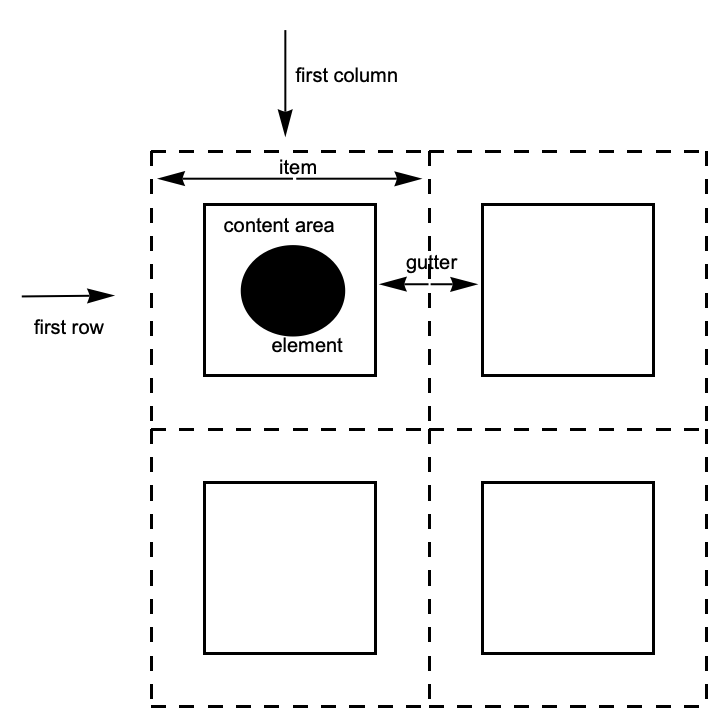
Vocabulary for grids.
column
vertical sequence of items
row
horizontal sequence of items
item
the region containing a grid element
gutter
the border between consecutive rows or columns
Different slices of a 2D grid.
Grid and GraphicsGrid follow the same conventions for describing the different possible slices of the grid. Column, GraphicsColumn, and GraphicsRow follow the same general conventions, except that they only deal in one of the two possible dimensions. Finally, Row does not participate in this system at all.
The World of Options
The following table identifies the slices each listed option can address. No option is valid for all constructs; refer to the key below to see which option can occur for a given construct.
To remember the syntax for options, the most important step is knowing that specific values for the columns are specified first, and values for rows are specified second.
In the Wolfram Language, options with a horizontal setting h and a vertical setting v are specified as opt->{h,v}. ImageSize and PlotRange are two common options that help establish this convention.
In a grid, these horizontal and vertical settings correspond to values for the columns and rows, respectively. This is because columns are stacked horizontally, and so their properties—such as width and location—correspond to the horizontal dimension. Rows are stacked vertically, and their properties correspond to the vertical dimension.
A graphic that is twice as long as it is tall:
In the following grid, each item is 2 "ems" wide and 1 "ex" tall:
Instead of a single width for all columns, a separate setting is given for each column:
Similarly, a different background color can be given at successive horizontal positions:
Gutters
Many Grid options deal with properties that can ultimately be associated with a column, row, or item in the grid.
However there are also options that deal with gutters between rows and columns.
A line that is not associated with any single row or column:
Compare this with a frame:
The syntax for Dividers and Spacings is exactly the same as for the other options. For a grid with n items in a particular direction, Dividers and Spacings can specify settings for the n+1 gaps between elements, starting before the first element and ending after the last element.
Items
The most granular level of description is the item. Each item in a grid can have its own value for options such as Background, Alignment, and Frame.
Item can be used to explicitly indicate the desired settings:
Alternatively, use the item's {i,j} index to assign it a value at the overall grid level:
A programmatically generated grid:
Give settings to an entire region of the grid:
Dividers and Frames
The Wolfram Language provides an extensive system for describing what dividers and frames should be drawn in a grid.
In general, any line and color directive may be used, including Hue, Thickness, Dashing, Dotted, and others. Multiple directives may be combined with Directive.
Precedence
When conflicting styles are given, Dividers has precedence over Frame, and they have precedence over FrameStyle. Styles from Item take precedence over all others.
Dividers and frames are added together:
Styles from different sources are combined together:
Alignment and Positioning
Aesthetic grids often require use of alignment. The Wolfram Language has considerable support for different kinds of alignment in grids.
The Alignment option can be passed to the overall grid.
Align contents to the right:
It is possible to give different horizontal alignments to different columns, and different vertical alignments to different rows.
Align the first column to the right, and the second column to the left:
It is also possible to give different alignments to the individual items in the grid.
Set the element at position {1,1} to the left, and the element at position {1,2} to the right:
Alignment can also be set with Item. The specification for Item will take precedence:
It is possible to align on a decimal point, or any character.
Align on ".":
Positioning a grid within its enclosing environment can be achieved with BaselinePosition.
Default position:
Align the bottom of the grid to the baseline of the enclosing expression:
Align the grid so that the baseline of the {2,1} element is at the overall baseline:
Background and Style
Common Cases
When working with a collection of elements, Grid provides a way to set them against a uniform background.
Though an element can have its own background, awkward gaps result when you put elements together.
Grid and related functions place a background across the entire group of items in which the elements are contained.
With more sophisticated syntax, a variety of patterns is easy to achieve.
Alternate the backgrounds:
Highlight a row and column that intersect:
Embed the background with a particular item inside the grid:
Precedence of Overlapping Background Settings
Backgrounds given in the list syntax blend together upon intersection:
Backgrounds specifically asserted using indices take precedence:
Indexed columns take precedence over indexed rows:
Backgrounds specified with Item have the highest precedence:
Spanning and Nesting
Sophisticated partitioning of 2D space can be achieved by nested grid constructs and/or by using spanning elements.
As their name suggests, spanning elements allow an item to span multiple columns, rows, or both.
Span "a" across the first two columns:
Span "a" across the first two rows:
Span "a" across the first two columns and rows:
It is important to note that the spanning region must be rectangular; items that fail to fall within the rectangle will not be spanned, and will instead display the spanning character.
Spanning is only done in rectangular chunks:
While many layouts can be achieved using spanning elements, it is sometimes faster or more convenient to simply nest grid constructs:
Particularly with complex grids, it is often clearer to use Row and Column to create the specifically desired structures than to try to design a complicated system of spanning.
Sizing and Spacing
Sizing in Grid
Grid will typically not modify the size of its elements. Also, rows and columns are by default made as narrow as possible while accommodating the contents.
Notice in the above example that the second row is much taller than the first, the second column thinner than the first, and the sizes of the elements were not modified in any way.
If elements in the grid are interactively or dynamically changed, the size of the entire grid will automatically adjust as appropriate.
A useful exception is that Button will by default expand to fill the available space.
ItemSize can be used to override the default behavior.
Make all items the same size:
Specify widths and heights for individual columns and rows:
The units used for ItemSize are the typesetting units known as "exs" and "ems."
It is also possible to specify widths as a fraction of the enclosing area by using Scaled.
Make the first two columns each .3 of the page width:
Line Wrapping in Grid
Textual items will line wrap if the columns are too narrow. Notice that this forces the rows to be taller than the minimum specified.
With ItemSize->Automatic, textual items are wrapped at the page width:
The Wolfram Language usually works by taking whatever input you give, and then processing it. Sometimes, however, you may want to have a program you write explicitly request more input. You can do this using Input and InputString.
Exactly how Input and InputString work depends on the computer system and the Wolfram Language interface you are using. With a text‐based interface, they typically just wait for standard input, terminated with a newline. With a notebook interface, however, they typically get the front end to put up a "dialog box", in which the user can enter input.
In general, Input is intended for reading complete Wolfram Language expressions. InputString, on the other hand, is for reading arbitrary strings.
Messages
The Wolfram Language has a general mechanism for handling messages generated during computations. Many built‐in Wolfram Language functions use this mechanism to produce error and warning messages. You can also use the mechanism for messages associated with functions you write.
The basic idea is that every message has a definite name, of the form symbol::tag. You can use this name to refer to the message. (The object symbol::tag has head MessageName.)
As discussed in "Warnings and Messages", you can use Quiet to control the printing of particular messages during an evaluation. Most messages associated with built‐in functions are switched on by default. If you want to suppress a message permanently, you can use Off.
This prints a warning message. Also, the front end highlights the extra argument in red:
This suppresses the warning message:
The message reappears with the next evaluation:
You can use On and Off to make global changes to the printing of particular messages. You can use Off to switch off a message if you never want to see it.
You can switch off the message like this:
Now no warning message is produced:
Although most messages associated with built‐in functions are switched on by default, there are some which are switched off by default, and which you will see only if you explicitly switch them on. An example is the message General::newsym, discussed in "Intercepting the Creation of New Symbols", which tells you every time a new symbol is created.
The text of a message with the name s::tag is stored simply as the value of s::tag, associated with the symbol s. You can therefore see the text of a message simply by asking for s::tag. You can set the text by assigning a value to s::tag.
If you give LinearSolve a singular matrix, it prints a warning message:
Here is the text of the message:
This redefines the message:
Now the new form will be used:
Messages are always stored as strings suitable for use with StringForm. When the message is printed, the appropriate expressions are "spliced" into it. The expressions are wrapped with HoldForm to prevent evaluation. In addition, any function that is assigned as the value of the global variable $MessagePrePrint is applied to the resulting expressions before they are given to StringForm. The default for $MessagePrePrint uses Short for text formatting and a combination of Short and Shallow for typesetting.
Most messages are associated directly with the functions that generate them. There are, however, some "general" messages, which can be produced by a variety of functions.
If you give the wrong number of arguments to a function F, the Wolfram Language will warn you by printing a message such as F::argx. If the Wolfram Language cannot find a message named F::argx, it will use the text of the "general" message General::argx instead. You can use Off[F::argx] to switch off the argument count message specifically for the function F. You can also use Off[General::argx] to switch off all messages that use the text of the general message.
The Wolfram Language prints a message if you give the wrong number of arguments to a built‐in function:
This argument count message is a general one, used by many different functions:
Quietening Sqrt::argx suppresses the message issued by the Sqrt function but not by other functions.
This prints the Sin::argx message but not Sqrt::argx:
Quietening General::argx suppresses all messages that use General::argx.
Here, no argx messages are printed:
If F::tag message is not using General::tag, suppressing General::tag will not suppress F::tag. For example, turning off the General::targ message will not turn off the Entropy::targ message, because those two messages are not one and the same.
Entropy::targ message is still printed inside of Quiet:
If something goes very wrong with a calculation you are doing, it is common to find that the same warning message is generated over and over again. This is usually more confusing than useful. As a result, the Wolfram Language keeps track of all messages that are produced during a particular calculation, and stops printing a particular message if it comes up more than three times. Whenever this happens, the Wolfram Language prints the message General::stop to let you know. If you really want to see all the messages that the Wolfram Language tries to print, you can do this by switching off General::stop.
a list of the messages produced during the processing of the nth input line in a Wolfram Language session
Finding out what messages were produced during a computation.
In every computation you do, the Wolfram Language maintains a list $MessageList of all the messages that are produced. In a standard Wolfram Language session, this list is cleared after each line of output is generated. However, during a computation, you can access the list. In addition, when the nth output line in a session is generated, the value of $MessageList is assigned to MessageList[n].
This returns $MessageList, which gives a list of the messages produced:
The message names are wrapped in HoldForm to stop them from evaluating:
In writing programs, it is often important to be able to check automatically whether any messages were generated during a particular calculation. If messages were generated, say as a consequence of producing indeterminate numerical results, then the result of the calculation may be meaningless.
Evaluating 1^0 produces no messages, so the result of the evaluation is returned:
Evaluating 0^0 produces a message, so the second argument of Check is returned:
Check[expr,failexpr] tests for all messages that are actually printed out. It does not test for messages whose output has been suppressed using Off.
In some cases you may want to test only for a specific set of messages, say ones associated with numerical overflow. You can do this by explicitly telling Check the names of the messages you want to look for.
The message generated by Sin[1,2] is ignored by Check, since it is not the one specified:
print a message, with the expri spliced into its string form
Generating messages.
By using the function Message, you can mimic all aspects of the way in which built‐in Wolfram Language functions generate messages. You can for example switch on and off messages using On and Off, and Message will automatically look for General::tag if it does not find the specific message s::tag.
This defines the text of a message associated with f:
Here is the function f:
When the argument of f is greater than 10, the message is generated:
This switches off the message:
Now the message is no longer generated:
When you call Message, it first tries to find a message with the explicit name you have specified. If this fails, it tries to find a message with the appropriate tag associated with the symbol General. If this too fails, then the Wolfram Language takes any function you have defined as the value of the global variable $NewMessage, and applies this function to the symbol and tag of the message you have requested.
By setting up the value of $NewMessage appropriately, you can, for example, get the Wolfram Language to read in the text of a message from a file when that message is first needed.
International Messages
The standard set of messages for built‐in Wolfram Language functions are written in American English. In some versions of the Wolfram System, messages are also available in other languages. In addition, if you set up messages yourself, you can give ones in other languages.
Languages in the Wolfram System are conventionally specified by strings. The languages are given in English, in order to avoid the possibility of needing special characters. Thus, for example, the French language is specified in the Wolfram System as "French".
When built‐in Wolfram Language functions generate messages, they look first for messages of the form s::t::Language, in the language specified by $Language. If they fail to find any such messages, then they use instead the form s::t without an explicit language specification.
The procedure used by built‐in functions will also be followed by functions you define if you call Message with message names of the form s::t. If you give explicit languages in message names, however, only those languages will be used.
Documentation Constructs
When you write programs in the Wolfram Language, there are various ways to document your code. As always, by far the best thing is to write clear code, and to name the objects you define as explicitly as possible.
Sometimes, however, you may want to add some "commentary text" to your code, to make it easier to understand. You can add such text at any point in your code simply by enclosing it in matching (* and *). Notice that in the Wolfram Language, "comments" enclosed in (* and *) can be nested in any way.
You can use comments anywhere in the Wolfram Language code you write:
(*text*)
a comment that can be inserted anywhere in Wolfram Language code
Comments in the Wolfram Language.
There is a convention in the Wolfram Language that all functions intended for later use should be given a definite "usage message", which documents their basic usage. This message is defined as the value of f::usage, and is retrieved when you type ?f.
f::usage="text"
define the usage message for a function
?f
get information about a function
??f
get more information about a function
Usage messages for functions.
Here is the definition of a function f:
Here is a "usage message" for f:
This gives the usage message for f:
??f gives all the information the Wolfram Language has about f, including the actual definition:
When you define a function f, you can usually display its value using ?f. However, if you give a usage message for f, then ?f just gives the usage message. Only when you type ??f do you get all the details about f, including its actual definition.
If you ask for information using ? about just one function, the Wolfram Language will print out the complete usage messages for the function. If you ask for information on several functions at the same time, however, the Wolfram Language will give the name of each function, if possible with a link to its usage information.
This gives all the symbols in the Wolfram Language that start with "Plot":
If you use the Wolfram Language with a text‐based interface, then messages and comments are the primary mechanisms for documenting your definitions. However, if you use the Wolfram Language with a notebook interface, then you will be able to give much more extensive documentation in text cells in the notebook.




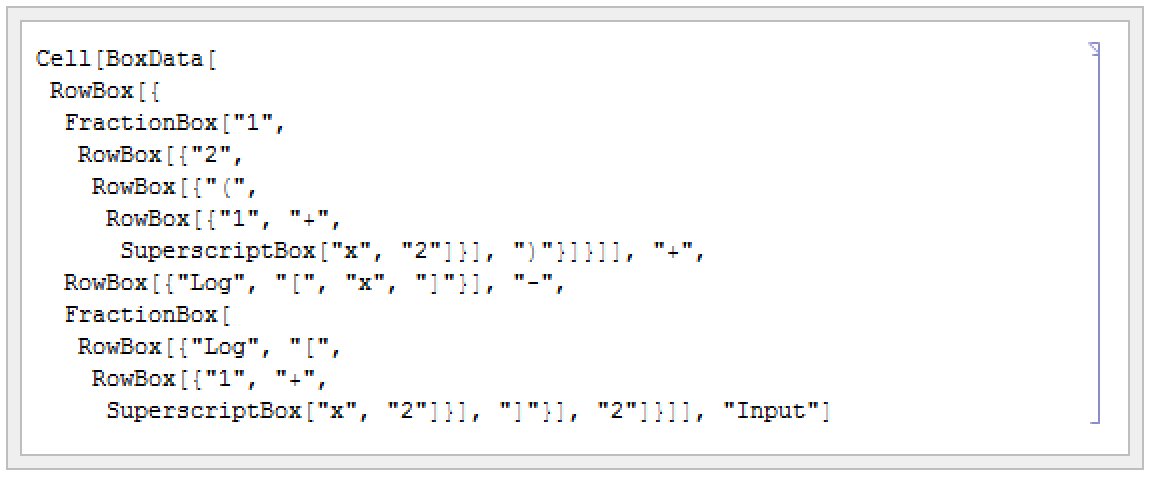


 ‐dimensional table, successive dimensions are alternately given as columns and rows. By setting the option TableDirections->{dir1,dir2,…}, where the diri are Column or Row, you can specify explicitly which way each dimension should be given. By default, the option is effectively set to {Column,Row,Column,Row,…}.





 ,
,  , and
, and  from any alphabet are treated just like ordinary English letters, and can for example appear in the names of symbols. The same is true of letter‐like forms such as
  ,
,  , and
, and  .
.  and
and  are infix operators, while
  is a prefix operator, and
  and
and  are matchfix operators.


 and
and  do have built‐in precedences. "Operator Input Forms" lists all the operators recognized by the Wolfram Language, in order of their precedence.


 is treated as an operator with precedence 100. This precedence turns out to be low enough that parentheses are inserted:
 for which the Wolfram Language already has built‐in input and output rules.