绘制一个模拟时钟面,显示当地时间的时、分和秒.
ClockGauge[time]
绘制一个模拟时钟面,显示对应于 AbsoluteTime、DateObject 或 TimeObject 规范的时间.
ClockGauge[{h,m,s}]
绘制一个模拟时钟面,显示小时 h、分钟 m 和秒 s.
ClockGauge[{y,m,d,h,m,s}]
绘制一个模拟时钟面,显示对应于 DateList 规范中日期列表的时间.
ClockGauge["string"]
绘制一个模拟时钟面,显示时间 DateList["string"].
ClockGauge
绘制一个模拟时钟面,显示当地时间的时、分和秒.
ClockGauge[time]
绘制一个模拟时钟面,显示对应于 AbsoluteTime、DateObject 或 TimeObject 规范的时间.
ClockGauge[{h,m,s}]
绘制一个模拟时钟面,显示小时 h、分钟 m 和秒 s.
ClockGauge[{y,m,d,h,m,s}]
绘制一个模拟时钟面,显示对应于 DateList 规范中日期列表的时间.
ClockGauge["string"]
绘制一个模拟时钟面,显示时间 DateList["string"].
更多信息和选项
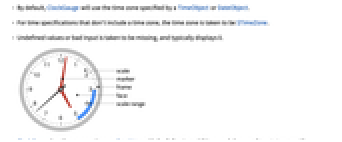
- 默认情况下,ClockGauge 使用由 TimeObject 或 DateObject 指定的时区.
- 对于不包括时区的时间规范,取 $TimeZone 作为时区.
- 未定义的值或者错误的输入被视为缺失,通常显示为 0.
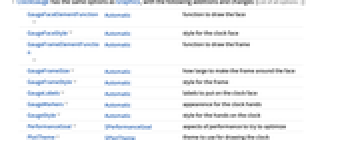
- ClockGauge 具有与 Graphics 相同的选项,并有以下增加和变化: [所有选项的列表]
-
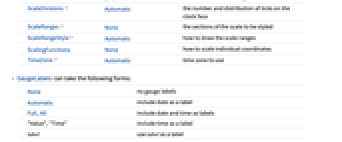
GaugeFaceElementFunction Automatic 绘制仪表面的函数 GaugeFaceStyle Automatic 仪表面的样式 GaugeFrameElementFunction Automatic 绘制仪表框的函数 GaugeFrameSize Automatic 环绕仪表面的仪表框的大小 GaugeFrameStyle Automatic 仪表框的样式 GaugeLabels Automatic 时钟面的标签 GaugeMarkers Automatic 时钟指针的外观 GaugeStyle Automatic 时钟指针的样式 PerformanceGoal $PerformanceGoal 力图优化的性能方面 PlotTheme $PlotTheme 绘制时钟所用的主题 ScaleDivisions Automatic 时钟表面刻度的数目和分布 ScaleRanges None 标度各范围的样式 ScaleRangeStyle Automatic 如何绘制标度范围 ScalingFunctions None 如何缩放单独坐标 TimeZone Automatic 所用的时区 - GaugeLabels 可以取以下形式:
-
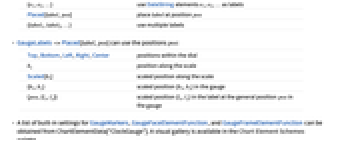
None 无仪表标签 Automatic 包括日期作为标签 Full,All 包括日期和时间作为标签 "Value","Time" 包括时间作为标签 label 使用 label 作为标签 {e1,e2,…} 使用 DateString 元素 e1、e2、… 作为标签 Placed[label,pos] 将 label 置于位置 pos {label1,label2,…} 使用多个标签 - GaugeLabels->Placed[label,pos] 可以使用位置 pos:
-
Top,Bottom,Left,Right,Center 表盘内的位置 bs 沿标度的位置 Scaled[bs] 沿标度经比例缩放的位置 {bx,by} 仪表中经比例缩放的位置 {bx,by} {pos,{lx,ly}} 仪表中一般位置 pos 处经比例缩放的位置 {lx,ly} - GaugeMarkers、GaugeFaceElementFunction 和 GaugeFrameElementFunction 的内置设置列表可以从 ChartElementData["ClockGauge"] 获得. 在 图表元素方案 面板中提供有一个可视化图库.
- GaugeMarkers->Placed[marker,location] 可用于控制标度在仪表上的位置. 可能的位置有:
-
"Center" 表盘中心 "DivisionCenter" 以分隔标记为中心的累计标度 "DivisionInterval" 分隔标记之间的累计标度 "Scale" 标度区域以内 "OutsideScale" 标度区域以外 "InsideScale" 标度区域内部 "ScaleRange" 标度区域以内的累计标度 "Frame" 表框以内 - 在缺省设置下,用于仪表标度、基准标度和标度区域的样式基于 GaugeStyle.
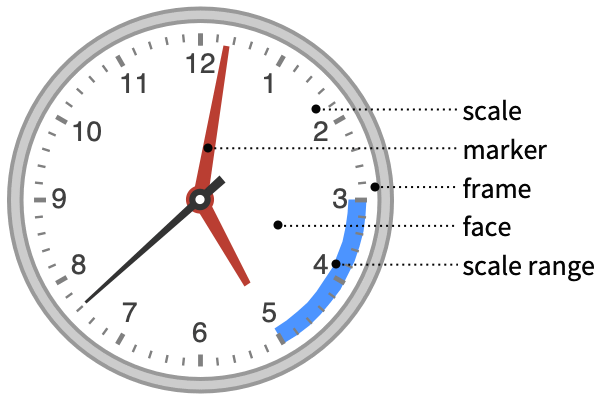
所有选项的列表
范例
打开所有单元 关闭所有单元基本范例 (4)
ClockGauge[]从 DateObject 生成一个时钟:
ClockGauge[DateObject[{2014, 11, 17, 15, 49, 4.13057}, "Instant", "Gregorian", -6.]]生成一个模拟时钟,时间根据 {hour,min,sec} 列表诠释:
ClockGauge[{14, 42, 56}]生成一个模拟时钟,时间根据 DateList 指定的字符串诠释:
ClockGauge["Mon 20 Oct 2008 21:03:14"]范围 (13)
数据和布局 (2)
样式化与外观 (8)
ClockGauge[{11, 1, 42}, PlotTheme -> "Minimal"]ClockGauge[{11, 1, 42}, GaugeStyle -> {Red, Green, Blue}]使用 ColorData 的梯度或索引色彩方案设置指针的样式:
Table[ClockGauge[{11, 1, 42}, GaugeStyle -> f], {f, {61, "Pastel"}}]Table[ClockGauge[{11, 1, 42}, GaugeMarkers -> f], {f, {"BezelBevelNeedle", "FlatProfileNeedle"}}]ClockGauge[{11, 1, 42}, GaugeMarkers -> Placed[[image], "Center"]]Table[ClockGauge[{11, 1, 42}, GaugeFaceStyle -> c], {c, {LightGray, LightOrange}}]Table[ClockGauge[{11, 1, 42}, GaugeFrameStyle -> c], {c, {LightGray, LightOrange}}]ClockGauge[{11, 1, 42}, ScaleRanges -> {10, 12}]标签与图例 (3)
使用 GaugeLabels 为表盘添加标签:
ClockGauge[{4, 31, 42}, GaugeLabels -> "Central Time"]ClockGauge[{11, 1, 42}, GaugeLabels -> "Value"]ClockGauge[DateList[], GaugeLabels -> Placed["DateShort", Bottom]]ClockGauge[{11, 1, 42}, GaugeLabels -> {
"Value", Placed[Style["CST", Italic, FontSize -> 8], {{.5, .27}, {.5, .5}}]}]选项 (69)
AspectRatio (2)
默认情况下,AspectRatio 自动生成完美圆形的结果:
ClockGauge[{14, 20, 42}]ClockGauge[{14, 20, 42}, AspectRatio -> 1 / 2]Background (1)
ClockGauge[{11, 1, 42}, Background -> LightBlue]使用 GaugeFaceStyle 设置仪表面的样式:
ClockGauge[{11, 1, 42}, GaugeFaceStyle -> LightBlue]Frame (4)
ClockGauge 默认情况下不使用边框:
ClockGauge[DateObject[{2014, 11, 17, 15, 49, 4.13057}, "Instant", "Gregorian", -6.]]ClockGauge[DateObject[{2014, 11, 17, 15, 49, 4.13057}, "Instant", "Gregorian", -6.], Frame -> True]ClockGauge[DateObject[{2014, 11, 17, 15, 49, 4.13057}, "Instant", "Gregorian", -6.], Frame -> {{True, True}, {False, False}}]ClockGauge[DateObject[{2014, 11, 17, 15, 49, 4.13057}, "Instant", "Gregorian", -6.], Frame -> {{True, False}, {True, False}}]FrameStyle (2)
ClockGauge[DateObject[{2014, 11, 17, 15, 49, 4.13057}, "Instant", "Gregorian", -6.], Frame -> True, FrameStyle -> Directive[StandardBlue, Thick]]ClockGauge[DateObject[{2014, 11, 17, 15, 49, 4.13057}, "Instant", "Gregorian", -6.], Frame -> True, FrameStyle -> {{Directive[Green, Thick], Red}, {Directive[Gray, Thick], Blue}}]GaugeFaceElementFunction (3)
列出 GaugeFaceElementFunction 的内置设置:
ChartElementData["ClockGauge", "Face"]Table[ClockGauge[{11, 1, 42}, GaugeFaceStyle -> LightBlue, GaugeFrameStyle -> None, GaugeFaceElementFunction -> f, PlotLabel -> f], {f, {"GlassSector", "OscillatingSector"}}]编写一个自定义的 GaugeFaceElementFunction:
f[{{θ1_, θ2_}, {r1_, r2_}}, __] := First[ParametricPlot[(Max[r, .5 + .2Sin[6θ]]){ Cos[θ], Sin[θ]}, {θ, θ1, θ2}, {r, r1, r2}, Mesh -> None, PlotStyle -> Directive[Opacity[1], LightGray], BoundaryStyle -> None]]ClockGauge[{11, 1, 42}, GaugeFaceElementFunction -> f]GaugeFaceStyle (3)
Table[ClockGauge[{11, 1, 42}, GaugeFaceStyle -> c], {c, {LightGray, LightOrange}}]使用 None 关闭表面:
ClockGauge[{11, 1, 42}, GaugeFaceStyle -> None, Background -> LightBlue]使用 Texture 作为仪表面:
ClockGauge[{11, 1, 42}, TicksStyle -> Black, GaugeFaceStyle -> Texture[ExampleData[{"ColorTexture", "Amboyna"}]]]ClockGauge[{11, 1, 42}, TicksStyle -> Black, GaugeFaceStyle -> Texture[ImageCrop[Graphics3D[Sphere[], Boxed -> False]]]]GaugeFrameElementFunction (3)
列出 GaugeFrameElementFunction 的内置设置:
ChartElementData["ClockGauge", "Frame"]Table[ClockGauge[{11, 1, 42}, GaugeFrameStyle -> GrayLevel[.7], GaugeFrameElementFunction -> i, PlotLabel -> i], {i, {"BezelSector", "GlassSector"}}]f[{{tmin_, tmax_}, {rmin_, rmax_}}, ___] := Module[{inpts, outpts},
inpts = Array[rmin{Cos[2π # / 100], Sin[2π # / 100]}&, 100];
outpts = Array[rmax{Cos[2π # / 100], Sin[2π # / 100]}&, 100];
{EdgeForm[Directive[Thick, Darker@Gray]], Gray, FilledCurve[{{Line[inpts]}, {Line[outpts]}}]}]ClockGauge[{11, 1, 42}, GaugeFrameElementFunction -> f]GaugeFrameSize (3)
{ClockGauge[{11, 1, 42}, GaugeFrameSize -> .4],
ClockGauge[{11, 1, 42}, GaugeFrameSize -> .05]}使用 None 去掉表框:
ClockGauge[{11, 1, 42}, GaugeFrameSize -> None]ClockGauge[{11, 1, 42}, GaugeFrameSize -> #]& /@ {Tiny, Small , Medium, Large}GaugeFrameStyle (1)
GaugeLabels (3)
ClockGauge[{11, 1, 42}, GaugeLabels -> Automatic]ClockGauge[{11, 1, 42}, GaugeLabels -> {Style["Local", Bold], "Value"}]使用 DateString 的一个字符串列表创建标签:
ClockGauge[{2012, 10, 28, 10, 9, 56}, GaugeLabels -> Placed[ {"Hour", ":", "Minute", " ", "AMPM"}, Bottom]]ClockGauge[{2012, 10, 28, 10, 9, 56}, GaugeLabels -> Placed[ {"MonthNameShort", " " , "DayShort"}, Bottom]]GaugeMarkers (3)
Table[ClockGauge[{11, 1, 42}, GaugeMarkers -> typ], {typ, {Automatic, None}}]列出 GaugeMarkers 的内置设置:
ChartElementData["ClockGauge", "Markers"]Table[ClockGauge[{11, 1, 42}, GaugeMarkers -> typ], {typ, {"FlatProfileNeedle", "TwoToneNeedle"}}]Table[ClockGauge[{11, 1, 42}, GaugeMarkers -> typ], {typ, {[image], [image]}}]GaugeStyle (4)
Table[ClockGauge[{11, 1, 42}, GaugeStyle -> s], {s, {Red, Darker[Blue]}}]ClockGauge[{11, 1, 42}]ClockGauge[{11, 1, 42}, GaugeStyle -> {Red, Orange, Yellow}]使用 ColorData 中的梯度或索引的色彩方案:
Table[ClockGauge[{11, 1, 42}, GaugeStyle -> s], {s, {"BlueGreenYellow", 24}}]ImageSize (8)
使用有名称的尺寸如 Tiny、Small、Medium 和 Large:
{ClockGauge[{3, 45}, ImageSize -> Tiny], ClockGauge[{3, 45}, ImageSize -> Small]}{ClockGauge[{3, 45}, ImageSize -> 150], ClockGauge[{3, 45}, AspectRatio -> 1 / GoldenRatio, ImageSize -> 150]}{ClockGauge[{3, 45}, ImageSize -> {Automatic, 100}], ClockGauge[{3, 45}, AspectRatio -> 1 / GoldenRatio, ImageSize -> {Automatic, 100}]}{ClockGauge[{3, 45}, ImageSize -> UpTo[200]], ClockGauge[{3, 45}, AspectRatio -> 1 / GoldenRatio, ImageSize -> UpTo[200]]}ClockGauge[{3, 45}, ImageSize -> {200, 200}, Background -> LightBlue]设置 AspectRatioFull 可填充可用空间:
ClockGauge[{3, 45}, AspectRatio -> Full, ImageSize -> {200, 200}, Background -> LightBlue]{ClockGauge[{3, 45}, ImageSize -> {UpTo[150], UpTo[100]}], ClockGauge[{3, 45}, AspectRatio -> 1 / GoldenRatio, ImageSize -> {UpTo[150], UpTo[100]}]}设置 ImageSizeFull 可填充对象中的可用空间:
Framed[Pane[ClockGauge[{3, 45}, ImageSize -> Full, Background -> LightBlue], {200, 100}]]Framed[Pane[ClockGauge[{3, 45}, AspectRatio -> Full, ImageSize -> {Scaled[0.5], Scaled[0.5]}, Background -> LightBlue], {200, 100}]]LabelStyle (2)
PerformanceGoal (1)
PlotTheme (3)
Multicolumn[Table[Labeled[ClockGauge[PlotTheme -> t, ImageSize -> 125], t], {t, {"Business", "Detailed", "Marketing", "Minimal", "Monochrome", "Scientific", "Web", "Classic"}}]]ClockGauge[PlotTheme -> "Minimal"]ClockGauge[PlotTheme -> "Minimal", GaugeStyle -> {RGBColor[0.0140993, 0.518868, 0.673548], RGBColor[0.0140993, 0.518868, 0.673548], LightGray}]ScaleDivisions (2)
ScaleOrigin (1)
使用 ScaleOrigin 指定标度的弧度位置:
ClockGauge[{11, 1, 42}, ScaleOrigin -> .75]ScaleRanges (7)
ClockGauge[{11, 1, 42}, ScaleRanges -> {6, 9}]ClockGauge[{11, 1, 42}, ScaleRanges -> {{3, 6}, {6, 9}, {9, 12}}]ClockGauge[{11, 1, 42}, ScaleRangeStyle -> Opacity[.5, Blue], ScaleRanges -> All]ClockGauge[{11, 1, 42}, ScaleRanges -> {{0, 2}, {3, 6}, {6, 10}, {5, 8}}]ClockGauge[{11, 1, 42}, ScaleRanges -> {{0, 3} -> LightBlue, {3, 6} -> LightGreen, {6, 9} -> LightYellow, {9, 12} -> LightRed}]ScaleRanges 出现在仪表面的前方:
ClockGauge[{11, 1, 42}, ScaleRanges -> All, GaugeFaceStyle -> LightGray]ClockGauge[{11, 1, 42}, ScaleRanges -> {{{3, 6}, .05}, {{6, 9}, .05}, {{9, 12}, .05}}]ClockGauge[{11, 1, 42}, ScaleRanges -> {{{3, 6}, {0, 0.1}}, {{6, 9}, {0, 0.2}}, {{9, 12}, {0, 0.3}}}]ScaleRangeStyle (8)
ClockGauge[{11, 1, 42}, GaugeStyle -> #, ScaleRanges -> {{0, 3}, {3, 6}, {6, 9}, {9, 12}}]& /@ {Automatic, Orange}ClockGauge[{11, 1, 42}, ScaleRanges -> {{0, 3}, {3, 6}, {6, 9}, {9, 12}}, ScaleRangeStyle -> EdgeForm[{Darker@Gray}]]ClockGauge[{11, 1, 42}, ScaleRanges -> {{0, 3}, {3, 6}, {6, 9}}, ScaleRangeStyle -> {Yellow, Orange, Red}]ClockGauge[{11, 1, 42}, ScaleRanges -> Table[{i, i + 1}, {i, 0, 12, 1}], ScaleRangeStyle -> {Yellow, Orange}]使用 ScaleRangeStyle->{None,style} 仅将样式应用于刻度:
ClockGauge[{11, 1, 42}, ScaleRanges -> {9, 12}, ScaleRangeStyle -> {None, Red}]ClockGauge[{11, 1, 42}, ScaleRanges -> {{3, 6}, {9, 12}}, ScaleRangeStyle -> {{LightBlue, Blue}, {LightRed, Red}}]Table[ClockGauge[{11, 1, 42}, ScaleRanges -> {{0, 3}, {3, 6}, {6, 9}, {9, 12}}, ScaleRangeStyle -> f], {f, {"BlueGreenYellow", 24}}]CoolColor[ z_ ] := RGBColor[1 - z, z, 1];ClockGauge[{11, 1, 42}, ScaleRanges -> {{0, 3}, {3, 6}, {6, 9}, {9, 12}}, ScaleRangeStyle -> CoolColor]TicksStyle (2)
Table[ClockGauge[{11, 1, 42}, TicksStyle -> c], {c, {Black, ColorData[63, 1]}}]使用 None 去掉刻度:
ClockGauge[{11, 1, 42}, TicksStyle -> None]TimeZone (3)
默认情况下,ClockGauge 使用时间中所包括的时区:
ClockGauge[DateObject[{2015, 4, 29}, TimeObject[{15, 56, 55.8601}, TimeZone -> 1.], TimeZone -> 1.]]如果没有指定时区,则使用 $TimeZone:
ClockGauge[{2015, 4, 29, 15, 56, 55}]ClockGauge[DateObject[{2015, 4, 29}, TimeObject[{15, 56, 55.8601}, TimeZone -> 1.], TimeZone -> 1.], TimeZone -> 0]将 $TimeZone 中的时间显示为格林尼治标准时间:
ClockGauge[{2015, 4, 29, 15, 56, 55}, TimeZone -> 0]应用 (1)
DynamicModule[{t = None},
Column[{
Dynamic[ActionMenu["Update Time:", {"On" :> (t = (UpdateInterval -> 1);), "Off" :> (t = None;)}]],
Dynamic[Refresh[Row[{ClockGauge[AbsoluteTime[], PlotLabel -> Style["Local", Large, Bold]], ClockGauge[AbsoluteTime[TimeZone -> 0], PlotLabel -> Style["London", Large, Bold]],
ClockGauge[AbsoluteTime[TimeZone -> -5], PlotLabel -> Style["New York", Large, Bold]], ClockGauge[AbsoluteTime[TimeZone -> -8], PlotLabel -> Style["Los Angeles", Large, Bold]]}], t]]
}, Alignment -> Center]
]文本
Wolfram Research (2012),ClockGauge,Wolfram 语言函数,https://reference.wolfram.com/language/ref/ClockGauge.html (更新于 2015 年).
CMS
Wolfram 语言. 2012. "ClockGauge." Wolfram 语言与系统参考资料中心. Wolfram Research. 最新版本 2015. https://reference.wolfram.com/language/ref/ClockGauge.html.
APA
Wolfram 语言. (2012). ClockGauge. Wolfram 语言与系统参考资料中心. 追溯自 https://reference.wolfram.com/language/ref/ClockGauge.html 年
BibTeX
@misc{reference.wolfram_2026_clockgauge, author="Wolfram Research", title="{ClockGauge}", year="2015", howpublished="\url{https://reference.wolfram.com/language/ref/ClockGauge.html}", note=[Accessed: 15-September-2026]}
BibLaTeX
@online{reference.wolfram_2026_clockgauge, organization={Wolfram Research}, title={ClockGauge}, year={2015}, url={https://reference.wolfram.com/language/ref/ClockGauge.html}, note=[Accessed: 15-September-2026]}