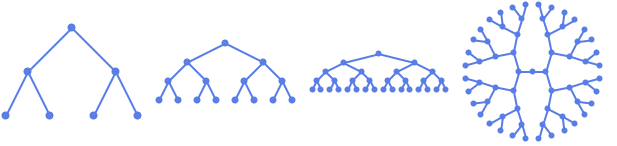
n レベルの完全二分木を与える.
CompleteKaryTree[n,k]
n レベルの完全 k 分木を与える.
CompleteKaryTree
n レベルの完全二分木を与える.
CompleteKaryTree[n,k]
n レベルの完全 k 分木を与える.
詳細とオプション
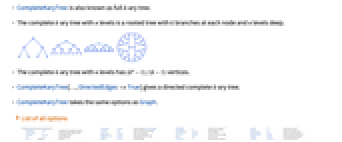
- CompleteKaryTreeは完全な k 分木としても知られている.
- n レベルの完全 k 分木は各ノードのブランチ数が k,深さが n レベルの有根木である.
- n レベルの完全 k 分木には

個の頂点がある. - CompleteKaryTree[…,DirectedEdges->True]は有向完全 k 分木を与える.
- CompleteKaryTreeにはGraphと同じオプションが使える.
全オプションのリスト
例題
すべて開く すべて閉じる例 (3)
オプション (79)
AnnotationRules (2)
DirectedEdges (1)
CompleteKaryTree[2, 3]DirectedEdges->Trueを使って有向グラフを生成する:
CompleteKaryTree[2, 3, DirectedEdges -> True]EdgeLabels (6)
CompleteKaryTree[2, 3, EdgeLabels -> {12 -> "Hello"}]el = EdgeList[CompleteKaryTree[2, 3]]CompleteKaryTree[2, 3, EdgeLabels -> Table[el[[i]] -> Subscript["e", i], {i, Length[el]}]]CompleteKaryTree[2, 3, EdgeLabels -> {12 -> [image], 13 -> [image], 14 -> [image]}]Table[CompleteKaryTree[2, 3, EdgeLabels -> {12 -> Placed["■■■", p]}, PlotLabel -> p, BaselinePosition -> Bottom], {p, {0, 1 / 4, 1 / 3}}]Table[CompleteKaryTree[2, 3, EdgeLabels -> {12 -> Placed["■■■", {1 / 2, p}]}, PlotLabel -> p, BaselinePosition -> Bottom], {p, {{0, 0}, {1 / 2, 1 / 2}, {1, 1}}}]CompleteKaryTree[2, 3, EdgeLabels -> {31 -> Placed[{"lbl1", "lbl2"}, {"Start", "End"}]}]CompleteKaryTree[2, 3, EdgeLabels -> {31 -> Placed[{"lbl1", "lbl2", "lbl3"}, {"Start", "Middle", "End"}]}]TooltipとStatusAreaからの値で自動的にラベルを付ける:
CompleteKaryTree[2, 3, EdgeLabels -> Placed["Name", Tooltip]]CompleteKaryTree[2, 3, EdgeLabels -> Placed["Name", StatusArea]]EdgeShapeFunction (6)
EdgeShapeFunctionの組込み設定のリストを得る:
ResourceData["EdgeShapeFunction"]CompleteKaryTree[2, 3, EdgeShapeFunction -> "Line"]Table[CompleteKaryTree[2, 3, EdgeShapeFunction -> {{ef, "ArrowSize" -> 0.1}}, PlotLabel -> ef], {ef, {"BoxLine", "DiamondLine", "DotLine"}}]Table[CompleteKaryTree[2, 3, EdgeShapeFunction -> {{ef, "ArrowSize" -> 0.1}}, PlotLabel -> ef], {ef, ResourceData["EdgeShapeFunction", "FilledArrow"]}]Table[CompleteKaryTree[2, 3, EdgeShapeFunction -> {{ef, "ArrowSize" -> 0.1}}, PlotLabel -> ef], {ef, ResourceData["EdgeShapeFunction", "UnfilledArrow"]}]Table[CompleteKaryTree[2, 3, EdgeShapeFunction -> {{ef, "ArrowSize" -> 0.1}}, PlotLabel -> ef], {ef, ResourceData["EdgeShapeFunction", "CarvedArrow"]}]CompleteKaryTree[2, 3, EdgeShapeFunction -> {12 -> "DotLine"}]CompleteKaryTree[2, 3, EdgeShapeFunction -> {12 -> "BoxLine", "DotLine"}]ef[pts_List, e_] :=
Block[{s = 0.015, g = [image]}, {Arrowheads[{{s, 0.33, g}, {s, 0.67, g}}], Arrow[pts]}]CompleteKaryTree[2, 3, EdgeShapeFunction -> ef]EdgeShapeFunctionはEdgeStyleと組み合せることができる:
CompleteKaryTree[2, 3, EdgeStyle -> Blue, EdgeShapeFunction -> (Line[#1]&)]EdgeShapeFunctionはEdgeStyleより優先順位が高い:
CompleteKaryTree[2, 3, EdgeStyle -> Blue, EdgeShapeFunction -> ({Red, Line[#1]}&)]EdgeStyle (2)
EdgeWeight (2)
CompleteKaryTree[2, 3, EdgeWeight -> RandomInteger[5, 3]]WeightedAdjacencyMatrix[%]//MatrixFormCompleteKaryTree[2, 3, EdgeWeight -> {a, b, c}]WeightedAdjacencyMatrix[%]//MatrixFormGraphLayout (5)
CompleteKaryTree[2, 3, GraphLayout -> Automatic]Table[CompleteKaryTree[5, 3, GraphLayout -> l, PlotLabel -> l], {l, {"CircularEmbedding", "SpiralEmbedding"}}]Table[CompleteKaryTree[5, 3, GraphLayout -> l, PlotLabel -> l], {l, {"SpringEmbedding", "SpringElectricalEmbedding", "HighDimensionalEmbedding"}}]VertexCoordinatesはGraphLayoutの座標を無効にする:
{CompleteKaryTree[2, 3, GraphLayout -> "SpringElectricalEmbedding"],
CompleteKaryTree[2, 3, GraphLayout -> "SpringElectricalEmbedding", VertexCoordinates -> Table[{i, i}, {i, 0, 3}]]}AbsoluteOptionsを使ってレイアウトアルゴリズムで計算されたVertexCoordinatesを抽出する:
CompleteKaryTree[2, 3]AbsoluteOptions[%, VertexCoordinates]GraphHighlight (3)
CompleteKaryTree[2, 3, VertexSize -> Tiny, GraphHighlight -> {1}]CompleteKaryTree[2, 3, VertexSize -> Tiny, GraphHighlight -> {13}]CompleteKaryTree[2, 3, VertexSize -> Tiny, GraphHighlight -> {1, 2, 13, 14}]GraphHighlightStyle (2)
GraphHighlightStyleの組込み設定のリストを得る:
ResourceData["GraphHighlightStyle"]GraphHighlightStyleの組込み設定を使う:
CompleteKaryTree[2, 3, GraphHighlight -> {1, 12}, VertexSize -> Small, GraphHighlightStyle -> #, PlotLabel -> #]& /@ Select[ResourceData["GraphHighlightStyle"], # =!= Automatic&]PlotTheme (4)
基本テーマ (2)
VertexCoordinates (3)
CompleteKaryTree[2, 3]AbsoluteOptionsを使って結果の頂点座標を抽出する:
AbsoluteOptions[%, VertexCoordinates]ellipseLayout[n_, {a_, b_}] := Table[{a Cos[2Pi / n u], b Sin[2Pi / n u]}, {u, 1, n}]Graphics[Point[ellipseLayout[20, {2, 1}]]]CompleteKaryTree[3, 3, VertexCoordinates -> ellipseLayout[13, {2, 1}]]VertexCoordinatesはGraphLayoutより優先順位が高い:
CompleteKaryTree[2, 3, VertexCoordinates -> Table[{i, i}, {i, 4}], GraphLayout -> "CircularEmbedding"]VertexLabels (13)
CompleteKaryTree[2, 3, VertexLabels -> "Name"]CompleteKaryTree[2, 3, VertexLabels -> {2 -> "one"}]CompleteKaryTree[2, 3, VertexLabels -> Table[i -> Subscript[v, i], {i, 4}]]CompleteKaryTree[2, 3, VertexLabels -> {1 -> [image], 2 -> [image], 3 -> [image]}]Placedを記号位置と一緒に使って外側位置を含むラベル配置を制御する:
Table[CompleteKaryTree[2, 3, VertexSize -> 0.1, VertexShapeFunction -> "Square", VertexLabels -> Table[i -> Placed["■■■", p], {i, 4}], PlotLabel -> p, ImagePadding -> 20], {p, {Before, After, Below, Above}}]pl = {{Before, Below}, {After, Below}, {Before, Above}, {After, Above}};Table[CompleteKaryTree[2, 3, VertexSize -> 0.1, VertexShapeFunction -> "Square", ImagePadding -> 20, VertexLabels -> Table[i -> Placed["■■■", p], {i, 4}], PlotLabel -> p], {p, pl}]Table[CompleteKaryTree[2, 3, VertexSize -> 0.45, VertexLabels -> Table[i -> Placed["■■■", p], {i, 4}], VertexShapeFunction -> "Square", PlotLabel -> p], {p, {Left, Top, Right, Bottom}}]pl = {{Left, Bottom}, {Right, Bottom}, {Left, Top}, {Right, Top}};Table[CompleteKaryTree[2, 3, VertexSize -> 0.45, VertexShapeFunction -> "Square", VertexLabels -> Table[i -> Placed["■■■", p], {i, 4}], PlotLabel -> p], {p, pl}]Table[CompleteKaryTree[2, 3, VertexSize -> 0.45, VertexShapeFunction -> "Square", VertexLabels -> Table[i -> Placed[[image], p], {i, 4}], PlotLabel -> p, BaselinePosition -> Bottom], {p, {{0, 0}, {1 / 2, 1 / 2}, {1, 1}}}]すべてのラベルを頂点の右上コーナー位置に置き,ラベル内の座標を変化させる:
Table[CompleteKaryTree[2, 3, VertexSize -> 0.45, VertexShapeFunction -> "Square", VertexLabels -> Table[i -> Placed[[image], {{1, 1}, p}], {i, 4}], PlotLabel -> p, BaselinePosition -> Bottom], {p, {{0, 0}, {1 / 2, 1 / 2}, {1, 1}}}]CompleteKaryTree[2, 3, VertexLabels -> {1 -> Placed[{"lbl1", "lbl2"}, {Above, Below}]}]CompleteKaryTree[2, 3, VertexLabels -> {1 -> Placed[{"lbl1", "lbl2", "lbl3", "lbl4"}, {Above, After, Below, Before}]}]Placedの引数を使ってTooltipを含むフォーマットを制御する:
CompleteKaryTree[2, 3, VertexLabels -> Placed["Name", Tooltip]]あるいはStatusAreaを含むフォーマットを制御する:
CompleteKaryTree[2, 3, VertexLabels -> Placed["Name", StatusArea]]rotateLabel[lab_] := Rotate[lab, 45Degree]CompleteKaryTree[2, 3, VertexLabels -> Table[i -> Placed["xxx", Below, rotateLabel], {i, 4}]]panelLabel[lab_] := Panel[lab, FrameMargins -> 0, Background -> StandardBlue]CompleteKaryTree[2, 3, VertexLabels -> Table[i -> Placed["xxx", Center, panelLabel], {i, 4}]]hyperlinkLabel[lab_] := Hyperlink[lab, "http://www.wolfram.com"]CompleteKaryTree[2, 3, VertexLabels -> Table[i -> Placed["xxx", Center, hyperlinkLabel], {i, 4}]]VertexShape (5)
Graphics,ImageあるいはGraphics3Dを頂点の形に使う:
Table[CompleteKaryTree[2, 3, VertexShape -> s, VertexSize -> Medium], {s, {[image], [image], [image]}}]CompleteKaryTree[2, 3, VertexShape -> {2 -> [image]}, VertexSize -> Large]VertexShapeはVertexSizeと組み合せることができる:
Table[CompleteKaryTree[2, 3, VertexSize -> s, VertexShape -> [image], PlotLabel -> s], {s, {Small, Large}}]VertexShapeはVertexStyleの影響を受けない:
CompleteKaryTree[2, 3, VertexSize -> 0.2, VertexShape -> [image], VertexStyle -> Blue]VertexShapeFunctionはVertexShapeより優先順位が高い:
CompleteKaryTree[2, 3, VertexSize -> 0.2, VertexShapeFunction -> "Square", VertexShape -> [image]]VertexShapeFunction (10)
組込みのVertexShapeFunctionコレクションのリストを得る:
ResourceData["VertexShapeFunction"]"Basic"コレクションのVertexShapeFunctionの組込み設定を使う:
ResourceData["VertexShapeFunction", "Basic"]Table[CompleteKaryTree[2, 3, VertexShapeFunction -> vf, VertexSize -> 0.2, PlotLabel -> vf], {vf, {"Triangle", "Square", "Rectangle", "Pentagon", "Hexagon", "Octagon"}}]Table[CompleteKaryTree[2, 3, VertexShapeFunction -> vf, VertexSize -> 0.2, PlotLabel -> vf], {vf, {"DownTrapezoid", "UpTrapezoid", "Parallelogram", "FiveDown", "Circle", "Diamond", "Star", "Capsule"}}]"Rounded"コレクションのVertexShapeFunction:
ResourceData["VertexShapeFunction", "Rounded"]Table[CompleteKaryTree[2, 3, VertexShapeFunction -> vf, VertexSize -> 0.2, PlotLabel -> vf], {vf, ResourceData["VertexShapeFunction", "Rounded"]}]"Concave"コレクションのVertexShapeFunctionの組込み設定を使う:
ResourceData["VertexShapeFunction", "Concave"]Table[CompleteKaryTree[2, 3, VertexShapeFunction -> vf, VertexSize -> 0.2, PlotLabel -> vf], {vf, ResourceData["VertexShapeFunction", "Concave"]}]CompleteKaryTree[2, 3, VertexShapeFunction -> { 1 -> "Square"}, VertexSize -> 0.2]CompleteKaryTree[2, 3, VertexShapeFunction -> { 1 -> "Square", "Triangle"}, VertexSize -> 0.2]CompleteKaryTree[2, 3, VertexShapeFunction -> (Inset[[image], #]&)]vf[{xc_, yc_}, name_, {w_, h_}] :=
Block[{xmin = xc - w, xmax = xc + w, ymin = yc - h, ymax = yc + h},
Polygon[{{xmin, ymin}, {xmax, ymax}, {xmin, ymax}, {xmax, ymin}}]
];CompleteKaryTree[2, 3, VertexShapeFunction -> vf, VertexSize -> 0.2]VertexShapeFunctionはVertexStyleと組み合せることができる:
vf1[{xc_, yc_}, name_, {w_, h_}] := Rectangle[{xc - w, yc - h}, {xc + w, yc + h}]CompleteKaryTree[2, 3, VertexSize -> 0.2, VertexStyle -> Blue, VertexShapeFunction -> vf1]VertexShapeFunctionはVertexStyleより優先順位が高い:
vf2[{xc_, yc_}, name_, {w_, h_}] := {Red, Rectangle[{xc - w, yc - h}, {xc + w, yc + h}]}CompleteKaryTree[2, 3, VertexSize -> 0.2, VertexStyle -> Blue, VertexShapeFunction -> vf2]VertexShapeFunctionはVertexSizeと組み合せることができる:
CompleteKaryTree[2, 3, VertexShapeFunction -> "Star", VertexSize -> {1 -> Small, Medium}]VertexShapeFunctionはVertexShapeより優先順位が高い:
CompleteKaryTree[2, 3, VertexSize -> 0.3, VertexShapeFunction -> "Star", VertexShape -> [image]]VertexSize (8)
CompleteKaryTree[2, 3, VertexSize -> Automatic]Table[CompleteKaryTree[2, 3, VertexSize -> s, PlotLabel -> s], {s, {Tiny, Small, Medium, Large}}]Table[CompleteKaryTree[2, 3, VertexSize -> s, PlotLabel -> s], {s, 0.1, 1, 0.3}]Table[CompleteKaryTree[2, 3, VertexSize -> {"Scaled", s}, PlotLabel -> {"Scaled", s}], {s, 0.1, 1, 0.3}]Table[CompleteKaryTree[2, 3, VertexSize -> s, PlotLabel -> s], {s, {{0.1, 0.2}, {0.2, 0.1}}}]CompleteKaryTree[2, 3, VertexSize -> {1 -> 0.2, 2 -> 0.3}]VertexSizeはVertexShapeFunctionと組み合せることができる:
Table[CompleteKaryTree[2, 3, VertexSize -> s, VertexShapeFunction -> "Square", PlotLabel -> s], {s, {0.05, 0.1, 0.2}}]VertexSizeはVertexShapeと組み合せることができる:
Table[CompleteKaryTree[2, 3, VertexSize -> s, VertexShape -> [image], PlotLabel -> s], {s, {0.1, 0.2, 0.4}}]VertexStyle (5)
Table[CompleteKaryTree[2, 3, VertexStyle -> style, VertexSize -> 0.3, PlotLabel -> style], {style, {Yellow, EdgeForm[Dashed]}}]CompleteKaryTree[2, 3, VertexStyle -> {1 -> Blue, 2 -> Red}, VertexSize -> 0.2]VertexShapeFunctionはVertexStyleと組み合せることができる:
vf1[{xc_, yc_}, name_, {w_, h_}] := Rectangle[{xc - w, yc - h}, {xc + w, yc + h}]CompleteKaryTree[2, 3, VertexSize -> 0.2, VertexStyle -> Blue, VertexShapeFunction -> vf1]VertexShapeFunctionはVertexStyleより優先順位が高い:
vf2[{xc_, yc_}, name_, {w_, h_}] := {Red, Rectangle[{xc - w, yc - h}, {xc + w, yc + h}]}CompleteKaryTree[2, 3, VertexSize -> 0.2, VertexStyle -> Blue, VertexShapeFunction -> vf2]VertexStyleはBaseStyleと組み合せることができる:
CompleteKaryTree[2, 3, VertexStyle -> LightBlue, BaseStyle -> EdgeForm[Dotted], VertexSize -> 0.2]VertexStyleはBaseStyleより優先順位が高い:
CompleteKaryTree[2, 3, VertexStyle -> LightBlue, BaseStyle -> Gray, VertexSize -> 0.2]VertexShapeはVertexStyleの影響を受けない:
CompleteKaryTree[2, 3, VertexSize -> 0.2, VertexShape -> [image], VertexStyle -> Blue]VertexWeight (2)
CompleteKaryTree[2, 3, VertexWeight -> {2, 3, 4, 5}]AnnotationValue[{%, 1}, VertexWeight]CompleteKaryTree[2, 3, VertexWeight -> {a, b, c, d}]AnnotationValue[{%, 1}, VertexWeight]アプリケーション (7)
完全 k 分木のGraphCenter:
Table[HighlightGraph[#, GraphCenter[#]]&[CompleteKaryTree[i, 2, VertexSize -> Medium]], {i, 2, 4}]Table[HighlightGraph[#, GraphPeriphery[#]]&[CompleteKaryTree[i, 2, VertexSize -> Medium]], {i, 2, 4}]VertexEccentricity[CompleteKaryTree[3, 2], #]& /@ VertexList[CompleteKaryTree[3, 2]]FindVertexEccentricityPath[g_ ? UndirectedGraphQ, u_] /; MemberQ[VertexList[g], u] := Module[{d = GraphDistanceMatrix[g], posu, posv, vl = VertexList[g]}, posu = VertexIndex[g, u];
posv = First@First@Position[d[[posu]], Max[d[[posu]]]];
PathGraph[FindShortestPath[g, u, vl[[posv]]]]]Table[HighlightGraph[g = CompleteKaryTree[3, 2], FindVertexEccentricityPath[g, u]], {u, Range[3]}]Table[GraphRadius[CompleteKaryTree[i, 2]], {i, 2, 4}]FindRadiusPath[g_ ? UndirectedGraphQ] := Module[{c = First@GraphCenter[g], d, v, pos}, d = Table[GraphDistance[g, c, u], {u, VertexList[g]}];
pos = First@Position[d, Max[d]];
v = First@Part[VertexList[g], pos];
PathGraph[FindShortestPath[g, c, v]]]Table[HighlightGraph[#, FindRadiusPath[#]]&[CompleteKaryTree[i, 2, VertexSize -> Tiny]], {i, 2, 4}]Table[GraphDiameter[CompleteKaryTree[i, 2]], {i, 2, 4}]FindDiameterPath[g_ ? UndirectedGraphQ] := Module[{d = GraphDistanceMatrix[g], u, v, pos}, pos = First@Position[d, Max[d]];
{u, v} = Part[VertexList[g], pos];
PathGraph[FindShortestPath[g, u, v]]]Table[HighlightGraph[#, FindDiameterPath[#]]&[CompleteKaryTree[i, 2, VertexSize -> Tiny]], {i, 2, 4}]CompleteKaryTreeの頂点次数をハイライトする:
HighlightCentrality[g_, cc_] := HighlightGraph[g, Table[Style[VertexList[g][[i]], ColorData["TemperatureMap"][cc[[i]] / Max[cc]]], {i, VertexCount[g]}]];g = CompleteKaryTree[3, 2, VertexSize -> Large];HighlightCentrality[g, VertexDegree[g]]HighlightCentrality[g, ClosenessCentrality[g]]HighlightCentrality[g, EigenvectorCentrality[g]]
から
までの頂点連結性は
から
までの頂点独立経路の数である:
g = CompleteKaryTree[3, 2, VertexLabels -> "Name"]Table[HighlightGraph[g, PathGraph[FindShortestPath[g, 2, k]]], {k, Complement[Range[7], {2}]}]特性と関係 (8)
CompleteKaryTree[n,k]には
の頂点がある:
VertexCount[CompleteKaryTree[n, k]]CompleteKaryTree[n,k]には
の辺がある:
EdgeCount[CompleteKaryTree[n, k]]CompleteKaryTree[3, 3]VertexCount[%] - EdgeCount[%]CompleteKaryTree[3, 4]TreeGraphQ[%]BipartiteGraphQ[CompleteKaryTree[3, 3]]AcyclicGraphQ[CompleteKaryTree[3, 3]]LoopFreeGraphQ[CompleteKaryTree[3, 3]]Table[CompleteKaryTree[3, i], {i, {2, 3, 4}}]Table[KaryTree[(i^3 - 1) / (i - 1), i], {i, {2, 3, 4}}]テキスト
Wolfram Research (2010), CompleteKaryTree, Wolfram言語関数, https://reference.wolfram.com/language/ref/CompleteKaryTree.html.
CMS
Wolfram Language. 2010. "CompleteKaryTree." Wolfram Language & System Documentation Center. Wolfram Research. https://reference.wolfram.com/language/ref/CompleteKaryTree.html.
APA
Wolfram Language. (2010). CompleteKaryTree. Wolfram Language & System Documentation Center. Retrieved from https://reference.wolfram.com/language/ref/CompleteKaryTree.html
BibTeX
@misc{reference.wolfram_2026_completekarytree, author="Wolfram Research", title="{CompleteKaryTree}", year="2010", howpublished="\url{https://reference.wolfram.com/language/ref/CompleteKaryTree.html}", note=[Accessed: 14-September-2026]}
BibLaTeX
@online{reference.wolfram_2026_completekarytree, organization={Wolfram Research}, title={CompleteKaryTree}, year={2010}, url={https://reference.wolfram.com/language/ref/CompleteKaryTree.html}, note=[Accessed: 14-September-2026]}