



KaryTree
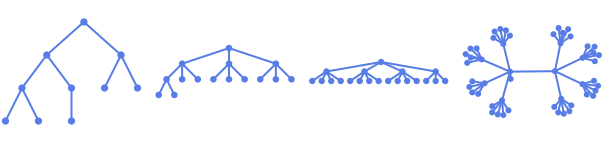
例題
すべて開く すべて閉じる例 (2)
オプション (80)
AnnotationRules (2)
DirectedEdges (1)
KaryTree[6]DirectedEdges->Trueを使って有向グラフを生成する:
KaryTree[6, DirectedEdges -> True]EdgeLabels (7)
KaryTree[3, 3, EdgeLabels -> {12 -> "Hello"}]el = EdgeList[KaryTree[3, 3]]KaryTree[3, 3, EdgeLabels -> Table[el[[i]] -> Subscript["e", i], {i, Length[el]}]]KaryTree[4, 3, EdgeLabels -> {12 -> [image], 13 -> [image], 14 -> [image]}]Placedを記号位置と一緒に使って辺に沿ったラベル配置を制御する:
Table[KaryTree[4, 3, EdgeLabels -> {14 -> Placed["■■■", p]}, PlotLabel -> p], {p, {"Start", "Middle", "End"}}]Table[KaryTree[4, 3, EdgeLabels -> {14 -> Placed["■■■", p]}, PlotLabel -> p, BaselinePosition -> Bottom], {p, {0, 1 / 4, 1 / 3}}]Table[KaryTree[4, 3, EdgeLabels -> {14 -> Placed["■■■", {1 / 2, p}]}, PlotLabel -> p, BaselinePosition -> Bottom], {p, {{0, 0}, {1 / 2, 1 / 2}, {1, 1}}}]KaryTree[4, 3, EdgeLabels -> {13 -> Placed[{"lbl1", "lbl2"}, {"Start", "End"}]}]KaryTree[4, 3, EdgeLabels -> {13 -> Placed[{"lbl1", "lbl2", "lbl3"}, {"Start", "Middle", "End"}]}]TooltipとStatusAreaからの値を使って自動的にラベルを付ける:
KaryTree[4, 3, EdgeLabels -> Placed["Name", Tooltip]]KaryTree[4, 3, EdgeLabels -> Placed["Name", StatusArea]]EdgeShapeFunction (6)
EdgeShapeFunctionの組込み設定のリストを得る:
ResourceData["EdgeShapeFunction"]KaryTree[5, 3, EdgeShapeFunction -> "Line"]Table[KaryTree[4, 3, EdgeShapeFunction -> {{ef, "ArrowSize" -> 0.1}}, PlotLabel -> ef], {ef, {"BoxLine", "DiamondLine", "DotLine"}}]Table[KaryTree[4, 3, EdgeShapeFunction -> {{ef, "ArrowSize" -> 0.1}}, PlotLabel -> ef], {ef, ResourceData["EdgeShapeFunction", "FilledArrow"]}]Table[KaryTree[4, 3, EdgeShapeFunction -> {{ef, "ArrowSize" -> 0.1}}, PlotLabel -> ef], {ef, ResourceData["EdgeShapeFunction", "UnfilledArrow"]}]Table[KaryTree[4, 3, EdgeShapeFunction -> {{ef, "ArrowSize" -> 0.1}}, PlotLabel -> ef], {ef, ResourceData["EdgeShapeFunction", "CarvedArrow"]}]KaryTree[4, 3, EdgeShapeFunction -> {12 -> "DotLine"}]KaryTree[4, 3, EdgeShapeFunction -> {12 -> "BoxLine", "DotLine"}]ef[pts_List, e_] :=
Block[{s = 0.015, g = [image]}, {Arrowheads[{{s, 0.33, g}, {s, 0.67, g}}], Arrow[pts]}]KaryTree[5, 3, EdgeShapeFunction -> ef]EdgeShapeFunctionはEdgeStyleと組み合せることができる:
KaryTree[5, 3, EdgeStyle -> Blue, EdgeShapeFunction -> (Line[#1]&)]EdgeShapeFunctionはEdgeStyleより優先順位が高い:
KaryTree[5, 3, EdgeStyle -> Blue, EdgeShapeFunction -> ({Red, Line[#1]}&)]EdgeStyle (2)
EdgeWeight (2)
GraphLayout (5)
KaryTree[5, 3, GraphLayout -> Automatic]Table[KaryTree[50, 3, GraphLayout -> l, PlotLabel -> l], {l, {"CircularEmbedding", "SpiralEmbedding"}}]Table[KaryTree[50, 3, GraphLayout -> l, PlotLabel -> l], {l, {"SpringEmbedding", "SpringElectricalEmbedding", "HighDimensionalEmbedding"}}]VertexCoordinatesはGraphLayoutの座標を無効にする:
{KaryTree[4, 3, GraphLayout -> "SpringElectricalEmbedding"],
KaryTree[4, 3, GraphLayout -> "SpringElectricalEmbedding", VertexCoordinates -> Table[{i, i}, {i, 0, 3}]]}AbsoluteOptionsを使ってレイアウトアルゴリズムで計算されたVertexCoordinatesを抽出する:
KaryTree[4, 3]AbsoluteOptions[%, VertexCoordinates]GraphHighlight (3)
GraphHighlightStyle (2)
GraphHighlightStyleの組込み設定のリストを得る:
ResourceData["GraphHighlightStyle"]GraphHighlightStyleの組込み設定を使う:
KaryTree[4, 3, GraphHighlight -> {1, 13}, VertexSize -> Small, GraphHighlightStyle -> #, PlotLabel -> #]& /@ Select[ResourceData["GraphHighlightStyle"], # =!= Automatic&]PlotTheme (4)
基本テーマ (2)
VertexCoordinates (3)
KaryTree[4, 3]AbsoluteOptionsを使って結果の頂点座標を抽出する:
AbsoluteOptions[%, VertexCoordinates]ellipseLayout[n_, {a_, b_}] := Table[{a Cos[2Pi / n u], b Sin[2Pi / n u]}, {u, 1, n}]Graphics[Point[ellipseLayout[20, {2, 1}]]]KaryTree[20, 3, VertexCoordinates -> ellipseLayout[20, {2, 1}]]VertexCoordinatesはGraphLayoutより優先順位が高い:
KaryTree[4, 3, VertexCoordinates -> Table[{i, i}, {i, 4}], GraphLayout -> "CircularEmbedding"]VertexLabels (13)
KaryTree[5, 3, VertexLabels -> "Name"]KaryTree[5, 3, VertexLabels -> {2 -> "one"}]KaryTree[5, 3, VertexLabels -> Table[i -> Subscript[v, i], {i, 5}]]KaryTree[4, 3, VertexLabels -> {1 -> [image], 2 -> [image], 3 -> [image]}]Placedを記号位置と一緒に使って外側位置を含むラベルの置き方を制御する:
Table[KaryTree[4, 3, VertexSize -> 0.1, VertexShapeFunction -> "Square", VertexLabels -> Table[i -> Placed["■■■", p], {i, 4}], PlotLabel -> p, ImagePadding -> 20], {p, {Before, After, Below, Above}}]pl = {{Before, Below}, {After, Below}, {Before, Above}, {After, Above}};Table[KaryTree[4, 3, VertexSize -> 0.1, VertexShapeFunction -> "Square", ImagePadding -> 20, VertexLabels -> Table[i -> Placed["■■■", p], {i, 4}], PlotLabel -> p], {p, pl}]Table[KaryTree[4, 3, VertexSize -> 0.45, VertexLabels -> Table[i -> Placed["■■■", p], {i, 4}], VertexShapeFunction -> "Square", PlotLabel -> p], {p, {Left, Top, Right, Bottom}}]pl = {{Left, Bottom}, {Right, Bottom}, {Left, Top}, {Right, Top}};Table[KaryTree[4, 3, VertexSize -> 0.45, VertexShapeFunction -> "Square", VertexLabels -> Table[i -> Placed["■■■", p], {i, 4}], PlotLabel -> p], {p, pl}]Table[KaryTree[4, 3, VertexSize -> 0.45, VertexShapeFunction -> "Square", VertexLabels -> Table[i -> Placed[[image], p], {i, 4}], PlotLabel -> p, BaselinePosition -> Bottom], {p, {{0, 0}, {1 / 2, 1 / 2}, {1, 1}}}]すべてのラベルを頂点の右上コーナー位置に置き,ラベル内の座標を変化させる:
Table[KaryTree[4, 3, VertexSize -> 0.45, VertexShapeFunction -> "Square", VertexLabels -> Table[i -> Placed[[image], {{1, 1}, p}], {i, 4}], PlotLabel -> p, BaselinePosition -> Bottom], {p, {{0, 0}, {1 / 2, 1 / 2}, {1, 1}}}]KaryTree[4, 3, VertexLabels -> {1 -> Placed[{"lbl1", "lbl2"}, {Above, Below}]}]KaryTree[4, 3, VertexLabels -> {1 -> Placed[{"lbl1", "lbl2", "lbl3", "lbl4"}, {Above, After, Below, Before}]}]Placedの引数を使ってTooltipを含むフォーマットを制御する:
KaryTree[4, 3, VertexLabels -> Placed["Name", Tooltip]]あるいはStatusAreaを含むフォーマットを制御する:
KaryTree[4, 3, VertexLabels -> Placed["Name", StatusArea]]rotateLabel[lab_] := Rotate[lab, 45Degree]KaryTree[4, 3, VertexLabels -> Table[i -> Placed["xxx", Below, rotateLabel], {i, 4}]]panelLabel[lab_] := Panel[lab, FrameMargins -> 0, Background -> StandardBlue]KaryTree[4, 3, VertexLabels -> Table[i -> Placed["xxx", Center, panelLabel], {i, 4}]]hyperlinkLabel[lab_] := Hyperlink[lab, "http://www.wolfram.com"]KaryTree[4, 3, VertexLabels -> Table[i -> Placed["xxx", Center, hyperlinkLabel], {i, 4}]]VertexShape (5)
Graphics,ImageあるいはGraphics3Dを頂点の形に使う:
Table[KaryTree[4, 3, VertexShape -> s, VertexSize -> Medium], {s, {[image], [image], [image]}}]KaryTree[4, 3, VertexShape -> {2 -> [image]}, VertexSize -> Large]VertexShapeはVertexSizeと組み合せることができる:
Table[KaryTree[4, 3, VertexSize -> s, VertexShape -> [image], PlotLabel -> s], {s, {Small, Large}}]VertexShapeはVertexStyleの影響を受けない:
KaryTree[4, 3, VertexSize -> 0.2, VertexShape -> [image], VertexStyle -> Blue]VertexShapeFunctionはVertexShapeより優先順位が高い:
KaryTree[4, 3, VertexSize -> 0.2, VertexShapeFunction -> "Square", VertexShape -> [image]]VertexShapeFunction (10)
組込みのVertexShapeFunctionコレクションのリストを得る:
ResourceData["VertexShapeFunction"]"Basic"コレクションのVertexShapeFunctionの組込み設定を使う:
ResourceData["VertexShapeFunction", "Basic"]Table[KaryTree[5, 3, VertexShapeFunction -> vf, VertexSize -> 0.2, PlotLabel -> vf], {vf, {"Triangle", "Square", "Rectangle", "Pentagon", "Hexagon", "Octagon"}}]Table[KaryTree[5, 3, VertexShapeFunction -> vf, VertexSize -> 0.2, PlotLabel -> vf], {vf, {"DownTrapezoid", "UpTrapezoid", "Parallelogram", "FiveDown", "Circle", "Diamond", "Star", "Capsule"}}]"Rounded"コレクションのVertexShapeFunctionの組込み設定を使う:
ResourceData["VertexShapeFunction", "Rounded"]Table[KaryTree[5, 3, VertexShapeFunction -> vf, VertexSize -> 0.2, PlotLabel -> vf], {vf, ResourceData["VertexShapeFunction", "Rounded"]}]"Concave"コレクションのVertexShapeFunctionの組込み設定を使う:
ResourceData["VertexShapeFunction", "Concave"]Table[KaryTree[5, 3, VertexShapeFunction -> vf, VertexSize -> 0.2, PlotLabel -> vf], {vf, ResourceData["VertexShapeFunction", "Concave"]}]KaryTree[5, 3, VertexShapeFunction -> { 1 -> "Square"}, VertexSize -> 0.2]KaryTree[5, 3, VertexShapeFunction -> { 1 -> "Square", "Triangle"}, VertexSize -> 0.2]KaryTree[5, 3, VertexShapeFunction -> (Inset[[image], #]&)]vf[{xc_, yc_}, name_, {w_, h_}] :=
Block[{xmin = xc - w, xmax = xc + w, ymin = yc - h, ymax = yc + h},
Polygon[{{xmin, ymin}, {xmax, ymax}, {xmin, ymax}, {xmax, ymin}}]
];KaryTree[5, 3, VertexShapeFunction -> vf, VertexSize -> 0.2]VertexShapeFunctionはVertexStyleと組み合せることができる:
vf1[{xc_, yc_}, name_, {w_, h_}] := Rectangle[{xc - w, yc - h}, {xc + w, yc + h}]KaryTree[5, 3, VertexSize -> 0.2, VertexStyle -> Blue, VertexShapeFunction -> vf1]VertexShapeFunctionはVertexStyleより優先順位が高い:
vf2[{xc_, yc_}, name_, {w_, h_}] := {Red, Rectangle[{xc - w, yc - h}, {xc + w, yc + h}]}KaryTree[5, 3, VertexSize -> 0.2, VertexStyle -> Blue, VertexShapeFunction -> vf2]VertexShapeFunctionはVertexSizeと組み合せることができる:
KaryTree[5, 3, VertexShapeFunction -> "Star", VertexSize -> {1 -> Small, Medium}]VertexShapeFunctionはVertexShapeより優先順位が高い:
KaryTree[5, 3, VertexSize -> 0.3, VertexShapeFunction -> "Star", VertexShape -> [image]]VertexSize (8)
KaryTree[4, 3, VertexSize -> Automatic]Table[KaryTree[4, 3, VertexSize -> s, PlotLabel -> s], {s, {Tiny, Small, Medium, Large}}]Table[KaryTree[4, 3, VertexSize -> s, PlotLabel -> s], {s, 0.1, 1, 0.3}]Table[KaryTree[4, 3, VertexSize -> {"Scaled", s}, PlotLabel -> {"Scaled", s}], {s, {0.1, 0.2, 0.3, 0.5}}]

Table[KaryTree[4, 3, VertexSize -> s, PlotLabel -> s], {s, {{0.1, 0.2}, {0.2, 0.1}}}]KaryTree[4, 3, VertexSize -> {1 -> 0.2, 2 -> 0.3}]VertexSizeはVertexShapeFunctionと組み合せることができる:
Table[KaryTree[4, 3, VertexSize -> s, VertexShapeFunction -> "Square", PlotLabel -> s], {s, {0.05, 0.1, 0.2}}]VertexSizeはVertexShapeと組み合せることができる:
Table[KaryTree[4, 3, VertexSize -> s, VertexShape -> [image], PlotLabel -> s], {s, {0.1, 0.2, 0.4}}]VertexStyle (5)
Table[KaryTree[6, 3, VertexStyle -> style, VertexSize -> 0.3, PlotLabel -> style], {style, {Yellow, EdgeForm[Dashed]}}]KaryTree[6, 3, VertexStyle -> {1 -> Blue, 2 -> Red}, VertexSize -> 0.2]VertexShapeFunctionはVertexStyleと組み合せることができる:
vf1[{xc_, yc_}, name_, {w_, h_}] := Rectangle[{xc - w, yc - h}, {xc + w, yc + h}]KaryTree[6, 3, VertexSize -> 0.2, VertexStyle -> Blue, VertexShapeFunction -> vf1]VertexShapeFunctionはVertexStyleより優先順位が高い:
vf2[{xc_, yc_}, name_, {w_, h_}] := {Red, Rectangle[{xc - w, yc - h}, {xc + w, yc + h}]}KaryTree[6, 3, VertexSize -> 0.2, VertexStyle -> Blue, VertexShapeFunction -> vf2]VertexStyleはBaseStyleと組み合せることができる:
KaryTree[6, 3, VertexStyle -> LightBlue, BaseStyle -> EdgeForm[Dotted], VertexSize -> 0.2]VertexStyleはBaseStyleより優先順位が高い:
KaryTree[6, 3, VertexStyle -> LightBlue, BaseStyle -> Gray, VertexSize -> 0.2]VertexShapeはVertexStyleの影響を受けない:
KaryTree[6, 3, VertexSize -> 0.2, VertexShape -> [image], VertexStyle -> Blue]VertexWeight (2)
アプリケーション (7)
 分木のGraphCenter:
Table[HighlightGraph[#, GraphCenter[#]]&[KaryTree[i, 2, VertexSize -> Medium]], {i, 5, 7}]Table[HighlightGraph[#, GraphPeriphery[#]]&[KaryTree[i, 2, VertexSize -> Medium]], {i, 5, 7}]VertexEccentricity[KaryTree[8, 3], #]& /@ VertexList[KaryTree[8, 3]]FindVertexEccentricityPath[g_ ? UndirectedGraphQ, u_] /; MemberQ[VertexList[g], u] := Module[{d = GraphDistanceMatrix[g], posu, posv, vl = VertexList[g]}, posu = VertexIndex[g, u];
posv = First@First@Position[d[[posu]], Max[d[[posu]]]];
PathGraph[FindShortestPath[g, u, vl[[posv]]]]]Table[HighlightGraph[g = KaryTree[8, 3], FindVertexEccentricityPath[g, u]], {u, Range[3]}]Table[GraphRadius[KaryTree[i, 2]], {i, {5, 9, 16}}]FindRadiusPath[g_ ? UndirectedGraphQ] := Module[{c = First@GraphCenter[g], d, v, pos}, d = Table[GraphDistance[g, c, u], {u, VertexList[g]}];
pos = First@Position[d, Max[d]];
v = First@Part[VertexList[g], pos];
PathGraph[FindShortestPath[g, c, v]]]Table[HighlightGraph[#, FindRadiusPath[#]]&[KaryTree[i, 2, VertexSize -> Tiny]], {i, {5, 9, 16}}]Table[GraphDiameter[KaryTree[i, 2]], {i, {5, 9, 16}}]FindDiameterPath[g_ ? UndirectedGraphQ] := Module[{d = GraphDistanceMatrix[g], u, v, pos}, pos = First@Position[d, Max[d]];
{u, v} = Part[VertexList[g], pos];
PathGraph[FindShortestPath[g, u, v]]]Table[HighlightGraph[#, FindDiameterPath[#]]&[KaryTree[i, 2, VertexSize -> Tiny]], {i, {5, 9, 16}}]KaryTreeの頂点次数をハイライトする:
HighlightCentrality[g_, cc_] := HighlightGraph[g, Table[Style[VertexList[g][[i]], ColorData["TemperatureMap"][cc[[i]] / Max[cc]]], {i, VertexCount[g]}]];g = KaryTree[10, 2, VertexSize -> Large];HighlightCentrality[g, VertexDegree[g]]HighlightCentrality[g, ClosenessCentrality[g]]HighlightCentrality[g, EigenvectorCentrality[g]] から
から  までの頂点接続性は
  から
から  までの頂点独立経路の数である:
g = KaryTree[9, 2, VertexLabels -> "Name"]Table[HighlightGraph[g, PathGraph[FindShortestPath[g, 2, k]]], {k, Complement[Range[9], {2}]}]特性と関係 (8)
KaryTree[n,k]には n 個の頂点がある:
VertexCount[KaryTree[n, k]]KaryTree[n,k]には n-1本の辺がある:
EdgeCount[KaryTree[n, k]]KaryTree[8, 4]TreeGraphQ[%]BipartiteGraphQ[KaryTree[10, 3]]AcyclicGraphQ[KaryTree[7, 3]]LoopFreeGraphQ[KaryTree[10, 3]]Table[NeighborhoodGraph[KaryTree[10, 3], i], {i, 3}]Table[CompleteKaryTree[3, i], {i, {2, 3, 4}}]Table[KaryTree[(i^3 - 1) / (i - 1), i], {i, {2, 3, 4}}]
 An Elementary Introduction to the Wolfram Language
テキスト
Wolfram Research (2010), KaryTree, Wolfram言語関数, https://reference.wolfram.com/language/ref/KaryTree.html.
CMS
Wolfram Language. 2010. "KaryTree." Wolfram Language & System Documentation Center. Wolfram Research. https://reference.wolfram.com/language/ref/KaryTree.html.
APA
Wolfram Language. (2010). KaryTree. Wolfram Language & System Documentation Center. Retrieved from https://reference.wolfram.com/language/ref/KaryTree.html