Cepstrogram[data]
绘制根据 data 的每个分区算出的功率倒频谱数组.
Cepstrogram[data,n]
使用长度为 n 的分区.
Cepstrogram[data,n,d]
使用偏移量为 d 的分区.
Cepstrogram[data,n,d,wfun]
对每个分区应用平滑窗口 wfun.
Cepstrogram[data,n,d,wfun,m]
在计算变换前用零把分区长度填充至 m.
Cepstrogram
Cepstrogram[data]
绘制根据 data 的每个分区算出的功率倒频谱数组.
Cepstrogram[data,n]
使用长度为 n 的分区.
Cepstrogram[data,n,d]
使用偏移量为 d 的分区.
Cepstrogram[data,n,d,wfun]
对每个分区应用平滑窗口 wfun.
Cepstrogram[data,n,d,wfun,m]
在计算变换前用零把分区长度填充至 m.
更多信息和选项
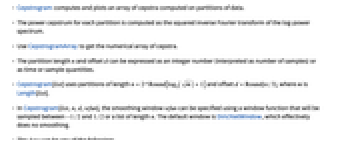
- Cepstrogram 计算并绘制根据数据分区算出的倒频谱数组.
- 每个分区的功率倒频谱的计算方法为:功率谱的对数值的傅立叶逆变换的平方.
- 用 CepstrogramArray 来获得倒频谱的数值数组.
- 分区长度 n 和偏移量 d 可用整数(解释为样本数)、时间或抽样数量来表示.
- Cepstrogram[list] 使用分区长度

和偏移量
,其中 m 为 Length[list]. - 在 Cepstrogram[list,n,d,wfun] 中,可以用在
和
之间被抽样的窗口函数或长度为 n 的列表来指定平滑窗口 wfun. 默认窗口为 DirichletWindow,实际上不进行任何平滑处理. - data 可为以下形式:
-
list 1 维数值数组 audio Audio 或 Sound 对象 video a Video object - 对于多通道音频对象,是在所有通道的和之上计算倒频谱图.
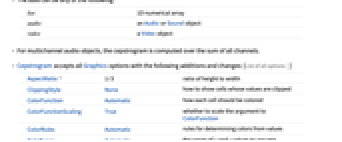
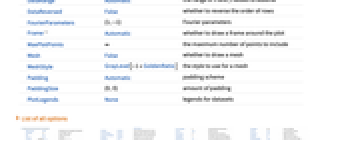
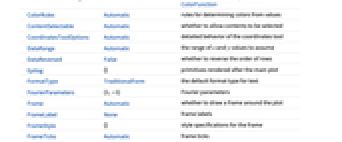
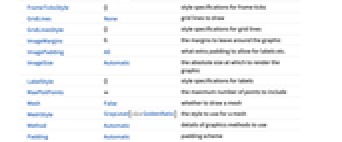
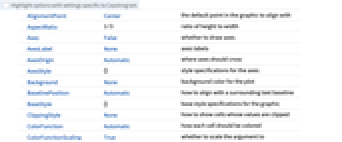
- Cepstrogram 接受所有 Graphics 选项,更多选项及不同之处如下所示: [所有选项的列表]
-
AspectRatio 1/3 高宽比 ClippingStyle None 怎样显示值被截断的单元 ColorFunction Automatic 怎样为每个单元着色 ColorFunctionScaling True 是否缩放传送给 ColorFunction 的参数 ColorRules Automatic 用于根据数值确定颜色的规则 DataRange Automatic 假设的
和
值的范围DataReversed False 是否反转行的顺序 FourierParameters {1,-1} 傅立叶参数 Frame Automatic 是否在绘图的周围画出边框 MaxPlotPoints ∞ 包括的最大点数 Mesh False 是否画出网格 MeshStyle GrayLevel[-1+GoldenRatio] 网格的样式 Padding Automatic 填充方案 PaddingSize {0,0} 填充数量 PlotLegends None 数据集的图例
所有选项的列表
范例
打开所有单元 关闭所有单元基本范例 (2)
范围 (2)
a = \!\(\*AudioBox[""]\);Cepstrogram[a]Cepstrogram[a, 64]Cepstrogram[a, 64, 32]Cepstrogram[a, 256, 64]Cepstrogram[a, 256, 64, HammingWindow]Cepstrogram[a, 256, 64, None]Cepstrogram[\!\(\*VideoBox[""]\)]选项 (50)
AspectRatio (3)
默认情况下,Cepstrogram 使用固定的高宽比:
Cepstrogram[IconizedObject[«sawtooth wave»]]通过 AspectRatio1 使高度和宽度一致:
Cepstrogram[IconizedObject[«sawtooth wave»], AspectRatio -> 1]AspectRatioFull 调整高度和宽度,使图形正好可以放置在其他结构中:
plot = Cepstrogram[IconizedObject[«sawtooth wave»], AspectRatio -> Full];{Framed[Pane[plot, {200, 150}]], Framed[Pane[plot, {200, 100}]]}Axes (4)
默认情况下,Cepstrogram 使用边框而非轴:
Cepstrogram[IconizedObject[«sawtooth wave»]]Cepstrogram[IconizedObject[«sawtooth wave»], Frame -> False, Axes -> True]使用 AxesOrigin 可指定轴的相交处:
Cepstrogram[IconizedObject[«sawtooth wave»], Frame -> False, Axes -> True, AxesOrigin -> {0, 0}]{Cepstrogram[IconizedObject[«sawtooth wave»], Frame -> False, Axes -> {True, False}], Cepstrogram[IconizedObject[«sawtooth wave»], Frame -> False, Axes -> {False, True}]}AxesLabel (3)
Cepstrogram[IconizedObject[«sawtooth wave»], Frame -> False, Axes -> True]Cepstrogram[IconizedObject[«sawtooth wave»], Frame -> False, Axes -> True, AxesLabel -> Label]Cepstrogram[IconizedObject[«sawtooth wave»], Frame -> False, Axes -> True, AxesLabel -> {Label1, Label2}]AxesOrigin (2)
AxesStyle (4)
Cepstrogram[IconizedObject[«sawtooth wave»], Frame -> False, Axes -> True, AxesStyle -> Red]Cepstrogram[IconizedObject[«sawtooth wave»], Frame -> False, Axes -> True, AxesStyle -> {{Thick, Red}, {Thick, Blue}}]Cepstrogram[IconizedObject[«sawtooth wave»], Frame -> False, Axes -> True, AxesStyle -> Green, TicksStyle -> Red]Cepstrogram[IconizedObject[«sawtooth wave»], Frame -> False, Axes -> True, AxesStyle -> Green, LabelStyle -> Gray]Frame (4)
Cepstrogram 默认使用边框:
Cepstrogram[ \!\(\*AudioBox[""]\)]Cepstrogram[ \!\(\*AudioBox[""]\), Frame -> False]Cepstrogram[ \!\(\*AudioBox[""]\), Frame -> {{True, True}, {False, False}}]Cepstrogram[ \!\(\*AudioBox[""]\), Frame -> {{True, False}, {True, False}}]FrameLabel (2)
Cepstrogram[ \!\(\*AudioBox[""]\), FrameLabel -> {{"Bottom", None}, {None, None}}]Cepstrogram[ \!\(\*AudioBox[""]\), FrameLabel -> {{"Bottom", "Top"}, {"Left", "Right"}}]FrameStyle (2)
Cepstrogram[ \!\(\*AudioBox[""]\), FrameStyle -> Directive[StandardGray, Thick]]Cepstrogram[ \!\(\*AudioBox[""]\), FrameStyle -> {{Directive[StandardGreen, Thick], Directive[Red]}, {Directive[StandardGray, Thick], Directive[StandardBlue]}}]FrameTicks (6)
Cepstrogram[ \!\(\*AudioBox[""]\)]Cepstrogram[ \!\(\*AudioBox[""]\)]使用 All 可在所有边上添加刻度:
Cepstrogram[ \!\(\*AudioBox[""]\), FrameTicks -> All]Cepstrogram[ \!\(\*AudioBox[""]\), FrameTicks -> {{{.001, .005, .008}, None}, {Automatic, Automatic}}]Cepstrogram[ \!\(\*AudioBox[""]\), FrameTicks -> {{{{.001, a}, {.005, b}, {.008, c}}, Automatic}, {{{.1, a}, {.5, b}, {.8, c}}, Automatic}}]Cepstrogram[ \!\(\*AudioBox[""]\), FrameTicks -> {{{{.001, a, .05}, {.005, b, .1}, {.008, c, .1}}, Automatic}, {{{.1, a, .1}, {.5, b, .2}, {.8, c, .2}}, Automatic}}]Cepstrogram[ \!\(\*AudioBox[""]\), FrameTicks -> {{{{.001, a, {.05, .1}}, {.005, b, {.1, .1}}, {.008, c, {.1, .1}}}, Automatic}, {Automatic, Automatic}}]Cepstrogram[ \!\(\*AudioBox[""]\), FrameTicks -> {{{{.001, a, {.05, .1}, Directive[Thick, Blue, Dashed]}, {.005, b, {.1, .1}, Directive[Thick, Red]}, {.008, c, {.1, .1}, Directive[Thick, Green]}}, Automatic}, {Automatic, Automatic}}]FrameTicksStyle (3)
Cepstrogram[ \!\(\*AudioBox[""]\), FrameStyle -> Directive[Red]]Cepstrogram[ \!\(\*AudioBox[""]\), FrameTicksStyle -> Directive[Blue, Thick]]Cepstrogram[ \!\(\*AudioBox[""]\), FrameTicksStyle -> {{Directive[Red, Thick], Directive[Blue, Thick]}, {Directive[Black, Thick], Directive[Darker@Green, Thick]}}, FrameTicks -> All]ImageSize (7)
使用有名称的尺寸如 Tiny、Small、Medium 和 Large:
{Cepstrogram[IconizedObject[«sawtooth wave»], ImageSize -> Tiny], Cepstrogram[IconizedObject[«sawtooth wave»], ImageSize -> Small]}{Cepstrogram[IconizedObject[«sawtooth wave»], ImageSize -> 150], Cepstrogram[IconizedObject[«sawtooth wave»], AspectRatio -> 1.5, ImageSize -> 150]}{Cepstrogram[IconizedObject[«sawtooth wave»], ImageSize -> {Automatic, 120}], Cepstrogram[IconizedObject[«sawtooth wave»], AspectRatio -> 2, ImageSize -> {Automatic, 120}]}{Cepstrogram[IconizedObject[«sawtooth wave»], ImageSize -> UpTo[200]], Cepstrogram[IconizedObject[«sawtooth wave»], AspectRatio -> 2, ImageSize -> UpTo[200]]}Cepstrogram[IconizedObject[«sawtooth wave»], ImageSize -> {200, 200}, Background -> StandardBlue]设置 AspectRatioFull 会填充可用空间:
Cepstrogram[IconizedObject[«sawtooth wave»], AspectRatio -> Full, ImageSize -> {200, 200}, Background -> StandardBlue]{Cepstrogram[IconizedObject[«sawtooth wave»], ImageSize -> {UpTo[200], UpTo[100]}], Cepstrogram[IconizedObject[«sawtooth wave»], AspectRatio -> 1, ImageSize -> {UpTo[200], UpTo[300]}]}设置 ImageSizeFull 可填充对象中的可用空间:
Framed[Pane[Cepstrogram[IconizedObject[«sawtooth wave»], ImageSize -> Full, Background -> StandardBlue], {200, 100}]]Framed[Pane[Cepstrogram[IconizedObject[«sawtooth wave»], AspectRatio -> Full, ImageSize -> {Scaled[0.5], Full}, Background -> StandardBlue], {400, 150}]]Ticks (6)
Cepstrogram[ \!\(\*AudioBox[""]\), Frame -> False, Axes -> True]Cepstrogram[ \!\(\*AudioBox[""]\), Frame -> False, Axes -> True, Ticks -> None]Cepstrogram[ \!\(\*AudioBox[""]\), Frame -> False, Axes -> True, Ticks -> {{.5, 1, 1.6}, {.005, .007, .01}}]Cepstrogram[ \!\(\*AudioBox[""]\), Frame -> False, Axes -> True, Ticks -> {{{.5, a}, {1, b}, {1.6, c}}, {{.005, d}, {.007, e}, {.01, f}}}]Cepstrogram[ \!\(\*AudioBox[""]\), Frame -> False, Axes -> True, Ticks -> {{{.5, a, .05}, {1, b, .1}, {1.6, c, .2}}, {{.005, d, .05}, {.007, e, .1}, {.01, f, .2}}}]Cepstrogram[ \!\(\*AudioBox[""]\), Frame -> False, Axes -> True, Ticks -> {Automatic, {{.005, d, {.05, .05}}, {.007, e, {.1, .1}}, {.01, f, {.2, .2}}}}]Cepstrogram[ \!\(\*AudioBox[""]\), Frame -> False, Axes -> True,
Ticks -> {{{.5, a, .05, Directive[Red, Thick]}, {1, b, .1,
Directive[Red]}, {1.6, c, .2,
Directive[Red, Dashed, Thick]}}, {{.005, d, .05,
Directive[Blue, Thick]}, {.007, e, .1, Directive[Blue]}, {.01,
f, .2, Directive[Blue, Dashed, Thick]}}}]TicksStyle (4)
Cepstrogram[ \!\(\*AudioBox[""]\), Frame -> False, Axes -> True]Cepstrogram[ \!\(\*AudioBox[""]\), Frame -> False, Axes -> True, TicksStyle -> Red]Cepstrogram[ \!\(\*AudioBox[""]\), Frame -> False, Axes -> True, TicksStyle -> {Directive[Red, Thick], Directive[Blue, Thick]}]Cepstrogram[ \!\(\*AudioBox[""]\), Frame -> False, Axes -> True, TicksStyle -> Directive[Red, Thick], LabelStyle -> Blue]应用 (2)
a = \!\(\*AudioBox[""]\);Spectrogram[a]功率倒频谱允许从信号和镶边 (flanger) 中进行分量退耦:
Cepstrogram[a]i = [image];Cepstrogram[Flatten[ImageData[i]], 512, 64, HannWindow]属性和关系 (2)
对于多通道 Sound 或 Audio,在各个通道的和上计算倒频谱图:
a = \!\(\*AudioBox[""]\);AudioChannels[a]Cepstrogram[a] === Cepstrogram@Total@AudioChannelSeparate[a]根据 CepstrogramArray 生成倒频谱:
chirp = Table[SawtoothWave[( i/100) + ((i/1000))^2], {i, 10000}];
ca = CepstrogramArray[chirp];ListDensityPlot[Transpose[Abs[ca]][[ ;; (Last@Dimensions[ca] / 2)]], Frame -> None, AspectRatio -> 1 / 3]与 Cepstrogram 的输出相比较:
Cepstrogram[chirp, Frame -> False]文本
Wolfram Research (2017),Cepstrogram,Wolfram 语言函数,https://reference.wolfram.com/language/ref/Cepstrogram.html (更新于 2024 年).
CMS
Wolfram 语言. 2017. "Cepstrogram." Wolfram 语言与系统参考资料中心. Wolfram Research. 最新版本 2024. https://reference.wolfram.com/language/ref/Cepstrogram.html.
APA
Wolfram 语言. (2017). Cepstrogram. Wolfram 语言与系统参考资料中心. 追溯自 https://reference.wolfram.com/language/ref/Cepstrogram.html 年
BibTeX
@misc{reference.wolfram_2026_cepstrogram, author="Wolfram Research", title="{Cepstrogram}", year="2024", howpublished="\url{https://reference.wolfram.com/language/ref/Cepstrogram.html}", note=[Accessed: 09-August-2026]}
BibLaTeX
@online{reference.wolfram_2026_cepstrogram, organization={Wolfram Research}, title={Cepstrogram}, year={2024}, url={https://reference.wolfram.com/language/ref/Cepstrogram.html}, note=[Accessed: 09-August-2026]}