---
title: "Lists"
language: "en"
type: "Tech Note"
summary: "In doing calculations, it is often convenient to collect together several objects, and treat them as a single entity. Lists give you a way to make collections of objects in the Wolfram Language. As you will see later, lists are very important and general structures in the Wolfram Language. A list such as {3,5,1} is a collection of three objects. But in many ways, you can treat the whole list as a single object. You can, for example, do arithmetic on the whole list at once, or assign the whole list to be the value of a variable. Just as you can set variables to be numbers, so also you can set them to be lists."
keywords: 
- .
- [[
- ]]
- ;;
- absent from list
- addition
- adjoin
- all
- Append
- appending
- arrange
- array
- arrays
- beginning of list
- blocking lists
- blocks
- canonical order
- car
- catenating lists
- cdr
- changing parts
- collections
- columns
- column vectors
- combinations
- combining lists
- complement
- concatenating lists
- count
- Cross
- cycle
- Delete
- deleting elements
- Det
- determinants
- diagonal matrix
- DiagonalMatrix
- dimensions
- discard elements
- disjointness
- distinct elements in lists
- Dot
- dot product
- Drop
- duplicates
- dyads
- Eigenvalues
- Eigenvectors
- elements of table
- encoding
- First
- flatten
- format
- FreeQ
- gathering elements in lists
- generating tuples
- grade
- Hilbert matrices
- IdentityMatrix
- independence
- indexed variables
- indices
- inner products
- Insert
- intersection
- Inverse
- inverse of a matrix
- iota in APL
- join lists
- largest
- Last
- Left shift
- length
- levels
- list
- lists
- lists as tables
- matrices
- MatrixForm
- maximal element
- MemberQ
- membership test
- merging lists
- metric
- Min
- minimal element
- Most
- multiplication
- multiplicity
- neighborhoods
- nested lists
- norm
- number of occurrences
- order
- ordered pairs
- ordering
- order statistics
- overlap between lists
- padding
- PadLeft
- PadRight
- pairs
- part
- Part
- partition
- parts
- permutations
- perpendicular vector
- position
- positions
- Powerset
- Prepend
- present
- product
- range
- ranges of elements
- ranking
- ravel in APL
- removing elements from lists
- repeating expressions
- replacements
- ReplacePart
- replicating expressions
- resetting parts of lists
- reshape in APL
- Rest
- reverse
- Riffle
- Right shift
- RotateLeft
- RotateRight
- rows
- run length encoding
- scalar multiplication
- scalar product
- scalars
- search
- sequence
- sequence of elements
- sequences
- set exponential
- sets
- shape
- shift
- shortening lists
- similarity transformation
- size
- smallest
- sort
- sorting
- Span
- splicing
- split
- squash
- stride
- sublists
- Sublists
- subscripts
- subsets
- symbolic vectors
- table
- Table
- TableForm
- table of function values
- tables
- tabular format
- tabulated data
- tabulated values
- tabulation of values
- Take
- tensors as tables
- transpose
- triples
- truncate list
- tuples
- Tuples
- Unflatten
- Union
- unique elements in lists
- unravel
- vector product
- vectors
canonical_url: "https://reference.wolfram.com/language/tutorial/Lists.html"
source: "Wolfram Language Documentation"
related_guides: 
  - 
    title: "List Manipulation"
    link: "https://reference.wolfram.com/language/guide/ListManipulation.en.md"
  - 
    title: "Rearranging and Restructuring Lists"
    link: "https://reference.wolfram.com/language/guide/RearrangingAndRestructuringLists.en.md"
  - 
    title: "Elements of Lists"
    link: "https://reference.wolfram.com/language/guide/ElementsOfLists.en.md"
  - 
    title: "Operations on Vectors"
    link: "https://reference.wolfram.com/language/guide/OperationsOnVectors.en.md"
  - 
    title: "Matrix Operations"
    link: "https://reference.wolfram.com/language/guide/MatrixOperations.en.md"
  - 
    title: "Rules and Patterns"
    link: "https://reference.wolfram.com/language/guide/RulesAndPatterns.en.md"
related_functions: 
  - 
    title: "All"
    link: "https://reference.wolfram.com/language/ref/All.en.md"
  - 
    title: "Append"
    link: "https://reference.wolfram.com/language/ref/Append.en.md"
  - 
    title: "Array"
    link: "https://reference.wolfram.com/language/ref/Array.en.md"
  - 
    title: "Column"
    link: "https://reference.wolfram.com/language/ref/Column.en.md"
  - 
    title: "Complement"
    link: "https://reference.wolfram.com/language/ref/Complement.en.md"
  - 
    title: "Count"
    link: "https://reference.wolfram.com/language/ref/Count.en.md"
  - 
    title: "Cross"
    link: "https://reference.wolfram.com/language/ref/Cross.en.md"
  - 
    title: "Delete"
    link: "https://reference.wolfram.com/language/ref/Delete.en.md"
  - 
    title: "DeleteDuplicates"
    link: "https://reference.wolfram.com/language/ref/DeleteDuplicates.en.md"
  - 
    title: "Det"
    link: "https://reference.wolfram.com/language/ref/Det.en.md"
  - 
    title: "DiagonalMatrix"
    link: "https://reference.wolfram.com/language/ref/DiagonalMatrix.en.md"
  - 
    title: "Dimensions"
    link: "https://reference.wolfram.com/language/ref/Dimensions.en.md"
  - 
    title: "Drop"
    link: "https://reference.wolfram.com/language/ref/Drop.en.md"
  - 
    title: "Eigenvalues"
    link: "https://reference.wolfram.com/language/ref/Eigenvalues.en.md"
  - 
    title: "Eigenvectors"
    link: "https://reference.wolfram.com/language/ref/Eigenvectors.en.md"
  - 
    title: "First"
    link: "https://reference.wolfram.com/language/ref/First.en.md"
  - 
    title: "Flatten"
    link: "https://reference.wolfram.com/language/ref/Flatten.en.md"
  - 
    title: "FreeQ"
    link: "https://reference.wolfram.com/language/ref/FreeQ.en.md"
  - 
    title: "Gather"
    link: "https://reference.wolfram.com/language/ref/Gather.en.md"
  - 
    title: "GatherBy"
    link: "https://reference.wolfram.com/language/ref/GatherBy.en.md"
  - 
    title: "IdentityMatrix"
    link: "https://reference.wolfram.com/language/ref/IdentityMatrix.en.md"
  - 
    title: "Insert"
    link: "https://reference.wolfram.com/language/ref/Insert.en.md"
  - 
    title: "Intersection"
    link: "https://reference.wolfram.com/language/ref/Intersection.en.md"
  - 
    title: "Inverse"
    link: "https://reference.wolfram.com/language/ref/Inverse.en.md"
  - 
    title: "Join"
    link: "https://reference.wolfram.com/language/ref/Join.en.md"
  - 
    title: "Last"
    link: "https://reference.wolfram.com/language/ref/Last.en.md"
  - 
    title: "Length"
    link: "https://reference.wolfram.com/language/ref/Length.en.md"
  - 
    title: "MatrixForm"
    link: "https://reference.wolfram.com/language/ref/MatrixForm.en.md"
  - 
    title: "MatrixPower"
    link: "https://reference.wolfram.com/language/ref/MatrixPower.en.md"
  - 
    title: "Max"
    link: "https://reference.wolfram.com/language/ref/Max.en.md"
  - 
    title: "MemberQ"
    link: "https://reference.wolfram.com/language/ref/MemberQ.en.md"
  - 
    title: "Min"
    link: "https://reference.wolfram.com/language/ref/Min.en.md"
  - 
    title: "Most"
    link: "https://reference.wolfram.com/language/ref/Most.en.md"
  - 
    title: "Norm"
    link: "https://reference.wolfram.com/language/ref/Norm.en.md"
  - 
    title: "Ordering"
    link: "https://reference.wolfram.com/language/ref/Ordering.en.md"
  - 
    title: "PadLeft"
    link: "https://reference.wolfram.com/language/ref/PadLeft.en.md"
  - 
    title: "PadRight"
    link: "https://reference.wolfram.com/language/ref/PadRight.en.md"
  - 
    title: "Part"
    link: "https://reference.wolfram.com/language/ref/Part.en.md"
  - 
    title: "Partition"
    link: "https://reference.wolfram.com/language/ref/Partition.en.md"
  - 
    title: "Permutations"
    link: "https://reference.wolfram.com/language/ref/Permutations.en.md"
  - 
    title: "Position"
    link: "https://reference.wolfram.com/language/ref/Position.en.md"
  - 
    title: "Prepend"
    link: "https://reference.wolfram.com/language/ref/Prepend.en.md"
  - 
    title: "Range"
    link: "https://reference.wolfram.com/language/ref/Range.en.md"
  - 
    title: "ReplacePart"
    link: "https://reference.wolfram.com/language/ref/ReplacePart.en.md"
  - 
    title: "Rest"
    link: "https://reference.wolfram.com/language/ref/Rest.en.md"
  - 
    title: "Reverse"
    link: "https://reference.wolfram.com/language/ref/Reverse.en.md"
  - 
    title: "Riffle"
    link: "https://reference.wolfram.com/language/ref/Riffle.en.md"
  - 
    title: "RotateLeft"
    link: "https://reference.wolfram.com/language/ref/RotateLeft.en.md"
  - 
    title: "RotateRight"
    link: "https://reference.wolfram.com/language/ref/RotateRight.en.md"
  - 
    title: "Sort"
    link: "https://reference.wolfram.com/language/ref/Sort.en.md"
  - 
    title: "Split"
    link: "https://reference.wolfram.com/language/ref/Split.en.md"
  - 
    title: "SplitBy"
    link: "https://reference.wolfram.com/language/ref/SplitBy.en.md"
  - 
    title: "Subsets"
    link: "https://reference.wolfram.com/language/ref/Subsets.en.md"
  - 
    title: "Table"
    link: "https://reference.wolfram.com/language/ref/Table.en.md"
  - 
    title: "TableForm"
    link: "https://reference.wolfram.com/language/ref/TableForm.en.md"
  - 
    title: "Take"
    link: "https://reference.wolfram.com/language/ref/Take.en.md"
  - 
    title: "Tr"
    link: "https://reference.wolfram.com/language/ref/Tr.en.md"
  - 
    title: "Transpose"
    link: "https://reference.wolfram.com/language/ref/Transpose.en.md"
  - 
    title: "Tuples"
    link: "https://reference.wolfram.com/language/ref/Tuples.en.md"
  - 
    title: "Union"
    link: "https://reference.wolfram.com/language/ref/Union.en.md"
---
# Lists

## Making Lists of Objects

In doing calculations, it is often convenient to collect together several objects, and treat them as a single entity. *Lists* give you a way to make collections of objects in the Wolfram Language. As you will see later, lists are very important and general structures in the Wolfram Language.

A list such as ``{3, 5, 1}`` is a collection of three objects. But in many ways, you can treat the whole list as a single object. You can, for example, do arithmetic on the whole list at once, or assign the whole list to be the value of a variable.

Here is a list of three numbers:

```wl
In[1]:=  {3, 5, 1}

Out[1]=  {3, 5, 1}
```

This squares each number in the list, and adds ``1`` to it:

```wl
In[2]:=  {3, 5, 1} ^ 2 + 1

Out[2]=  {10, 26, 2}
```

This takes differences between corresponding elements in the two lists. The lists must be the same length:

```wl
In[3]:=  {6, 7, 8} - {3.5, 4, 2.5}

Out[3]=  {2.5, 3, 5.5}
```

The value of ``%`` is the whole list:

```wl
In[4]:=  %

Out[4]=  {2.5, 3, 5.5}
```

You can apply any of the mathematical functions in ["Some Mathematical Functions"](https://reference.wolfram.com/language/tutorial/SomeMathematicalFunctions.en.md) to whole lists:

```wl
In[5]:=  Exp[%]//N

Out[5]=  {12.1825, 20.0855, 244.692}
```

Just as you can set variables to be numbers, so also you can set them to be lists.

This assigns ``v`` to be a list:

```wl
In[6]:=  v = {2, 4, 3.1}

Out[6]=  {2, 4, 3.1}
```

Wherever ``v`` appears, it is replaced by the list:

```wl
In[7]:=  v / (v - 1)

Out[7]=  {2, (4/3), 1.47619}
```

## Collecting Objects Together

We first encountered lists in ["Making Lists of Objects"](https://reference.wolfram.com/language/tutorial/Lists.en.md#15346) as a way of collecting numbers together. Here, we shall see many different ways to use lists. You will find that lists are some of the most flexible and powerful objects in the Wolfram Language. You will see that lists in the Wolfram Language represent generalizations of several standard concepts in mathematics and computer science.

At a basic level, what a Wolfram Language list essentially does is to provide a way for you to collect together several expressions of any kind.

Here is a list of numbers:

```wl
In[1]:=  {2, 3, 4}

Out[1]=  {2, 3, 4}
```

This gives a list of symbolic expressions:

```wl
In[2]:=  x ^ % - 1

Out[2]=  {-1 + x^2, -1 + x^3, -1 + x^4}
```

You can differentiate these expressions:

```wl
In[3]:=  D[%, x]

Out[3]=  {2 x, 3 x^2, 4 x^3}
```

And then you can find values when ``x`` is replaced with ``3`` :

```wl
In[4]:=  % /. x -> 3

Out[4]=  {6, 27, 108}
```

The mathematical functions that are built into the Wolfram Language are mostly set up to be "listable" so that they act separately on each element of a list. This is, however, not true of all functions in the Wolfram Language. Unless you set it up specially, a new function ``f`` that you introduce will treat lists just as single objects. ["Applying Functions to Parts of Expressions"](https://reference.wolfram.com/language/tutorial/FunctionalOperations.en.md#28027) and ["Structural Operations"](https://reference.wolfram.com/language/tutorial/FunctionalOperations.en.md#31585) will describe how you can use ``Map`` and ``Thread`` to apply a function like this separately to each element in a list.

## Making Tables of Values

You can use lists as tables of values. You can generate the tables, for example, by evaluating an expression for a sequence of different parameter values.

This gives a table of the values of $i^2$, with $i$ running from 1 to 6:

```wl
In[1]:=  Table[i ^ 2, {i, 6}]

Out[1]=  {1, 4, 9, 16, 25, 36}
```

Here is a table of $\sin (n/5)$ for $n$ from $0$ to $4$ :

```wl
In[2]:=  Table[Sin[n / 5], {n, 0, 4}]

Out[2]=  {0, Sin[(1/5)], Sin[(2/5)], Sin[(3/5)], Sin[(4/5)]}
```

This gives the numerical values:

```wl
In[3]:=  N[%]

Out[3]=  {0., 0.198669, 0.389418, 0.564642, 0.717356}
```

You can also make tables of formulas:

```wl
In[4]:=  Table[x ^ i + 2i, {i, 5}]

Out[4]=  {2 + x, 4 + x^2, 6 + x^3, 8 + x^4, 10 + x^5}
```

``Table`` uses exactly the same iterator notation as the functions ``Sum`` and ``Product``, which are discussed in ["Sums and Products"](https://reference.wolfram.com/language/tutorial/SeriesLimitsAndResidues.en.md#5396) :

```wl
In[5]:=  Product[x ^ i + 2i, {i, 5}]

Out[5]=  (2 + x) (4 + x^2) (6 + x^3) (8 + x^4) (10 + x^5)
```

This makes a table with values of ``x`` running from ``0`` to ``1`` in steps of ``0.25`` :

```wl
In[6]:=  Table[Sqrt[x], {x, 0, 1, 0.25}]

Out[6]=  {0, 0.5, 0.707107, 0.866025, 1.}
```

You can perform other operations on the lists you get from ``Table`` :

```wl
In[7]:=  % ^ 2 + 3

Out[7]=  {3, 3.25, 3.5, 3.75, 4.}
```

``TableForm`` displays lists in a "tabular" format. Notice that both words in the name ``TableForm`` begin with capital letters:

```wl
In[8]:=  %//TableForm

Out[8]//TableForm= 
|      |
| :--- |
| 3    |
| 3.25 |
| 3.5  |
| 3.75 |
| 4.   |
```

All the examples so far have been of tables obtained by varying a single parameter. You can also make tables that involve several parameters. These multidimensional tables are specified using the standard Wolfram Language iterator notation, discussed in ["Sums and Products"](https://reference.wolfram.com/language/tutorial/SeriesLimitsAndResidues.en.md#5396).

This makes a table of $x^{ i}+y^{ j}$ with $i$ running from 1 to 3 and $j$ running from 1 to 2:

```wl
In[9]:=  Table[x ^ i + y ^ j, {i, 3}, {j, 2}]

Out[9]=  {{x + y, x + y^2}, {x^2 + y, x^2 + y^2}, {x^3 + y, x^3 + y^2}}
```

The table in this example is a *list of lists*. The elements of the outer list correspond to successive values of $i$. The elements of each inner list correspond to successive values of $j$, with $i$ fixed.

Sometimes you may want to generate a table by evaluating a particular expression many times, without incrementing any variables.

This creates a list containing four copies of the symbol ``x`` :

```wl
In[10]:=  Table[x, {4}]

Out[10]=  {x, x, x, x}
```

This gives a list of four pairs of numbers sampled from ``{1, 2, 3, 4}``. ``Table`` reevaluates ``RandomSample[{1, 2, 3, 4}, 2]`` for each element in the list, so that you get four different samples:

```wl
In[19]:= Table[RandomSample[{1, 2, 3, 4}, 2], {4}]

Out[19]= {{3, 2}, {4, 2}, {4, 3}, {2, 1}}
```

This evaluates ``Sqrt[i]`` for each of the values of ``i`` in the list ``{1, 4, 9, 16}`` :

```wl
In[21]:= Table[Sqrt[i], {i, {1, 4, 9, 16}}]

Out[21]= {1, 2, 3, 4}
```

This creates a 3×2 table:

```wl
In[30]:= Table[i + 2j, {i, 3}, {j, 2}]

Out[30]= {{3, 5}, {4, 6}, {5, 7}}
```

In this table, the length of the rows depends on the more slowly varying iterator variable, ``i`` :

```wl
In[31]:= Table[i + 2j, {i, 3}, {j, i}]

Out[31]= {{3}, {4, 6}, {5, 7, 9}}
```

You can use ``Table`` to generate arrays with any number of dimensions.

This generates a three‐dimensional 2×2×2 array. It is a list of lists of lists:

```wl
In[17]:=  Table[i j ^ 2 k ^ 3, {i, 2}, {j, 2}, {k, 2}]

Out[17]=  {{{1, 8}, {4, 32}}, {{2, 16}, {8, 64}}}
```

|                                               |                                                                             |
| --------------------------------------------- | --------------------------------------------------------------------------- |
| Table[f, {imax}]                              | give a list of imax values of f                                             |
| Table[f, {i, imax}]                           | give a list of the values of f as i runs from 1 to imax                     |
| Table[f, {i, imin, imax}]                     | give a list of values with i running from imin to imax                      |
| Table[f, {i, imin, imax, di}]                 | use steps of di                                                             |
| Table[f, {i, imin, imax}, {j, jmin, jmax}, …] | generate a multidimensional table                                           |
| Table[f, {i, {i1, i2, …}]                     | give a list of the values of f as i successively takes the values i1, i2, … |
| TableForm[list]                               | display a list in tabular form                                              |

*Functions for generating tables.*

You can use the operations discussed in ["Manipulating Elements of Lists"](https://reference.wolfram.com/language/tutorial/Lists.en.md#12464) to extract elements of the table.

This creates a table and gives it the name ``sq`` :

```wl
In[25]:= sq = Table[j ^ 2, {j, 7}]

Out[25]= {1, 4, 9, 16, 25, 36, 49}
```

This gives the third part of the table:

```wl
In[26]:= sq[[3]]

Out[26]= 9
```

This gives a list of the third through fifth parts:

```wl
In[27]:= sq[[3 ;; 5]]

Out[27]= {9, 16, 25}
```

This creates a 2×2 table, and gives it the name ``m`` :

```wl
In[23]:= m = Table[i - j, {i, 2}, {j, 2}]

Out[23]= {{0, -1}, {1, 0}}
```

This extracts the first sublist from the list of lists that makes up the table:

```wl
In[13]:=  m[[1]]

Out[13]=  {0, -1}
```

This extracts the second element of that sublist:

```wl
In[14]:=  %[[2]]

Out[14]=  -1
```

This does the two operations together:

```wl
In[15]:=  m[[1, 2]]

Out[15]=  -1
```

This displays ``m`` in a "tabular" form:

```wl
In[16]:=  TableForm[m]

Out[16]//TableForm= 
|   |    |
| :- | :- |
| 0 | -1 |
| 1 | 0  |
```

|                                          |                                                                         |
| ---------------------------------------- | ----------------------------------------------------------------------- |
| t[[i]]or  Part[t, i]                     | give the i$$^{\text{th}}$$ sublist in t (also input as t[[i]])            |
| t[[i ;; j]]or  Part[t, i ;; j]           | give a list of the parts i through j                                    |
| t[[{i1, i2, …}]]or  Part[t, {i1, i2, …}] | give a list of the i1$$^{\text{th}}$$, i2$$^{\text{th}}$$, … parts of t |
| t[[i, j, …]]or  Part[t, i, j, …]         | give the part of t corresponding to t[[i]][[j]]…                        |

*Ways to extract parts of tables.*

As mentioned in ["Manipulating Elements of Lists"](https://reference.wolfram.com/language/tutorial/Lists.en.md#12464), you can think of lists in the Wolfram Language as being analogous to "arrays". Lists of lists are then like two‐dimensional arrays. When you lay them out in a tabular form, the two indices of each element are like its $x$ and $y$ coordinates.

## Manipulating Elements of Lists

Many of the most powerful list manipulation operations in the Wolfram Language treat whole lists as single objects. Sometimes, however, you need to pick out or set individual elements in a list.

You can refer to an element of a Wolfram Language list by giving its "index". The elements are numbered in order, starting at 1.

|                                            |                                                                            |
| ------------------------------------------ | -------------------------------------------------------------------------- |
| {a, b, c}                                  | a list                                                                     |
| Part[list, i]or  list[[i]]                 | the i$$^{\text{th}}$$ element of list (the first element is list[[1]])     |
| Part[list, {i, j, …}]or  list[[{i, j, …}]] | a list of the i$$^{\text{th}}$$, j$$^{\text{th}}$$, … elements of list     |
| Part[list, i ;; j]                         | a list of the i$$^{\text{th}}$$ through j$$^{\text{th}}$$ elements of list |

*Operations on list elements.*

This extracts the second element of the list:

```wl
In[1]:=  {5, 8, 6, 9}[[2]]

Out[1]=  8
```

This extracts a list of elements:

```wl
In[2]:=  {5, 8, 6, 9}[[{3, 1, 3, 2, 4}]]

Out[2]=  {6, 5, 6, 8, 9}
```

This assigns the value of ``v`` to be a list:

```wl
In[3]:=  v = {2, 4, 7}

Out[3]=  {2, 4, 7}
```

You can extract elements of ``v`` :

```wl
In[4]:=  v[[2]]

Out[4]=  4
```

By assigning a variable to be a list, you can use Wolfram Language lists much like "arrays" in other computer languages. Thus, for example, you can reset an element of a list by assigning a value to ``v[[i]]``.

|                                      |                                                 |
| ------------------------------------ | ----------------------------------------------- |
| Part[v, i]or  v[[i]]                 | extract the i$$^{\text{th}}$$ element of a list |
| Part[v, i] = valueor  v[[i]] = value | reset the i$$^{\text{th}}$$ element of a list   |

*Array‐like operations on lists.*

Here is a list:

```wl
In[5]:=  v = {4, -1, 8, 7}

Out[5]=  {4, -1, 8, 7}
```

This resets the third element of the list:

```wl
In[6]:=  v[[3]] = 0

Out[6]=  0
```

Now the list assigned to ``v`` has been modified:

```wl
In[7]:=  v

Out[7]=  {4, -1, 0, 7}
```

## Vectors and Matrices

Vectors and matrices in the Wolfram Language are simply represented by lists and by lists of lists, respectively.

|     |     |
| --- | --- |
| {a, b, c} | vector $(a,b,c)$ |
| {{a, b}, {c, d}} | matrix $\left( \begin{array}{cc}  a & b \\  c & d \\ \end{array} \right)$ |

*The representation of vectors and matrices by lists.*

This is a 2×2 matrix:

```wl
In[1]:= m = {{a, b}, {c, d}}

Out[1]= {{a, b}, {c, d}}
```

Here is the first row:

```wl
In[2]:= m[[1]]

Out[2]= {a, b}
```

Here is the element $m_{12}$ :

```wl
In[3]:= m[[1, 2]]

Out[3]= b
```

This is a two‐component vector:

```wl
In[4]:= v = {x, y}

Out[4]= {x, y}
```

The objects ``p`` and ``q`` are treated as scalars:

```wl
In[5]:= p v + q

Out[5]= {q + p x, q + p y}
```

Vectors are added component by component:

```wl
In[6]:= v + {xp, yp} + {xpp, ypp}

Out[6]= {x + xp + xpp, y + yp + ypp}
```

This gives the dot (scalar) product of two vectors:

```wl
In[7]:= {x, y}.{xp, yp}

Out[7]= x xp + y yp
```

You can also multiply a matrix by a vector:

```wl
In[8]:= m.v

Out[8]= {a x + b y, c x + d y}
```

Or a matrix by a matrix:

```wl
In[9]:= m.m

Out[9]= {{a^2 + b c, a b + b d}, {a c + c d, b c + d^2}}
```

Or a vector by a matrix:

```wl
In[10]:= v.m

Out[10]= {a x + c y, b x + d y}
```

This combination makes a scalar:

```wl
In[11]:= v.m.v

Out[11]= x (a x + c y) + y (b x + d y)
```

Because of the way the Wolfram Language uses lists to represent vectors and matrices, you never have to distinguish between "row" and "column" vectors.

|                            |                                                             |
| -------------------------- | ----------------------------------------------------------- |
| Table[f, {i, n}]           | build a length‐n vector by evaluating f with i = 1, 2, …, n |
| Array[a, n]                | build a length‐n vector of the form {a[1], a[2], …}         |
| Range[n]                   | create the list {1, 2, 3, …, n}                             |
| Range[n1, n2]              | create the list {n1, n1 + 1, …, n2}                         |
| Range[n1, n2, dn]          | create the list {n1, n1 + dn, …, n2}                        |
| list[[i]]or  Part[list, i] | give the i$$^{\text{th}}$$ element in the vector list       |
| Length[list]               | give the number of elements in list                         |
| c v                        | multiply a vector by a scalar                               |
| a.b                        | dot product of two vectors                                  |
| Cross[a, b]                | cross product of two vectors (also input as a×b)            |
| Norm[v]                    | Euclidean norm of a vector                                  |

*Functions for vectors.*

|                                      |                                                                                          |
| ------------------------------------ | ---------------------------------------------------------------------------------------- |
| Table[f, {i, m}, {j, n}]             | build an m×n matrix by evaluating f with i ranging from 1 to m and j ranging from 1 to n |
| Array[a, {m, n}]                     | build an m×n matrix with i, j$$^{\text{th}}$$ element a[i, j]                            |
| IdentityMatrix[n]                    | generate an n×n identity matrix                                                          |
| DiagonalMatrix[list]                 | generate a square matrix with the elements in list on the main diagonal                  |
| list[[i]]or  Part[list, i]           | give the i$$^{\text{th}}$$ row in the matrix list                                        |
| list[[All, j]]or  Part[list, All, j] | give the j$$^{\text{th}}$$ column in the matrix list                                     |
| list[[i, j]]or  Part[list, i, j]     | give the i, j$$^{\text{th}}$$ element in the matrix list                                 |
| Dimensions[list]                     | give the dimensions of a matrix represented by list                                      |

*Functions for matrices.*

|                  |                                          |
| ---------------- | ---------------------------------------- |
| Column[list]     | display the elements of list in a column |
| MatrixForm[list] | display list in matrix form              |

*Formatting constructs for vectors and matrices.*

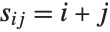
This builds a 3×3 matrix $s$ with elements $s_{ij}=i+j$ :

```wl
In[12]:= s = Table[i + j, {i, 3}, {j, 3}]

Out[12]= {{2, 3, 4}, {3, 4, 5}, {4, 5, 6}}
```

This displays ``s`` in standard two‐dimensional matrix format:

```wl
In[13]:= MatrixForm[s]

Out[13]//MatrixForm=
(⁠|   |   |   |
| :- | :- | :- |
| 2 | 3 | 4 |
| 3 | 4 | 5 |
| 4 | 5 | 6 |⁠)
```

This gives a vector with symbolic elements. You can use this in deriving general formulas that are valid with any choice of vector components:

```wl
In[14]:= Array[a, 4]

Out[14]= {a[1], a[2], a[3], a[4]}
```

This gives a 3×2 matrix with symbolic elements. ["Building Lists from Functions"](https://reference.wolfram.com/language/tutorial/FunctionalOperations.en.md#18271) discusses how you can produce other kinds of elements with ``Array`` :

```wl
In[15]:= Array[p, {3, 2}]

Out[15]= {{p[1, 1], p[1, 2]}, {p[2, 1], p[2, 2]}, {p[3, 1], p[3, 2]}}
```

Here are the dimensions of the matrix on the previous line:

```wl
In[16]:= Dimensions[%]

Out[16]= {3, 2}
```

This generates a 3×3 diagonal matrix:

```wl
In[17]:= DiagonalMatrix[{a, b, c}]

Out[17]= {{a, 0, 0}, {0, b, 0}, {0, 0, c}}
```

|                   |                                     |
| ----------------- | ----------------------------------- |
| c m               | multiply a matrix by a scalar       |
| a.b               | dot product of two matrices         |
| Inverse[m]        | matrix inverse                      |
| MatrixPower[m, n] | n$$^{\text{th}}$$ power of a matrix |
| Det[m]            | determinant                         |
| Tr[m]             | trace                               |
| Transpose[m]      | transpose                           |
| Eigenvalues[m]    | eigenvalues                         |
| Eigenvectors[m]   | eigenvectors                        |

*Some mathematical operations on matrices.*

Here is the 2×2 matrix of symbolic variables that was defined:

```wl
In[18]:= m

Out[18]= {{a, b}, {c, d}}
```

This gives its determinant:

```wl
In[19]:= Det[m]

Out[19]= -b c + a d
```

Here is the transpose of ``m`` :

```wl
In[20]:= Transpose[m]

Out[20]= {{a, c}, {b, d}}
```

This gives the inverse of ``m`` in symbolic form:

```wl
In[21]:= Inverse[m]

Out[21]= {{(d/-b c + a d), -(b/-b c + a d)}, {-(c/-b c + a d), (a/-b c + a d)}}
```

Here is a 3×3 rational matrix:

```wl
In[22]:= h = Table[1 / (i + j - 1), {i, 3}, {j, 3}]

Out[22]= {{1, (1/2), (1/3)}, {(1/2), (1/3), (1/4)}, {(1/3), (1/4), (1/5)}}
```

This gives its inverse:

```wl
In[23]:= Inverse[h]

Out[23]= {{9, -36, 30}, {-36, 192, -180}, {30, -180, 180}}
```

Taking the dot product of the inverse with the original matrix gives the identity matrix:

```wl
In[24]:= %.h

Out[24]= {{1, 0, 0}, {0, 1, 0}, {0, 0, 1}}
```

Here is a 3×3 matrix:

```wl
In[25]:= r = Table[i + j + 1, {i, 3}, {j, 3}]

Out[25]= {{3, 4, 5}, {4, 5, 6}, {5, 6, 7}}
```

``Eigenvalues`` gives the eigenvalues of the matrix:

```wl
In[26]:= Eigenvalues[r]

Out[26]= {(1/2) (15 + Sqrt[249]), (1/2) (15 - Sqrt[249]), 0}
```

This gives a numerical approximation to the matrix:

```wl
In[27]:= rn = N[r]

Out[27]= {{3., 4., 5.}, {4., 5., 6.}, {5., 6., 7.}}
```

Here are numerical approximations to the eigenvalues:

```wl
In[28]:= Eigenvalues[rn]

Out[28]= {15.3899, -0.389867, -1.499553248501123`*^-16}
```

["Linear Algebra in Wolfram Language](https://reference.wolfram.com/language/tutorial/LinearAlgebraInMathematicaOverview.en.md)" discusses many other matrix operations that are built into the Wolfram Language.

## Getting Pieces of Lists

|                                                |                                             |
| ---------------------------------------------- | ------------------------------------------- |
| First[list]                                    | the first element in list                   |
| Last[list]                                     | the last element                            |
| Part[list, n]or  list[[n]]                     | the n$$^{\text{th}}$$ element               |
| Part[list,  - n]or  list[[ - n]]               | the n$$^{\text{th}}$$ element from the end  |
| Part[list, m ;; n]                             | elements m through n                        |
| Part[list, {n1, n2, …}]or  list[[{n1, n2, …}]] |                                             |
|                                                | the list of elements at positions n1, n2, … |

*Picking out elements of lists.*

We will use this list for the examples:

```wl
In[5]:= t = {a, b, c, d, e, f, g}

Out[5]= {a, b, c, d, e, f, g}
```

Here is the last element of ``t`` :

```wl
In[2]:=  Last[t]

Out[2]=  g
```

This gives the third element:

```wl
In[3]:=  t[[3]]

Out[3]=  c
```

This gives the list of elements ``3`` through ``6`` :

```wl
In[6]:= t[[3 ;; 6]]

Out[6]= {c, d, e, f}
```

This gives a list of the first and fourth elements:

```wl
In[4]:=  t[[{1, 4}]]

Out[4]=  {a, d}
```

|                    |                                        |
| ------------------ | -------------------------------------- |
| Take[list, n]      | the first n elements in list           |
| Take[list,  - n]   | the last n elements                    |
| Take[list, {m, n}] | elements m through n (inclusive)       |
| Rest[list]         | list with its first element dropped    |
| Drop[list, n]      | list with its first n elements dropped |
| Most[list]         | list with its last element dropped     |
| Drop[list,  - n]   | list with its last n elements dropped  |
| Drop[list, {m, n}] | list with elements m through n dropped |

*Picking out sequences in lists.*

This gives the first three elements of the list ``t`` defined above:

```wl
In[5]:=  Take[t, 3]

Out[5]=  {a, b, c}
```

This gives the last three elements:

```wl
In[6]:=  Take[t, -3]

Out[6]=  {e, f, g}
```

This gives elements ``2`` through ``5`` inclusive:

```wl
In[7]:=  Take[t, {2, 5}]

Out[7]=  {b, c, d, e}
```

This gives elements ``3`` through ``7`` in steps of ``2`` :

```wl
In[8]:=  Take[t, {3, 7, 2}]

Out[8]=  {c, e, g}
```

This gives ``t`` with the first element dropped:

```wl
In[9]:=  Rest[t]

Out[9]=  {b, c, d, e, f, g}
```

This gives ``t`` with its first three elements dropped:

```wl
In[10]:=  Drop[t, 3]

Out[10]=  {d, e, f, g}
```

This gives ``t`` with only its third element dropped:

```wl
In[11]:=  Drop[t, {3, 3}]

Out[11]=  {a, b, d, e, f, g}
```

["Manipulating Expressions like Lists"](https://reference.wolfram.com/language/tutorial/Expressions.en.md#4485) shows how all the functions here can be generalized to work not only on lists, but on any Wolfram Language expressions.

The functions here allow you to pick out pieces that occur at particular positions in lists. ["Finding Expressions That Match a Pattern"](https://reference.wolfram.com/language/tutorial/Patterns.en.md#7301) shows how you can use functions like ``Select`` and ``Cases`` to pick out elements of lists based not on their positions, but instead on their properties.

## Testing and Searching List Elements

|                      |                                                        |
| -------------------- | ------------------------------------------------------ |
| Position[list, form] | the positions at which form occurs in list             |
| Count[list, form]    | the number of times form appears as an element of list |
| MemberQ[list, form]  | test whether form is an element of list                |
| FreeQ[list, form]    | test whether form occurs nowhere in list               |

*Testing and searching for elements of lists.*

["Getting Pieces of Lists"](https://reference.wolfram.com/language/tutorial/Lists.en.md#30946) discusses how to extract pieces of lists based on their positions or indices. The Wolfram System also has functions that search and test for elements of lists, based on the values of those elements.

This gives a list of the positions at which ``a`` appears in the list:

```wl
In[1]:=  Position[{a, b, c, a, b}, a]

Out[1]=  {{1}, {4}}
```

``Count`` counts the number of occurrences of ``a`` :

```wl
In[2]:=  Count[{a, b, c, a, b}, a]

Out[2]=  2
```

This shows that ``a`` is an element of ``{a, b, c}`` :

```wl
In[3]:=  MemberQ[{a, b, c}, a]

Out[3]=  True
```

On the other hand, ``d`` is not:

```wl
In[4]:=  MemberQ[{a, b, c}, d]

Out[4]=  False
```

This assigns ``m`` to be the 3×3 identity matrix:

```wl
In[5]:=  m = IdentityMatrix[3]

Out[5]=  {{1, 0, 0}, {0, 1, 0}, {0, 0, 1}}
```

This shows that ``0`` does occur *somewhere* in ``m`` :

```wl
In[6]:=  FreeQ[m, 0]

Out[6]=  False
```

This gives a list of the positions at which ``0`` occurs in ``m`` :

```wl
In[7]:=  Position[m, 0]

Out[7]=  {{1, 2}, {1, 3}, {2, 1}, {2, 3}, {3, 1}, {3, 2}}
```

As discussed in ["Finding Expressions That Match a Pattern"](https://reference.wolfram.com/language/tutorial/Patterns.en.md#7301), the functions ``Count`` and ``Position``, as well as ``MemberQ`` and ``FreeQ``, can be used not only to search for *particular* list elements, but also to search for classes of elements which match specific "patterns".

## Adding, Removing, and Modifying List Elements

|                                  |                                                    |
| -------------------------------- | -------------------------------------------------- |
| Prepend[list, element]           | add element at the beginning of list               |
| Append[list, element]            | add element at the end of list                     |
| Insert[list, element, i]         | insert element at position i in list               |
| Insert[list, element,  - i]      | insert at position i counting from the end of list |
| Riffle[list, element]            | interleave element between the entries of list     |
| Delete[list, i]                  | delete the element at position i in list           |
| ReplacePart[list, i -> new]      | replace the element at position i in list with new |
| ReplacePart[list, {i, j} -> new] | replace list[[i, j]] with new                      |

*Functions for manipulating elements in explicit lists.*

This gives a list with ``x`` prepended:

```wl
In[1]:=  Prepend[{a, b, c}, x]

Out[1]=  {x, a, b, c}
```

This inserts ``x`` so that it becomes element number 2:

```wl
In[2]:=  Insert[{a, b, c}, x, 2]

Out[2]=  {a, x, b, c}
```

This interleaves ``x`` between the entries of the list:

```wl
In[1]:= Riffle[{a, b, c}, x]

Out[1]= {a, x, b, x, c}
```

This replaces the third element in the list with ``x`` :

```wl
In[3]:=  ReplacePart[{a, b, c, d}, 3 -> x]

Out[3]=  {a, b, x, d}
```

This replaces the 1, 2 element in a 2×2 matrix:

```wl
In[4]:=  ReplacePart[{{a, b}, {c, d}}, {1, 2} -> x]

Out[4]=  {{a, x}, {c, d}}
```

Functions like ``ReplacePart`` take explicit lists and give you new lists. Sometimes, however, you may want to modify a list "in place", without explicitly generating a new list.

|                 |                                                     |
| --------------- | --------------------------------------------------- |
| v = {e1, e2, …} | assign a variable to be a list                      |
| v[[i]] = new    | assign a new value to the i$$^{\text{th}}$$ element |

*Resetting list elements.*

This defines ``v`` to be a list:

```wl
In[5]:=  v = {a, b, c, d}

Out[5]=  {a, b, c, d}
```

This sets the third element to be ``x`` :

```wl
In[6]:=  v[[3]] = x

Out[6]=  x
```

Now ``v`` has been changed:

```wl
In[7]:=  v

Out[7]=  {a, b, x, d}
```

|                   |                                                        |
| ----------------- | ------------------------------------------------------ |
| m[[i, j]] = new   | replace the (i, j)$$^{\text{th}}$$ element of a matrix |
| m[[i]] = new      | replace the i$$^{\text{th}}$$ row                      |
| m[[All, i]] = new | replace the i$$^{\text{th}}$$ column                   |

*Resetting pieces of matrices.*

This defines ``m`` to be a matrix:

```wl
In[8]:=  m = {{a, b}, {c, d}}

Out[8]=  {{a, b}, {c, d}}
```

This sets the first column of the matrix:

```wl
In[9]:=  m[[All, 1]] = {x, y};m

Out[9]=  {{x, b}, {y, d}}
```

This sets every element in the first column to be ``0`` :

```wl
In[10]:=  m[[All, 1]] = 0;m

Out[10]=  {{0, b}, {0, d}}
```

## Combining Lists

|                        |                                                                  |
| ---------------------- | ---------------------------------------------------------------- |
| Join[list1, list2, …]  | concatenate lists together                                       |
| Union[list1, list2, …] | combine lists, removing repeated elements and sorting the result |
| Riffle[list1, list2]   | interleave elements of list1 and list2                           |

*Functions for combining lists.*

``Join`` concatenates any number of lists together:

```wl
In[1]:=  Join[{a, b, c}, {x, y}, {t, u}]

Out[1]=  {a, b, c, x, y, t, u}
```

``Union`` combines lists, keeping only distinct elements:

```wl
In[2]:=  Union[{a, b, c}, {c, a, d}, {a, d}]

Out[2]=  {a, b, c, d}
```

``Riffle`` combines lists by interleaving their elements:

```wl
In[1]:= Riffle[{a, b, c}, {x, y, z}]

Out[1]= {a, x, b, y, c, z}
```

## Lists as Sets

The Wolfram Language usually keeps the elements of a list in exactly the order you originally entered them. If you want to treat a Wolfram Language list like a mathematical *set*, however, you may want to ignore the order of elements in the list.

|                                 |                                                                                |
| ------------------------------- | ------------------------------------------------------------------------------ |
| Union[list1, list2, …]          | give a list of the distinct elements in the listi                              |
| Intersection[list1, list2, …]   | give a list of the elements that are common to all the listi                   |
| Complement[universal, list1, …] | give a list of the elements that are in universal, but not in any of the listi |
| Subsets[list]                   | give a list of all subsets of the elements in list                             |
| DeleteDuplicates[list]          | delete all duplicates from list                                                |

*Set theoretical functions.*

``Union`` gives the elements that occur in *any* of the lists:

```wl
In[1]:= Union[{c, a, b}, {d, a, c}, {a, e}]

Out[1]= {a, b, c, d, e}
```

``Intersection`` gives only elements that occur in *all* the lists:

```wl
In[2]:= Intersection[{a, c, b}, {b, a, d, a}]

Out[2]= {a, b}
```

``Complement`` gives elements that occur in the first list, but not in any of the others:

```wl
In[3]:= Complement[{a, b, c, d}, {a, d}]

Out[3]= {b, c}
```

This gives all the subsets of the list:

```wl
In[4]:= Subsets[{a, b, c}]

Out[4]= {{}, {a}, {b}, {c}, {a, b}, {a, c}, {b, c}, {a, b, c}}
```

``DeleteDuplicates`` deletes all duplicate elements from the list:

```wl
In[5]:= DeleteDuplicates[{a, b, c, a}]

Out[5]= {a, b, c}
```

## Rearranging Lists

|                      |                                                  |
| -------------------- | ------------------------------------------------ |
| Sort[list]           | sort the elements of list into a standard order  |
| Union[list]          | sort elements, removing any duplicates           |
| Reverse[list]        | reverse the order of elements in list            |
| RotateLeft[list, n]  | rotate the elements of list n places to the left |
| RotateRight[list, n] | rotate n places to the right                     |

*Functions for rearranging lists.*

This sorts the elements of a list into a standard order. In simple cases like this, the order is alphabetical or numerical:

```wl
In[1]:=  Sort[{b, a, c, a, b}]

Out[1]=  {a, a, b, b, c}
```

This sorts the elements, removing any duplicates:

```wl
In[2]:=  Union[{b, a, c, a, b}]

Out[2]=  {a, b, c}
```

This rotates ("shifts") the elements in the list two places to the left:

```wl
In[3]:=  RotateLeft[{a, b, c, d, e}, 2]

Out[3]=  {c, d, e, a, b}
```

You can rotate to the right by giving a negative displacement, or by using ``RotateRight`` :

```wl
In[4]:=  RotateLeft[{a, b, c, d, e}, -2]

Out[4]=  {d, e, a, b, c}
```

|                        |                                                   |
| ---------------------- | ------------------------------------------------- |
| PadLeft[list, len, x]  | pad list on the left with x to make it length len |
| PadRight[list, len, x] | pad list on the right                             |

*Padding lists.*

This pads a list with ``x``'s to make it length 10:

```wl
In[5]:=  PadLeft[{a, b, c}, 10, x]

Out[5]=  {x, x, x, x, x, x, x, a, b, c}
```

## Grouping and Combining Elements of Lists

|                       |                                                                                   |
| --------------------- | --------------------------------------------------------------------------------- |
| Partition[list, n]    | partition list into n‐element pieces                                              |
| Partition[list, n, d] | use offset d for successive pieces                                                |
| Split[list]           | split list into pieces consisting of runs of identical elements                   |
| SplitBy[list, f]      | split list into runs of elements with identical values when f is applied          |
| Gather[list]          | gather the elements of list into sublists of identical elements                   |
| GatherBy[list, f]     | gather the elements of list into sublists with identical values when f is applied |

*Functions for grouping together elements of lists.*

Here is a list:

```wl
In[1]:=  t = {a, b, c, d, e, f, g}

Out[1]=  {a, b, c, d, e, f, g}
```

This groups the elements of the list in pairs, throwing away the single element left at the end:

```wl
In[2]:=  Partition[t, 2]

Out[2]=  {{a, b}, {c, d}, {e, f}}
```

This groups elements in triples. There is no overlap between the triples:

```wl
In[3]:=  Partition[t, 3]

Out[3]=  {{a, b, c}, {d, e, f}}
```

This makes triples of elements, with each successive triple offset by just one element:

```wl
In[4]:=  Partition[t, 3, 1]

Out[4]=  {{a, b, c}, {b, c, d}, {c, d, e}, {d, e, f}, {e, f, g}}
```

This splits up the list into runs of identical elements:

```wl
In[5]:=  Split[{a, a, b, b, b, a, a, a, b}]

Out[5]=  {{a, a}, {b, b, b}, {a, a, a}, {b}}
```

Here is a random list of integers:

```wl
In[21]:= t = RandomInteger[10, 20]

Out[21]= {2, 7, 6, 10, 6, 6, 6, 4, 7, 3, 2, 5, 9, 5, 7, 6, 3, 10, 7, 8}
```

This splits the list into runs of even and odd numbers:

```wl
In[22]:= SplitBy[t, EvenQ]

Out[22]= {{2}, {7}, {6, 10, 6, 6, 6, 4}, {7, 3}, {2}, {5, 9, 5, 7}, {6}, {3}, {10}, {7}, {8}}
```

Gather the integers into sublists:

```wl
In[27]:= Gather[t]

Out[27]= {{2, 2}, {7, 7, 7, 7}, {6, 6, 6, 6, 6}, {10, 10}, {4}, {3, 3}, {5, 5}, {9}, {8}}
```

Gather the integers into sublists based on equivalence mod 3:

```wl
In[25]:= GatherBy[t, Mod[#, 3]&]

Out[25]= {{2, 2, 5, 5, 8}, {7, 10, 4, 7, 7, 10, 7}, {6, 6, 6, 6, 3, 9, 6, 3}}
```

|                           |                                                                   |
| ------------------------- | ----------------------------------------------------------------- |
| Tuples[list, n]           | generate all possible n‐tuples of elements from list              |
| Tuples[{list1, list2, …}] | generate all tuples whose i$$^{\text{th}}$$ element is from listi |

*Finding possible tuples of elements in lists.*

This gives all possible ways of picking two elements out of the list:

```wl
In[6]:=  Tuples[{a, b}, 2]

Out[6]=  {{a, a}, {a, b}, {b, a}, {b, b}}
```

This gives all possible ways of picking one element from each list:

```wl
In[7]:=  Tuples[{{a, b}, {1, 2, 3}}]

Out[7]=  {{a, 1}, {a, 2}, {a, 3}, {b, 1}, {b, 2}, {b, 3}}
```

## Ordering in Lists

|                      |                                                     |
| -------------------- | --------------------------------------------------- |
| Sort[list]           | sort the elements of list into order                |
| Ordering[list]       | the positions in list of the elements in Sort[list] |
| Ordering[list, n]    | the first n elements of Ordering[list]              |
| Ordering[list,  - n] | the last n elements of Ordering[list]               |
| Permutations[list]   | all possible orderings of list                      |
| Min[list]            | the smallest element in list                        |
| Max[list]            | the largest element in list                         |

*Ordering in lists.*

Here is a list of numbers:

```wl
In[50]:= t = {17, 21, 14, 9, 18}

Out[50]= {17, 21, 14, 9, 18}
```

This gives the elements of ``t`` in sorted order:

```wl
In[51]:= Sort[t]

Out[51]= {9, 14, 17, 18, 21}
```

This gives the positions of the elements of ``t``, from the position of the smallest to that of the largest:

```wl
In[54]:= Ordering[t]

Out[54]= {4, 3, 1, 5, 2}
```

This is the same as ``Sort[t]`` :

```wl
In[55]:= t[[%]]

Out[55]= {9, 14, 17, 18, 21}
```

This gives the smallest element in the list:

```wl
In[2]:=  Min[t]

Out[2]=  9
```

## Rearranging Nested Lists

You will encounter nested lists if you use matrices or generate multidimensional arrays and tables. The Wolfram Language provides many functions for handling such lists.

|                               |                                         |
| ----------------------------- | --------------------------------------- |
| Flatten[list]                 | flatten out all levels in list          |
| Flatten[list, n]              | flatten out the top n levels in list    |
| Partition[list, {n1, n2, …}]  | partition into blocks of size n1×n2×…   |
| Transpose[list]               | interchange the top two levels of lists |
| RotateLeft[list, {n1, n2, …}] | rotate successive levels by ni places   |
| PadLeft[list, {n1, n2, …}]    | pad successive levels to be length ni   |

*A few functions for rearranging nested lists.*

This "flattens out" sublists. You can think of it as effectively just removing all inner braces:

```wl
In[1]:=  Flatten[{{a}, {b, {c}}, {d}}]

Out[1]=  {a, b, c, d}
```

This flattens out only one level of sublists:

```wl
In[2]:=  Flatten[{{a}, {b, {c}}, {d}}, 1]

Out[2]=  {a, b, {c}, d}
```

There are many other operations you can perform on nested lists. More operations are discussed in ["Manipulating Lists"](https://reference.wolfram.com/language/tutorial/ManipulatingListsOverview.en.md).

## Related Guides

* [List Manipulation](https://reference.wolfram.com/language/guide/ListManipulation.en.md)
* [Rearranging and Restructuring Lists](https://reference.wolfram.com/language/guide/RearrangingAndRestructuringLists.en.md)
* [Elements of Lists](https://reference.wolfram.com/language/guide/ElementsOfLists.en.md)
* [Operations on Vectors](https://reference.wolfram.com/language/guide/OperationsOnVectors.en.md)
* [Matrix Operations](https://reference.wolfram.com/language/guide/MatrixOperations.en.md)
* [Rules and Patterns](https://reference.wolfram.com/language/guide/RulesAndPatterns.en.md)