ClusteringTree[{e1,e2,…}]
要素 e1, e2, …の階層的クラスタ化から重み付きツリーを構築する.
ClusteringTree[{e1v1,e2v2,…}]
構築されたグラフ内の viで eiを表す.
ClusteringTree[{e1,e2,…}{v1,v2,…}]
構築されたグラフ内の viで eiを表す.
ClusteringTree[label1e1,label2e2…]
構築されたグラフ内でラベル labeliを使って eiを表す.
ClusteringTree[data,h]
h 未満の距離にあるサブクラスタを繋いで,data の階層的クラスタ化から重み付きツリーを構築する.
ClusteringTree
ClusteringTree[{e1,e2,…}]
要素 e1, e2, …の階層的クラスタ化から重み付きツリーを構築する.
ClusteringTree[{e1v1,e2v2,…}]
構築されたグラフ内の viで eiを表す.
ClusteringTree[{e1,e2,…}{v1,v2,…}]
構築されたグラフ内の viで eiを表す.
ClusteringTree[label1e1,label2e2…]
構築されたグラフ内でラベル labeliを使って eiを表す.
ClusteringTree[data,h]
h 未満の距離にあるサブクラスタを繋いで,data の階層的クラスタ化から重み付きツリーを構築する.
詳細とオプション
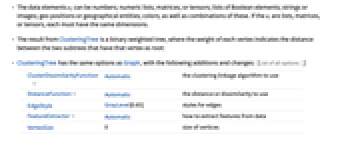
- ClusteringTreeは,データ点が階層的にどのようにクラスタ化されるかを示すTreeオブジェクトを作成する.
- データ要素 eiは,数(数値のリスト,行列,テンソル),ブール要素(列または画像),地理的な位置または地理実体,色,およびそれらの組合せでよい.eiがリスト,行列,またはテンソルの場合は,それぞれが同じ次元でなければならない.
- ClusteringTreeの結果はバイナリ重み付きツリーである.各頂点の重みは,その頂点を根とする2つのサブツリー間の距離を示す.
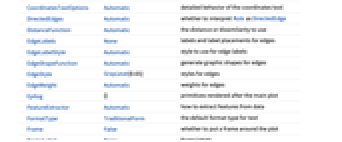
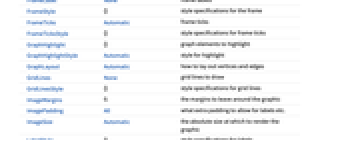
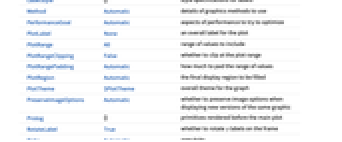
- ClusteringTreeには,Graphと同じオプションに次の追加・変更を加えたものが使える. [全オプションのリスト]
-
ClusterDissimilarityFunction Automatic 使用するクラスタ化結合アルゴリズム DistanceFunction Automatic 使用する距離または非類似度 EdgeStyle GrayLevel[0.65] 辺のスタイル FeatureExtractor Automatic データからどのように特徴を抽出するか VertexSize 0 頂点のサイズ - デフォルトで,DistanceFunctionまたはFeatureExtractorが指定されていない限り,ClusteringTreeは自動的にデータを前処理する.
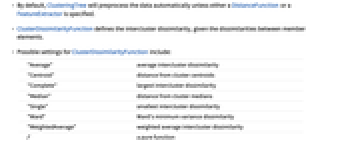
- ClusterDissimilarityFunctionは,メンバー要素間の非類似度が与えられた場合のクラスタ間非類似度を定義する.
- ClusterDissimilarityFunctionの可能な設定
-
"Average" 平均クラスタ間非類似度 "Centroid" クラスタ重心からの距離 "Complete" 最大クラスタ間非類似度 "Median" クラスタ中央値からの距離 "Single" 最小クラスタ間非類似度 "Ward" Wardの最小分散非類似度 "WeightedAverage" クラスタ間非類似度の重み付き平均 純関数 - 関数 f は任意の2つのクラスタからの距離を定義する.
- 関数 f はDistanceMatrixの実数値関数でなければならない.
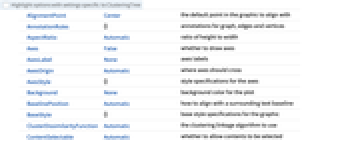
全オプションのリスト
例題
すべて開く すべて閉じる例 (5)
ClusteringTree[{1, 2, 5}]ClusteringTree[{1, 2, 5}, 1.3]ClusteringTree[{"a", "abba", "ababa", "abcdefg"}]ClusteringTree[{[image], [image], [image], [image]}]ClusteringTree[{Entity["City", {"Paris", "IleDeFrance", "France"}], Entity["City", {"Sydney", "NewSouthWales", "Australia"}], Entity["City", {"Boston", "Massachusetts", "UnitedStates"}], Entity["City", {"SanFrancisco", "California", "UnitedStates"}]}]ClusteringTree[{{False, False}, {True, False}, {True, True}}]スコープ (8)
g = ClusteringTree[{0.1, 2.2, 3.4, 5.6, 8.9}]AnnotationValue[g, "LeafLabels"]VertexWeightを見ることで,サブクラスタ間の距離を見る:
AnnotationValue[g, VertexWeight]FindShortestPath[g, 1, 7 ]data = {{RGBColor[0.3882530591983919, 0.2972372289203644, 0.14662872236042124], "brown"}, {RGBColor[0.3134110772018093, 0.6577487501778145, 0.7061181487042973], "light blue"}, {RGBColor[0.31684543929904985, 0.32154575812724917, 0.8496239355766027], "blue"}, {RGBColor[0.5443420548178017, 0.4583234220657759, 0.8094937667804043], "violet"}, {RGBColor[0.4274650545373566, 0.9072941688093845, 0.898117681435409], "light blue"}, {RGBColor[0.9323469092538643, 0.8301659871869203, 0.4534352919547222], "yellow"}, {RGBColor[0.7518445360980579, 0.05631287374652039, 0.6430690822523268], "light violet"}};ClusteringTree[data]ClusteringTree[data[[All, 1]]]data = RandomColor[20]"Centroid"結合を使ってリストからクラスタ階層を得る:
ClusteringTree[data, ClusterDissimilarityFunction -> "Centroid"]Associationから階層的クラスタ化を計算する:
association = <|"Red" -> RGBColor[0.7355420127983632, 0.2464091158003272, 0.1318671396857256], "Blue" -> RGBColor[0.19595271830233885, 0.10998208611256777, 0.5195988419509086], "Pink" -> RGBColor[0.98714064424384, 0.4517971556938676, 0.7345757642205208], "Yellow" -> RGBColor[0.914802573832932, 0.9472567075421043, 0.19573643015491093]|>;ClusteringTree[association]上記をそのValuesの階層的クラスタ化と比較する:
ClusteringTree[Values[association]]上記をそのKeysの階層的クラスタ化と比較する:
ClusteringTree[Keys[association]]距離が0.4未満のクラスタを結合することでクラスタ階層を得る:
data = RandomColor[20]ClusteringTree[data, 0.4, ClusterDissimilarityFunction -> "Centroid"]ClusteringTreeのスタイルとレイアウトを変更する:
data = RandomInteger[{0, 100}, 50];disk = Graphics[{GrayLevel[.45], Disk[]}]ClusteringTree[data, VertexSize -> 0.2, VertexShape -> disk]ClusteringTree[data, GraphLayout -> "RadialEmbedding"]三次元ベクトルのリストからクラスタ階層を得,対応する要素の合計で葉にラベルを付ける:
r = RandomReal[1, {7, 3}];g = ClusteringTree[r -> Total /@ r]ClusteringTree[Total /@ r]data = RandomSample[Range[3, 10], 6];g = ClusteringTree[data]labels = Graphics[{Blue, RegularPolygon[#]}, ImageSize -> 20]& /@ datag = ClusteringTree[data -> labels]オプション (9)
ClusterDissimilarityFunction (1)
data = RandomColor[80]"Centroid"結合を使ってリストからクラスタ階層を得る:
ClusteringTree[data, ClusterDissimilarityFunction -> "Centroid"]ClusteringTree[data, ClusterDissimilarityFunction -> "Single"]異なる"ClusterDissimilarityFunction"を使ってリストからクラスタ階層を得る:
ClusteringTree[data, ClusterDissimilarityFunction -> (Max[#]&)]DistanceFunction (1)
data = RandomReal[{10, 20}, {10, 2}];異なるDistanceFunctionを使ってクラスタ階層を得る:
ClusteringTree[data, DistanceFunction -> ManhattanDistance]ClusteringTree[data, DistanceFunction -> ChessboardDistance]FeatureExtractor (1)
flowers = { [image], [image], [image], [image], [image], [image], [image], [image], [image], [image], [image], [image], [image], [image], [image], [image], [image], [image], [image]};ClusteringTree[flowers]別のFeatureExtractorを使って特徴を抽出する:
fe = FeatureExtraction[flowers, "ImageFeatures"]ClusteringTree[flowers, FeatureExtractor -> fe]Identity FeatureExtractorを使ってデータを変更しないでおく:
ClusteringTree[flowers, FeatureExtractor -> Identity]ImageSize (2)
ClusteringTree[{1, 2, 5}, ImageSize -> Tiny]幅と高さを別々に設定すると木の境界ボックスに影響するが,縦横比には影響しない:
ClusteringTree[{1, 2, 5}, ImageSize -> {300, 150}]//FramedImageSizeとAspectRatioの両方を明示的に設定する:
ClusteringTree[{1, 2, 5}, ImageSize -> {300, 150}, AspectRatio -> 150 / 300]VertexLabelStyle (4)
ClusteringTree[{3, 3, 5, 4, 7, 7}, VertexLabelStyle -> Large]ClusteringTree[{3, 3, 5, 4, 7, 7}, VertexLabelStyle -> Red]ClusteringTree[{3, 3, 5, 4, 7, 7}, VertexLabelStyle -> Directive[Purple, Italic, 40]]式の中には,画像のようにFontSizeの影響を受けないものがある:
images = {[image], [image], [image], [image]};ClusteringTree[images, VertexLabelStyle -> Tiny, ImageSize -> Small]Magnificationを使うとあらゆるタイプの式に影響する:
ClusteringTree[images, VertexLabelStyle -> Directive[Magnification -> .3], ImageSize -> Small]labels = ColorConvert[ImageResize[#, {Automatic, 40}], "Grayscale"]& /@ imagesClusteringTree[images -> labels, ImageSize -> Small]テキスト
Wolfram Research (2016), ClusteringTree, Wolfram言語関数, https://reference.wolfram.com/language/ref/ClusteringTree.html (2017年に更新).
CMS
Wolfram Language. 2016. "ClusteringTree." Wolfram Language & System Documentation Center. Wolfram Research. Last Modified 2017. https://reference.wolfram.com/language/ref/ClusteringTree.html.
APA
Wolfram Language. (2016). ClusteringTree. Wolfram Language & System Documentation Center. Retrieved from https://reference.wolfram.com/language/ref/ClusteringTree.html
BibTeX
@misc{reference.wolfram_2026_clusteringtree, author="Wolfram Research", title="{ClusteringTree}", year="2017", howpublished="\url{https://reference.wolfram.com/language/ref/ClusteringTree.html}", note=[Accessed: 11-September-2026]}
BibLaTeX
@online{reference.wolfram_2026_clusteringtree, organization={Wolfram Research}, title={ClusteringTree}, year={2017}, url={https://reference.wolfram.com/language/ref/ClusteringTree.html}, note=[Accessed: 11-September-2026]}