BioMoleculePlot3D[biomol]
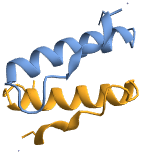
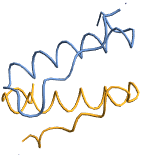
创建生物分子 biomol 的三维图形.
BioMoleculePlot3D[biomolpart]
只显示 biomol 的 part 部分.
BioMoleculePlot3D[{bm1,bm2,…}]
将一组生物分子绘制在同一张图表中.
BioMoleculePlot3D
BioMoleculePlot3D[biomol]
创建生物分子 biomol 的三维图形.
BioMoleculePlot3D[biomolpart]
只显示 biomol 的 part 部分.
BioMoleculePlot3D[{bm1,bm2,…}]
将一组生物分子绘制在同一张图表中.
更多信息和选项
- BioMoleculePlot3D 返回 Graphics3D 表达式.
- biomol 可以是 BioMolecule 对象或可以直接转换为该对象的对象,如 ExternalIdentifier、肽 BioSequence 或 "Protein" Entity.
- 对于形为 BioMoleculePlot3D[biomolpart] 的输入,part 应为 Association,其键和默认值为:
-
"ModelNumber" 1 使用哪个模型 "Chains" All 包含哪些链 - 有些生物分子包含有关生物组装的信息,其中含有链的各种组合以及几何变换. 用 BioMoleculePlot3D[biomol<|"AssemblyNumber"n|>] 可绘制生物组装的编号 n.
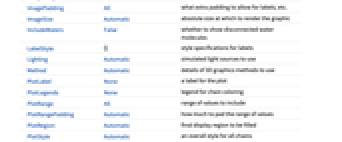
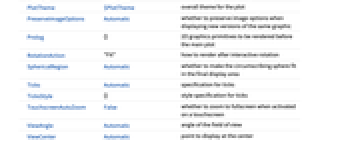
- BioMoleculePlot3D 具有与 Graphics3D 相同的选项,不同之处及更多选项如下所示: [所有选项的列表]
-
Boxed False 是否绘制边界框 ColorRules Automatic 链的着色规则 IncludeWaters False 是否显示断开的水分子 PlotLegends None 链的着色图例 PlotStyle Automatic 所有链的样式 PlotTheme $PlotTheme 绘图的整体主题 - 以卡通形式展示多肽、DNA 和 RNA 等聚合物链,其中聚合物主链呈管状,并显示各种二级结构,如螺旋、片层和核酸环.
- 对于 biomol 中不属于聚合物链的分离的组成部分(称为配体),则以与 MoleculePlot3D 相同的方式显示.
- ColorRules 的常见设置包括:
-
Automatic 自动为链着色 {"ai"coli,…} 用 coli 对标签为 ai 的链进行着色 {"Residues","resi"coli,…} 按残基名称着色 {{"ai",j}colij,…} 用 coli 对标签为 ai 的链上索引为 j 的残基进行着色 - 想获取 biomol 的链的标签列表,请使用 BioMoleculeValue[biomol,"PolymerChainLabels"].
- 想获取 biomol 的残基名称列表,请使用 BioMoleculeValue[biomol,"ResidueNames"].
- 在从晶体结构解析得到的生物分子中,通常会包含水分子,但默认情况下不会显示. 使用 PlotTheme"IncludeWaters" 可在绘图中将其包含进来. 请注意,晶体结构中通常不包含氢原子,因此这些水分子将显示为孤立的氧原子.
- 支持的绘图主题包括:
-

"Ribbons" 用缎带显示聚合物链 
"Backbone" 用丝带显示聚合物链 
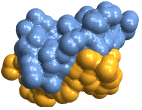
"SolventAccessibleSurface" 溶剂可及表面 
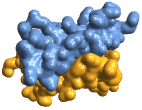
"GaussianSurface" 高斯表面 
"VanDerWaalsSurface" van der Waals 表面 
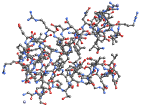
"BallAndStick" 用 Sphere 和 Cylinder 基元显示原子和键 
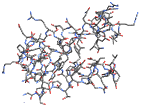
"Tubes" 用管子显示键,不显示原子 
"Spacefilling" 用球体表示原子,其半径与范德华半径相符 - PlotLegends 的常见设置包括:
-
None 没有图例 Automatic 自动确定图例 Placed[lspec,…] 指定如何放置图例 {label1,label2,…} 为多个生物分子指定标签 - 以下封装可用于生物分子:
-
StatusArea[bm,label] 鼠标悬停时在状态区域显示 Style[bm,styles] 使用指定样式显示生物分子 Tooltip[bm,label] 为生物分子附加工具提示
所有选项的列表
范例
打开所有单元 关闭所有单元基本范例 (3)
根据 ExternalIdentifier 创建生物分子:
BioMolecule[ExternalIdentifier["PDBStructureID", "168L"]]BioMoleculePlot3D[%]BioMoleculePlot3D[%% -> <|"Chains" -> "A"|>]BioMoleculePlot3D[BioMolecule[ExternalIdentifier["PDBStructureID", "1PPT"]], PlotTheme -> "GaussianSurface"]BioMoleculePlot3D[{BioMolecule[ExternalIdentifier["PDBStructureID", "1PPT"]], BioMolecule[ExternalIdentifier["PDBStructureID", "1CRN"]]}, PlotLegends -> {"1PPT", "1CRN"}]范围 (1)
选项 (11)
Axes (1)
Boxed (1)
Background (1)
ColorRules (3)
用 ColorRules 控制聚合物链的样式. 下面的例子明确指定了四个链的颜色,并指定所有其他链使用默认颜色:
BioMoleculePlot3D[BioMolecule[ExternalIdentifier["PDBStructureID", "4YOV"]], ColorRules -> {"A" | "B" | "C" -> Red, "D" -> Blue, _ -> RGBColor[0.14, 0.86, 0.5990900699076309]}]如果想按残基而不是链着色,请使用 ColorRules"Residues":
BioMoleculePlot3D[BioMolecule[ExternalIdentifier["PDBStructureID", "4YOV"]], ColorRules -> "Residues"]BioMoleculePlot3D[BioMolecule[ExternalIdentifier["PDBStructureID", "4YOV"]], ColorRules -> {"Residues", "ARG" | "GLY" | "LEU" -> Red, "VAL" -> Blue, _ -> RGBColor[0.14, 0.86, 0.5990900699076309]}]BioMoleculePlot3D[BioMolecule[ExternalIdentifier["PDBStructureID", "4BXR"]], ColorRules -> {{"A", 24 | 25 | 26} -> Red, {"B", _} -> Blue, _ -> RGBColor[0.14, 0.86, 0.5990900699076309]}]IncludeHydrogens (1)
默认情况下,当使用全原子绘图主题时,BioMoleculePlot3D 会显示所有坐标明确包含的氢原子:
BioMoleculePlot3D["8PI4", PlotTheme -> "BallAndStick"]使用 IncludeHydrogensNone 仅显示重原子(非氢原子):
BioMoleculePlot3D["8PI4", PlotTheme -> "BallAndStick", IncludeHydrogens -> None]IncludeWaters (1)
晶体结构通常会在目标生物分子周围区域解析出水分子。这些水分子默认不显示,使用 IncludeWatersTrue 可显示它们:
BioMoleculePlot3D[ExternalIdentifier["PDBStructureID", "3kqy"], IncludeWaters -> True]PlotStyle (1)
PlotLabel (1)
PlotLegends (1)
BioMoleculePlot3D[BioMolecule[ExternalIdentifier["PDBStructureID", "4YOV"]], PlotLegends -> Automatic]BioMoleculePlot3D[BioMolecule[ExternalIdentifier["PDBStructureID", "4YOV"]], PlotLegends -> Placed[Automatic, Before]]BioMoleculePlot3D[BioMolecule[ExternalIdentifier["PDBStructureID", "4YOV"]], PlotLegends -> SwatchLegend[Automatic, LegendLabel -> "chain label:", LegendFunction -> "Frame", LabelStyle -> Directive[Bold, Medium]]]相关指南
-
▪
- 分子结构与计算
文本
Wolfram Research (2024),BioMoleculePlot3D,Wolfram 语言函数,https://reference.wolfram.com/language/ref/BioMoleculePlot3D.html.
CMS
Wolfram 语言. 2024. "BioMoleculePlot3D." Wolfram 语言与系统参考资料中心. Wolfram Research. https://reference.wolfram.com/language/ref/BioMoleculePlot3D.html.
APA
Wolfram 语言. (2024). BioMoleculePlot3D. Wolfram 语言与系统参考资料中心. 追溯自 https://reference.wolfram.com/language/ref/BioMoleculePlot3D.html 年
BibTeX
@misc{reference.wolfram_2026_biomoleculeplot3d, author="Wolfram Research", title="{BioMoleculePlot3D}", year="2024", howpublished="\url{https://reference.wolfram.com/language/ref/BioMoleculePlot3D.html}", note=[Accessed: 11-August-2026]}
BibLaTeX
@online{reference.wolfram_2026_biomoleculeplot3d, organization={Wolfram Research}, title={BioMoleculePlot3D}, year={2024}, url={https://reference.wolfram.com/language/ref/BioMoleculePlot3D.html}, note=[Accessed: 11-August-2026]}