

CSGRegion
詳細とオプション
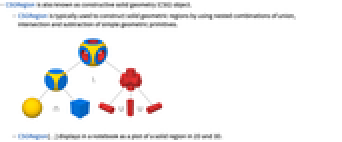
- CSGRegionは空間領域構成法(constructive solid geometry, CSG)オブジェクトとしても知られている.
- CSGRegionは,通常,単純な幾何プリミティブの和集合,共通部分,差集合を使った立体幾何領域の構築に使われる.
- CSGRegion[…]はノートブックに2Dおよび3Dの立体領域としてプロットされる.
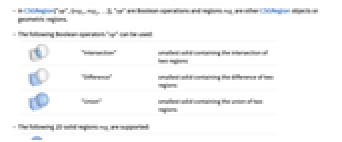
- CSGRegion["op",{reg1,reg2,…}]の"op"はブール演算子で,領域 regiは他のCSGRegionオブジェクトか幾何学領域である.
- 次のフール演算子"op"を使うことができる.
-
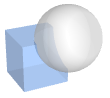
"Intersection" 2つの領域の共通集合を含む最小の立体 
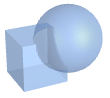
"Difference" 2つの領域の差集合を含む最小の立体 
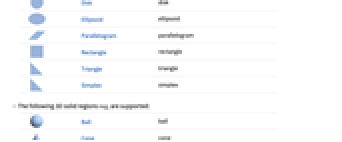
"Union" 2つの領域の和集合を含む最小の立体 - 次の2D立体領域 regiがサポートされている.
-

Disk 円板 
Ellipsoid 楕円 
Parallelogram 平行四辺形 
Rectangle 長方形 
Triangle 三角形 
Simplex 単体 - 次の3D立体領域 regiがサポートされている.
-

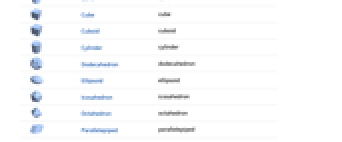
Ball 球体 
Cone 円錐 
Cube 立方体 
Cuboid 直方体 
Cylinder 円柱 
Dodecahedron 12面体 
Ellipsoid 楕円体 
Icosahedron 20面体 
Octahedron 八面体 
Parallelepiped 平行六面体 
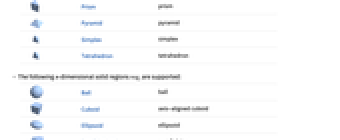
Prism 角柱 
Pyramid 角錐 
Simplex 単体 
Tetrahedron 四面体 - 次の n 次元立体領域 regiがサポートされている.
-

Ball 球体 
Cuboid 軸整列立方体 
Ellipsoid 楕円体 
Parallelepiped 平行六面体 
Simplex 単体 - CSGRegion["op",{…,wi[regi],…}]の wiは領域 regiの幾何変換またはラッパーである.
- 次の幾何変換 wiが使われる.
-
GeometricTransformation[regi,…] 幾何アフィン変換 Rotate[regi,…] 回転 Scale[regi,…] スケーリング Translate[regi,…] 平行移動 - 次の特別なラッパー wiを使うことができる.
-
Annotation[regi,…] 注釈を regiに関連付ける Style[regi,…] regiを指定されたスタイルで表示する - CSGRegion[{reg1,reg2,…}]はCSGRegion["Union",{reg1,reg2,…}]に等しい.
- CSGRegionにはRegionと同じオプションが使える.
- CSGRegionは,RegionMember,RegionDistance,RegionMeasure,NIntegrate等の関数と一緒に使うことができる.
例題
すべて開く すべて閉じる例 (3)
CSGRegion["Intersection", {Disk[], Rectangle[]}]Area[%]CSGRegion["Intersection", {Ball[], Cuboid[]}]Volume[%]CSGRegion["Intersection", {Style[Cube[1.5], Hue[0.58, 1, 0.9]], Style[Ball[], Hue[0.13, 1, 0.91]]}]スコープ (11)
基本的な用法 (4)
領域のUnion:
CSGRegion["Union", {Cube[3 / 2], Ball[]}]CSGRegion["Difference", {Cube[3 / 2], Ball[]}]CSGRegion["Intersection", {Cube[3 / 2], Ball[]}]CSGRegion["Intersection", {Disk[], Rectangle[]}]CSGRegion["Intersection", {Ball[], Cuboid[]}]CSGRegion["Intersection", {Ball[{0, 0, 0, 0}], Ball[{1, 0, 1, 0}]}]CSGRegion["Intersection", {Ball[], Cube[3 / 2]}]CSGRegion["Difference", {CSGRegion["Intersection", {Ball[], Cube[3 / 2]}], Cylinder[{{0, 0, -1}, {0, 0, 1}}, 1 / 2]}]CSGRegion["Union", {Ball[], Cube[{2, 0, 0}, 2], Ball[{4, 0, 0}]}]Orを"Union"の代りとして使う:
CSGRegion[Or, {Cube[3 / 2], Ball[]}]Andを"Intersection"の代りとして使う:
CSGRegion[And, {Cube[3 / 2], Ball[]}]表現 (4)
2DのCSGRegionの一部のスタイリングを指定する:
CSGRegion["Union", {Style[Disk[], Hue[0.58, 1, 0.9]], Style[Rectangle[], Hue[0.13, 1, 1]]}]CSGRegion["Intersection", {Style[Cuboid[], Hue[0.58, 1, 0.9]], Style[Ball[], Hue[0.13, 1, 0.91]]}]CSGRegion内の部分木のスタイリングを指定する:
CSGRegion[Cube /@ {{-1, -1, 0}, {-1, 1, 0}, {1, -1, 0}, {1, 1, 0}}]CSGRegion[{Cube[], Style[%, Red]}]CSGRegionにスタイリングを適用する:
CSGRegion[{Cuboid[], Ball[]}]Annotate[%, "CSGRegionStyle" -> Red]既存のCSGRegionのスタイリングを変更する:
csg = CSGRegion[{Cuboid[], Ball[]}]AnnotationValue[csg, "CSGRegionStyle"] = Red;スタイリングはもとのCSGRegion式に適用された:
csg注釈 (3)
Annotationで注釈を指定する:
csg = CSGRegion[{Annotation[Cube[3 / 2], "Material" -> "Wood"], Ball[]}]AnnotationKeysで既存の注釈をチェックする:
AnnotationKeys[{csg, {1}}]AnnotationValueで注釈を書き換える:
AnnotationValue[{csg, {1}}, "Material"]Annotateで注釈を適用する:
Annotate[{csg, {1}}, "Weight" -> Quantity[30, "Grams"]]AnnotationKeys[{%, {1}}]AnnotationDeleteで注釈を削除する:
AnnotationDelete[{csg, {1}}, "Material"]AnnotationKeys[{%, {1}}]AnnotationValueで注釈に変更を加える:
csg = CSGRegion[{Annotation[Cuboid[], "Material" -> "Wood"], Ball[]}]AnnotationValue[{csg, {1}}, "Material"] = "Iron";もとのCSGRegionは更新された注釈の値を与える:
AnnotationValue[{csg, {1}}, "Material"]CSGRegionスタイリングは注釈を介して統合される:
Annotate[{CSGRegion[{Ball[], Cuboid[]}], {1}}, "CSGRegionStyle" -> Red]AnnotationValue[{%, {1}}, "CSGRegionStyle"]Styleラッパーを短縮形として使ってスタイリングの注釈を指定する:
CSGRegion[{Style[Ball[], Red], Cuboid[]}]AnnotationValue[{%, {1}}, "CSGRegionStyle"]アプリケーション (7)
基本的なアプリケーション (4)
rings = Table[CSGRegion["Difference", {Disk[{0, 0}, t + 0.1], Disk[{0, 0}, t]}], {t, 0.1, 1.0, 0.2}];
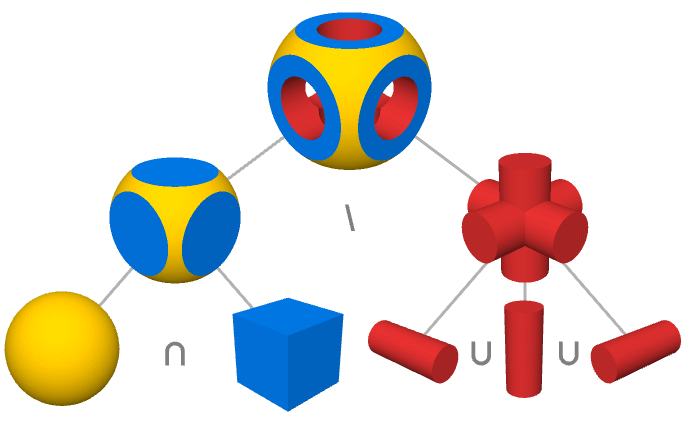
CSGRegion["Union", rings]複数の操作を使ったCSGRegion:
cylinder = Cylinder[{{0., 0., -0.6}, {0., 0., 0.6}}, 0.3];
CSGRegion["Difference", {CSGRegion["Intersection", {Ball[{0, 0, 0}, 0.65], Cube[]}],
CSGRegion["Union", {cylinder,
Rotate[cylinder, {{0, 0, 1}, {1, 0, 0}}], Rotate[cylinder, {{0, 0, 1}, {0, 1, 0}}]}]}]CSGRegion["Intersection", {Icosahedron[], Ball[{0, 0, 0}, 0.85]}]CSGRegion["Union", {...}]CADモデリング (3)
CSGRegion["Difference", {CSGRegion["Union", {Cuboid[{-10, -10, 0}, {10, 10, 40}], Cuboid[{-26, -10, 0}, {26, 10, 5}]}], CSGRegion["Union", {Cuboid[{-1, -12, 30}, {1, 12, 50}], Cylinder[{{-20, 0, 35}, {20, 0, 35}}, 2], Cylinder[{{0, -20, 25}, {0, 20, 25}}, 7], Cylinder[{{-18, 0, -1}, {-18, 0, 12}}, 4], Cylinder[{{18, 0, -1}, {18, 0, 12}}, 4]}]}]CSGRegion["Union", {Cuboid[{-30, -30, -1}, {30, 30, 1}], Cylinder[{{-30, 0, 0}, {30, 0, 0}}, 10], Cylinder[{{0, -30, 0}, {0, 30, 0}}, 10]}]CSGRegion["Union", {Cylinder[{{-31, 0, 0}, {31, 0, 0}}, 9], Cylinder[{{0, -31, 0}, {0, 31, 0}}, 9], Cylinder[{{-20, -20, -2}, {-20, -20, 2}}, 3], Cylinder[{{20, -20, -2}, {20, -20, 2}}, 3], Cylinder[{{-20, 20, -2}, {-20, 20, 2}}, 3], Cylinder[{{20, 20, -2}, {20, 20, 2}}, 3], Cuboid[{-40, -40, 0}, {40, 40, -15}], Cylinder[{{0, 0, -15}, {0, 0, 15}}, 10], Sequence@@Table[CSGRegion["Difference", {Cube[c * 25 + c * 5 * Sqrt[2], 15], Cylinder[{c * 25 - {0, 0, 10}, c * 25 + {0, 0, 10}}, 5]}], {c, Append[#, 0]& /@ {{-1, -1}, {-1, 1}, {1, -1}, {1, 1}}}]}]CSGRegion["Difference", {%%, %}]CSGRegion["Difference", {Cylinder[{{0, 0, -15}, {0, 0, 15}}, 10], CSGRegion["Union", {Cylinder[{{-9, -10, 0}, {-9, 10, 0}}, 5], Cylinder[{{9, -10, 0}, {9, 10, 0}}, 5], Cuboid[{-12, -10, 0}, {-4, 10, 10}], Cuboid[{12, -10, 0}, {4, 10, 10}], Cylinder[{{0, 0, -8}, {0, 0, 16}}, 8], Cylinder[{{0, 0, -16}, {0, 0, 16}}, 4], Cylinder[{{0, -14, 8}, {0, 14, 8}}, 2], CSGRegion["Difference", {Cuboid[{-11, -12, 8}, {11, 12, 18}], Cylinder[{{0, -14, 8}, {0, 14, 8}}, 4]}]}]}]CSGRegion["Union", {%, Translate[Rotate[Rotate[%, 180Degree, {1, 0, 0}], 90Degree, {0, 0, 1}], {0, 0, 16}], CSGRegion["Union", {Cylinder[{{0, -12, 8}, {0, 12, 8}}, 1.5], Cylinder[{{-12, 0, 8}, {12, 0, 8}}, 1.5], Ball[{0, 0, 8}, 4]}]}]特性と関係 (4)
Region[RegionUnion[Rectangle[], Rectangle[{0.5, 0.5}]]]Region[RegionIntersection[Rectangle[], Rectangle[{0.5, 0.5}]]]Region[RegionDifference[Rectangle[], Rectangle[{0.5, 0.5}]]]CSGRegion["Union", {Ball[], Cuboid[]} ]Region[BooleanRegion[Or, {Ball[], Cuboid[]}]]CSGRegionは立体である:
SolidRegionQ[CSGRegion["Intersection", {Ball[], Cuboid[]}]]CSGRegion["Intersection", {Ball[], Cuboid[]}]RegionEmbeddingDimension[%] === RegionDimension[%]考えられる問題 (1)
透明度があるCSGRegionは閉塞領域を表示しない:
CSGRegion[{Cube[], Style[Ball[], RGBColor[1, 0, 0, 1 / 4]]}]Graphics3Dを使ってすべての領域を表示する:
Graphics3D[{Cube[], Style[Ball[], RGBColor[1, 0, 0, 1 / 4]]}]インタラクティブな例題 (3)
複数のドラッグ可能な円板を可視化するためにインタラクティブなCSG領域を作成する:
DynamicModule[{p = CirclePoints[1 / 2, 3]}, LocatorPane[Dynamic@p, Dynamic@Graphics[{CSGRegion["Intersection", Disk /@ p], Dashed, FaceForm[], Circle /@ p}, PlotRange -> {{-2, 2}, {-2, 2}}], Appearance -> "•"]]ドラッグ可能な点があるインタラクティブなCSG領域を作成する.領域をクリックしてドラッグ可能な点を追加したり削除したりする:
DynamicModule[{p = RandomReal[{-4, 4}, {8, 2}]}, LocatorPane[Dynamic@p, Dynamic@CSGRegion["Difference", {Rectangle[{-5, -5}, {5, 5}], CSGRegion["Union", Disk /@ p]}, ImageSize -> Small], LocatorAutoCreate -> True, Appearance -> "•"]]Manipulate[DynamicModule[{positions, base}, positions = Flatten[Table[{x, y, z}, {x, {-1, 1}}, {y, {-1, 1}}, {z, {-1, 1}}], 2];
CSGRegion["Union", Table[base = t * positions[[i]];
CSGRegion["Intersection", {Ball[base, 2], Cube[base + positions[[i]], 2]}], {i, Length[positions]}]]], {{t, 1 / 2}, 0, 1}]おもしろい例題 (3)
CSGRegion["Difference", {Style[#[1], RGBColor[0.430592, 0.585007, 0.337497]], CSGRegion[{Style[#[0.8], RGBColor[0.882911, 0.359638, 0.360092]], Style[Cube[{0, 0, 5}, 9.5], RGBColor[0.949819, 0.725559, 0.725754]]}]}]& /@ {Icosahedron, Dodecahedron, Octahedron}pts = Flatten[Table[{x, y, z}, {x, {-1, 1}}, {y, {-1, 1}}, {z, {-1, 1}}], 2];
chunks = CSGRegion["Intersection", {Ball[{0, 0, 0}, 2], Cube[#, 2]}]& /@ pts;
colors = {RGBColor[0.131838, 0.159976, 0.163333], RGBColor[0.230913, 0.290626, 0.293972], RGBColor[0.392506, 0.513992, 0.525327], RGBColor[0.484579, 0.662274, 0.695467], RGBColor[0.523077, 0.717819, 0.782847], RGBColor[0.566364, 0.722379, 0.819837], RGBColor[0.609652, 0.686364, 0.806245], RGBColor[0.479438, 0.4981, 0.622843]};
CSGRegion[Table[Style[Translate[chunks[[i]], # * pts[[i]]], colors[[i]]], {i, 8}], ImageSize -> Tiny]& /@ {0, 1 / 2, 1}pts1 = Prepend[#, -11]& /@ CirclePoints[3, 24];
pts2 = RotateRight[Prepend[#, 11]& /@ CirclePoints[3, 24], 7];
cylinders = Cylinder[#, 1 / 5]& /@ Transpose[{pts1, pts2}];
slices = Table[Cuboid[{x - 1, -4, -4}, {x + 1, 4, 4}], {x, -9, 9, 18 / 5}];
CSGRegion["Intersection", {Style[CSGRegion[cylinders], Hue[0.11, 1., 0.98]], Style[CSGRegion[slices], Hue[0., 1., 0.71]]}]テキスト
Wolfram Research (2021), CSGRegion, Wolfram言語関数, https://reference.wolfram.com/language/ref/CSGRegion.html (2024年に更新).
CMS
Wolfram Language. 2021. "CSGRegion." Wolfram Language & System Documentation Center. Wolfram Research. Last Modified 2024. https://reference.wolfram.com/language/ref/CSGRegion.html.
APA
Wolfram Language. (2021). CSGRegion. Wolfram Language & System Documentation Center. Retrieved from https://reference.wolfram.com/language/ref/CSGRegion.html
BibTeX
@misc{reference.wolfram_2026_csgregion, author="Wolfram Research", title="{CSGRegion}", year="2024", howpublished="\url{https://reference.wolfram.com/language/ref/CSGRegion.html}", note=[Accessed: 07-September-2026]}
BibLaTeX
@online{reference.wolfram_2026_csgregion, organization={Wolfram Research}, title={CSGRegion}, year={2024}, url={https://reference.wolfram.com/language/ref/CSGRegion.html}, note=[Accessed: 07-September-2026]}