CSGRegion
更多信息和选项
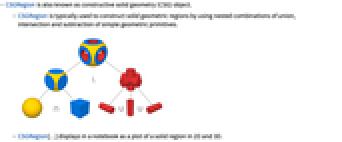
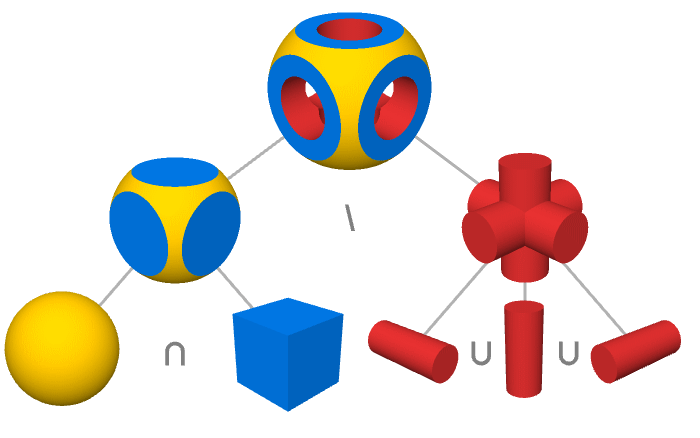
- CSGRegion 也称为构造实体几何 (CSG) 对象.
- CSGRegion 通常用于通过使用简单几何图元的并、交和减法的嵌套组合来构造实体几何区域.
- CSGRegion[…] 在笔记本中显示为二维和三维实体区域图.
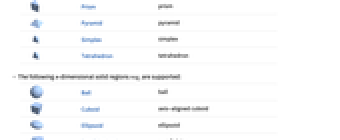
- 在 CSGRegion["op",{reg1,reg2,…}] 中,"op" 是布尔运算而区域 regi 是其他 CSGRegion 对象或几何区域.
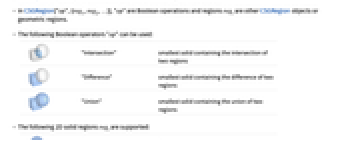
- 可以使用以下布尔运算符 "op":
-
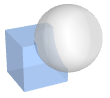
"Intersection" 包含两个区域交叉区域的最小实体 
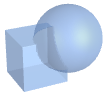
"Difference" 包含两个区域之差的最小实体 
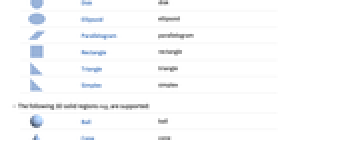
"Union" 包含两个区域并集的最小实体 - 支持以下二维实体区域 regi:
-

Disk 圆盘 
Ellipsoid 椭圆 
Parallelogram 平行四边形 
Rectangle 矩形 
Triangle 三角形 
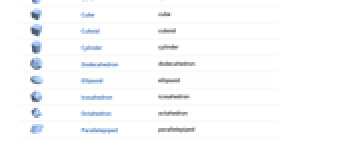
Simplex 单纯形 - 支持以下三维实体区域 regi:
-

Ball 球体 
Cone 圆锥 
Cube 立方体 
Cuboid 长方体 
Cylinder 圆柱体 
Dodecahedron 十二面体 
Ellipsoid 椭球体 
Icosahedron 二十面体 
Octahedron 八面体 
Parallelepiped 平行六面体 
Prism 棱柱体 
Pyramid 锥体 
Simplex 单纯形 
Tetrahedron 四面体 - 支持以下 n 维实体区域 regi:
-

Ball 球体 
Cuboid 轴对齐长方体 
Ellipsoid 椭球体 
Parallelepiped 平行六面体 
Simplex 单纯形 - 在 CSGRegion["op",{…,wi[regi],…}] 中,wi 是区域 regi 的几何变换或封装.
- 可以使用以下几何变换 wi:
-
GeometricTransformation[regi,…] 几何仿射变换 Rotate[regi,…] 旋转 Scale[regi,…] 缩放 Translate[regi,…] 平移 - 可以使用以下特殊包装器 wi:
-
Annotation[regi,…] 将注释与 regi 关联 Style[regi,…] 以指定样式显示 regi - CSGRegion[{reg1,reg2,…}] 等价于 CSGRegion["Union",{reg1,reg2,…}].
- CSGRegion 采用与 Region 相同的选项.
- CSGRegion 可与 RegionMember、RegionDistance、RegionMeasure 和 NIntegrate 等函数一起使用.
范例
打开所有单元 关闭所有单元基本范例 (3)
CSGRegion["Intersection", {Disk[], Rectangle[]}]Area[%]CSGRegion["Intersection", {Ball[], Cuboid[]}]Volume[%]CSGRegion["Intersection", {Style[Cube[1.5], Hue[0.58, 1, 0.9]], Style[Ball[], Hue[0.13, 1, 0.91]]}]范围 (11)
基础用法 (4)
区域的 Union:
CSGRegion["Union", {Cube[3 / 2], Ball[]}]CSGRegion["Difference", {Cube[3 / 2], Ball[]}]CSGRegion["Intersection", {Cube[3 / 2], Ball[]}]CSGRegion["Intersection", {Disk[], Rectangle[]}]CSGRegion["Intersection", {Ball[], Cuboid[]}]CSGRegion["Intersection", {Ball[{0, 0, 0, 0}], Ball[{1, 0, 1, 0}]}]CSGRegion["Intersection", {Ball[], Cube[3 / 2]}]CSGRegion["Difference", {CSGRegion["Intersection", {Ball[], Cube[3 / 2]}], Cylinder[{{0, 0, -1}, {0, 0, 1}}, 1 / 2]}]CSGRegion["Union", {Ball[], Cube[{2, 0, 0}, 2], Ball[{4, 0, 0}]}]用 Or 代替 "Union":
CSGRegion[Or, {Cube[3 / 2], Ball[]}]使用 And 代替 "Intersection":
CSGRegion[And, {Cube[3 / 2], Ball[]}]演示 (4)
为 CSGRegion 的二维部分指定样式:
CSGRegion["Union", {Style[Disk[], Hue[0.58, 1, 0.9]], Style[Rectangle[], Hue[0.13, 1, 1]]}]CSGRegion["Intersection", {Style[Cuboid[], Hue[0.58, 1, 0.9]], Style[Ball[], Hue[0.13, 1, 0.91]]}]为 CSGRegion 中的子树指定样式:
CSGRegion[Cube /@ {{-1, -1, 0}, {-1, 1, 0}, {1, -1, 0}, {1, 1, 0}}]CSGRegion[{Cube[], Style[%, Red]}]对 CSGRegion 应用样式:
CSGRegion[{Cuboid[], Ball[]}]Annotate[%, "CSGRegionStyle" -> Red]修改现有 CSGRegion 的样式:
csg = CSGRegion[{Cuboid[], Ball[]}]AnnotationValue[csg, "CSGRegionStyle"] = Red;样式现在应用于原始 CSGRegion 表达式:
csg注释 (3)
使用 Annotation 指定注释:
csg = CSGRegion[{Annotation[Cube[3 / 2], "Material" -> "Wood"], Ball[]}]使用 AnnotationKeys 检查现有注释:
AnnotationKeys[{csg, {1}}]检索带有 AnnotationValue 的注释:
AnnotationValue[{csg, {1}}, "Material"]使用 Annotate 应用注释:
Annotate[{csg, {1}}, "Weight" -> Quantity[30, "Grams"]]AnnotationKeys[{%, {1}}]使用 AnnotationDelete 删除注释:
AnnotationDelete[{csg, {1}}, "Material"]AnnotationKeys[{%, {1}}]使用 AnnotationValue 修改注释:
csg = CSGRegion[{Annotation[Cuboid[], "Material" -> "Wood"], Ball[]}]AnnotationValue[{csg, {1}}, "Material"] = "Iron";原始 CSGRegion 会给出更新的注释值:
AnnotationValue[{csg, {1}}, "Material"]CSGRegion 的样式通过注释进行管理:
Annotate[{CSGRegion[{Ball[], Cuboid[]}], {1}}, "CSGRegionStyle" -> Red]AnnotationValue[{%, {1}}, "CSGRegionStyle"]使用 Style 包装器作为指定样式注释的快捷方式:
CSGRegion[{Style[Ball[], Red], Cuboid[]}]AnnotationValue[{%, {1}}, "CSGRegionStyle"]应用 (7)
基本应用 (4)
rings = Table[CSGRegion["Difference", {Disk[{0, 0}, t + 0.1], Disk[{0, 0}, t]}], {t, 0.1, 1.0, 0.2}];
CSGRegion["Union", rings]使用多个运算的 CSGRegion:
cylinder = Cylinder[{{0., 0., -0.6}, {0., 0., 0.6}}, 0.3];
CSGRegion["Difference", {CSGRegion["Intersection", {Ball[{0, 0, 0}, 0.65], Cube[]}],
CSGRegion["Union", {cylinder,
Rotate[cylinder, {{0, 0, 1}, {1, 0, 0}}], Rotate[cylinder, {{0, 0, 1}, {0, 1, 0}}]}]}]CSGRegion["Intersection", {Icosahedron[], Ball[{0, 0, 0}, 0.85]}]CSGRegion["Union", {...}]CAD 建模 (3)
CSGRegion["Difference", {CSGRegion["Union", {Cuboid[{-10, -10, 0}, {10, 10, 40}], Cuboid[{-26, -10, 0}, {26, 10, 5}]}], CSGRegion["Union", {Cuboid[{-1, -12, 30}, {1, 12, 50}], Cylinder[{{-20, 0, 35}, {20, 0, 35}}, 2], Cylinder[{{0, -20, 25}, {0, 20, 25}}, 7], Cylinder[{{-18, 0, -1}, {-18, 0, 12}}, 4], Cylinder[{{18, 0, -1}, {18, 0, 12}}, 4]}]}]CSGRegion["Union", {Cuboid[{-30, -30, -1}, {30, 30, 1}], Cylinder[{{-30, 0, 0}, {30, 0, 0}}, 10], Cylinder[{{0, -30, 0}, {0, 30, 0}}, 10]}]CSGRegion["Union", {Cylinder[{{-31, 0, 0}, {31, 0, 0}}, 9], Cylinder[{{0, -31, 0}, {0, 31, 0}}, 9], Cylinder[{{-20, -20, -2}, {-20, -20, 2}}, 3], Cylinder[{{20, -20, -2}, {20, -20, 2}}, 3], Cylinder[{{-20, 20, -2}, {-20, 20, 2}}, 3], Cylinder[{{20, 20, -2}, {20, 20, 2}}, 3], Cuboid[{-40, -40, 0}, {40, 40, -15}], Cylinder[{{0, 0, -15}, {0, 0, 15}}, 10], Sequence@@Table[CSGRegion["Difference", {Cube[c * 25 + c * 5 * Sqrt[2], 15], Cylinder[{c * 25 - {0, 0, 10}, c * 25 + {0, 0, 10}}, 5]}], {c, Append[#, 0]& /@ {{-1, -1}, {-1, 1}, {1, -1}, {1, 1}}}]}]CSGRegion["Difference", {%%, %}]CSGRegion["Difference", {Cylinder[{{0, 0, -15}, {0, 0, 15}}, 10], CSGRegion["Union", {Cylinder[{{-9, -10, 0}, {-9, 10, 0}}, 5], Cylinder[{{9, -10, 0}, {9, 10, 0}}, 5], Cuboid[{-12, -10, 0}, {-4, 10, 10}], Cuboid[{12, -10, 0}, {4, 10, 10}], Cylinder[{{0, 0, -8}, {0, 0, 16}}, 8], Cylinder[{{0, 0, -16}, {0, 0, 16}}, 4], Cylinder[{{0, -14, 8}, {0, 14, 8}}, 2], CSGRegion["Difference", {Cuboid[{-11, -12, 8}, {11, 12, 18}], Cylinder[{{0, -14, 8}, {0, 14, 8}}, 4]}]}]}]CSGRegion["Union", {%, Translate[Rotate[Rotate[%, 180Degree, {1, 0, 0}], 90Degree, {0, 0, 1}], {0, 0, 16}], CSGRegion["Union", {Cylinder[{{0, -12, 8}, {0, 12, 8}}, 1.5], Cylinder[{{-12, 0, 8}, {12, 0, 8}}, 1.5], Ball[{0, 0, 8}, 4]}]}]属性和关系 (4)
Region[RegionUnion[Rectangle[], Rectangle[{0.5, 0.5}]]]Region[RegionIntersection[Rectangle[], Rectangle[{0.5, 0.5}]]]Region[RegionDifference[Rectangle[], Rectangle[{0.5, 0.5}]]]CSGRegion["Union", {Ball[], Cuboid[]} ]Region[BooleanRegion[Or, {Ball[], Cuboid[]}]]CSGRegion 对象是实体:
SolidRegionQ[CSGRegion["Intersection", {Ball[], Cuboid[]}]]CSGRegion["Intersection", {Ball[], Cuboid[]}]RegionEmbeddingDimension[%] === RegionDimension[%]可能存在的问题 (1)
有透明度的 CSGRegion 不会显示遮挡区域:
CSGRegion[{Cube[], Style[Ball[], RGBColor[1, 0, 0, 1 / 4]]}]使用 Graphics3D 显示所有区域:
Graphics3D[{Cube[], Style[Ball[], RGBColor[1, 0, 0, 1 / 4]]}]互动范例 (3)
DynamicModule[{p = CirclePoints[1 / 2, 3]}, LocatorPane[Dynamic@p, Dynamic@Graphics[{CSGRegion["Intersection", Disk /@ p], Dashed, FaceForm[], Circle /@ p}, PlotRange -> {{-2, 2}, {-2, 2}}], Appearance -> "•"]]创建具有可拖动点的交互式 CSG 区域. 单击区域以添加和删除可拖动点:
DynamicModule[{p = RandomReal[{-4, 4}, {8, 2}]}, LocatorPane[Dynamic@p, Dynamic@CSGRegion["Difference", {Rectangle[{-5, -5}, {5, 5}], CSGRegion["Union", Disk /@ p]}, ImageSize -> Small], LocatorAutoCreate -> True, Appearance -> "•"]]Manipulate[DynamicModule[{positions, base}, positions = Flatten[Table[{x, y, z}, {x, {-1, 1}}, {y, {-1, 1}}, {z, {-1, 1}}], 2];
CSGRegion["Union", Table[base = t * positions[[i]];
CSGRegion["Intersection", {Ball[base, 2], Cube[base + positions[[i]], 2]}], {i, Length[positions]}]]], {{t, 1 / 2}, 0, 1}]巧妙范例 (3)
CSGRegion["Difference", {Style[#[1], RGBColor[0.430592, 0.585007, 0.337497]], CSGRegion[{Style[#[0.8], RGBColor[0.882911, 0.359638, 0.360092]], Style[Cube[{0, 0, 5}, 9.5], RGBColor[0.949819, 0.725559, 0.725754]]}]}]& /@ {Icosahedron, Dodecahedron, Octahedron}pts = Flatten[Table[{x, y, z}, {x, {-1, 1}}, {y, {-1, 1}}, {z, {-1, 1}}], 2];
chunks = CSGRegion["Intersection", {Ball[{0, 0, 0}, 2], Cube[#, 2]}]& /@ pts;
colors = {RGBColor[0.131838, 0.159976, 0.163333], RGBColor[0.230913, 0.290626, 0.293972], RGBColor[0.392506, 0.513992, 0.525327], RGBColor[0.484579, 0.662274, 0.695467], RGBColor[0.523077, 0.717819, 0.782847], RGBColor[0.566364, 0.722379, 0.819837], RGBColor[0.609652, 0.686364, 0.806245], RGBColor[0.479438, 0.4981, 0.622843]};
CSGRegion[Table[Style[Translate[chunks[[i]], # * pts[[i]]], colors[[i]]], {i, 8}], ImageSize -> Tiny]& /@ {0, 1 / 2, 1}pts1 = Prepend[#, -11]& /@ CirclePoints[3, 24];
pts2 = RotateRight[Prepend[#, 11]& /@ CirclePoints[3, 24], 7];
cylinders = Cylinder[#, 1 / 5]& /@ Transpose[{pts1, pts2}];
slices = Table[Cuboid[{x - 1, -4, -4}, {x + 1, 4, 4}], {x, -9, 9, 18 / 5}];
CSGRegion["Intersection", {Style[CSGRegion[cylinders], Hue[0.11, 1., 0.98]], Style[CSGRegion[slices], Hue[0., 1., 0.71]]}]文本
Wolfram Research (2021),CSGRegion,Wolfram 语言函数,https://reference.wolfram.com/language/ref/CSGRegion.html (更新于 2024 年).
CMS
Wolfram 语言. 2021. "CSGRegion." Wolfram 语言与系统参考资料中心. Wolfram Research. 最新版本 2024. https://reference.wolfram.com/language/ref/CSGRegion.html.
APA
Wolfram 语言. (2021). CSGRegion. Wolfram 语言与系统参考资料中心. 追溯自 https://reference.wolfram.com/language/ref/CSGRegion.html 年
BibTeX
@misc{reference.wolfram_2026_csgregion, author="Wolfram Research", title="{CSGRegion}", year="2024", howpublished="\url{https://reference.wolfram.com/language/ref/CSGRegion.html}", note=[Accessed: 16-September-2026]}
BibLaTeX
@online{reference.wolfram_2026_csgregion, organization={Wolfram Research}, title={CSGRegion}, year={2024}, url={https://reference.wolfram.com/language/ref/CSGRegion.html}, note=[Accessed: 16-September-2026]}