



SectorChart
SectorChart[{{x1,y1},{x1,y2},…}]
制作一个扇形图表,其扇形角和 xi 成比例,并且有半径 yi.
SectorChart[{…,wi[{xi,yi},…],…,wj[{xj,yj},…],…}]
制作一个扇形图表,其扇形特性由符号封装 wk 定义.
SectorChart[{data1,data2,…}]
绘制多个数据集 datai 的一个扇形图表.
更多信息和选项
- SectorChart 的数据元素可以给出下列形式:
-
{xi,yi} 扇形角和半径 {Quantity[xi,ux],Quantity[yi,uy]} 具有单位的扇区角度和半径 wi[{xi,yi},…] 大小 {xi,yi} 和封装 wi 的扇形 formi->mi 有元数据 mi 的一个扇形 - 没有按这些形式给出的数据在扇形图表的形成过程中被忽略.
- SectorChart 中的数据集可以给出下列形式:
-
{e1,e2,…} 有或无包装的元素列表 <k1e1,k2e2,…> 键和长度的相关性 TimeSeries[…],EventSeries[…],TemporalData[…] 时间序列、活动序列和时间数据 WeightedData[…] 具有权值的数据集 w[{e1,e2,…},…] 包装应用于整个数据集 w[{data1,data1,…},…] 包装应用于所有数据集 - SectorChart[Tabular[…]cspec] 用列指定 cspec 从表格对象中提取值并绘制.
- 可使用以下形式的列指定 cspec 来绘制表格数据:
-
{colx,coly} 绘制列 y 与列 x {{colx1,coly1},{colx2,coly2},…} 绘制列 y1 与列 x1,y2 与 x2、… - 下列包装可以用于图表元素:
-
Annotation[e,label] 提供一个注解 Button[e,action] 当点击元素时,执行的行为 Callout[e,label] 用标注 (callout) 显示元素 EventHandler[e,…] 定义元素的普通事件处理 Hyperlink[e,uri] 使得元素作为一个超链接 Labeled[e,…] 用标签显示元素 Legended[e,…] 在一个图例中元素的特例 Mouseover[e,over] 使得元素显示为一个鼠标指向的形式 PopupWindow[e,cont] 元素增加一个弹出窗口 StatusArea[e,label] 当鼠标指向时,在状态栏上显示 Style[e,opts] 用指定的样式显示元素 Tooltip[e,label] 为元素增加一个提示工具 - 在 SectorChart 中, Labeled, Callout 和 Placed 允许使用下列名称位置:
-
"RadialOuter","RadialCenter","RadialInner" 扇形内的位置 "RadialOutside","RadialInside","RadialEdge" 扇形外的位置 "RadialCallout" 标注线的位置 {{sθ,sr},{lx,ly}} 缩放标签中坐标 {lx,ly} 到扇形中极坐标 {sθ,sr} - 在 SectorChart 中,Callout 允许使用下列位置 pos:
-
Automatic 自动放置 {x,y} 图形中的位置 Scaled[{sθ,sr}] 扇形中缩放过的极坐标位置 {sθ,sr} {pos,{lx,ly}} 位置 pos 处的标签中缩放过的位置 {lx,ly} - SectorChart 有和 Graphics 相同的选项,并增加下列变化: [所有选项的列表]
-
ChartBaseStyle Automatic 扇形的整体样式 ChartElementFunction Automatic 如何产生扇形的原图形 ChartLabels None 数据元素和数据集的标签 ChartLayout Automatic 使用的整体布局 ChartLegends None 数据元素和数据集的图例 ChartStyle Automatic 扇形的样式 ColorFunction Automatic 如何着色扇形 ColorFunctionScaling True 是否归一化传递给 ColorFunction 的参数 LabelingFunction Automatic 如何标注扇形 LabelingSize Automatic 标注和标签的最大尺寸 LegendAppearance Automatic 图例的整体外观 PerformanceGoal $PerformanceGoal 优化的目标 PlotInteractivity $PlotInteractivity 是否允许绘制互动元素 PlotRange Automatic 包含值的范围 PlotTheme $PlotTheme 图表的整体主题 PolarAxes False 是否绘制极轴 PolarAxesOrigin Automatic 在哪里绘制极轴 PolarGridLines None 极坐标网格线 PolarTicks Automatic 极轴刻度 SectorOrigin Automatic 初始角度和扇形弧度 SectorSpacing Automatic 扇形间的间距 TargetUnits Automatic 图表中显示的单位 - 在单个显示平板中包括多个数据组的 ChartLayout 可能设置包括:
-

"Grouped" 分离每个数据集的数据 
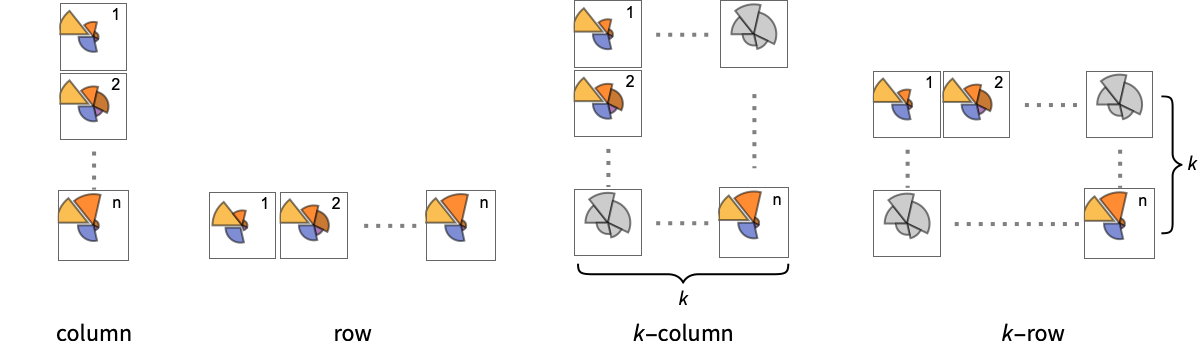
"Stacked" 累积每个数据集的数据 - 在不同面板中显示单个数据组的 ChartLayout 的可能设置包括:
-
"Column" 在一列面板中分别使用不同扇区组 "Row" 在一行面板中分别使用不同扇区组 {"Column",k},{"Row",k} 使用 k 列或行 {"Column",UpTo[k]},{"Row",UpTo[k]} 使用至多 k 列或行 - ChartElementFunction 的参数是扇形区域 {{θmin,θmax},{rmin,rmax}},值 {xi,yi} 和数据集的嵌套列表中每层的元数据 {m1,m2,…}.
- ChartElementFunction 的内置列表可以从 ChartElementData["SectorChart"] 得到.
- ColorFunction 的参数是 θ 和 r,θ 是扇形的角度,r 是半径.
- SectorChart 中选项和其它结构的样式和其它设置按照 ChartStyle、ColorFunction、Style 和 和其他包装和 ChartElementFunction,后面的设置会屏蔽之前的设置.
所有选项的列表
范例
打开所有单元 关闭所有单元基本范例 (5)
SectorChart[{{1, 1}, {1, 2}, {1, 3}}]SectorChart[{{1, 1}, {1, 2}, {1, 3}}, SectorOrigin -> {Automatic, 1}]SectorChart[{{{1, 1}, {1, 2}, {1, 3}}, {{7, 3}, {5, 2}, {1, 1}}}]SectorChart[{{{1, 1}, {1, 2}, {1, 3}}, {{7, 3}, {5, 2}, {1, 1}}}, ChartLayout -> "Row"]SectorChart[{{1, 1}, {1, 2}, {1, 3}}, ChartLabels -> {"a", "b", "c"}]SectorChart[{{1, 1}, {1, 2}, {1, 3}}, ChartLegends -> {"a", "b", "c"}]SectorChart[Tuples[{1, 2, 3}, 2], ChartStyle -> "Pastel"]范围 (39)
数据和布局 (13)
SectorChart[{{{1, 1}, {1, 2}, {1, 3}}, {{2, 1}, {2, 2}, {2, 3}}, {{3, 1}, {3, 2}, {3, 3}}}]SectorChart[{{{1, 2}, {2, 3}}, {{1, 1}, {2, 2}, {3, 3}}, {{1, 1}, {2, 2}, {3, 3}, {4, 4}}}]SectorChart[{{{1, 2}, {2, 3}}, {{1, 1}, {2, Missing[]}, {3, 3}}, {{1, 1}, {2, 2}, {foo, 3}, {4, 4}}}]SectorChart[{{Quantity[1, "Seconds"], Quantity[2, "Meters"]}, {Quantity[1, "Seconds"], Quantity[3, "Meters"]}, {Quantity[2, "Seconds"], Quantity[5, "Meters"]}, {Quantity[3, "Seconds"], Quantity[7, "Meters"]}, {Quantity[5, "Seconds"], Quantity[11, "Meters"]}}]忽略 TimeSeries、EventSeries 和 TemporalData 中的时间戳:
SectorChart[TimeSeries[{{19, 16}, {9, 3}, {7, 2}, {17, 5}}, {"May 24, 1982"}]]SectorChart[<|"a" -> {2, 3}, "b" -> {4, 6}, "c" -> {5, 8}, "d" -> {3, 7}|>]SectorChart[<|"a" -> {2, 3}, "b" -> {4, 6}, "c" -> {5, 8}, "d" -> {3, 7}|>, ChartLabels -> Placed[Automatic, "RadialCallout"]]SectorChart[<|"a" -> {2, 3}, "b" -> {4, 6}, "c" -> {5, 8}, "d" -> {3, 7}|>, ChartLabels -> Callout[Automatic]]SectorChart[<|"a" -> {2, 3}, "b" -> {4, 6}, "c" -> {5, 8}, "d" -> {3, 7}|>, ChartStyle -> 66, ChartLegends -> Automatic]SectorChart[<|"group a" -> <|"a" -> {1, 1}, "b" -> {2, 3}, "c" -> {5, 8}, "d" -> {3, 7}|>, "group b" -> <|"a" -> {1, 1}, "b" -> {3, 2}, "c" -> {5, 3}, "d" -> {7, 2}|>|>, ChartLegends -> Automatic]忽略 WeightedData 中的权值:
SectorChart[WeightedData[{{1, 2}, {3, 4}, {5, 6}}, {0.5, 0.2, 0.1}]]Table[SectorChart[RandomInteger[{1, 4}, {2, 10, 2}], ChartLayout -> l], {l, {"Grouped", "Stacked"}}]SectorChart[{IconizedObject[«data #1»], IconizedObject[«data #2»], IconizedObject[«data #3»]}, ImageSize -> Medium, ChartLayout -> "Row"]SectorChart[{IconizedObject[«data #1»], IconizedObject[«data #2»], IconizedObject[«data #3»]}, ImageSize -> Medium, ChartLayout -> "Column"]SectorChart[{IconizedObject[«data #1»], IconizedObject[«data #2»], IconizedObject[«data #3»], IconizedObject[«data #4»]}, ImageSize -> Medium, ChartLayout -> {"Row", 2}]Table[SectorChart[{{1, 1}, {1, 2}, {2, 3}, {3, 2}}, SectorOrigin -> o, PlotLabel -> o], {o, {{Pi / 6, "Clockwise"}, {Pi / 6, "Counterclockwise"}}}]Table[SectorChart[{{1, 1}, {1, 2}, {2, 3}, {3, 2}}, SectorOrigin -> o, PlotLabel -> o], {o, {0, Pi / 2}}]Table[SectorChart[{{1, 1}, {1, 2}, {2, 3}, {3, 2}}, SectorOrigin -> o, PlotLabel -> o], {o, {{{0, "Clockwise"}, 0}, {{0, "Clockwise"}, 1}}}]Table[SectorChart[{{{2, 1}, {3, 4}, {4, 2}, {3, 4}}, {{2, 2}, {2, 3}, {3, 2}, {4, 3}}}, SectorSpacing -> s, PlotLabel -> s, ChartStyle -> Opacity[0.8]], {s, {Automatic, {0, 1}, {0.1, 1}}}]表格数据 (1)
tabdata = AggregateRows[Tabular[ResourceData["Sample Data: 1993 US Cars"]], {"AvgPrice" -> (Mean[#AvgPrice]&), "TotalCars" -> (Length[#AvgPrice]&), "AvgWeight" -> (Mean[#Weight]&), "AvgFuelTankCap" -> (Mean[#FuelTankCapacity]&)}, {"Type"}]SectorChart[tabdata -> {"TotalCars", "AvgPrice"}, ChartLabels -> Normal[tabdata[All, "Type"]]]包装 (4)
{{d1, d2, d3, d4}, {w1, w2, w3, w4}} = {{{2, 1}, {3, 4}, {4, 2}, {3, 4}}, {{2, 2}, {2, 3}, {3, 2}, {4, 3}}};{SectorChart[{{d1, Style[d2, Red], d3, d4}, {w1, w2, w3, w4}}], SectorChart[{Style[{d1, d2, d3, d4}, Green], {w1, w2, w3, w4}}], SectorChart[Style[{{d1, d2, d3, d4}, {w1, w2, w3, w4}}, Blue]]}{SectorChart[{{d1, Style[d2, Red], d3, d4}, {w1, w2, w3, w4}}], SectorChart[{Style[{d1, Style[d2, Red], d3, d4}, Green], {w1, w2, w3, w4}}], SectorChart[Style[{Style[{d1, Style[d2, Red], d3, d4}, Green], {w1, w2, w3, w4}}, Blue]]}SectorChart[{{1, 3}, {2, 1}, Tooltip[{3, 3}, "median"], {4, 2}}]SectorChart[Table[Tooltip[{QuantityMagnitude@CountryData[c, "Population"], QuantityMagnitude@CountryData[c, "LifeExpectancy"]}, CountryData[c, "Flag"]], {c, CountryData["G8"]}]]用 PopupWindow 进一步提供信息:
SectorChart[{{1, 3}, {2, 1}, PopupWindow[{3, 3}, DateListPlot[FinancialData["IBM", "Jan. 1, 2004"]]], {4, 2}}]Button 可以用于触发任何行为:
SectorChart[{{1, 3}, {2, 1}, Button[{3, 3}, Speak[3]], {4, 2}}]样式和外观 (9)
SectorChart[{{1, 3}, {2, 1}, {3, 3}, {4, 2}}, ChartStyle -> {Red, Green, Blue, Yellow}]使用 ColorData 中任何梯度或索引颜色方案:
{SectorChart[{{1, 3}, {2, 1}, {3, 3}, {4, 2}}, ChartStyle -> "AvocadoColors"], SectorChart[{{1, 3}, {2, 1}, {3, 3}, {4, 2}}, ChartStyle -> 52]}ColorData["Charting"]data = RandomInteger[{1, 4}, {10, 2}];Table[SectorChart[data, ChartStyle -> i, Axes -> None], {i, RandomChoice[ColorData["Charting"], 4]}]{SectorChart[{{1, 3}, {2, 1}, {3, 3}, {4, 2}}, PlotTheme -> "Web"], SectorChart[{{1, 3}, {2, 1}, {3, 3}, {4, 2}}, PlotTheme -> "Marketing"], SectorChart[{{1, 3}, {2, 1}, {3, 3}, {4, 2}}, PlotTheme -> "Monochrome"]}ChartBaseStyle 可以对所有图表元素设置一个初始样式:
SectorChart[{{1, 3}, {2, 1}, {3, 3}, {4, 2}}, ChartBaseStyle -> EdgeForm[Dashed], ChartStyle -> 45]Style 可以用于屏蔽样式:
SectorChart[{{1, 3}, Style[{2, 1}, Red], {3, 3}, {4, 2}}, ChartStyle -> 45]ChartElementData["SectorChart"]Table[SectorChart[{{1, 3}, {2, 1}, {3, 3}, {4, 2}}, ChartElementFunction -> f, ChartStyle -> "Pastel"], {f, {"NoiseSector", "PlateauSector"}}]SectorChart[{{1, 3}, {2, 1}, {3, 3}, {4, 2}}, ChartElementFunction -> ChartElementDataFunction["GlassSector", "GradientDirection" -> "Angular"], ChartStyle -> "SolarColors"]SectorChart[{{1, 3}, {2, 2}, {3, 3}, {4, 2}}, PlotTheme -> "Marketing"]SectorChart[{{{4, 9}, {7, 4}, {4, 10}, {7, 4}, {4, 9}}, {{7, 4}, {5, 7}, {9, 8}, {8, 4}, {9, 4}}}, PlotTheme -> "Monochrome"]标签和图例 (12)
使用 Labeled 对扇区添加标签:
SectorChart[{{1, 3}, {2, 1}, Labeled[{3, 3}, "label"], {4, 2}}]Table[SectorChart[{{1, 3}, {2, 1}, Labeled[{3, 3}, "label", p], {4, 2}}, PlotLabel -> p, SectorOrigin -> {Automatic, 1}], {p, {"RadialInner", "RadialCenter", "RadialOuter"}}]Table[SectorChart[{{1, 3}, {2, 1}, Labeled[{3, 3}, "label", p], {4, 2}}, PlotLabel -> p, SectorOrigin -> {Automatic, 1}], {p, {"RadialInside", "RadialOutside"}}]Table[SectorChart[{Labeled[{1, 3}, "L1", p], Labeled[{2, 1}, "L2", p], Labeled[{3, 3}, "L3", p], Labeled[{4, 2}, "L4", p]}, PlotLabel -> p], {p, {"RadialCallout", "VerticalCallout"}}]SectorChart[{{{2, 1}, {2, 3}, {3, 4}, {4, 2}}, {{2, 3}, {4, 3}, {2, 3}, {3, 2}}}, ChartLabels -> {"c1", "c2", "c3"}]SectorChart[{{{2, 1}, {2, 3}, {3, 4}, {4, 2}}, {{2, 3}, {4, 3}, {2, 3}, {3, 2}}}, ChartLabels -> {{"r1", "r2"}, None}, SectorSpacing -> 2]SectorChart[{{{2, 1}, {2, 3}, {3, 4}, {4, 2}}, {{2, 3}, {4, 3}, {2, 3}, {3, 2}}}, ChartLabels -> {{"r1", "r2"}, {"c1", "c2", "c3"}}, SectorSpacing -> 2]使用 Placed 来控制标签位置,使用与 Labeled 中相同的位置:
SectorChart[{{{2, 1}, {2, 3}, {3, 4}, {4, 2}}, {{2, 3}, {4, 3}, {2, 3}, {3, 2}}}, ChartLabels -> {Placed[{"r1", "r2"}, "RadialOutside"], Placed[{"c1", "c2", "c3"}, "RadialCenter"]}, SectorSpacing -> 2]用 Callout 为扇区添加标签:
SectorChart[{{2, 1}, Callout[{2, 3}, "label"], {3, 4}}]SectorChart[{{2, 1}, Callout[{2, 3}, "label", Appearance -> "Balloon"], {3, 4}}]SectorChart[Callout[#, Unique["text"]]& /@ RandomReal[{0.3, 1}, {6, 2}]]通过使用 LabelingFunction 添加数值标签:
SectorChart[{{2, 1}, {2, 3}, {3, 4}, {4, 2}}, LabelingFunction -> "RadialOutside"]SectorChart[RandomInteger[{3, 10}, {6, 2}], LabelingFunction -> (Callout[Style[Total@#, 10 + #[[2]]], Automatic]&)]SectorChart[{{{2, 1}, {2, 3}, {3, 4}, {4, 2}}, {{2, 3}, {4, 3}, {2, 3}, {3, 2}}}, ChartLegends -> {"ccc1", "ccc2", "ccc3", "ccc4"}, ChartStyle -> "Pastel"]SectorChart[{{{2, 1}, {2, 3}, {3, 4}, {4, 2}}, {{2, 3}, {4, 3}, {2, 3}, {3, 2}}}, ChartLegends -> {{"rr1", "rr2"}, None}, ChartStyle -> {"Pastel", None}]使用 Legended 来添加额外的图例项目:
SectorChart[{{{2, 1}, Legended[{2, 3}, "extra"], {3, 4}, {4, 2}}, {{2, 3}, {4, 3}, {2, 3}, {3, 2}}}, ChartLegends -> {"aaa", "bbb", "ccc", "ddd"}]使用 Placed 来影响图例位置:
Table[SectorChart[{{{2, 1}, {2, 3}, {3, 4}, {4, 2}}, {{2, 3}, {4, 3}, {2, 3}, {3, 2}}}, ChartLegends -> Placed[{"ccc1", "ccc2", "ccc3", "ccc4"}, p]], {p, {Below, Above}}]选项 (85)
AspectRatio (4)
SectorChart[{{1, 3}, {2, 1}, {3, 3}, {4, 2}}]通过 AspectRatio1 使高等和宽度相等:
SectorChart[{{1, 3}, {2, 1}, {3, 3}, {4, 2}}, AspectRatio -> 1]SectorChart[{{1, 3}, {2, 1}, {3, 3}, {4, 2}}, AspectRatio -> 1 / 2]AspectRatioFull 调整高度和宽度以便可以恰当地放在其他结构的里面:
plot = SectorChart[{{1, 3}, {2, 1}, {3, 3}, {4, 2}}, AspectRatio -> Full];{Framed[Pane[plot, {50, 100}]], Framed[Pane[plot, {100, 100}]], Framed[Pane[plot, {100, 50}]]}Axes (3)
默认情况下不绘制 Axes:
SectorChart[{{1, 3}, {2, 1}, {3, 3}, {4, 2}}]SectorChart[{{1, 3}, {2, 1}, {3, 3}, {4, 2}}, Axes -> True]{SectorChart[{{1, 3}, {2, 1}, {3, 3}, {4, 2}}, Axes -> {True, False}], SectorChart[{{1, 3}, {2, 1}, {3, 3}, {4, 2}}, Axes -> {False, True}]}AxesLabel (3)
SectorChart[{{1, 3}, {2, 1}, {3, 3}, {4, 2}}, Axes -> True]

SectorChart[{{1, 3}, {2, 1}, {3, 3}, {4, 2}}, Axes -> True, AxesLabel -> label]SectorChart[{{1, 3}, {2, 1}, {3, 3}, {4, 2}}, Axes -> True, AxesLabel -> {x, y}]AxesOrigin (2)
AxesStyle (3)
SectorChart[{{1, 3}, {2, 1}, {3, 3}, {4, 2}}, Axes -> True, AxesStyle -> Red]SectorChart[{{1, 3}, {2, 1}, {3, 3}, {4, 2}}, Axes -> True, AxesStyle -> {{Thick, Red}, {Thick, Blue}}]SectorChart[{{1, 3}, {2, 1}, {3, 3}, {4, 2}}, Axes -> True, AxesStyle -> Green, TicksStyle -> Red]ChartBaseStyle (5)
用 ChartBaseStyle 设置所有扇形的样式:
Table[SectorChart[{{1, 1}, {1, 2}, {2, 3}, {3, 2}}, ChartBaseStyle -> s], {s, {EdgeForm[Dashed], Opacity[0.7]}}]ChartBaseStyle 和 ChartStyle 连用:
SectorChart[{{1, 1}, {1, 2}, {2, 3}, {3, 2}}, ChartStyle -> 24, ChartBaseStyle -> EdgeForm[Dashed]]ChartStyle 可能屏蔽 ChartBaseStyle 的设置:
SectorChart[{{1, 1}, {1, 2}, {2, 3}, {3, 2}}, ChartStyle -> EdgeForm[None], ChartBaseStyle -> EdgeForm[Dashed]]ChartBaseStyle 和 Style 连用:
SectorChart[{{1, 1}, Style[{1, 2}, Yellow], {2, 3}, {3, 2}}, ChartBaseStyle -> EdgeForm[Dashed]]Style 可能屏蔽 ChartBaseStyle 的设置:
SectorChart[{{1, 1}, Style[{1, 2}, EdgeForm[None]], {2, 3}, {3, 2}}, ChartBaseStyle -> EdgeForm[Dashed]]ChartBaseStyle 和 ColorFunction 连用:
SectorChart[{{1, 1}, {1, 2}, {2, 3}, {3, 2}}, ChartBaseStyle -> EdgeForm[Dashed], ColorFunction -> Function[{x, y}, ColorData["Pastel"][x * y]]]ColorFunction 可能屏蔽 ChartBaseStyle 的设置:
SectorChart[{{1, 1}, {1, 2}, {2, 3}, {3, 2}}, ChartBaseStyle -> EdgeForm[Dashed], ColorFunction -> (EdgeForm[None]&)]ChartElementFunction (5)
获得 ChartElementFunction 内置的设置列表:
ChartElementData["SectorChart"]Table[SectorChart[Tuples[{1, 2}, 2], ChartElementFunction -> f, ChartStyle -> "Pastel", PlotLabel -> f], {f, {"Sector", "PlateauSector"}}]Table[SectorChart[Tuples[{1, 2}, 2], ChartElementFunction -> f, ChartStyle -> "Pastel", PlotLabel -> f], {f, {"NoiseSector", "OscillatingSector"}}]Table[SectorChart[Tuples[{1, 2}, 2], ChartElementFunction -> f, ChartStyle -> "Pastel", PlotLabel -> f], {f, {"SquareWaveSector", "TriangleWaveSector"}}]Table[SectorChart[Tuples[{1, 2}, 2], ChartElementFunction -> f, ChartStyle -> "Pastel", PlotLabel -> f], {f, {"GlassSector", "GradientSector"}}]用 ChartElementData 指定相同的图形渲染函数如上:
SectorChart[Tuples[{1, 2}, 2], ChartElementFunction -> Function[{angleRadiusMinMax, yr, meta}, ChartElementData["TriangleWaveSector"][angleRadiusMinMax, yr, meta]]]写入一个定制的 ChartElementFunction:
f[{{t0_, t1_}, {r0_, r1_}}, ___] := Disk[{0, 0}, r1, {t0, t1}]SectorChart[Tuples[{1, 2}, 2], ChartElementFunction -> f]g[{{t0_, t1_}, {r0_, r1_}}, ___] := GraphicsGroup[{Circle[{0, 0}, r0, {t0, t1}], Circle[{0, 0}, r1, {t0, t1}],
Line[{r0{Cos[t0], Sin[t0]}, r1{Cos[t1], Sin[t1]}}], Line[{r0{Cos[t1], Sin[t1]}, r1{Cos[t0], Sin[t0]}}]}]SectorChart[Tuples[{1, 2}, 2], ChartBaseStyle -> Thick, ChartStyle -> Blue, ChartElementFunction -> g]DataDrilldownSector[{{t0_, t1_}, {r0_, r1_}}, y_, {data_List}] :=
PopupWindow[ChartElementData["NoiseSector"][{{t0, t1}, {r0, r1}}, y], BarChart[data]]DataDrilldownSector[{{t0_, t1_}, {r0_, r1_}}, y_, _] :=
ChartElementData["Sector"][{{t0, t1}, {r0, r1}}, y]SectorChart[{{1, 1} -> Range[5], {1, 2}, {2, 1} -> RandomReal[1, 10], {2, 2}}, ChartElementFunction -> DataDrilldownSector]ChartLabels (8)
SectorChart[{{1, 1}, {1, 2}, {2, 3}, {3, 2}}, ChartLabels -> {"a", "b", "c", "d"}]数据中的 Labeled 包装将放置其它标签:
SectorChart[{{1, 1}, Labeled[{1, 2}, "label", "RadialOutside"], {2, 3}, {3, 2}}, ChartLabels -> {"a", "b", "c", "d"}]用 Placed 控制标签放置:
Table[SectorChart[{{1, 1}, {1, 2}, {2, 3}, {3, 2}}, ChartLabels -> Placed[{"a", "b", "c", "d"}, p], PlotLabel -> p], {p, {"RadialInner", "RadialCenter", "RadialOuter"}}]Table[SectorChart[{{1, 1}, {1, 2}, {2, 3}, {3, 2}}, SectorOrigin -> {Automatic, 1}, ChartLabels -> Placed[{"a", "b", "c", "d"}, p], PlotLabel -> p, Ticks -> None], {p, {"RadialInside", "RadialOutside", "RadialEdge"}}]Table[SectorChart[{{1, 1}, {1, 2}, {2, 3}, {3, 2}}, SectorOrigin -> {Automatic, 1}, ChartLabels -> Placed[{"a", "b", "c", "d"}, p], PlotLabel -> p, Ticks -> None], {p, {"RadialCallout", "VerticalCallout"}}]Table[SectorChart[{{1, 1}, {1, 2}, {2, 3}, {3, 2}}, SectorOrigin -> {Automatic, 1}, ChartLabels -> Placed[{"aa", "bb", "cc", "dd"}, p], PlotLabel -> p], {p, {{0.1, 0.1}, {1 / 2, 1 / 2}, {1, 1}}}]Table[SectorChart[{{1, 2}, {2, 3}, {3, 2}}, SectorOrigin -> {Automatic, 1}, ChartLabels -> Placed[Framed /@ {"aa", "bb", "cc"}, {{1, 1}, p}], PlotLabel -> p], {p, {{0, 0}, {1 / 2, 1 / 2}, {1, 1}}}]用 Placed 的第三个参数控制格式化:
SectorChart[{{1, 1}, {1, 2}, {2, 3}, {3, 2}}, ChartLabels -> Placed[{"aaa", "bbb", "ccc", "ddd"}, "RadialCenter", Rotate[#, 45Degree]&]]SectorChart[{{1, 1}, {1, 2}, {2, 3}, {3, 2}}, ChartLabels -> Placed[{"aaa", "bbb", "ccc", "ddd"}, "RadialCenter", Panel[#, FrameMargins -> 0]&]]SectorChart[{{1, 1}, {1, 2}, {2, 3}, {3, 2}}, ChartLabels -> Placed[{"aaa", "bbb", "ccc", "ddd"}, "RadialCenter", Hyperlink[#, "http://www.wolfram.com"]&]]data = {{{1, 1}, {1, 2}, {2, 3}, {3, 2}}, {{1, 1}, {2, 2}, {2, 3}}};{SectorChart[data, ChartLabels -> {"c1", "c2", "c3", "c4"}],
SectorChart[data, ChartLabels -> {None, {"c1", "c2", "c3", "c4"}}]}SectorChart[data, ChartLabels -> {{"r1", "r2"}, None}]SectorChart[data, ChartLabels -> {{"r1", "r2"}, {"c1", "c2", "c3", "c4"}}]用 Placed 影响位置:
SectorChart[data, ChartLabels -> {Placed[{"r1", "r2"}, "RadialOutside"], Placed[{"c1", "c2", "c3", "c4"}, "RadialCenter"]}, SectorSpacing -> 2]用 Callout 来把标签连接到扇区:
SectorChart[{{1, 1}, {1, 2}, {3, 2}}, ChartLabels -> Callout[{"c1", "c2", "c3"}, Automatic]]SectorChart[{{1, 1}, {1, 2}, {2, 3}, {3, 2}}, ChartLabels -> Placed[{{"a", "b", "c", "d"}, {"x", "y", "z", "w"}}, {"RadialCenter", "RadialCallout"}]]ChartLayout (4)
ChartLayout 按同心环分组:
data = {{{1, 1}, {1, 2}, {2, 3}, {3, 2}}, {{1, 1}, {2, 2}, {2, 3}}};{SectorChart[data], SectorChart[data, ChartLayout -> "Grouped"]}data = {{{1, 1}, {1, 2}, {2, 3}, {3, 2}}, {{1, 1}, {2, 2}, {2, 3}}};SectorChart[data, ChartLayout -> "Stacked"]SectorChart[RandomReal[1, {10, 5, 2}], ChartLayout -> "Stacked"]SectorChart[{{{1, 6}, {1, 4}, {2, 7}, {1, 6}, {2, 8}}, {{1, 4}, {1, 3}, {2, 10}, {1, 6}, {2, 4}}, {{1, 8}, {1, 3}, {2, 8}, {1, 7}, {2, 6}}}, ImageSize -> Medium, ChartLayout -> "Column"]SectorChart[{{{1, 6}, {1, 4}, {2, 7}, {1, 6}, {2, 8}}, {{1, 6}, {1, 3}, {2, 10}, {1, 6}, {2, 4}}, {{1, 8}, {1, 3}, {2, 8}, {1, 7}, {2, 6}}}, ImageSize -> Medium, ChartLayout -> "Row"]SectorChart[{IconizedObject[«data #1»], IconizedObject[«data #2»], IconizedObject[«data #3»], IconizedObject[«data #4»], IconizedObject[«data #5»], IconizedObject[«data #6»]}, ImageSize -> Medium, ChartLayout -> {"Column", 4}]SectorChart[{IconizedObject[«data #1»], IconizedObject[«data #2»], IconizedObject[«data #3»], IconizedObject[«data #4»], IconizedObject[«data #5»], IconizedObject[«data #6»]}, ImageSize -> Medium, ChartLayout -> {"Column", UpTo[4]}]ChartLegends (4)
SectorChart[{{1, 1}, {1, 2}, {2, 3}, {3, 2}}, ChartLegends -> {"John", "Mary", "Bob", "Peter"}]用 Legended 增加其它图例项:
SectorChart[{{1, 1}, Legended[{1, 2}, "Henry"], {2, 3}, {3, 2}}, ChartLegends -> {"John", "Mary", "Bob", "Peter"}]SectorChart[{{1, 1}, Legended[{1, 2}, "Henry"], {2, 3}, {3, 2}}]data = {{{1, 1}, {1, 2}, {2, 3}, {3, 2}}, {{1, 1}, {2, 2}, {2, 3}}};SectorChart[data, ChartLegends -> {{"Group A", "Group B"}, None}, ChartStyle -> {"Pastel", None}]SectorChart[data, ChartLegends -> {{"Group A", "Group B", "Group C"}, None}, ChartStyle -> {"Pastel", None}]SectorChart[data, ChartLegends -> {{"Test A", "Test B"}, {"John", "Mary", "Bob"}}, ChartStyle -> {{EdgeForm[Red], EdgeForm[Dashed]}, "Pastel"}]用 Placed 控制图例的放置:
data = {{{1, 1}, {1, 2}, {2, 3}, {3, 2}}, {{1, 1}, {2, 2}, {2, 3}}};Table[SectorChart[data, ChartLegends -> Placed[{"John", "Mary", "Bob", "Peter"}, pos]], {pos, {Before, Below}}]ChartStyle (6)
用 ChartStyle 设置扇形的样式:
Table[SectorChart[Tuples[{1, 2}, 2], ChartStyle -> s], {s, {LightBlue, EdgeForm[Dashed], Directive[LightBlue, EdgeForm[Dashed]]}}]SectorChart[Tuples[{1, 2}, 2], ChartStyle -> {Red, Green, Blue, Yellow}]使用 ColorData 的"Gradient"颜色:
SectorChart[Tuples[{1, 2}, 2], ChartStyle -> "Pastel"]用 ColorData 的"Indexed" 颜色:
SectorChart[Tuples[{1, 2}, 2], ChartStyle -> 24]SectorChart[Tuples[{1, 2}, 2], ChartStyle -> {Red, Green}]data = {{{1, 1}, {1, 2}, {2, 3}, {3, 2}}, {{1, 1}, {2, 2}, {2, 3}}};SectorChart[data, ChartStyle -> {Red, Green, Blue}]SectorChart[data, ChartStyle -> {{Red, Green}, None}]SectorChart[data, ChartStyle -> {{EdgeForm[Dotted], EdgeForm[Dashed]}, {Red, Green, Blue}}]SectorChart[data, ChartStyle -> {{Yellow, Magenta}, {Red, Green, Blue}}]Style 屏蔽 ChartStyle 的设置:
SectorChart[{{1, 1}, Style[{1, 3}, Yellow], {3, 2}, {3, 4}}, ChartStyle -> {Red, Green, Blue}]SectorChart[{{1, 1}, Style[{1, 3}, EdgeForm[Dashed]], {3, 2}, {3, 4}}, ChartStyle -> {Red, Green, Blue}]ColorFunction 屏蔽 ChartStyle 的设置:
SectorChart[Tuples[{1, 2}, 2], ChartStyle -> {Red, Green, Blue, Brown}, ColorFunction -> (ColorData["SolarColors"][#2]&)]SectorChart[Tuples[{1, 2}, 2], ChartStyle -> EdgeForm /@ {Dashed, Dotted, DotDashed}, ColorFunction -> (Blend[{LightBlue, LightRed}, #]&)]ColorFunction (4)
SectorChart[Table[{Exp[-t ^ 2], Exp[-t ^ 2]}, {t, -2, 2, 0.25}], ColorFunction -> Function[{angle, radius}, ColorData["Rainbow"][angle]]]用 ColorFunctionScaling->False,获得未调整的角度值:
SectorChart[Tuples[{1, 2}, 2], ColorFunction -> (Switch[{#1, #2}, {1, 1}, Yellow, {1, 2}, Orange, {2, 1}, Red, _, Blue]&), ColorFunctionScaling -> False]SectorChart[{{1, 1}, {1, 2}, {2, 1}, {2, 2}}, ColorFunction -> Function[{angle, radius}, ColorData["Rainbow"][angle radius / 4]], ColorFunctionScaling -> False]ColorFunction 屏蔽 ChartStyle 中的样式:
SectorChart[Tuples[{1, 2, 3}, 2], ChartStyle -> {Red, Green, Brown}, ColorFunction -> "Pastel"]用 ColorFunction 组合不同样式效果:
SectorChart[Table[{Exp[-t ^ 2], Exp[-t ^ 2]}, {t, -2, 2, 0.25}], ColorFunction -> Function[{angle, radius}, Opacity[radius]], ChartStyle -> Purple]ColorFunctionScaling (2)
用 ColorFunctionScaling->False 得到未调整的高度值:
SectorChart[Tuples[{1, 2}, 2], ColorFunction -> (Switch[{#1, #2}, {1, 1}, Yellow, {1, 2}, Orange, {2, 1}, Red, _, Blue]&), ColorFunctionScaling -> False]SectorChart[{{1, 1}, {1, 2}, {2, 1}, {2, 2}}, ColorFunction -> Function[{angle, radius}, ColorData["Rainbow"][angle radius / 4]], ColorFunctionScaling -> False]Frame (4)
默认情况下,SectorChart 不显示边框:
SectorChart[{{1, 3}, {2, 1}, {3, 3}, {4, 2}}]SectorChart[{{1, 3}, {2, 1}, {3, 3}, {4, 2}}, Frame -> True]SectorChart[{{1, 3}, {2, 1}, {3, 3}, {4, 2}}, Frame -> {{True, True}, {False, False}}]SectorChart[{{1, 3}, {2, 1}, {3, 3}, {4, 2}}, Frame -> {{True, False}, {True, False}}]FrameLabel (4)
SectorChart[{{1, 3}, {2, 1}, {3, 3}, {4, 2}}, Frame -> True, FrameLabel -> {"label"}]SectorChart[{{1, 3}, {2, 1}, {3, 3}, {4, 2}}, Frame -> True, FrameLabel -> {"bottom", "left"}]SectorChart[{{1, 3}, {2, 1}, {3, 3}, {4, 2}}, Frame -> True, FrameLabel -> {{"left", "right"}, {"bottom", "top"}}]SectorChart[{{1, 3}, {2, 1}, {3, 3}, {4, 2}}, Frame -> True, FrameLabel -> {{"left", "right"}, {"bottom", "top"}}, LabelStyle -> Directive[Bold, StandardBrown]]FrameStyle (2)
SectorChart[{{1, 3}, {2, 1}, {3, 3}, {4, 2}}, Frame -> True, FrameStyle -> Directive[StandardBrown, Thick]]SectorChart[{{1, 3}, {2, 1}, {3, 3}, {4, 2}}, Frame -> True, FrameStyle -> {{Directive[Green, Thick], Red}, {Directive[Gray, Thick], Blue}}]ImageSize (7)
使用有名称尺寸 Tiny、Small、Medium 和 Large:
{SectorChart[{{1, 1}, {1, 2}, {1, 3}}, ImageSize -> Tiny], SectorChart[{{1, 1}, {1, 2}, {1, 3}}, ImageSize -> Small]}SectorChart[{{1, 1}, {1, 2}, {1, 3}}, ImageSize -> 150]SectorChart[{{1, 1}, {1, 2}, {1, 3}}, ImageSize -> {Automatic, 150}]SectorChart[{{1, 1}, {1, 2}, {1, 3}}, ImageSize -> UpTo[200]]SectorChart[{{1, 1}, {1, 2}, {1, 3}}, ImageSize -> {200, 250}, Background -> LightBlue]SectorChart[{{1, 1}, {1, 2}, {1, 3}}, ImageSize -> {UpTo[250], UpTo[200]}]chart = SectorChart[{{1, 1}, {1, 2}, {1, 3}}, ImageSize -> Full];{Framed[Pane[chart, {100, 100}]], Framed[Pane[chart, {200, 200}]]}Framed[Pane[SectorChart[{{1, 1}, {1, 2}, {1, 3}}, ImageSize -> {Scaled[0.5], Scaled[0.5]}, Background -> LightBlue], {200, 100}]]LabelingFunction (8)
Tooltip 和 StatusArea 使用自动标签:
SectorChart[{{1, 1}, {1, 2}, {2, 3}, {3, 2}}, LabelingFunction -> Automatic]SectorChart[{{1, 1}, {1, 2}, {2, 3}, {3, 2}}, LabelingFunction -> None]用 Placed 控制标签放置:
Table[SectorChart[{{1, 1}, {1, 2}, {2, 3}, {3, 2}}, LabelingFunction -> (Placed[#, p]&), PlotLabel -> p, Ticks -> None], {p, {"RadialInner", "RadialCenter", "RadialOuter"}}]Table[SectorChart[{{1, 1}, {1, 2}, {2, 3}, {3, 2}}, SectorOrigin -> {Automatic, 4}, LabelingFunction -> (Placed[#, p]&), PlotLabel -> p], {p, {"RadialInside", "RadialOutside", "RadialEdge"}}]Table[SectorChart[{{1, 1}, {1, 2}, {2, 3}, {3, 2}}, LabelingFunction -> (Placed[#, p]&), PlotLabel -> p], {p, {"RadialCallout", "VerticalCallout"}}]Table[SectorChart[{{1, 1}, {1, 2}, {2, 3}, {3, 2}}, LabelingFunction -> (Placed[#, p]&), PlotLabel -> p, SectorOrigin -> {Automatic, 2}], {p, {{0.1, 0.1}, {1 / 2, 1 / 2}, {1, 1}}}]用 Callout 自动放置标签:
SectorChart[{{1, 1}, {1, 2}, {2, 3}, {3, 2}}, LabelingFunction -> (Callout[Row[{"$", NumberForm[#[[2]], {2, 2}]}], Automatic]&)]SectorChart[{{1, 1}, {1, 2}, {2, 3}, {3, 2}}, LabelingFunction -> (Placed[Row[{"$", #[[1]]}, " "], "RadialOutside"]&)]data = {{{1, 1}, {1, 2}, {2, 3}, {3, 2}}, {{1, 1}, {2, 2}, {2, 3}}};SectorChart[data, ChartLabels -> {{"r1", "r2"}, {"c1", "c2", "c3"}}, LabelingFunction -> (Placed[Row[{#3[[1, 1]], #3[[2, 1]], #1}, ","], Tooltip]&)]LabelingSize (3)
SectorChart[{{1, 1}, {1, 2}, {2, 3}, {3, 2}}, ChartLabels -> {"healthfulness", "obstreperous", "spectrogram", "vestige"}]SectorChart[{{1, 1}, {1, 2}, {2, 3}, {3, 2}}, ChartLabels -> {[image], [image], [image], [image], [image], [image], [image]}]SectorChart[{{1, 1}, {1, 2}, {2, 3}, {3, 2}}, ChartLabels -> {"healthfulness", "obstreperous", "spectrogram", "vestige"}, LabelingSize -> 50]PlotInteractivity (4)
SectorChart[{{1, 1}, {2, 1}, {2, 2}}]SectorChart[{{1, 1}, {2, 1}, {2, 2}}, PlotInteractivity -> False]SectorChart[{{1, 1}, {2, 1}, Tooltip[{2, 2}, "Hello"]}, PlotInteractivity -> False]SectorChart[{{1, 1}, {2, 1}, Tooltip[{2, 2}, "Hello"]}, PlotInteractivity -> <|"User" -> True, "System" -> False|>]应用 (7)
g[{{t0_, t1_}, {r0_, r1_}}, ___] := Polygon[{r0 {Cos[t0], Sin[t0]}, r1 {Cos[t0], Sin[t0]}, r1 {Cos[t1], Sin[t1]}, r0 {Cos[t1], Sin[t1]}}]SectorChart[RandomReal[1, {10, 2}], ChartBaseStyle -> Thick, PolarAxes -> Automatic, PolarGridLines -> Automatic, ChartStyle -> EdgeForm[Gray], ChartElementFunction -> g]g[{{t0_, t1_}, {r0_, r1_}}, ___] := Block[{tm = (t0 + t1) / 2}, {Thick, Red, Arrowheads[Large], Arrow[{r0{Cos[tm], Sin[tm]}, r1{Cos[tm], Sin[tm]}}]}]SectorChart[RandomReal[{1, 4}, {10, 2}], ChartBaseStyle -> Thick, PolarAxes -> Automatic, PolarGridLines -> Automatic, PolarTicks -> {"Direction", Automatic}, ChartElementFunction -> g]g[{{t0_, t1_}, {r0_, r1_}}, ___] := Block[{tm = (t0 + t1) / 2}, {Thickness[0.03], Blue, Line[{r0{Cos[tm], Sin[tm]}, r1{Cos[tm], Sin[tm]}}]}]SectorChart[RandomReal[{1, 4}, {10, 2}], ChartBaseStyle -> Thick, PolarAxes -> Automatic, PolarGridLines -> Automatic, PolarTicks -> {"Degrees", Automatic}, ChartStyle -> Opacity[1], ChartElementFunction -> g]countries = {"Sweden", "Portugal", "Bulgaria", "Slovenia", "Austria"};
properties = {"GDPPerCapita", "Population"};data = Table[With[{v = cp}, Button[v[[2 ;; 3]], Speak[StringJoin[ToString /@ {v[[1]], ", GDP per capita: $", Round[v[[2]]], ", Population: ", Round[v[[3]]]}]]]], {cp, Table[Prepend[QuantityMagnitude@Table[CountryData[c, p], {p, properties}], c], {c, countries}]}];SectorChart[data, AxesLabel -> properties, ChartLabels -> Placed[countries, Tooltip]]connect[{{t0_, t1_}, {r0_, r1_}}, r___] := Line[{{lastVertex, lastVertex = r1 {Cos[t1], Sin[t1]}}}]data = {50, 30, 60, 40, 30};labels = {"Vitamin A", "Protein", "Niacin", "Thiamin", "Vitamin C"};options = {SectorOrigin -> 0, ChartLayout -> "Stacked", ChartBaseStyle -> Thick, PolarAxes -> Automatic, ChartStyle -> StandardBlue, ChartElementFunction -> connect, PlotRange -> All, PlotLabel -> "Food M"};Block[{lastVertex = {Last[data], 0}, llen = Length[labels]}, SectorChart[Table[{1, d}, {d, data}], PolarTicks -> {Table[{i 2Pi / llen, labels[[i]]}, {i, 1, llen}], Automatic}, PolarGridLines -> {Table[(i - 1)2Pi / llen, {i, llen}], Automatic}, options]]countries = CountryData["G8"];
gdp = CountryData[#, {"GDP", 2006}]& /@ countries;
gdpPerCapita = CountryData[#, {"GDPPerCapita", 2006}]& /@ countries;
population = CountryData[#, {"Population", 2006}]& /@ countries;
data = Transpose[{population, gdpPerCapita}];
dollarForm[a_] := NumberForm[a, {10, 2}, NumberPadding -> {"", "0"}]对每一个扇形加一个别致的 Tooltip 标签:
labeler = (Placed[#, Tooltip, Style[Column[{Row[{"GDP (Area): ", dollarForm[First@# * Last@#]}], Row[{"Population (Angle): ", First@#}], Row[{"GDP Per Capita (Radius): ", dollarForm[First@#]}]}, Alignment -> {Left, Bottom}, Frame -> True], 14, FontFamily -> "Helvetica"]&]&);SectorChart[data, SectorOrigin -> {Automatic, 10000}, LabelingFunction -> labeler, ChartStyle -> 2, ChartLabels -> Placed[EntityValue[countries, "Name"], "RadialCallout", Style[#, 12, FontFamily -> "Helvetica", Darker@Brown]&], Epilog -> Text[Style["GDP", 12, Bold, Darker[Brown], FontFamily -> "Helvetica"]], PlotLabel -> Style["Visualizing GDP Per Capita", 14, Bold, FontFamily -> "Helvetica", Darker@Brown], PlotRange -> All, ChartLegends -> Placed[Style[dollarForm[#], FontFamily -> "Helvetica"]& /@ gdp, After]]从 0° 到 360° 的 WeatherData 中的风向:
WeatherData["KCMI", "WindDirection"]WeatherData["KCMI", "WindDirection", "Units"]data = WeatherData["KCMI", "WindDirection", {{2007, 11, 1}, {2008, 11, 1}}]["Values"];data = DeleteCases[data, _Missing];用 Sow 定义一个图表元素函数,来存储组距和频数数据:
sowingBar[{{x0_, x1_}, {y0_, y1_}}, __] := (Sow[{x1 - x0, 100 * (y1 - y0)}];Rectangle[{x0, y0}, {x1, y1}]){histogram, newdata} = Reap[Histogram[data, Automatic, "Probability", ChartElementFunction -> sowingBar]];histogramSectorChart[newdata, SectorOrigin -> {Pi / 2, "Clockwise"}, PolarAxes -> True, PolarGridLines -> Automatic, PolarTicks -> {"Direction", Automatic}, ChartBaseStyle -> Directive[Opacity[1], EdgeForm[Thin]]]属性和关系 (4)
SectorChart 是 PieChart 的一般化:
{SectorChart[{{1, 1}, {2, 1}, {3, 1}}], PieChart[{1, 2, 3}]}使用 SectorChart3D 得到一个三维扇形图:
SectorChart3D[{{2, 2, 3}, {2, 1, 2}, {1, 2, 1}}]使用 RectangleChart 把成对数绘制成条状:
RectangleChart[{{1, 1}, {2, 2}, {3, 1}}]使用 ListPlot 和 ListLinePlot 从成对数产生线图:
{ListPlot[Table[{i, i ^ 2}, {i, 10}], Filling -> Axis], ListLinePlot[Table[{i, i ^ 2}, {i, 10}]]}巧妙范例 (3)
SectorChart[RandomReal[10, {10, 2}], PolarAxes -> True, PolarGridLines -> Automatic, PolarTicks -> {Automatic, Table[{i, "A " ~~ ToString[i], {0.1, 0.6}}, {i, 0, 10, 2}]}, TicksStyle -> {Directive[Darker[Green], 12, Bold], Directive[Gray, 12, Bold]}]SectorChart[RandomReal[1, {20, 2}], PolarAxes -> True, PolarGridLines -> Automatic, GridLinesStyle -> Directive[Dashed, Orange], PolarAxesOrigin -> {{Top, Right}, Automatic}]SectorChart[RandomReal[10, {10, 300, 2}], ColorFunction -> "DeepSeaColors", PerformanceGoal -> "Speed", Background -> StandardGray, ChartStyle -> EdgeForm[None]]文本
Wolfram Research (2008),SectorChart,Wolfram 语言函数,https://reference.wolfram.com/language/ref/SectorChart.html (更新于 2025 年).
CMS
Wolfram 语言. 2008. "SectorChart." Wolfram 语言与系统参考资料中心. Wolfram Research. 最新版本 2025. https://reference.wolfram.com/language/ref/SectorChart.html.
APA
Wolfram 语言. (2008). SectorChart. Wolfram 语言与系统参考资料中心. 追溯自 https://reference.wolfram.com/language/ref/SectorChart.html 年