ArrayPlot3D[array]
配列内の値が立方体の離散配列として表示されるプロットを生成する.
ArrayPlot3D
ArrayPlot3D[array]
配列内の値が立方体の離散配列として表示されるプロットを生成する.
詳細とオプション
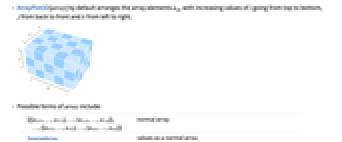
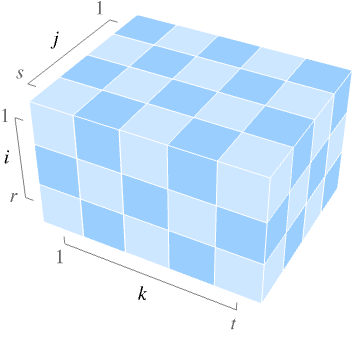
- ArrayPlot3D[array]は,デフォルトで,配列要素 aijkを,i の値が上から下,j の値が後ろから前,k の値が左から右に増加するように並べる.
- array の可能な形式には以下がある.
-
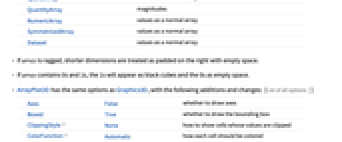
{{{a111,…,a11t},…,{a1s1,…,a1st}},…,{{ar11,…,ar1t},…,{ars1,…,arst}}} 通常の配列 SparseArray 通常の配列としての値 QuantityArray 大きさ NumericArray 通常の配列としての値 SymmetrizedArray 通常の配列としての値 Dataset 通常の配列としての値 - array が不調和配列の場合は,短い次元の右側が空白で充填されたものとして扱われる.
- array に0と1が含まれている場合は,1は黒の立方体で,0は空白スペースとして表示される.
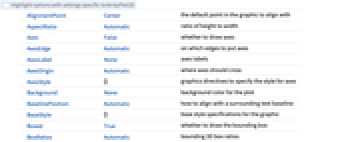
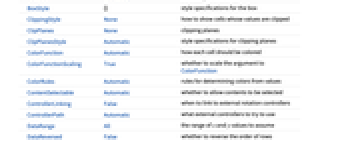
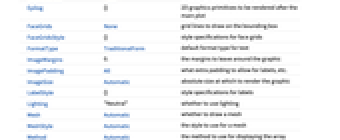
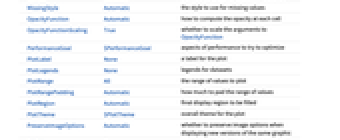
- ArrayPlot3Dには,Graphics3Dのオプションに以下の追加・変更を加えたものが使える. [全オプションのリスト]
-
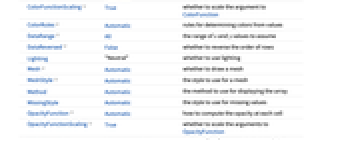
Axes False 軸を描くかどうか Boxed True 境界ボックスを描くかどうか ClippingStyle None 値が切り取られているセルをどのように表示するか ColorFunction Automatic 各セルをどのように彩色するか ColorFunctionScaling True ColorFunctionの引数をスケールするかどうか ColorRules Automatic 値から色を決定する規則 DataRange All 仮定すべき
と
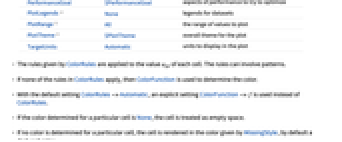
の値の範囲DataReversed False 行の順序を逆にするかどうか Lighting "Neutral" 照明を使うかどうか Mesh Automatic メッシュを描くかどうか MeshStyle Automatic メッシュに使用するスタイル Method Automatic 配列の表示に使用するメソッド MissingStyle Automatic 欠落値に使うスタイル OpacityFunction Automatic 各セルの不透明度をどのように計算するか OpacityFunctionScaling True OpacityFunctionの引数をスケールするかどうか PerformanceGoal $PerformanceGoal パフォーマンスのどの面について最適化するか PlotLegends None データ集合の凡例 PlotRange All プロットする値の範囲 PlotTheme $PlotTheme プロットの全体的なテーマ TargetUnits Automatic プロット中に表示する単位 - ColorRulesで与えられる規則は各セルの値 aijkに適用される.規則にはパターンが含まれていてもよい.
- ColorRulesの中の規則がどれも適用されない場合は,ColorFunctionを使って色が決められる.
- デフォルト設定のColorRules->Automaticでは,ColorRulesの代りに明示的な設定ColorFunction->f が使われる.
- 特性のセルの色がNoneに設定されていると,そのセルは空白として扱われる.
- 特定のセルに色が設定されていないと,そのセルはMissingStyleで与えられる色(デフォルトは暗赤色)で描画される.
- ColorFunctionおよびOpacityFunctionは,デフォルトで0から1の間にスケールされた aijkの値で与えられる1つの引数で与えられる.
- DataReversed->Trueのとき,行の順序は逆になるので,行は下から上に並べられて最後の行が一番上になる.
- TicksAutomaticの設定のとき,目盛は丸めた整数(よく使われるのは5あるいは10の倍数)の位置に置かれる.
- TicksAllの設定のとき,目盛は i,j,k の最小値と最大値の位置にも置かれる.
- 明示的なFrameTicks指定では,目盛座標は i,j,k を参照するものとみなされる.
- PlotRangeには以下の形式が使える.
-
amax 0から amaxまでの aijkの値を示す {amin,amax} aminから amaxまでの aijkの値を示す {rangei,rangej,rangek} i が rangei, …の aijkの値を示す {rangei,rangej,rangek,rangea} aijk の値を i が rangei, … で aijkが rangeaで示す - 配列指標の範囲 rangei,rangej,rangekには以下の形式が使える.
-
{min,max} min から max までの指標を含む All すべての指標を含む - 以下は,PlotLegendsのよく使われる設定である.
-
None 凡例は使わない Automatic 凡例を自動的に決定する Placed[lspec,…] 凡例の置き方を指定する - 以下は,Meshの可能な設定である.
-
Automatic メッシュを自動的に表示する None メッシュは表示しない Full 塗り潰された配列セルに隣接するメッシュを表示する All すべての配列セルに隣接するメッシュを表示する {speci,specj,speck} 特定の次元のメッシュを表示する - Methodの可能な設定には,"Graphics3D","Raster3D","ArrayMesh"がある.
全オプションのリスト
例題
すべて開く すべて閉じる例 (4)
d = RandomInteger[1, {5, 5, 5}];ArrayPlot3D[d]ArrayPlot3D[CellularAutomaton[
<|"GrowthCases" -> {1}, "Dimension" -> 3, "Neighborhood" -> 7|>, {{{{1}}}, 0}, {{{5}}}]]ArrayPlot3D[RandomInteger[2, {5, 5, 5}], ColorRules -> {1 -> Yellow, 2 -> Orange}]d = RandomReal[5, {5, 5, 5}];ArrayPlot3D[d, ColorFunction -> "Rainbow"]スコープ (6)
ArrayPlot3D[RandomInteger[1, {5, 5, 5}]]ArrayPlot3D[RandomInteger[1, {5, 5, 5}], OpacityFunction -> None]ArrayPlot3D[QuantityArray[RandomInteger[1, {5, 5, 5}], "Meters"], AxesLabel -> Automatic, Axes -> True]ArrayPlot3D[{{{1}, {1, 1}, {1, 0, 1}, {1, 1, 1, 1}},
{{1}, {1, 1}, {1, 0, 1}, {1, 1, 1, 1}},
{{1}, {1, 1}, {1, 0, 1}, {1, 1, 1, 1}},
{{1}, {1, 1}, {1, 0, 1}, {1, 1, 1, 1}}}]値がNoneのセルは背景のように描画される:
ArrayPlot3D[Table[If[x == y, None, 1 / (x - y)], {x, -2, 2}, {y, -2, 2}, {z, -2, 2}]]ArrayPlot3D[SparseArray[{{x_, x_, x_} -> 1, ({x_, y_, z_} /; Abs[x - y + z] < 3) -> .5}, {10, 10, 10}]]オプション (32)
AspectRatio (2)
ArrayPlot3D[CellularAutomaton[{14, {2, 1}, {1, 1}}, {{{1}}, 0}, 10], AspectRatio -> 1]ArrayPlot3D[CellularAutomaton[{14, {2, 1}, {1, 1}}, {{{1}}, 0}, 10], AspectRatio -> 1 / 2]デフォルトではArrayPlot3Dは軸を表示しない:
ArrayPlot3D[IconizedObject[«data»]]AxesLabel (3)
ArrayPlot3D[IconizedObject[«data»], Axes -> True]ArrayPlot3D[IconizedObject[«data»], Axes -> True, AxesLabel -> "z"]ArrayPlot3D[IconizedObject[«data»], Axes -> True, AxesLabel -> {"k", "j", "i"}]AxesStyle (4)
ArrayPlot3D[IconizedObject[«data»], Axes -> True, AxesStyle -> Red]ArrayPlot3D[IconizedObject[«data»], Axes -> True, AxesStyle -> {Directive[{Thick, RGBColor[0.6, 0.4, 0.2]}],
Directive[{Thick, RGBColor[0, 0, 1]}],
Directive[{Thick, RGBColor[0, 1, 0]}]}]ArrayPlot3D[IconizedObject[«data»], Axes -> True, AxesStyle -> Red, TicksStyle -> Green]ArrayPlot3D[IconizedObject[«data»], Axes -> True, AxesStyle -> Red, LabelStyle -> Green]ClippingStyle (1)
d = RandomReal[5, {5, 5, 5}];ArrayPlot3D[d, PlotRange -> {1, 4}]ArrayPlot3D[d, PlotRange -> {1, 4}, ClippingStyle -> Red]ArrayPlot3D[d, PlotRange -> {1, 4}, ClippingStyle -> {Gray, Green}]ColorFunction (2)
0から1までの値をHueに従って色にマッピングする:
d = RandomReal[5, {5, 5, 5}];ArrayPlot3D[d, ColorFunction -> Hue]ArrayPlot3D[d, ColorFunction -> (Hue[# ^ 4 / 2]&)]ColorDataからの名前付きの色勾配を使う:
ArrayPlot3D[d, ColorFunction -> "Pastel"]ArrayPlot3D[RandomInteger[1, {5, 5, 5}], ColorFunction -> (If[# == 1, Black, White]&), ColorFunctionScaling -> False, OpacityFunction -> None]ColorFunctionScaling (1)
ColorFunctionScaling->Trueのときは,まず値が0から1の間になるようにスケールされる:
d = RandomInteger[5, {5, 5, 5}];ArrayPlot3D[d, ColorFunction -> Hue, ColorFunctionScaling -> True]ColorRules (1)
d = RandomInteger[{-5, 5}, {5, 5, 5}];ArrayPlot3D[d, ColorRules -> {1 -> Red, 2 -> Blue, 3 -> Yellow, _ -> Gray}]色の規則が適用されないときはColorFunctionが使われる:
ArrayPlot3D[d, ColorRules -> {1 -> Red}]ArrayPlot3D[d, ColorRules -> {1 -> Blue, 0 -> Green, _ -> Gray}, OpacityFunction -> None]ColorRulesの任意のパターンを使う:
ArrayPlot3D[d, ColorRules -> {_ ? EvenQ -> Red, 1 | -1 -> Blue, x_ /; x < -1 -> Gray}]ArrayPlot3D[d, ColorRules -> {1 -> Red, 0 -> Blue, 1 -> Gray}]DataRange (1)
DataReversed (1)
Mesh (1)
MeshStyle (1)
OpacityFunction (4)
デフォルトで,OpacityFunctionはAutomaticである:
data = Table[Sin[π x]Sin[π (y + z)], {z, -2, 2, .25}, {y, -2, 2, .25}, {x, -2, 2, .25}];ArrayPlot3D[data]Noneを使って配列全体を不透明にする:
data = Table[Sin[π x]Sin[π (y + z)], {z, -2, 2, .25}, {y, -2, 2, .25}, {x, -2, 2, .25}];ArrayPlot3D[data, OpacityFunction -> None]data = Table[Sin[π x]Sin[π (y + z)], {z, -2, 2, 0.25}, {y, -2, 2, 0.25}, {x, -2, 2, 0.25}];ArrayPlot3D[data, OpacityFunction -> (If[# < 0.4, 1, 0.25]&), Mesh -> None]一定の不透明度Opacity[0.5]を使う:
data = Table[Sin[π x]Sin[π y] Sin[π z], {z, -2, 2, .5}, {y, -2, 2, .5}, {x, -2, 2, .5}];ArrayPlot3D[data, OpacityFunction -> 0.5, PlotLegends -> Automatic]OpacityFunctionScaling (2)
data = Table[x y z, {z, -5, 5}, {y, -5, 5}, {x, -5, 5}];ArrayPlot3D[data, OpacityFunction -> Function[f, If[f > 0, 1, 0]]]OpacityFunctionScalingをFalseに設定してスケールされていない値を使う:
data = Table[x y z, {z, -5, 5}, {y, -5, 5}, {x, -5, 5}];ArrayPlot3D[data, OpacityFunction -> Function[f, If[f > 0, 1, 0.25]], OpacityFunctionScaling -> False]PlotLegends (2)
d = RandomInteger[2, {3, 3, 3}];ArrayPlot3D[d]ArrayPlot3D[d, PlotLegends -> Automatic]PlotLegendsはColorFunctionを自動的に決める:
Table[ArrayPlot3D[RandomInteger[2, {10, 20, 10}], ColorFunction -> cf, PlotLegends -> Placed[Automatic, Below], ImageSize -> 100, OpacityFunction -> None], {cf, {"Pastel", GrayLevel}}]PlotRange (2)
d = RandomInteger[5, {5, 5, 5}];ArrayPlot3D[d]ArrayPlot3D[d, PlotRange -> {0, 3}]PlotRangeの最初の3つの項目は,含める i,j,k の範囲を指定する:
ArrayPlot3D[d, PlotRange -> {{2, 5}, {1, 3}, {3, 5}}]ArrayPlot3D[RandomInteger[{-10, 10}, {10, 20, 10}], PlotRange -> {All, All, All, {0, All}}]PlotTheme (1)
Ticks (2)
d = RandomInteger[5, {5, 5, 5}];ArrayPlot3D[d, Axes -> True, Ticks -> Automatic]d = RandomInteger[5, {20, 20, 20}];ArrayPlot3D[d, Ticks -> {{1, 5, 10, 15}, {6, 12, 18}, {3, 7, 9, 13}}, Axes -> True]アプリケーション (6)
セルオートマトン (2)
配列構造 (4)
array = ConstantArray[1, {3, 4, 5}];array[[1, 4, 5]] = 2;ArrayPlot3D[array]array = ConstantArray[1, {3, 4, 5}];array[[All, 4, 5]] = 2;ArrayPlot3D[array]array = ConstantArray[1, {3, 4, 5}];array[[All, All, 4]] = 2;ArrayPlot3D[array]array = ConstantArray[1, {3, 4, 5}];array[[1 ;; 2, 2 ;; 4, 3 ;; 5]] = 2;ArrayPlot3D[array]特性と関係 (6)
ArrayPlotまたはMatrixPlotを2D配列に使う:
{ArrayPlot[{{0, 0, 1, 0}, {0, 1, 1, 0}, {1, 0, 0, 1}}], MatrixPlot[{{0, 0, 1, 0}, {0, 1, 1, 0}, {1, 0, 0, 1}}]}ArrayPlot3Dは,たとえ次元の1つが1であっても3D配列を使う:
ArrayPlot3D[{{{0, 0, 1, 0}, {0, 1, 1, 0}, {1, 0, 0, 1}}}]Raster3DはArrayPlot3Dとは逆の順序で要素を並べる:
{ArrayPlot3D[{{{0, 1}, {2, 3}}, {{4, 5}, {6, 7}}}, ColorFunction -> "Rainbow", OpacityFunction -> None], Graphics3D[Raster3D[{{{0, 1}, {2, 3}}, {{4, 5}, {6, 7}}} / 7, ColorFunction -> "Rainbow"]]}DataReversedオプションを使うとArrayPlot3DでRaster3Dと同じ順序が使える:
ArrayPlot3D[{{{0, 1}, {2, 3}}, {{4, 5}, {6, 7}}}, ColorFunction -> "Rainbow", OpacityFunction -> None, DataReversed -> {True, True, False}]ListDensityPlot3Dを連続密度に使い,変化する不透明度で内部の特徴を見る:
data = Table[x + Sin[3z + y ^ 2], {z, -3, 3, 0.25}, {y, -3, 3, 0.25}, {x, -3, 3, 0.25}];{ListDensityPlot3D[data, ColorFunction -> "SunsetColors"], ArrayPlot3D[data, ColorFunction -> "SunsetColors"]}Image3Dは,データの表示に補間された体積の描画を使う:
ca = CellularAutomaton[
<|"GrowthCases" -> {1}, "Dimension" -> 3, "Neighborhood" -> 7|>, {{{{1}}}, 0}, {{{5}}}];{Image3D[ca], ArrayPlot3D[ca]}ReliefPlotは2Dデータに人工的な影を付ける:
ReliefPlot[Import["http://exampledata.wolfram.com/hailey.dem.gz", "Data"], ColorFunction -> "GreenBrownTerrain", MaxPlotPoints -> 100]ComplexArrayPlotを複素数値の2D配列に使う:
ComplexArrayPlot[RandomComplex[{-1 - I, 1 + I}, {25, 50}]]おもしろい例題 (3)
Sin関数を整数点でプロットする:
ArrayPlot3D[Table[Sin[x y z], {x, -5, 5}, {y, -5, 5}, {z, -5, 5}]]Manipulate[ArrayPlot3D[CellularAutomaton[{rn, {2, 1}, {1, 1, 1}}, {{{Table[1, init]}}, 0}, {{{t}}}]], {{rn, 14, "rule number"}, 2, 200, 4, Appearance -> "Labeled"},
{{t, 5, "steps"}, 0, 15, 1, Appearance -> "Labeled"},
{{init, 1, "initial width"}, 1, 10, 1, Appearance -> "Labeled"}, Delimiter,
{{pr, False, ""}, {True -> "fixed view", False -> "zoom to fit"}},
AutorunSequencing -> {{1, 20}, {2, 15}, {3, 10}, {4, 5}}]Hueを使ってGCDの値を色にインタラクティブにマッピングする:
Manipulate[ArrayPlot3D[Array[GCD, {10, 10, 10}], ColorFunction -> (Hue[Mod[# + a, 1]]&), ColorFunctionScaling -> True], {a, 0, 1}]関連するガイド
-
▪
- データの可視化
テキスト
Wolfram Research (2020), ArrayPlot3D, Wolfram言語関数, https://reference.wolfram.com/language/ref/ArrayPlot3D.html.
CMS
Wolfram Language. 2020. "ArrayPlot3D." Wolfram Language & System Documentation Center. Wolfram Research. https://reference.wolfram.com/language/ref/ArrayPlot3D.html.
APA
Wolfram Language. (2020). ArrayPlot3D. Wolfram Language & System Documentation Center. Retrieved from https://reference.wolfram.com/language/ref/ArrayPlot3D.html
BibTeX
@misc{reference.wolfram_2026_arrayplot3d, author="Wolfram Research", title="{ArrayPlot3D}", year="2020", howpublished="\url{https://reference.wolfram.com/language/ref/ArrayPlot3D.html}", note=[Accessed: 14-October-2026]}
BibLaTeX
@online{reference.wolfram_2026_arrayplot3d, organization={Wolfram Research}, title={ArrayPlot3D}, year={2020}, url={https://reference.wolfram.com/language/ref/ArrayPlot3D.html}, note=[Accessed: 14-October-2026]}