Export
形式のリスト »詳細
- Exportはさまざまな形式を扱う.一般に,それぞれの形式に異なるさまざまな要素が含まれる.使用可能な形式は$ExportFormatsというリストと「全形式のリスト」で与えられる.
- デフォルトで,ExportはDirectory[]で与えられる現行ディレクトリにファイルを作る.
- Export[dest,…]の dest は以下のいずれでもよい.
-
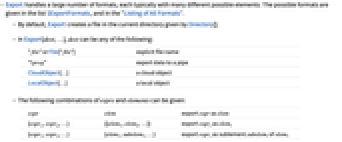
"file" または File["file"] 明示的なファイル名 "!prog" データをパイプにエキスポートする CloudObject[…] クラウドオブジェクト LocalObject[…] ローカルオブジェクト - exprs と elements の次の組合せが使える.
-
expr elem expr を elem としてエキスポートする {expr1,expr2,…} {{elem1,elem2,…}} expriを elemiとしてエキスポートする {expr1,expr2,…} {elem1,subelem1,…} expriを elem1の部分要素 subelemiとしてエキスポートする rules "Rules" 要素と式の規則をエキスポートする - 形式を指定する場合は,次の elements 指定が使える.
-
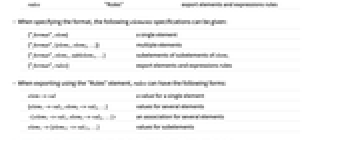
{"format",elem} 単一の要素 {"format",{elem1,elem2,…}} 複数の要素 {"format",elem1,sublelem1,…} elem1の部分要素の部分要素 {"format",rules} 要素と式の規則をエキスポートする - "Rules"要素を使ってエキスポートする際の rules には,次の形式が使える.
-
elem->val 単一要素の値 {elem1->val1,elem2->val2,…} 複数の要素の値 elem1->val1,elem2->val2,… 複数の要素についての連想 elem1->{elem11->val11,…} 部分要素の値 - Exportは,すべての形式についてOverwriteTargetオプションを取る.次は,使用可能な設定である.
-
False 既存のファイルは上書きしない True 既存のファイルを上書きする(デフォルト) "KeepBoth" 既存のファイルはそのままにし,新規ファイルの名前を自動的に選択する - Export[dest,…,options]を使って,エキスポート動作を制御する,形式に特有のオプションを与える.
- Export[file,NotebookObject[…],…]は,可能な場合はNotebookObjectで参照されるノートブックのコンテンツをエキスポートする.
- 新たな形式を手動でWolfram言語に登録することができる.「エキスポートコンバータの開発」についてのチュートリアルを参照のこと.
例題
すべて開く すべて閉じる例 (4)
Export["landscape.jpg", [image]]Export["test.gif", Plot[Sin[x], {x, 0, 10}]]Export["test.gif", Integrate[1 / (x ^ 4 - 1), x]]Import[%]Export["middlec.mid", Sound[{SoundNote["C"], SoundNote["G"]}]]スコープ (13)
基本的な用法 (5)
SparseArrayをMatrix Marketファイルにエキスポートする:
s = SparseArray[{{1, 1} -> 1, {2, 2} -> 2, {3, 3} -> 3, {1, 3} -> 4}]Export["file.mtx", s]Datasetを"JSONLines"ファイルにエキスポートする:
ds = Dataset[Table[<|"a" -> 3i, "b" -> 3i + 2, "c" -> 3i + 5|>, {i, 3}]]Export["file.jsonl", ds]Tabularオブジェクトを"Parquet"ファイルにエキスポートする:
tabular = Import["ExampleData/USstates.orc"]Export["file.parquet", tabular]Export["file", \!\(\*AudioBox[""]\), "WAV"]FileFormat["file"]"MP3"のオプションを使ってメタデータを除外してデータをエキスポートする:
Export["car.mp3", \!\(\*AudioBox[""]\), "MP3", IncludeMetaInformation -> False]Import["car.mp3", "MetaInformation"]形式のタイプ (8)
音声 (1)
グラフィックス (1)
3Dグラフィックス (1)
3Dモデルを"X3D"ファイルにエキスポートする:
Export["model.x3d", [image]]FilePrint[%]スプレッドシート (1)
テキスト (2)
(text = Import["ExampleData/USConstitution.txt"])//SnippetExport["file.txt", text]行列を"Markdown"ファイルにエキスポートする:
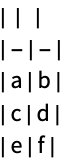
matrix = {{a, b}, {c, d}, {e, f}}Export["file.md", matrix]//FilePrint動画 (1)
アニメーションを"MP4"ファイルにエキスポートする:
animation = Manipulate[Plot[Sin[a x], {x, 0, 10}], {a, 1, 5}]Export["file.mp4", animation]一般化と拡張 (2)
ローカルオブジェクトをExportおよびImportで使ってデータを永久的に保存する:
Export[LocalObject["plot"], Plot[Sin[x], {x, 0, 10}], "PNG"]Import[%]クラウドオブジェクトを ExportおよびImportで使ってデータを永久的に保存することができる:
Export[CloudObject["plot"], Plot[Sin[x], {x, 0, 10}], "PNG"]Import[%]オプション (1)
OverwriteTarget (1)
Export["file.png", RandomImage[]]デフォルトで,Exportは既存のファイルを上書きする:
Export["file.png", RandomImage[]]OverwriteTargetFalseを使って上書きしないようにする:
Export["file.png", RandomImage[], OverwriteTarget -> False]特性と関係 (1)
Exportは,デフォルトで,FileNameToFormatListが返す最初の形式を使う:
FileNameToFormatList["file.cdf"]Export["data.cdf", RandomInteger[100, 10]]FileFormat[%]Export["data.cdf", RandomInteger[100, 10], "NASACDF"]FileFormat[%]テクニカルノート
関連するガイド
-
▪
- インポートとエキスポート ▪
- 全形式のリスト ▪
- グラフィックスのインポートとエキスポート ▪
- C/C++言語インターフェース ▪
- WDF(Wolfram Data Framework) ▪
- ラスタ画像形式 ▪
- Webページの作成 ▪
- 音声形式 ▪
- ノートブックにおけるインポートとエキスポート ▪
- XMLのインポートとエキスポート ▪
- マルチメディア形式 ▪
- 表形式の伝達 ▪
- 音声表現 ▪
- ファイル ▪
- 動画作成 ▪
- 色 ▪
- 計算音楽 ▪
- 外部操作 ▪
- Wolfram言語ファイル形式 ▪
- 永続ストレージ ▪
- 動画処理 ▪
- 表形式処理の概要 ▪
- ライブメールボックスの操作 ▪
- ローカルオブジェクト ▪
- インターネットとコンピュータイステムのデータ ▪
- ニューラルネットワークの構築と特性
関連するワークフロー
- 出版品質のグラフィックスを作る ▪
- ノートブックをPDFとして保存する ▪
- JSONを生成する
履歴
1999 で導入 (4.0) | 2003 で更新 (5.0) ▪ 2004 (5.1) ▪ 2007 (6.0) ▪ 2014 (10.0) ▪ 2017 (11.2) ▪ 2019 (12.0)
テキスト
Wolfram Research (1999), Export, Wolfram言語関数, https://reference.wolfram.com/language/ref/Export.html (2019年に更新).
CMS
Wolfram Language. 1999. "Export." Wolfram Language & System Documentation Center. Wolfram Research. Last Modified 2019. https://reference.wolfram.com/language/ref/Export.html.
APA
Wolfram Language. (1999). Export. Wolfram Language & System Documentation Center. Retrieved from https://reference.wolfram.com/language/ref/Export.html
BibTeX
@misc{reference.wolfram_2026_export, author="Wolfram Research", title="{Export}", year="2019", howpublished="\url{https://reference.wolfram.com/language/ref/Export.html}", note=[Accessed: 09-September-2026]}
BibLaTeX
@online{reference.wolfram_2026_export, organization={Wolfram Research}, title={Export}, year={2019}, url={https://reference.wolfram.com/language/ref/Export.html}, note=[Accessed: 09-September-2026]}