



RevolutionPlot3D
RevolutionPlot3D[fz,{t,tmin,tmax}]
在半径 t 处生成高为 fz 的旋转曲面图.
RevolutionPlot3D[fz,{t,tmin,tmax},{θ,θmin,θmax}]
方位角 θ 在 θmin 和 θmax 之间变化.
RevolutionPlot3D[{fx,fz},{t,tmin,tmax}]
通过绕 z 轴旋转含有 x、z 坐标的参数化曲线 {fx,fz} 生成曲面图.
RevolutionPlot3D[{fx,fz},{t,tmin,tmax},{θ,θmin,θmax}]
方位角 θ 在 θmin 到 θmax 之间变化.
RevolutionPlot3D[{fx,fy,fz},{t,tmin,tmax},…]
绘制通过旋转含有 x、y、z 坐标的参数化曲线 {fx,fy,fz} 所得的曲面.
更多信息和选项
- RevolutionPlot3D[fz,{t,…}] 等同于 RevolutionPlot3D[{t,0,fz},{t,…}].
- RevolutionPlot3D[fz,{t,tmin,tmax},{θ,θmin,θmax}] 相当于在柱坐标系中绘制作为半径 t 和角 θ 的函数的 fz.
- 角 θ 以弧度为单位,从上面观察时,从正 x 轴出发逆时针测量.
- RevolutionPlot3D[{{f},{g},…},…] 绘制出与所有函数 f、g、… 对应的曲面.
- 在 f 等函数计算结果为 None 或实数以外的任何值的位置上留下洞.
- RevolutionPlot3D 将变量 r、t 和 θ 视为局部变量,相当于使用 Block.
- RevolutionPlot3D 具有属性 HoldAll,只在将具体的数值赋给变量后才计算 f.
- 某些情况下,在将具体数值赋给变量之前,用 Evaluate 以符号方式计算 f 可能更高效.
- RevolutionPlot3D 和 Graphics3D 有同样的选项,不同之处及更多选项如下所示: [所有选项的列表]
-
Axes True 是否绘制坐标轴 BoundaryStyle Automatic 如何绘制曲面的边线 BoxRatios Automatic 三维边框的比例 ColorFunction Automatic 如何确定曲线和曲面的颜色 ColorFunctionScaling True 是否缩放 ColorFunction 的参数 EvaluationMonitor None 每次运行函数时要计算的表达式 Exclusions Automatic 要排除的  、
 曲线
ExclusionsStyle None 在要排除的点或曲线处绘制什么内容 MaxRecursion Automatic 允许的递归子划分的最大数量 Mesh Automatic 在每个方向上绘制多少网格 MeshFunctions {#4&,#5&} 如何确定网格的位置 MeshShading None 怎样处理网格之间区域的色调 MeshStyle Automatic 网格的样式 Method Automatic 细化曲面的方法 NormalsFunction Automatic 如何确定有效的曲面法线 PerformanceGoal $PerformanceGoal 优化的目标 PlotLegends None 曲面的图例 PlotPoints Automatic 每个参数的初始采样点的数量 PlotStyle Automatic 每个对象的样式的图形指令 PlotTheme $PlotTheme 绘图的整体主题 RegionFunction (True&) 如何判断是否应包括一个点 RevolutionAxis {0,0,1} 绕指定轴旋转 ScalingFunctions None 怎样缩放个别坐标 TextureCoordinateFunction Automatic 如何决定纹理的坐标 TextureCoordinateScaling True 是否缩放 TextureCoordinateFunction 的参数 WorkingPrecision MachinePrecision 内部计算使用的精度 - 可用 Tooltip、StatusArea 或 Annotation 为曲面指定交互式标签.
- RevolutionPlot3D 最初在 PlotPoints 指定的多个等距采样点处对每个函数进行计算. 然后使用自适应算法来选择额外的样本点,在每个参数中最多细分 MaxRecursion 次.
- 应该注意的是,由于使用有限数量的样本点,RevolutionPlot3D 可能会遗漏函数中的特征. 如果想要检查所得结果是否正确,应尝试增大 PlotPoints 和 MaxRecursion 的设置.
- 如果曲线不能达到一定的平滑度,则 On[RevolutionPlot3D::accbend] 将使 RevolutionPlot3D 显示一条信息.
- 使用默认设置 BoxRatiosAutomatic 时,平行于 z 轴的最终 3D 图形切片给出与 Plot 使用的默认长宽比一致的形式.
- 提供给 MeshFunctions 和 RegionFunction 中的函数的参数是 x、y、z、t、θ 和 r,其中
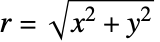 . 默认情况下,提供给 ColorFunction 和 TextureCoordinateFunction 中的函数的是这些参数缩放过的版本.
- 在每个曲面的所有地方对函数进行计算.
- 默认情况下,曲面被视为均匀的白色漫反射器,对应于 ColorFunction(White&).
- RevolutionPlot3D 返回 Graphics3D[GraphicsComplex[data]].
- 影响三维曲面的主题包括:
-
"DarkMesh" 暗色网格线 
"GrayMesh" 灰色网格线 
"LightMesh" 浅色网格线 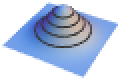
"ZMesh" 垂直分布的网格线 
"ThickSurface" 给曲面添加厚度 - ScalingFunctions 的可能设置包括:
-
{sx,sy,sz} 缩放 x、y 和 z 坐标轴 {sx,sy,sz,st,sθ,sr} 缩放 θ 和 ϕ 参数空间 - 常见的内置缩放函数 s 包括:
-
"Log" 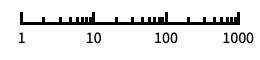
对数刻度,自动进行标记 "Log10" 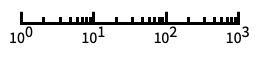
以 10 为底的对数刻度,用 10 的幂进行标记 "SignedLog" 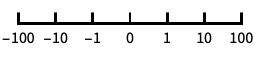
类似对数的刻度,包含 0 和负数 "Reverse" 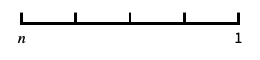
反转坐标的方向 "Infinite" 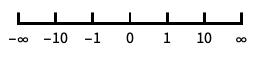
无穷刻度 - 缩放 θ 或 ϕ 参数空间将影响如何对绘图采样,但不影响整体的视觉外观.
所有选项的列表


范例
打开所有单元 关闭所有单元基本范例 (3)


范围 (18)
采样 (8)
RevolutionPlot3D[{Sin[t] + Sin[7t] / 10, Cos[t] + Cos[7t] / 10}, {t, 0, Pi}, Mesh -> All]RevolutionPlot3D[1 / t, {t, 0, 1}]RevolutionPlot3D[Sqrt[t Sin[2θ]], {t, 0, 1}, {θ, 0, 2Pi}]RevolutionPlot3D[Im[(t Exp[I θ] ^ 5) ^ (1 / 5)], {t, 0, 2}, {θ, 0, 2Pi}, Mesh -> None, ExclusionsStyle -> {None, Red}]用 PlotPoints 和 MaxRecursion 来控制适应性取样:
Grid[Table[RevolutionPlot3D[Sin[t], {t, 0, 2Pi}, PlotPoints -> pp, MaxRecursion -> mr], {mr, {0, 2}}, {pp, {5, 10}}]]PlotRange 集中在指定区域:
{RevolutionPlot3D[Sin[t]t, {t, 0, 20}],
	RevolutionPlot3D[Sin[t]t, {t, 0, 20}, PlotRange -> {0, 3}]}
Exclusions 来移除点或分散结果曲面:
RevolutionPlot3D[1 / (t - 1), {t, 0, 2}, Exclusions -> {t == 1}, Axes -> None, Mesh -> None]RevolutionPlot3D[{{t, -t}, {t, t ^ 2}}, {t, 0, 1}]演示 (10)
RevolutionPlot3D[{{t, t ^ 2}, {t, -t ^ 2}}, {t, 0, 1}, PlotStyle -> {Directive[Red, Specularity[White, 20]], Directive[Cyan, Specularity[White, 20]]}]RevolutionPlot3D[{{t, Sin[t] ^ 2}, {t, Cos[t] ^ 2}}, {t, 0, π}, PlotLegends -> "Expressions"]RevolutionPlot3D[{t, t ^ 2}, {t, 0, 2}, AxesLabel -> {x, y}, PlotLabel -> z == t ^ 2, AxesEdge -> {{-1, -1}, {1, -1}, {-1, -1}}]对于曲面提供一交互 Tooltip :
RevolutionPlot3D[Tooltip[{t, t}, "cone"], {t, -2, 2}, ColorFunction -> "Rainbow"]RevolutionPlot3D[{Sin[t] + Sin[5t] / 10, Cos[t] + Cos[5t] / 10}, {t, 0, Pi}, Mesh -> 10, MeshStyle -> {Cyan, Directive[Green, Dashed]}, PlotStyle -> Gray]RevolutionPlot3D[{Sin[t] + Sin[5t] / 10, Cos[t] + Cos[5t] / 10}, {t, 0, Pi}, Mesh -> 25, MeshShading -> {{Red, Yellow}, {Pink, Orange}}]RevolutionPlot3D[{Sin[t] + Sin[5t] / 10, Cos[t] + Cos[5t] / 10}, {t, 0, Pi}, Mesh -> 25, ColorFunction -> Function[{x, y, z, t, θ, r}, Hue[θ ]]]RevolutionPlot3D[{Sin[t] + Sin[5t] / 10, Cos[t] + Cos[5t] / 10}, {t, 0, Pi}, Mesh -> 25, ColorFunction -> (ColorData["Rainbow"][#6]&)]RevolutionPlot3D[{Sin[t] + Sin[5t] / 10, Cos[t] + Cos[5t] / 10}, {t, 0, Pi}, RegionFunction -> Function[{x, y, z, t, θ, r}, Sin[8t]Sin[8θ] > 0.1], Mesh -> None, PlotStyle -> FaceForm[Red, Cyan], PlotPoints -> 35, BoundaryStyle -> Yellow]RevolutionPlot3D[{Sin[t] + Sin[5t] / 10, Cos[t] + Cos[5t] / 10}, {t, 0, Pi}, PlotTheme -> "Marketing"]RevolutionPlot3D[t, {t, 0, 40}, BoxRatios -> {1, 1, 1}, ScalingFunctions -> {None, None, "Reverse"}]选项 (97)
Axes (3)
默认情况下,绘制 Axes:
RevolutionPlot3D[{Sin[t] + Sin[5t] / 10, Cos[t] + Cos[5t] / 10}, {t, 0, Pi}]RevolutionPlot3D[{Sin[t] + Sin[5t] / 10, Cos[t] + Cos[5t] / 10}, {t, 0, Pi}, Axes -> False]{RevolutionPlot3D[{Sin[t] + Sin[5t] / 10, Cos[t] + Cos[5t] / 10}, {t, 0, Pi}, Axes -> {True, False, False}], RevolutionPlot3D[{Sin[t] + Sin[5t] / 10, Cos[t] + Cos[5t] / 10}, {t, 0, Pi}, Axes -> {False, True, False}], RevolutionPlot3D[{Sin[t] + Sin[5t] / 10, Cos[t] + Cos[5t] / 10}, {t, 0, Pi}, Axes -> {False, False, True}]}AxesLabel (3)
RevolutionPlot3D[{Sin[t] + Sin[5t] / 10, Cos[t] + Cos[5t] / 10}, {t, 0, Pi}]
RevolutionPlot3D[{Sin[t] + Sin[5t] / 10, Cos[t] + Cos[5t] / 10}, {t, 0, Pi}, AxesLabel -> z]RevolutionPlot3D[{Sin[t] + Sin[5t] / 10, Cos[t] + Cos[5t] / 10}, {t, 0, Pi}, AxesLabel -> {x, y, z}]AxesOrigin (2)
AxesStyle (4)
RevolutionPlot3D[{Sin[t] + Sin[5t] / 10, Cos[t] + Cos[5t] / 10}, {t, 0, Pi}, AxesStyle -> Red]RevolutionPlot3D[{Sin[t] + Sin[5t] / 10, Cos[t] + Cos[5t] / 10}, {t, 0, Pi}, AxesStyle -> {{Thick, Brown}, {Thick, Blue}, {Thick, Green}}]RevolutionPlot3D[{Sin[t] + Sin[5t] / 10, Cos[t] + Cos[5t] / 10}, {t, 0, Pi}, AxesStyle -> Green, TicksStyle -> Blue]RevolutionPlot3D[{Sin[t] + Sin[5t] / 10, Cos[t] + Cos[5t] / 10}, {t, 0, Pi}, AxesStyle -> Green, LabelStyle -> Blue]BoundaryStyle (4)
BoundaryStyle 自动地配对 MeshStyle:
RevolutionPlot3D[t, {t, 0, 1}, MeshStyle -> Red]RevolutionPlot3D[t, {t, 0, 1}, MeshStyle -> None]RevolutionPlot3D[t, {t, 0, 1}, BoundaryStyle -> Directive[Thick, Red]]画出 RegionFunction 修剪的表面的边界:
RevolutionPlot3D[t, {t, 0, 2Pi}, BoundaryStyle -> Red, RegionFunction -> Function[{x, y, z, t, θ}, Sin[3t]Sin[3θ] > 0]]Exclusions修剪的表面的边界不画出:
RevolutionPlot3D[Im[(t Exp[I θ] ^ 5) ^ (1 / 5)], {t, 0, 2}, {θ, 0, 2Pi}, BoundaryStyle -> Red]BoxRatios (3)
通过使用 Plot, BoxRatios 默认保留 AspectRatio :
{Plot[Sin[x], {x, 0, 2Pi}], RevolutionPlot3D[Sin[x], {x, 0, 2Pi}, {θ, 0, Pi / 2}, ViewPoint -> Front]}BoxRatios 默认保留旋转圆圈:
RevolutionPlot3D[Sin[x], {x, 0, 2Pi}, {θ, 0, 2Pi / 3}, ViewPoint -> Top]用指定的 BoxRatios:
RevolutionPlot3D[Sin[x], {x, 0, 2Pi}, {θ, 0, 2Pi / 3}, BoxRatios -> {1, 1, 1}]ColorFunction (5)


Table[RevolutionPlot3D[{Sin[t], Cos[t]}, {t, 0, Pi}, {θ, 0, 2Pi}, ColorFunction -> Function[{x, y, z, t, θ, r}, Evaluate[f]], PlotLabel -> f, Axes -> None], {f, {Hue[x], Hue[y], Hue[z], Hue[t], Hue[θ], Hue[r]}}]用 ColorData 来预定义颜色梯度:
RevolutionPlot3D[Cos[t], {t, 0, 3Pi / 2}, ColorFunction -> Function[{x, y, z, t, θ, r}, ColorData["Rainbow"][r]]]
RevolutionPlot3D[Cos[t], {t, 0, 3Pi / 2}, ColorFunction -> "Rainbow"]ColorFunction 优先级高于 PlotStyle:
RevolutionPlot3D[Cos[t], {t, 0, 3Pi / 2}, ColorFunction -> "Rainbow", PlotStyle -> Directive[Opacity[0.5], Red]]ColorFunction 优先级低于 MeshShading:
RevolutionPlot3D[Cos[t], {t, 0, 3Pi / 2}, ColorFunction -> Function[{x, y, z, t, θ, r}, Hue[z]], MeshShading -> {{Automatic, None}, {None, Automatic}}]ColorFunctionScaling (1)


EvaluationMonitor (2)
显示 RevolutionPlot3D 在 {t,θ} 坐标下的取样函数:
ListPolarPlot[Reap[RevolutionPlot3D[Cos[t], {t, 0, 3Pi / 2}, {θ, 0, 2Pi}, EvaluationMonitor :> Sow[{θ, t}]]][[-1, 1]]]
Block[{k = 0}, RevolutionPlot3D[Cos[t], {t, 0, 3Pi / 2}, EvaluationMonitor :> k++];k]Exclusions (5)
RevolutionPlot3D[Im[(t Exp[I θ] ^ 5) ^ (1 / 5)], {t, 0, 2}, {θ, 0, 2Pi}]RevolutionPlot3D[Im[(t Exp[I θ] ^ 5) ^ (1 / 5)], {t, 0, 2}, {θ, 0, 2Pi}, Exclusions -> None]RevolutionPlot3D[1 / (t - 1), {t, 0, 2}, Exclusions -> {t == 1}, PlotRange -> 2, Mesh -> None]RevolutionPlot3D[Tan[θ] / (t - 1), {t, 0, 5}, {θ, 0, 2Pi}, Exclusions -> {Cos[θ] == 0, t == 1}, PlotRange -> 5, Mesh -> None]RevolutionPlot3D[Im[Sqrt[-t Exp[I θ]]] / (t - 1), {t, 0, 2}, {θ, 0, 2Pi}, Exclusions -> {Automatic, t == 1}, PlotRange -> 2, Mesh -> False]ExclusionsStyle (2)
RevolutionPlot3D[Im[(t Exp[I θ] ^ 5) ^ (1 / 5)], {t, 0, 2}, {θ, 0, 2Pi}, Mesh -> None, ExclusionsStyle -> {None, Directive[Blue, Thick]}]RevolutionPlot3D[Im[(t Exp[I θ] ^ 5) ^ (1 / 5)], {t, 0, 2}, {θ, 0, 2Pi}, Mesh -> {5, 0}, ExclusionsStyle -> {Yellow, Directive[Thick, Blue]}]ImageSize (7)
使用命名尺寸,例如 Tiny、Small、Medium 和 Large:
{RevolutionPlot3D[{Sin[t] + Sin[5t] / 10, Cos[t] + Cos[5t] / 10}, {t, 0, Pi}, ImageSize -> Tiny], RevolutionPlot3D[{Sin[t] + Sin[5t] / 10, Cos[t] + Cos[5t] / 10}, {t, 0, Pi}, ImageSize -> Small]}{RevolutionPlot3D[{Sin[t] + Sin[5t] / 10, Cos[t] + Cos[5t] / 10}, {t, 0, Pi}, ImageSize -> 150], RevolutionPlot3D[{Sin[t] + Sin[5t] / 10, Cos[t] + Cos[5t] / 10}, {t, 0, Pi}, AspectRatio -> 1.5, ImageSize -> 150]}{RevolutionPlot3D[{Sin[t] + Sin[5t] / 10, Cos[t] + Cos[5t] / 10}, {t, 0, Pi}, ImageSize -> {Automatic, 150}], RevolutionPlot3D[{Sin[t] + Sin[5t] / 10, Cos[t] + Cos[5t] / 10}, {t, 0, Pi}, AspectRatio -> 2, ImageSize -> {Automatic, 150}]}{RevolutionPlot3D[{Sin[t] + Sin[5t] / 10, Cos[t] + Cos[5t] / 10}, {t, 0, Pi}, ImageSize -> UpTo[200]], RevolutionPlot3D[{Sin[t] + Sin[5t] / 10, Cos[t] + Cos[5t] / 10}, {t, 0, Pi}, AspectRatio -> 2, ImageSize -> UpTo[200]]}RevolutionPlot3D[{Sin[t] + Sin[5t] / 10, Cos[t] + Cos[5t] / 10}, {t, 0, Pi}, ImageSize -> {200, 250}, Background -> StandardGray]设置 AspectRatioFull 将填充可用空间:
RevolutionPlot3D[{Sin[t] + Sin[5t] / 10, Cos[t] + Cos[5t] / 10}, {t, 0, Pi}, AspectRatio -> Full, ImageSize -> {200, 250}, Background -> StandardGray]{RevolutionPlot3D[{Sin[t] + Sin[5t] / 10, Cos[t] + Cos[5t] / 10}, {t, 0, Pi}, ImageSize -> {UpTo[150], UpTo[100]}], RevolutionPlot3D[{Sin[t] + Sin[5t] / 10, Cos[t] + Cos[5t] / 10}, {t, 0, Pi}, AspectRatio -> 2, ImageSize -> {UpTo[150], UpTo[100]}]}Framed[Pane[RevolutionPlot3D[{Sin[t] + Sin[5t] / 10, Cos[t] + Cos[5t] / 10}, {t, 0, Pi}, ImageSize -> Full, Background -> StandardGray], {200, 100}]]Framed[Pane[RevolutionPlot3D[{Sin[t] + Sin[5t] / 10, Cos[t] + Cos[5t] / 10}, {t, 0, Pi}, AspectRatio -> Full, ImageSize -> {Scaled[0.5], Scaled[0.5]}, Background -> StandardGray], {200, 200}]]MaxRecursion (1)
Mesh (5)
{RevolutionPlot3D[Cos[t], {t, 0, 3Pi / 2}, Mesh -> Full], RevolutionPlot3D[Cos[t], {t, 0, 3Pi / 2}, Mesh -> All]}RevolutionPlot3D[Cos[t], {t, 0, 3Pi / 2}, {θ, 0, 2Pi}, Mesh -> 10]RevolutionPlot3D[Cos[t], {t, 0, 3Pi / 2}, {θ, 0, 2Pi}, Mesh -> {5, 20}]

RevolutionPlot3D[Cos[t], {t, 0, 3Pi / 2}, {θ, 0, 2Pi}, Mesh -> {Range[0, 3Pi / 2, Pi / 8], 0}]
RevolutionPlot3D[Cos[t], {t, 0, 3Pi / 2}, {θ, 0, 2Pi}, MeshFunctions -> {#4&}, Mesh -> {{{1, Thick}, {2, Directive[Thick, Red]}}}]MeshFunctions (2)


Table[RevolutionPlot3D[{Sin[t] + Sin[5t] / 10, Cos[t] + Cos[5t] / 10}, {t, 0, Pi}, BoundaryStyle -> None, MeshFunctions -> {Function[{x, y, z, t, θ, r}, Evaluate[f]]}, Mesh -> 10, PlotLabel -> f, Axes -> None], {f, {x, y, z, t, θ, r}}]

RevolutionPlot3D[{Sin[t] + Sin[5t] / 10, Cos[t] + Cos[5t] / 10}, {t, 0, Pi}, Mesh -> {5, 10}, MeshFunctions -> {#4&, #5&}, MeshStyle -> {Red, Blue}]MeshShading (7)

RevolutionPlot3D[{Sin[t] + Sin[5t] / 10, Cos[t] + Cos[5t] / 10}, {t, 0, Pi}, Mesh -> 15, MeshFunctions -> {#5&}, MeshShading -> {Red, Blue}]None 用来移除片段数:
RevolutionPlot3D[{Sin[t] + Sin[5t] / 10, Cos[t] + Cos[5t] / 10}, {t, 0, Pi}, Mesh -> 15, MeshFunctions -> {#5&}, MeshShading -> {Red, None}]对于样式,MeshShading 优先级高于 PlotStyle :
RevolutionPlot3D[{Sin[t] + Sin[5t] / 10, Cos[t] + Cos[5t] / 10}, {t, 0, Pi}, Mesh -> 15, MeshFunctions -> {#5&}, PlotStyle -> Green, MeshShading -> {Red, Blue}]通过设置 MeshShading 到 Automatic,用 PlotStyle 来某些片段:
RevolutionPlot3D[{Sin[t] + Sin[5t] / 10, Cos[t] + Cos[5t] / 10}, {t, 0, Pi}, Mesh -> 15, MeshFunctions -> {#5&}, PlotStyle -> Directive[Opacity[0.5], Yellow], MeshShading -> {Red, Automatic}]MeshShading 与 ColorFunction 一起应用:
RevolutionPlot3D[{Sin[t] + Sin[5t] / 10, Cos[t] + Cos[5t] / 10}, {t, 0, Pi}, Mesh -> 15, MeshFunctions -> {#5&}, ColorFunction -> Function[{x, y, z, t, θ, r}, Hue[t]], MeshShading -> {StandardGray, Automatic}]RevolutionPlot3D[{Sin[t] + Sin[5t] / 10, Cos[t] + Cos[5t] / 10}, {t, 0, Pi}, ColorFunction -> Function[{x, y, z, t, θ, r}, Hue[r]], Mesh -> 15, MeshShading -> {{StandardGray, Automatic}, {None, Orange}}]用 FaceForm 对曲面不同侧采用不同的样式:
RevolutionPlot3D[{Sin[t] + Sin[5t] / 10, Cos[t] + Cos[5t] / 10}, {t, 0, Pi}, MeshShading -> {{FaceForm[Red, None], FaceForm[None, Blue]}, {FaceForm[None, Cyan], FaceForm[Orange, None]}}]MeshStyle (2)

RevolutionPlot3D[{Sin[t] + Sin[5t] / 10, Cos[t] + Cos[5t] / 10}, {t, 0, Pi}, MeshFunctions -> {#1&}, MeshStyle -> Red, BoundaryStyle -> None]

RevolutionPlot3D[{Sin[t] + Sin[5t] / 10, Cos[t] + Cos[5t] / 10}, {t, 0, Pi}, MeshFunctions -> {#1&, #2&}, MeshStyle -> {Red, Blue}]NormalsFunction (3)
RevolutionPlot3D[{Sin[t] + Sin[5t] / 10, Cos[t] + Cos[5t] / 10}, {t, 0, Pi}, Mesh -> None]对所有多边形,None 用来得到平直的底绞:
RevolutionPlot3D[{Sin[t] + Sin[5t] / 10, Cos[t] + Cos[5t] / 10}, {t, 0, Pi}, NormalsFunction -> None, Mesh -> None]RevolutionPlot3D[{Sin[t] + Sin[5t] / 10, Cos[t] + Cos[5t] / 10}, {t, 0, Pi}, Mesh -> None, NormalsFunction -> Function[{x, y, z, t, θ, r}, RandomReal[{0, 1}, {3}]]]PerformanceGoal (2)
PlotLegends (2)
RevolutionPlot3D[{{t, Sin[t] ^ 2}, {t, Cos[t] ^ 2}}, {t, 0, π}, PlotLegends -> Automatic]RevolutionPlot3D[{{t, Sin[t] ^ 2}, {t, Cos[t] ^ 2}}, {t, 0, π}, PlotLegends -> {"one", "two"}]RevolutionPlot3D[{{t, Sin[t] ^ 2}, {t, Cos[t] ^ 2}}, {t, 0, π}, PlotLegends -> "Expressions"]使用 Placed 控制图例位置:
RevolutionPlot3D[{{t, Sin[t] ^ 2}, {t, Cos[t] ^ 2}}, {t, 0, π}, PlotLegends -> Placed[{"one", "two"}, Below]]PlotPoints (1)
PlotStyle (3)
Table[RevolutionPlot3D[{Sin[t] + Sin[5t] / 10, Cos[t] + Cos[5t] / 10}, {t, 0, Pi}, PlotStyle -> ps], {ps, {Red, Directive[Orange, Specularity[White, 50]], Opacity[0.3], Directive[Purple, Opacity[0.5]]}}]RevolutionPlot3D[{{t, -t}, {t, t ^ 2}}, {t, 0, 1}, PlotStyle -> {Yellow, Red}]RevolutionPlot3D[{Sin[t], Cos[t]}, {t, 0, Pi}, {θ, 0, 5Pi / 3}, PlotStyle -> FaceForm[Red, Blue]]PlotTheme (5)
RevolutionPlot3D[{{t - t ^ 2, t}, {t + t ^ 2, t}}, {t, 0, 1}, PlotTheme -> "Business"]RevolutionPlot3D[{{t - t ^ 2, t}, {t + t ^ 2, t}}, {t, 0, 1}, PlotTheme -> "Business", Ticks -> None]RevolutionPlot3D[{{t - t ^ 2, t}, {t + t ^ 2, t}}, {t, 0, 1}, PlotTheme -> "Monochrome"]RevolutionPlot3D[{{t - t ^ 2, t}, {t + t ^ 2, t}}, {t, 0, 1}, PlotTheme -> {"Monochrome", StandardGreen}]RevolutionPlot3D[t^4 - t^2, {t, 0, 1}, PlotTheme -> "ThickSurface"]RegionFunction (2)


Table[RevolutionPlot3D[{Sin[t] + Sin[5t] / 10, Cos[t] + Cos[5t] / 10}, {t, 0, Pi}, RegionFunction -> Function[{x, y, z, t, θ, r}, Evaluate[f]], Mesh -> None, BoundaryStyle -> Green, PlotRange -> 1.1, Axes -> None, PlotLabel -> f], {f, {0 < x < 1, 0 < y < 1, 0 < z < 1, 0 < t < 1, 0 < θ < Pi / 2, 1 / 2 < r < 1}}]RevolutionPlot3D[{Sin[t] + Sin[5t] / 10, Cos[t] + Cos[5t] / 10}, {t, 0, Pi}, RegionFunction -> (Sin[5(#4 + #5)] > 0&), Mesh -> None, BoundaryStyle -> Green]RevolutionAxis (2)
默认情况下,RevolutionPlot3D 绕着  轴旋转:
RevolutionPlot3D[t^4 - t^2, {t, 0, 1}]
RevolutionPlot3D[t^4 - t^2, {t, 0, 1}, RevolutionAxis -> "X"]RevolutionPlot3D[t^4 - t^2, {t, 0, 1}, RevolutionAxis -> {1, 1}]ScalingFunctions (3)
RevolutionPlot3D[t, {t, 0, 40}, BoxRatios -> {1, 1, 1}]RevolutionPlot3D[t, {t, 0, 40}, BoxRatios -> {1, 1, 1}, ScalingFunctions -> {None, None, "Log"}]用 ScalingFunctions 逆转  轴的坐标方向:
RevolutionPlot3D[t, {t, 0, 40}, BoxRatios -> {1, 1, 1}, ScalingFunctions -> {None, None, "Reverse"}]TextureCoordinateFunction (4)


RevolutionPlot3D[{Sin[t] + Sin[5t] / 5, Cos[t] + Cos[5t] / 5}, {t, 0, Pi}, Mesh -> None, PlotStyle -> Texture[ExampleData[{"ColorTexture", "TriWeavePattern"}]]]

RevolutionPlot3D[{Sin[t] + Sin[5t] / 5, Cos[t] + Cos[5t] / 5}, {t, 0, Pi}, Mesh -> None, TextureCoordinateFunction -> ({#1, #2}&), PlotStyle -> Texture[ExampleData[{"ColorTexture", "TriWeavePattern"}]]]RevolutionPlot3D[{Sin[t] + Sin[5t] / 5, Cos[t] + Cos[5t] / 5}, {t, 0, Pi}, Mesh -> None, TextureCoordinateScaling -> False, PlotStyle -> Texture[ExampleData[{"ColorTexture", "TriWeavePattern"}]]]texture = ArrayPlot[{{1, 1, 1, 2, 1, 1}, {2, 0, 0, 2, 0, 0}, {2, 0, 0, 2, 0, 0}, {2, 1, 1, 1, 1, 1}, {2, 0, 0, 2, 0, 0}, {2, 0, 0, 2, 0, 0}}, ColorRules -> {1 -> Red, 2 -> Blue, 0 -> White}, Frame -> False, PlotRangePadding -> None, ImagePadding -> None, ImageSize -> 100]RevolutionPlot3D[{Sin[t] + Sin[5t] / 5, Cos[t] + Cos[5t] / 5}, {t, 0, Pi}, Mesh -> None, TextureCoordinateScaling -> False, PlotStyle -> Texture[texture]]TextureCoordinateScaling (1)
texture = ArrayPlot[{{1, 1, 1, 2, 1, 1}, {2, 0, 0, 2, 0, 0}, {2, 0, 0, 2, 0, 0}, {2, 1, 1, 1, 1, 1}, {2, 0, 0, 2, 0, 0}, {2, 0, 0, 2, 0, 0}}, ColorRules -> {1 -> Red, 2 -> Blue, 0 -> White}, Frame -> False, PlotRangePadding -> None, ImagePadding -> None, ImageSize -> 100]Table[RevolutionPlot3D[{Sin[t] + Sin[5t] / 5, Cos[t] + Cos[5t] / 5}, {t, 0, Pi}, Mesh -> None, TextureCoordinateScaling -> s, PlotStyle -> Texture[texture], PlotLabel -> s], {s, {True, False}}]Ticks (6)
RevolutionPlot3D[{2 + Cos[t], Sin[t]}, {t, 0, 2 Pi}]RevolutionPlot3D[{2 + Cos[t], Sin[t]}, {t, 0, 2 Pi}, Ticks -> None]RevolutionPlot3D[{2 + Cos[t], Sin[t]}, {t, 0, 2 Pi}, Ticks -> {{-2, .5, 2}, {-2, 0, 2}, {-1, 0, 1}}]RevolutionPlot3D[{2 + Cos[t], Sin[t]}, {t, 0, 2 Pi}, Ticks -> {{{-2, -a}, {.5, b}, {2, a}}, {{-2, -a}, {0, c}, {2, a}}, {{-1, -d}, {0, c}, {1, d}}}]RevolutionPlot3D[{2 + Cos[t], Sin[t]}, {t, 0, 2 Pi}, Ticks -> {{{-2, -a, .12}, {.5, b, .08}, {2, a, .15}}, {{-2, -a, .16}, {0, c, .06}, {2, a, .07}}, {{-1, -d, .05}, {0, c, .05}, {1, d, .05}}}]RevolutionPlot3D[{2 + Cos[t], Sin[t]}, {t, 0, 2 Pi}, Ticks -> {{{-2, -a, .12, Directive[Blue]}, {.5, b, .08, Directive[Blue]}, {2, a, .15, Directive[Thick, Blue]}}, {{-2, -a, .16, Directive[Thick, Red]}, {0, c, .06, Directive[Thick, Red]}, {2, a, .07, Directive[Thick, Red]}}, {{-1, -d, .05, Directive[Thick, Green]}, {0, c, .05, Directive[Thick, Darker@Green]}, {1, d, .05, Directive[Thick, Green]}}}]TicksStyle (3)
RevolutionPlot3D[{2 + Cos[t], Sin[t]}, {t, 0, 2 Pi}, AxesStyle -> Directive[Red, 12]]RevolutionPlot3D[{2 + Cos[t], Sin[t]}, {t, 0, 2 Pi}, TicksStyle -> Directive[Red, 12]]RevolutionPlot3D[{2 + Cos[t], Sin[t]}, {t, 0, 2 Pi}, TicksStyle -> {Directive[Red, 14], Directive[Blue, 14], Directive[Green, 14]}]WorkingPrecision (2)
应用 (4)
RevolutionPlot3D[{1, t}, {t, 0, 1}]RevolutionPlot3D[{t, t}, {t, 0, 1}]RevolutionPlot3D[{Cos[t], Sin[t]}, {t, -Pi / 2, Pi / 2}]RevolutionPlot3D[{2 + Cos[t], Sin[t]}, {t, 0, 2Pi}]RevolutionPlot3D[{{t, t}, {t, 1}}, {t, 0, 1}]Pi Integrate[t ^ 2, {t, 0, 1}]Table[RevolutionPlot3D[Cos[(π i/10)] BesselJ[0, t], {t, 0, 10}, PlotRange -> {All, All, {-1, 1}}, Boxed -> False, Axes -> False, Mesh -> None], {i, 1, 8}]ListAnimate[%]RevolutionPlot3D[{(2 + Cos[v / 2] Sin[u] - Sin[v / 2] Sin[2 u]) Cos[v], (2 + Cos[v / 2] Sin[u] - Sin[v / 2] Sin[2 u]) Sin[v], Sin[v / 2] Sin[u] + Cos[v / 2] Sin[2 u]}, {u, 0, 2 Pi}, {v, 0, 2 Pi}, Mesh -> None, PlotStyle -> Directive[Specularity[White, 30], Opacity[0.8], Red], Boxed -> False, Axes -> False, PlotPoints -> 60]属性和关系 (8)
RevolutionPlot3D 是 ParametricPlot3D 的特例:
{RevolutionPlot3D[t, {t, 0, 3}, {θ, 0, 5Pi / 3}], ParametricPlot3D[{t Cos[θ], t Sin[θ], t}, {t, 0, 3}, {θ, 0, 5Pi / 3}, BoxRatios -> {1, 1, 1 / (2GoldenRatio)}]}默认的 BoxRatios 保留 Plot 使用的 AspectRatio:
{Plot[Sin[x], {x, 0, 2Pi}], RevolutionPlot3D[Sin[x], {x, 0, 2Pi}, {θ, 0, Pi / 2}, ViewPoint -> Front, Mesh -> None, BoundaryStyle -> Thick]}默认的 BoxRatios 保留旋转圆圈:
RevolutionPlot3D[Sin[x], {x, 0, 2Pi}, {θ, 0, 2Pi / 3}, ViewPoint -> Top]对球坐标使用 SphericalPlot3D:
SphericalPlot3D[1 + 1 / 5Sin[3v], {u, 0, Pi}, {v, 0, 2Pi}]对三维空间的任意曲线和曲面使用 ParametricPlot3D:
ParametricPlot3D[Evaluate[{Cos[u], Sin[u], -u / 5} / Sqrt[1 + (u / 5) ^ 2]], {u, -20, 20}]ParametricPlot3D[{u - u ^ 3 / 3 + u v ^ 2, -v - u ^ 2v + v ^ 3 / 3, u ^ 2 - v ^ 2}, {u, -1.5, 1.5}, {v, -1.5, 1.5}]对极坐标中的曲线使用 PolarPlot:
PolarPlot[Sin[4t], {t, 0, 2Pi}]对二维空间内的曲线和区域使用 ParametricPlot:
{ParametricPlot[{u Cos[u], u Sin[u]}, {u, 0, 4Pi}],
	ParametricPlot[{(u + v) Cos[u], (u + v) Sin[u]}, {u, 0, 4Pi}, {v, 0, 3}]}
ContourPlot3D 和 RegionPlot3D 可用于隐式定义的曲面和区域:
ContourPlot3D[x ^ 2 + y ^ 2 == z ^ 2, {x, -2, 2}, {y, -2, 2}, {z, -2, 2}]RegionPlot3D[x ^ 2 + y ^ 2 < z ^ 2, {x, -2, 2}, {y, -2, 2}, {z, -2, 2}]用 ListPlot3D 和 ListSurfacePlot3D 绘制数据:
ListPlot3D[Table[Sin[x y], {x, 0, 3, 0.1}, {y, 0, 3, 0.1}]]ListSurfacePlot3D[Table[{x = RandomReal[{-1, 1}], y = RandomReal[{-1, 1}], RandomChoice[{-1, 1}]Sqrt[1 - x ^ 2 - y ^ 2]}, {1000}]]可能存在的问题 (1)
文本
Wolfram Research (2007),RevolutionPlot3D,Wolfram 语言函数,https://reference.wolfram.com/language/ref/RevolutionPlot3D.html (更新于 2022 年).
CMS
Wolfram 语言. 2007. "RevolutionPlot3D." Wolfram 语言与系统参考资料中心. Wolfram Research. 最新版本 2022. https://reference.wolfram.com/language/ref/RevolutionPlot3D.html.
APA
Wolfram 语言. (2007). RevolutionPlot3D. Wolfram 语言与系统参考资料中心. 追溯自 https://reference.wolfram.com/language/ref/RevolutionPlot3D.html 年