



PointValuePlot
PointValuePlot[{pt1val1,pt2val2,…}]
点 ptiを値 valiに従ってスタイル付けしてプロットする.
PointValuePlot[ptsvals]
点集合 ptiからの点 pts を値 val からの対応する値 valiで使う.
PointValuePlot[…,enc]
プロット内の値 viをビジュアル符号化 enc を使って表す.
PointValuePlot[data,…]
data の場所と値をプロットする.
詳細とオプション
- PointValuePlotは,等級記号地図および主題地図としても知られている.
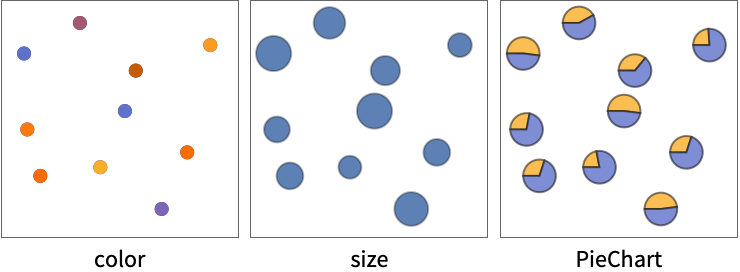
- PointValuePlotは,色,大きさ,形状等のさまざまなビジュアル符号化 enc を使って特定の位置の値を表す.
- 点 ptiの座標{x,y}は以下の形で与えることができる.
-
xi 実数値の数 Quantity[xi,unit] 単位がある数量 Around[xi,ei] 不確かさが eiの値 xi Interval[{xmin,xmax}] xminから xmaxまでの範囲の値 - ptsiは,次の形式の地理位置でよい.
-
GeoPosition[{lat,lon}] 経緯度 Entity[…] 地理実体 Dated[…] 日付付き実体 - 複数の点 pts は以下の形で与えることができる.
-
{pt1,pt2,…} 個々の点のリスト QuantityArray[…] 数量の配列 GeoPosition[…] 測地位置の配列 - 値 valiは以下を含む任意の形式でよい.
-
n 数値 Quantity[vali,unit] 単位がある値 "str" 列 RGBColor[…],Hue[…],… 色 {vali1,vali2,…} 値のリスト - 複数の値 values は以下の形で与えることができる.
-
{val1,val2,…} 個々の値のリスト QuantityArray[{val1,val2,…},unit] 数量の配列 Dataset[…] 値のデータ集合 - PointValuePlotで使うデータ data は以下の形で与えることができる.
-
{e1,e2,…} ラッパーがある/ない要素のリスト <k1e1,k2e2,…> キーと値の連想 SpatialPointData[…] 空間点と注釈 WeightedData[…] 値の重みがある位置 w[{e1,e2,…},…] データ集合全体に適用されたラッパー w[{data1,data1,…},…] すべてのデータ集合に適用されたラッパー - プロットの要素には次のラッパーを使うことができる.
-
Annotation[e,label] 注釈を与える Button[e,action] 要素がクリックされたときに実行するアクションを定義する Callout[e,label] コールアウトでデータにラベルを付ける EventHandler[e,…] 要素の一般的なイベントハンドラを定義する Hyperlink[e,uri] 要素をハイパーリンクにする Labeled[e,…] 要素にラベルを付けて表示する Legended[e,…] グラフの凡例に要素の特徴を含める PopupWindow[e,cont] 要素にポップアップウィンドウを付ける StatusArea[e,label] 要素の上にマウスが置かれたときにステータスエリアに表示する Style[e,opts] 指定のスタイルで要素を表示する Tooltip[e,label] 要素に任意のツールチップを付ける - これらの形式で与えられていないデータはプロットの作成時に無視される.
- デフォルトで,符号化 enc は値 valiの形式に基づいて自動的に選ばれる.
- 次は,符号化 enc の可能な設定である.
-
"Size" 値によって点の大きさを変える "Color" 値によって点に彩色する "DiscreteColor" 点を値に従って離散的に彩色する "Shape" 値によって点の形を変える "Label" 値によって点にラベルを付ける func func を値に適用して点のマーカーを決定する nenc n  番目の点の値を符号化 enc で符号化する
m;;nenc m  番目から n
 番目までの値を符号化 enc で符号化する
Allenc 点についてのすべての値を符号化 enc で符号化する {enc1,enc2,…} 異なる値に異なる符号化を使う - PointValuePlotには,Graphicsと同じオプションに以下の追加・変更を加えたものが使える. [全オプションのリスト]
全オプションのリスト
例題
すべて開く すべて閉じる例 (5)
PointValuePlot[Table[RandomReal[10, 2] -> RandomReal[], 10]]PointValuePlot[Table[RandomReal[10, 2] -> {RandomReal[], RandomChoice[{1, 2, 3}]}, 10]]PointValuePlot[Table[RandomReal[10, 2] -> RandomReal[], 10], "Size"]data = RandomReal[100, {10, 2}];
annotations = {{"on", "off", "on", "on", "off", "off", "on", "on", "off", "off"}, {275.9, 241.2, 256., 442.9, 209.4, 260.4, 348.8, 315.2, 275.3, 317.8}};PointValuePlot[SpatialPointData[data -> annotations], PlotLegends -> Automatic]PointValuePlot[Table[RandomGeoPosition[["US"]] -> RandomReal[3], 20]]スコープ (14)
データ (8)
PointValuePlot[{{1, 1} -> 1, {2, 2} -> 2, {3, 3} -> 3}]PointValuePlot[{{1, 1}, {2, 2}, {3, 3}} -> {1, 2, 3}]PointValuePlot[{{1, 1} -> Quantity[1, "Meters"], {2, 2} -> Quantity[2, "Meters"], {3, 3} -> Quantity[3, "Meters"]}]PointValuePlot[{{1, 1}, {2, 2}, {3, 3}} -> QuantityArray[{1, 2, 3}, "Meters"]]PointValuePlot[<|{1, 1} -> 1, {2, 2} -> 2, {3, 3} -> 3|>]PointValuePlot[<|Entity["City", {"London", "GreaterLondon", "UnitedKingdom"}] -> 1, Entity["City", {"Paris", "IleDeFrance", "France"}] -> 2, Entity["City", {"Berlin", "Berlin", "Germany"}] -> 3|>, "Size"]PointValuePlot[RandomGeoPosition[10] -> Range[10], "Size"]SpatialPointDataオブジェクトは場所と値の両方を含む:
PointValuePlot[SpatialPointData[RandomReal[100, {10, 2}] -> RandomReal[1, 10]]]符号化 (6)
PointValuePlot[{{1, 1}, {2, 2}, {3, 3}, {4, 4}, {5, 5}} -> {{"a", 1}, {"b", 2}, {"c", 3}, {"d", 4}, {"e", 5}}]PointValuePlot[{{1, 1}, {2, 2}, {3, 3}, {4, 4}, {5, 5}} -> {{"a", 1, 1}, {"b", 2, 1}, {"c", 3, 1}, {"d", 4, 2}, {"e", 5, 2}}, {2 -> "DiscreteColor", 3 -> "Size"}]PointValuePlot[{{1, 1}, {2, 2}, {3, 3}, {4, 4}, {5, 5}} -> {{"a", 1, 1}, {"b", 2, 1}, {"c", 3, 1}, {"d", 4, 2}, {"e", 5, 2}}, {2 -> "Color", 3 -> "Size"}, PlotLegends -> Automatic]PointValuePlot[{{1, 1}, {2, 2}, {3, 3}, {4, 4}, {5, 5}} -> {{"a", 1, 1}, {"b", 2, 1}, {"c", 3, 1}, {"d", 4, 2}, {"e", 5, 2}}, 2 ;; 3 -> PieChart]PointValuePlot[Table[RandomReal[1, 2] -> RandomReal[{5, 10}, 5], 20], All -> BarChart]PointValuePlot[Table[RandomReal[1, 2] -> RandomImage[1, {25, 25}], 20]]オプション (79)
AspectRatio (3)
PointValuePlot[IconizedObject[«plain»]]PointValuePlot[IconizedObject[«plain»], AspectRatio -> 1 / GoldenRatio]PointValuePlot[IconizedObject[«geo»]]PointValuePlot[IconizedObject[«geo»], GeoProjection -> "LambertAzimuthal"]Axes (3)
デフォルトで,PointValuePlotは軸ではなく枠を使う:
PointValuePlot[IconizedObject[«plain»]]PointValuePlot[IconizedObject[«plain»], Frame -> False, Axes -> True]{PointValuePlot[IconizedObject[«plain»], Frame -> False, Axes -> {True, False}], PointValuePlot[IconizedObject[«plain»], Frame -> False, Axes -> {False, True}]}AxesLabel (3)
PointValuePlot[IconizedObject[«plain»], Frame -> False, Axes -> True]
PointValuePlot[IconizedObject[«plain»], Frame -> False, Axes -> True, AxesLabel -> y]PointValuePlot[IconizedObject[«plain»], Frame -> False, Axes -> True, AxesLabel -> {x, y}]AxesOrigin (2)
AxesStyle (3)
PointValuePlot[IconizedObject[«plain»], Frame -> False, Axes -> True, AxesStyle -> Red]PointValuePlot[IconizedObject[«plain»], Frame -> False, Axes -> True, AxesStyle -> {{Thick, Red}, {Thick, Blue}}]PointValuePlot[IconizedObject[«plain»], Frame -> False, Axes -> True, AxesStyle -> Green, TicksStyle -> Red]BubbleSizes (3)
PointValuePlot[IconizedObject[«plain»]]{PointValuePlot[IconizedObject[«plain»], BubbleSizes -> Small], PointValuePlot[IconizedObject[«plain»], BubbleSizes -> Large]}PointValuePlot[IconizedObject[«plain»], BubbleSizes -> {0.02, 0.15}]ColorFunction (3)
PointValuePlot[IconizedObject[«scalar»], PlotLegends -> Automatic]PointValuePlot[IconizedObject[«scalar»], PlotLegends -> Automatic, ColorFunction -> "Rainbow"]PointValuePlot[IconizedObject[«scalar»], PlotLegends -> Automatic, ColorFunction -> (Hue[#, 1, 1 - #]&)]ColorFunctionScaling (2)
デフォルトで,色関数の引数は0から1までになるようにスケールされる:
PointValuePlot[IconizedObject[«scalar»], PlotLegends -> Automatic, ColorFunction -> (If[# < 1, Red, Blue]&)]PointValuePlot[IconizedObject[«scalar»], PlotLegends -> Automatic, ColorFunction -> (If[# < 1, Red, Blue]&), ColorFunctionScaling -> False]Frame (2)
FrameLabel (3)
FrameStyle (2)
GeoBackground (3)
PointValuePlot[IconizedObject[«geo scalar»]]PointValuePlot[IconizedObject[«geo scalar»], GeoBackground -> "Satellite"]PointValuePlot[IconizedObject[«geo scalar»], GeoBackground -> "ReliefMap"]GeoGridLines (3)
PointValuePlot[IconizedObject[«geo scalar»]]PointValuePlot[IconizedObject[«geo scalar»], GeoGridLines -> Automatic]PointValuePlot[IconizedObject[«geo scalar»], GeoGridLines -> Quantity[5, "AngularDegrees"]]GeoGridLinesStyle (2)
GeoProjection (3)
PointValuePlot[IconizedObject[«geo scalar»]]PointValuePlot[IconizedObject[«geo scalar»], GeoProjection -> "Mercator"]PointValuePlot[IconizedObject[«geo scalar»], GeoProjection -> "Albers"]GeoRange (3)
PointValuePlot[IconizedObject[«geo scalar»]]PointValuePlot[IconizedObject[«geo scalar»], GeoRange -> "World"]PointValuePlot[IconizedObject[«geo scalar»], GeoRange -> ["US"]]GeoScaleBar (2)
GridLines (3)
PointValuePlot[IconizedObject[«plain»], GridLines -> Automatic]PointValuePlot[IconizedObject[«plain»], GridLines -> {None, Automatic}]PointValuePlot[IconizedObject[«plain»], GridLines -> {None, Range[0, 5.5, 0.5]}]GridLinesStyle (1)
ImageSize (7)
Tiny,Small,Medium,Largeのような名前付きのサイズを使う:
{PointValuePlot[IconizedObject[«plain»], ImageSize -> Tiny], PointValuePlot[IconizedObject[«plain»], ImageSize -> Small]}{PointValuePlot[IconizedObject[«plain»], ImageSize -> 150], PointValuePlot[IconizedObject[«plain»], AspectRatio -> 1.5, ImageSize -> 150]}{PointValuePlot[IconizedObject[«plain»], ImageSize -> {Automatic, 150}], PointValuePlot[IconizedObject[«plain»], AspectRatio -> 2, ImageSize -> {Automatic, 150}]}{PointValuePlot[IconizedObject[«plain»], ImageSize -> UpTo[200]], PointValuePlot[IconizedObject[«plain»], AspectRatio -> 2, ImageSize -> UpTo[200]]}グラフィックスの幅と高さを指定して,必要な場合はスペースで充填する:
PointValuePlot[IconizedObject[«plain»], ImageSize -> {200, 300}, Background -> StandardGray]AspectRatioFullと設定すると,使用可能なスペースが塗り潰される:
PointValuePlot[IconizedObject[«plain»], AspectRatio -> Full, ImageSize -> {200, 300}, Background -> StandardGray]{PointValuePlot[IconizedObject[«plain»], ImageSize -> {UpTo[150], UpTo[100]}], PointValuePlot[IconizedObject[«plain»], AspectRatio -> 2, ImageSize -> {UpTo[150], UpTo[100]}]}ImageSizeFullを使ってオブジェクト内の使用可能なスペースを塗り潰す:
Framed[Pane[PointValuePlot[IconizedObject[«plain»], ImageSize -> Full, Background -> StandardGray], {200, 100}]]Framed[Pane[PointValuePlot[IconizedObject[«plain»], AspectRatio -> Full, ImageSize -> {Scaled[0.5], Scaled[0.5]}, Background -> StandardGray], {200, 200}]]LabelingSize (2)
PointValuePlot[{{1, 1}, {2, 2}, {3, 3}, {4, 4}, {5, 5}} -> {{1, 1}, {2, 1}, {3, 1}, {4, 2}, {5, 2}}]LabelingSizeを使ってサイズを変更する:
PointValuePlot[{{1, 1}, {2, 2}, {3, 3}, {4, 4}, {5, 5}} -> {{1, 1}, {2, 1}, {3, 1}, {4, 2}, {5, 2}}, LabelingSize -> 15]PointValuePlot[Table[RandomReal[1, 2] -> RandomImage[1, {25, 25}], 20], LabelingSize -> 20]LabelStyle (3)
PointValuePlot[IconizedObject[«labels»]]PointValuePlot[IconizedObject[«labels»], LabelStyle -> Red]PointValuePlot[IconizedObject[«labels»], LabelStyle -> {FontFamily -> "Times", FontSize -> 16}]PlotRange (2)
PlotStyle (3)
PointValuePlot[IconizedObject[«scalar»]]PointValuePlot[IconizedObject[«scalar»], PlotStyle -> AbsolutePointSize[10]]PointValuePlot[IconizedObject[«plain»], PlotStyle -> {Red, Blue}]PlotTheme (3)
PointValuePlot[IconizedObject[«plain»], PlotTheme -> "Marketing"]PointValuePlot[IconizedObject[«plain»], PlotTheme -> {"Marketing", "NoAxes"}]PointValuePlot[IconizedObject[«plain»], PlotTheme -> "Marketing", GridLines -> None]ScalingFunctions (2)

Ticks (4)
PointValuePlot[{{10, 1}, {20, 2}, {30, 3}, {40, 4}, {50, 5}} -> {{"a", 1}, {"a", 2}, {"b", 3}, {"b", 4}, {"b", 5}}, Frame -> False, Axes -> True]PointValuePlot[{{10, 1}, {20, 2}, {30, 3}, {40, 4}, {50, 5}} -> {{"a", 1}, {"a", 2}, {"b", 3}, {"b", 4}, {"b", 5}}, Frame -> False, Axes -> True, Ticks -> None]PointValuePlot[{{10, 1}, {20, 2}, {30, 3}, {40, 4}, {50, 5}} -> {{"a", 1}, {"a", 2}, {"b", 3}, {"b", 4}, {"b", 5}}, Frame -> False, Axes -> True, Ticks -> {{10, 20, 50}, {1, 2, 4}}]PointValuePlot[{{10, 1}, {20, 2}, {30, 3}, {40, 4}, {50, 5}} -> {{"a", 1}, {"a", 2}, {"b", 3}, {"b", 4}, {"b", 5}}, Frame -> False, Axes -> True, Ticks -> {{{10, x1}, {20, x2}, {50, x5}}, {{1, y1}, {2, y2}, {4, y4}}}]TicksStyle (4)
PointValuePlot[{{10, 1}, {20, 2}, {30, 3}, {40, 4}, {50, 5}} -> {{"a", 1}, {"a", 2}, {"b", 3}, {"b", 4}, {"b", 5}}, Frame -> False, Axes -> True, TicksStyle -> Directive[Red, Bold]]PointValuePlot[{{10, 1}, {20, 2}, {30, 3}, {40, 4}, {50, 5}} -> {{"a", 1}, {"a", 2}, {"b", 3}, {"b", 4}, {"b", 5}}, Frame -> False, Axes -> True, TicksStyle -> {Directive[Green, Bold], Directive[Bold, Red]}]PointValuePlot[{{10, 1}, {20, 2}, {30, 3}, {40, 4}, {50, 5}} -> {{"a", 1}, {"a", 2}, {"b", 3}, {"b", 4}, {"b", 5}}, Frame -> False, Axes -> True, Ticks -> {{{10, x1, .08}, {20, x2, .275}, {50, x5, .85}}, {{1, y1, .08}, {2, y2, .275}, {4, y4, .675}}}]PointValuePlot[{{10, 1}, {20, 2}, {30, 3}, {40, 4}, {50, 5}} -> {{"a", 1}, {"a", 2}, {"b", 3}, {"b", 4}, {"b", 5}}, Frame -> False, Axes -> True, Ticks -> {{{10, x1, .08, Directive[Red]}, {20, x2, .275, Directive[Blue]}, {50, x5, .85, Directive[Purple]}}, {{1, y1, .08, Directive[Red, Dashed, Thick]}, {2, y2, .275, Directive[Blue, Dashed, Thick]}, {4, y4, .675, Directive[Darker@Green, Dashed, Thick]}}}]テキスト
Wolfram Research (2020), PointValuePlot, Wolfram言語関数, https://reference.wolfram.com/language/ref/PointValuePlot.html.
CMS
Wolfram Language. 2020. "PointValuePlot." Wolfram Language & System Documentation Center. Wolfram Research. https://reference.wolfram.com/language/ref/PointValuePlot.html.
APA
Wolfram Language. (2020). PointValuePlot. Wolfram Language & System Documentation Center. Retrieved from https://reference.wolfram.com/language/ref/PointValuePlot.html