DateListPlot[{{date1,y1},{date2,y2},…,{daten,yn}}]
連続する日付で値 yiの点をプロットする.
DateListPlot[{y1,y2,…,yn},datespec]
日付の点を datespec で指定された間隔で等間隔にプロットする.
DateListPlot[tseries]
時系列 tseries をプロットする.
DateListPlot[{data1,data2,…}]
すべての dataiからのデータをプロットする.
DateListPlot[{…,w[datai],…}]
記号ラッパー w で特徴が定義された dataiをプロットする.
DateListPlot
DateListPlot[{{date1,y1},{date2,y2},…,{daten,yn}}]
連続する日付で値 yiの点をプロットする.
DateListPlot[{y1,y2,…,yn},datespec]
日付の点を datespec で指定された間隔で等間隔にプロットする.
DateListPlot[tseries]
時系列 tseries をプロットする.
DateListPlot[{data1,data2,…}]
すべての dataiからのデータをプロットする.
DateListPlot[{…,w[datai],…}]
記号ラッパー w で特徴が定義された dataiをプロットする.
詳細とオプション
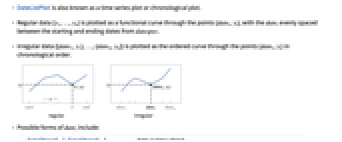
- DateListPlotは時系列プロットとしても知られている.
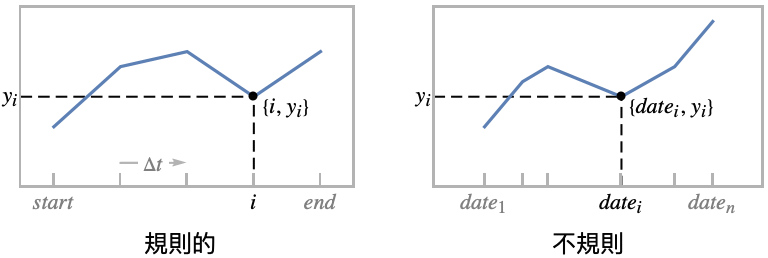
- 規則的なデータ{y1,…,yn}は点{datei,yi}を通る関数曲線としてプロットされる.dateiは datespec の開始日から終了日まで等間隔で置かれる.
- 不規則データ{{date1,y1},…,{daten,yn}}は点{datei,yi}を順に通る順序曲線としてプロットされる.
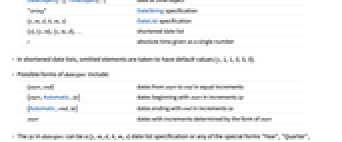
- dateiが取り得る形式には次のようなものがある.
-
DateObject[…],TimeObject[…] 日付オブジェクトあるいは時のオブジェクト "string" DateString指定 {y,m,d,h,m,s} DateList指定 {y},{y,m},{y,m,d},… 短縮された日付のリスト t 1つの数字として与えられる絶対的な時間 - 短縮された日付リストでは,省略された要素はデフォルト値{y,1,1,0,0,0}を取るものとされる.
- datespec が取り得る形式には次のようなものがある.
-
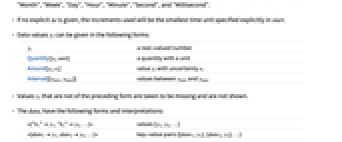
{start,end} start から end までの日付を等しい増分で {start,Automatic,Δt} start から始まる日付を増分 Δt で {Automatic,end,Δt} end で終る日付を増分 Δt で start 日付を start 形式で決定された増分で - datespec における Δt は,{y,m,d,h,m,s}の日付リストの指定でもよく,特殊形"Year","Quarter","Month","Week","Day","Hour","Minute","Second","Millisecond"のいずれかでもよい.
- 明示的な Δt が与えられていなければ,使用される増分は start で明示的に指定される最小の時間単位となる.
- データ値 yiは次の形式で与えることができる.
-
yi 実数値の数 Quantity[yi,unit] 単位の付いた数量 Around[yi,ei] 不確かさが eiの値 yi Interval[{ymin,ymax}] yminから ymaxまでの値 - 上記の形ではない値 yiは欠落しているとみなされ,表示されない.
- dataiには次の形式と解釈が使える.
-
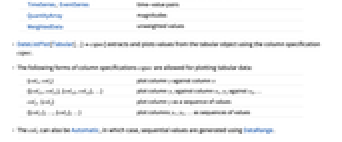
<|"k1"y1,"k2"y2,…|> 値{y1,y2,…} <|date1y1,date2y2,…|> キーと値のペア{{date1,y1},{date2,y2},…} TimeSeries, EventSeries 時と値のペア QuantityArray 大きさ WeightedData 重みなしの値 - DateListPlot[Tabular[…]cspec]は,列指定 cspec を使って表形式オブジェクトから値を抽出し,これをプロットする.
- 次は,表形式データのプロットに使用可能な列指定 cspec の形式である.
-
{colx,coly} 列 y と列 x をプロットする {{colx1,coly1},{colx2,coly2},…} 列 y1と列 x1,列 y2と列 x2をプロットする等 coly, {coly} 列 y を一連の値としてプロットする {{coly1},…,{colyi},…} 列 y1, y2, …を一連の値としてプロットする - colxはAutomaticでもよい.その場合は,DataRangeを使って一連の値が生成される.
- DateListPlot[TimeSeries[…]cspec]およびDateListPlot[EventSeries[…]cspec]は,成分指定 cspec を用いて,時系列または事象系列から値を抽出してプロットする.
- 系列データのプロットには,成分指定 cspec として以下の形式が使用できる.
-
com タイムスタンプと成分 com をプロットする {com1,com2,…} タイムスタンプと各成分 comiをプロットする - dataiには次のラッパー w を使うことができる.
-
Annotation[datai,label] データの注釈を与える Button[datai,action] 点がクリックされた際に実行する動作を定義する Callout[datai,label] コールアウトでデータにラベルを付ける EventHandler[datai,…] 点の一般的なイベントハンドラを定義する Highlighted[datai,effect] 効果を使って fiを動的にハイライトする Highlighted[datai,Placed[effect,pos]] 位置 pos で効果を使って fiを静的にハイライトする Hyperlink[datai,uri] 点をハイパーリンクにする Labeled[datai,label] データにラベルを付ける Legended[datai,label] 凡例でデータを識別する PopupWindow[datai,cont] 点にポップアップウィンドウを付ける StatusArea[datai,label] マウスオーバーの際にステータスエリアに表示する Style[datai,styles] 点を指定されたスタイルで示す Tooltip[datai,label] 点にツールチップを付ける Tooltip[datai] データ値を点のツールチップとして使う - ラッパー w は複数のレベルで適用することができる.
-
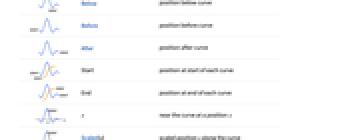
{…,w[yi],…} リスト中の値 yiを囲む {…,w[{datei,yi}],…} 点{datei,yi}を囲む w[datai] データ dataiを囲む w[{data1,…}] データ集合を囲む w1[w2[…]] ネストしたラッパーを使う - DateListPlotでは,LabeledとPlacedは次の位置を使うことができる.
-

Above 曲線の上 

Below 曲線の下 

Before 曲線の前 

After 曲線の後ろ 
Start 各曲線の開始位置 

End 各曲線の終了位置 
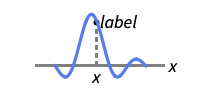
x 位置 x における曲線の近く 
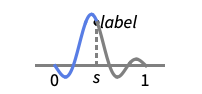
Scaled[s] 曲線に沿ってスケールされた位置 s 
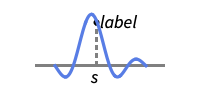
{s,Above} 曲線に沿った位置 s と相対的な位置の上 
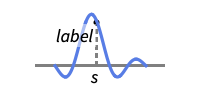
{s,Below} 曲線に沿った位置 s と相対的な位置の下 
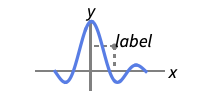
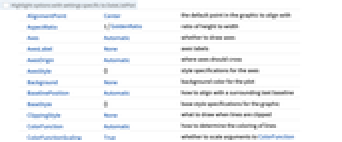
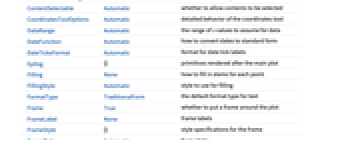
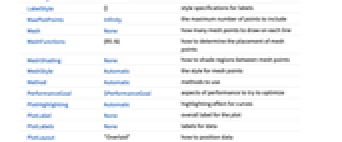
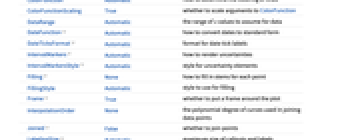
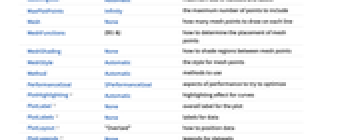
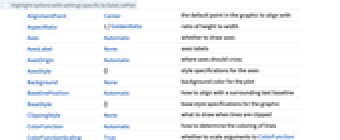
{pos,epos} 曲線の位置 pos と相対的な位置のラベル内の epos - DateListPlotには,Graphicsと同じオプションに次の追加・変更を加えたものをオプションとして使うことができる. [全オプションのリスト]
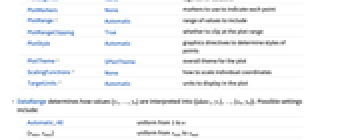
- DataRangeは,値{y1,…,yn}をどのように解釈して{{date1,y1},…,{xn,yn}}とするかを決定する.次は可能な設定である.
-
Automatic,All 1から n に一様に {xmin,xmax} xminから xmaxに一様に - 一般に,ペアのリスト{{x1,y1},{x2,y2},…}は点のリストと解釈されるが,DataRangeAllとすると複数データ{{y11,y12},{y21,y23},…}としての解釈が強制される.
- デフォルト設定のJoinedAutomaticでは,ほとんどの形式のデータが連結された曲線として描画されるが,EventSeriesからのデータは離散点として表示される.
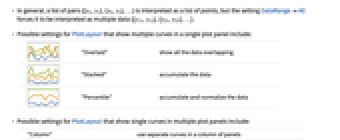
- 次は,単一のプロットパネルで複数の曲線を表示する際のPlotLayoutの可能な設定である.
-

"Overlaid" すべてのデータを重ね合せて表示する 

"Stacked" データを積み重ねる 

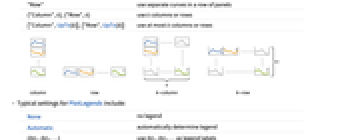
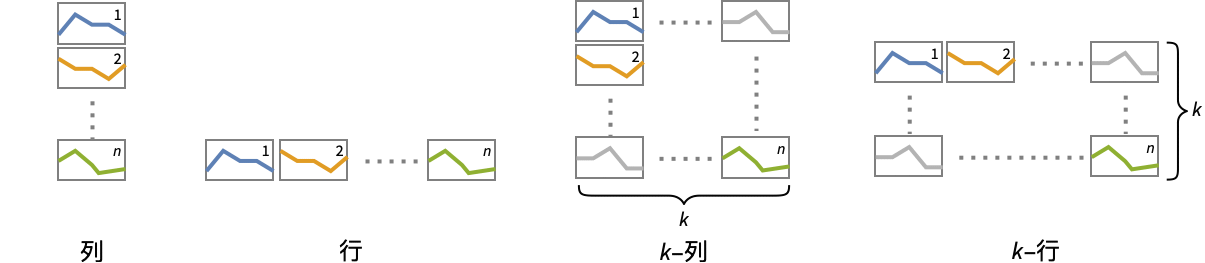
"Percentile" データを積み重ねて正規化する - 次は,複数のプロットパネルで単一の曲線を表示する際のPlotLayoutの可能な設定である.
-
"Column" パネルの列で別々の曲線を使う "Row" パネルの行で別々の曲線を使う {"Column",k},{"Row",k} k 列(行)使う {"Column",UpTo[k]},{"Row",UpTo[k]} 最大で k 列(行)使う - PlotLegendsのよく使われる設定
-
None 凡例は使わない Automatic 凡例を自動的に決定する {lbl1,lbl2,…} lbl1, lbl2, …を凡例ラベルとして使う Placed[lspec,…] 凡例の置き方を指定する - PlotStylesty は,各曲線に対して使用するスタイルを指定する.可能な設定には以下がある.
-
{sty1,sty2,…} データ集合に対するスタイルの並び <|"key"val,…|> データの異なるレベルに対するスタイル要素 - 受け入れられるキーは以下がある.
-
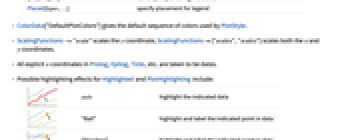
"Base" すべての datai に対する全体的なスタイル "Lists" datai の各々に対するスタイル styi のリスト - ColorData["DefaultPlotColors"]は,PlotStyleで使われるデフォルトの色のシーケンスを与える.
- ScalingFunctions->"scale"は
座標をスケールし,ScalingFunctions{"scalex","scaley"}は
座標と
座標の両方をスケールする. - Prolog,Epilog,Ticks等における明示的な
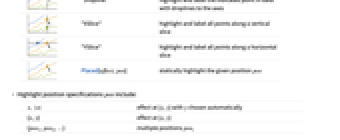
座標はすべて日付と解釈される. - 次は,HighlightedとPlotHighlightingに使用可能なハイライト効果である.
-
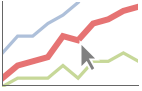
style 指定されたデータをハイライトする 

"Ball" データ上の指定された点をハイライトしてラベルを付ける 
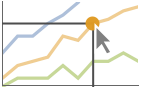
"Dropline" データ上の指定された点を軸までのドロップラインでハイライトしてラベルを付ける 

"XSlice" 垂直スライスに沿ったすべての点をハイライトしてラベルを付ける 
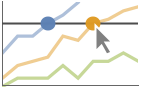
"YSlice" 水平スライスに沿ったすべての点をハイライトしてラベルを付ける 
Placed[effect,pos] 指定の位置 pos を静的にハイライトする - ハイライトの位置指定 pos には次がある.
-
x, {x} {x,y}における効果.y は自動的に選択される {x,y} {x,y}における効果 {pos1,pos2,…} 複数の位置 posi
全オプションのリスト
例題
すべて開く すべて閉じる例 (6)
DateListPlot[{{DateObject[{2016, 10, 1}, "Day", "Gregorian", -5.], 10}, {DateObject[{2016, 10, 15}, "Day", "Gregorian", -5.], 17}, {DateObject[{2016, 10, 30}, "Day", "Gregorian", -5.], 15}, {DateObject[{2016, 11, 20}, "Day", "Gregorian", -5.], 20}}]DateListPlot[{1, 1, 2, 3, 5, 8, 11}, DateObject[{2000, 8}, "Month"]]data1 = TimeSeries[{1, 1, 2, 3, 5, 8, 11}, {DateObject[{2015, 1, 1}, "Day"]}];
data2 = TimeSeries[{5, 8, 9, 6, 2, 4, 7}, {DateObject[{2015, 1, 1}, "Day"]}];DateListPlot[{data1, data2}, PlotLegends -> {"first", "second"}]DateListPlot[{{4, 9, 18, 27, 34, 40, 49, 54, 64, 72}, {1, 9, 11, 16, 18, 25, 34, 43, 49, 54}}, DateObject[{2025, 1, 1}, "Day"], PlotLabels -> {"first", "second"}]DateListPlot[TimeSeries[TimeEventSeries`TimestampData[Association["UniformlySpacedQ" -> True, "Count" -> 10,
"Endpoints" -> TabularColumn[Association[
"Data" -> {2, {{NumericArray[{15706, -2147483648}, "Integer32"], {},
DataStructure["BitVe ... 7, 34, 40, 49, 54, 64, 72}, {}, None},
"ElementType" -> "Integer64"]], TabularColumn[Association[
"Data" -> {{1, 9, 11, 16, 18, 25, 34, 43, 49, 54}, {}, None},
"ElementType" -> "Integer64"]]}}]]]], Association[]] -> "a", PlotLabels -> Automatic]DateListPlot[FinancialData["IBM", DateObject[{2024, 1, 1}, "Day"]]]スコープ (49)
データ (11)
data = WeatherData["KCMI", "MeanTemperature", {{2013, 1, 1}, {2013, 1, 31}, "Day"}]DateListPlot[data, FrameLabel -> Automatic, TargetUnits -> "Fahrenheit"]Plot all the data in TimeSeries or EventSeries:
DateListPlot[TimeSeries[TimeEventSeries`TimestampData[Association["UniformlySpacedQ" -> False,
"Timestamps" -> TabularColumn[Association[
"Data" -> {7, {{NumericArray[{-248, 118, 298, 638, 865, 1006, 1216}, "Integer32"], {},
None}}, None}, ... "Data" -> {{32, 62, 112, 167, 179, 209, 214}, {}, None}, "ElementType" -> "Integer64"]],
TabularColumn[Association["Data" -> {{30, 49, 81, 125, 142, 174, 177}, {}, None},
"ElementType" -> "Integer64"]]}}]]]], Association[]]]TimeSeriesまたはEventSeriesの特性の成分をプロットする:
trees = TimeSeries[TimeEventSeries`TimestampData[Association["UniformlySpacedQ" -> False,
"Timestamps" -> TabularColumn[Association[
"Data" -> {7, {{NumericArray[{-248, 118, 298, 638, 865, 1006, 1216}, "Integer32"], {},
None}}, None}, ... "Data" -> {{32, 62, 112, 167, 179, 209, 214}, {}, None}, "ElementType" -> "Integer64"]],
TabularColumn[Association["Data" -> {{30, 49, 81, 125, 142, 174, 177}, {}, None},
"ElementType" -> "Integer64"]]}}]]]], Association[]];DateListPlot[trees -> "tree 1"]DateListPlot[trees -> {"tree 1", "tree 2"}]AbsoluteTimeの指定として返された日付:
data = {{3368649600, 10}, {3369859200, 12}, {3371155200, 15}, {3372969600, 20}};DateListPlot[data]DateStringの指定として返された日付:
data = {{"June 2006", 10}, {"August 2006", 12}, {"November 2006", 15}, {"January 2007", 20}};DateListPlot[data]省略されたDateListの指定として返された日付:
data = {{{2006, 6}, 10}, {{2006, 8}, 12}, {{2006, 11}, 15}, {{2007, 1}, 20}};DateListPlot[data]DateListPlot[Sin[Range[100] / (2Pi)], "August 15, 2006"]DateListPlot[Sin[Range[100] / (2Pi)], {2006, 8, 15, 12, 15, 0}]DateListPlot[Sqrt[Range[10]], {{2006, 5, 5}, {2006, 5, 30}}]2006年1月1日から始めて90日ごとに集めたデータをプロットする:
DateListPlot[Range[10], {{2006, 1, 1}, Automatic, {0, 0, 90}}]DateListPlot[Range[10], {{2006, 1, 15}, Automatic, "Month"}]DateListPlot[ArcTan[Range[50] / 5], {Automatic, "September 2010", "Month"}]ScalingFunctionsを使って軸をスケールする:
DateListPlot[FinancialData["IBM", "Jan. 1, 2010"], ScalingFunctions -> "Log"]特殊データ (4)
Quantityを使ってデータに単位を加える:
DateListPlot[Quantity[Sqrt[Range[10]], "Meters"], {2010, 1, 1}, FrameLabel -> Automatic]QuantityArray中のデータをプロットする:
qa = QuantityArray[RandomReal[{0, 40}, 20], "Fahrenheit"]DateListPlot[qa, {2000, 1, 1}, FrameLabel -> Automatic]TargetUnitsで単位を指定する:
DateListPlot[qa, {2000, 1, 1}, TargetUnits -> "Kelvin", FrameLabel -> Automatic]Association中の数値は
座標として使われる:
DateListPlot[<|"a" -> 2, "b" -> 3, "c" -> 5, "d" -> 7, "e" -> 11, "f" -> 13|>, "Jan, 1, 2010"]Association中の数値によるキーと値は
座標と
座標として使われる:
DateListPlot[<|2 -> 1, 3 -> 2, 5 -> 3, 7 -> 4, 11 -> 5, 13 -> 6|>]DateListPlot[Table[Around[n, RandomReal[1, 2]], {n, 10}], {2010, 1, 1}]DateListPlot[Table[Interval[RandomReal[{n - 1, n + 1}, 2]], {n, 10}], {2010, 1, 1}]DateListPlot[Table[Interval[RandomReal[{n - 1, n + 1}, 2]], {n, 10}], {2010, 1, 1}, IntervalMarkers -> "Bands"]表形式データ (1)
tab = Tabular[IconizedObject[«Country populations»]]フランスの1940年から2020年までの人口をプロットする:
DateListPlot[tab -> {"Date", "France"}]DateListPlot[tab -> {{"Date", "France"}, {"Date", "Germany"}, {"Date", "Australia"}}]DateListPlot[tab -> {{"Date", "France"}, {"Date", "Germany"}, {"Date", "Australia"}}, PlotLegends -> {"France", "Germany", "Australia"}]ラッパー (8)
個々のデータ,データ集合,あるいはデータ集合の集合にラッパーを使う:
{DateListPlot[{Style[{1, 1, 2, 3, 5, 8}, Green], {2, 3, 5, 7, 11}}, {2014, 8}], DateListPlot[Style[{{1, 1, 2, 3, 5, 8}, {2, 3, 5, 7, 11}}, Blue], {2014, 8}]}DateListPlot[Style[{Style[{1, 1, 2, 3, 5, 8}, Green], {2, 3, 5, 7, 11}}, Blue], {2014, 8}]DateListPlot[Tooltip[Prime[Range[10]]], {2014, 8}, Mesh -> Full]DateListPlot[Tooltip[Prime[Range[10]], "primes"], {2014, 8}, Mesh -> Full]PopupWindowを使って追加的なドリルダウン情報を与える:
DateListPlot[{1, PopupWindow[2, DateListPlot[FinancialData["IBM", "Jan. 1, 2004"]]], 3}, {2004, 1}, Mesh -> Full, PlotStyle -> PointSize[0.05]]Buttonを使って任意のアクションを起こすことができる:
DateListPlot[{1, Button[2, Speak[2]], 3}, {2014, 8}, Mesh -> Full, PlotStyle -> PointSize[0.05]]マウスがプロット内に入ったときの動的アクションにAnnotationを使う:
data = TemporalData[TimeSeries, {{{7, 12, 15, 20}}, {{{3368649600, 3369859200, 3371155200, 3372969600}}},
1, {"Continuous", 1}, {"Discrete", 1}, 1, {ValueDimensions -> 1, DateFunction -> Automatic,
ResamplingMethod -> {"Interpolation", InterpolationOrder -> 1}}}, True, 10.2];{DateListPlot[Annotation[data, "label", "Mouse"]], Dynamic[MouseAnnotation[]]}Hyperlinkを使い,クリックされた場合に特定のリンクにジャンプする:
data = TemporalData[TimeSeries, {{{7, 12, 15, 20}}, {{{3368649600, 3369859200, 3371155200, 3372969600}}},
1, {"Continuous", 1}, {"Discrete", 1}, 1, {ValueDimensions -> 1, DateFunction -> Automatic,
ResamplingMethod -> {"Interpolation", InterpolationOrder -> 1}}}, True, 10.2];DateListPlot[Hyperlink[data, "http://www.wolfram.com"]]StatusAreaを使って現行ノートブックのステータスエリアの文字列を表示する:
data = TemporalData[TimeSeries, {{{7, 12, 15, 20}}, {{{3368649600, 3369859200, 3371155200, 3372969600}}},
1, {"Continuous", 1}, {"Discrete", 1}, 1, {ValueDimensions -> 1, DateFunction -> Automatic,
ResamplingMethod -> {"Interpolation", InterpolationOrder -> 1}}}, True, 10.2];DateListPlot[StatusArea[data, "String"]]ラベルと凡例 (16)
Labeledでデータにラベルを付ける:
data1 = Accumulate@RandomInteger[10, 10];data2 = Accumulate@RandomInteger[3, 10];DateListPlot[{Labeled[data1, "company1"], Labeled[data2, "company2"]}, {2010, 1, 1}]DateListPlot[Table[Labeled[RandomReal[], i], {i, 15}], {2010, 1, 1}, PlotMarkers -> Automatic]Table[DateListPlot[Table[Labeled[RandomReal[], i, p], {i, 6}], {2010, 1, 1}, PlotMarkers -> Automatic, PlotLabel -> p], {p, {Above, Below, Before, After}}]PlotLabelsでデータにラベルを付ける:
data1 = Accumulate@RandomInteger[10, 10];data2 = Accumulate@RandomInteger[3, 10];DateListPlot[{data1, data2}, {2000}, PlotLabels -> {"company1", "company2"}]DateListPlot[Labeled[Accumulate@RandomInteger[10, 10], "label", {2004}], {2000}]DateListPlot[Labeled[Accumulate@RandomInteger[10, 10], "label", Scaled[0.3]], {2000}]DateListPlot[Labeled[Accumulate@RandomInteger[10, 10], "label", {Scaled[0.3], Below}], {2000}]data1 = Accumulate@RandomInteger[10, 20];data2 = Accumulate@RandomInteger[3, 20];DateListPlot[{data1, data2}, {2000}, PlotLegends -> {"company1", "company2"}]data1 = Accumulate@RandomInteger[10, 20];data2 = Accumulate@RandomInteger[3, 20];DateListPlot[{Callout[data1, "company1"], Callout[data2, "company2"]}, {2000, 8}]DateListPlot[{{1, 1, 2, 3, 5, 8, 11}, Callout[{4, 7, 8, 5, 3, 4, 1}, "max", Above]}, {2000, 8}]DateListPlot[Callout[{1, 1, 2, 3, 5, 8, 11}, "label", DateObject[{2000, 10, 1}, "Day", "Gregorian", -6.]], {2000, 8}]data = Rule[TimeSeries[{1, 1, 2, 3, 5, 8, 11}, {"Jan 1, 2015"}], RandomWord[7]];DateListPlot[data, LabelingSize -> 30]DateListPlot[data, LabelingSize -> Full]Legendedを使って特定のデータ集合に凡例を与える:
data1 = Accumulate@RandomInteger[10, 20];data2 = Accumulate@RandomInteger[3, 20];DateListPlot[{data1, data2, Legended[data1 - data2, "difference"]}, {200}]Placedを使って凡例の位置を変える:
DateListPlot[{data1, data2, Legended[data1 - data2, Placed["difference", Bottom]]}, {200}]Associationキーをラベルとして使う:
data1 = Accumulate@RandomInteger[10, 20];data2 = Accumulate@RandomInteger[3, 20];DateListPlot[<|"company A" -> data1, "company B" -> data2|>, {2000}, PlotLabels -> Automatic, PlotLegends -> None]プロットには,通常,マウスオーバーの際に座標を示すインタラクティブなコールアウトが付いている:
DateListPlot[Range[10], {2007}]特定のラッパーあるいはツールチップのようなインタラクションを含めてインタラクティブ機能をオフにする:
DateListPlot[Callout[Range[10], "hello", "01/01/2012"], {2007}]{DateListPlot[Range[10], {2007}, PlotHighlighting -> "Dropline"], DateListPlot[Range[10], {2007}, PlotHighlighting -> "XSlice"]}Highlightedを使ってプロット中の特定の点を強調する:
DateListPlot[Highlighted[Range[10], Placed["Ball", DateObject[{2011, 1, 1}]]], {2007}]Highlighted[…,None]を使って単一のデータ集合についてのハイライト機能を無効にする:
DateListPlot[{Range[10], Highlighted[2 * Range[10], None]}, {2007}]プレゼンテーション (9)
曲線が複数あるときは,判別し易くなるように自動的に色分けされる:
data = {TemporalData[TimeSeries, {{{0.001728865808273472, -0.01590632147490456, -0.0018485884757761806,
0.006648303196752581, -0.008821574894342765, -0.011374996477267585, 0.014105518254347471,
-0.005791611372873207, -0.016712024386437596, 0.0442 ... ,
3473452800, 3473539200, 3473625600, 3473712000, 3473971200}}}, 1, {"Continuous", 1},
{"Discrete", 1}, 1, {ValueDimensions -> 1, DateFunction -> Automatic,
ResamplingMethod -> {"Interpolation", InterpolationOrder -> 1}}}, True, 10.4], TemporalData[TimeSeries, {{{-0.012079959639636706, -0.00649603754683159, -0.0034615116740605023,
0.010034759075811639, -0.010470083438789857, 0.007954880980081347, -0.0021454152647096825,
0.015971751173178284, -0.004005729627509891, 0.017 ... ,
3473452800, 3473539200, 3473625600, 3473712000, 3473971200}}}, 1, {"Continuous", 1},
{"Discrete", 1}, 1, {ValueDimensions -> 1, DateFunction -> Automatic,
ResamplingMethod -> {"Interpolation", InterpolationOrder -> 1}}}, True, 10.4]};DateListPlot[data]data = {TemporalData[TimeSeries, {{{0.001728865808273472, -0.01590632147490456, -0.0018485884757761806,
0.006648303196752581, -0.008821574894342765, -0.011374996477267585, 0.014105518254347471,
-0.005791611372873207, -0.016712024386437596, 0.0442 ... ,
3473452800, 3473539200, 3473625600, 3473712000, 3473971200}}}, 1, {"Continuous", 1},
{"Discrete", 1}, 1, {ValueDimensions -> 1, DateFunction -> Automatic,
ResamplingMethod -> {"Interpolation", InterpolationOrder -> 1}}}, True, 10.4], TemporalData[TimeSeries, {{{-0.012079959639636706, -0.00649603754683159, -0.0034615116740605023,
0.010034759075811639, -0.010470083438789857, 0.007954880980081347, -0.0021454152647096825,
0.015971751173178284, -0.004005729627509891, 0.017 ... ,
3473452800, 3473539200, 3473625600, 3473712000, 3473971200}}}, 1, {"Continuous", 1},
{"Discrete", 1}, 1, {ValueDimensions -> 1, DateFunction -> Automatic,
ResamplingMethod -> {"Interpolation", InterpolationOrder -> 1}}}, True, 10.4]};DateListPlot[data, PlotStyle -> {Dashed, Red}]DateListPlot[{FinancialData["AAPL", "FractionalChange", {{2010, 1}, {2010, 2}}], FinancialData["IBM", "FractionalChange", {{2010, 1}, {2010, 2}}]}, PlotLegends -> {"AAPL", "IBM"}]Legendedを使って特定のデータ集合の凡例を付ける:
data = Accumulate[RandomInteger[{-10, 10}, 100]];
avg = MovingAverage[data, 10];DateListPlot[{data, Legended[avg, "moving average"]}, {{2013, 1, 1}, Automatic, "Day"}, Joined -> True]data = {FinancialData["BAC", "FractionalChange", {{2014, 1}, {2014, 4}}], FinancialData["WFC", "FractionalChange", {{2014, 1}, {2014, 4}}]};DateListPlot[data, PlotTheme -> "Detailed"]DateListPlot[data, PlotTheme -> "Marketing"]data = {TemporalData[TimeSeries, {{{0.001728865808273472, -0.01590632147490456, -0.0018485884757761806,
0.006648303196752581, -0.008821574894342765, -0.011374996477267585, 0.014105518254347471,
-0.005791611372873207, -0.016712024386437596, 0.0442 ... ,
3473452800, 3473539200, 3473625600, 3473712000, 3473971200}}}, 1, {"Continuous", 1},
{"Discrete", 1}, 1, {ValueDimensions -> 1, DateFunction -> Automatic,
ResamplingMethod -> {"Interpolation", InterpolationOrder -> 1}}}, True, 10.4], TemporalData[TimeSeries, {{{-0.012079959639636706, -0.00649603754683159, -0.0034615116740605023,
0.010034759075811639, -0.010470083438789857, 0.007954880980081347, -0.0021454152647096825,
0.015971751173178284, -0.004005729627509891, 0.017 ... ,
3473452800, 3473539200, 3473625600, 3473712000, 3473971200}}}, 1, {"Continuous", 1},
{"Discrete", 1}, 1, {ValueDimensions -> 1, DateFunction -> Automatic,
ResamplingMethod -> {"Interpolation", InterpolationOrder -> 1}}}, True, 10.4]};DateListPlot[data, Filling -> Axis]DateListPlot[data, Filling -> {1 -> {2}}]data = {TemporalData[TimeSeries, {{{0.001728865808273472, -0.01590632147490456, -0.0018485884757761806,
0.006648303196752581, -0.008821574894342765, -0.011374996477267585, 0.014105518254347471,
-0.005791611372873207, -0.016712024386437596, 0.0442 ... ,
3473452800, 3473539200, 3473625600, 3473712000, 3473971200}}}, 1, {"Continuous", 1},
{"Discrete", 1}, 1, {ValueDimensions -> 1, DateFunction -> Automatic,
ResamplingMethod -> {"Interpolation", InterpolationOrder -> 1}}}, True, 10.4], TemporalData[TimeSeries, {{{-0.012079959639636706, -0.00649603754683159, -0.0034615116740605023,
0.010034759075811639, -0.010470083438789857, 0.007954880980081347, -0.0021454152647096825,
0.015971751173178284, -0.004005729627509891, 0.017 ... ,
3473452800, 3473539200, 3473625600, 3473712000, 3473971200}}}, 1, {"Continuous", 1},
{"Discrete", 1}, 1, {ValueDimensions -> 1, DateFunction -> Automatic,
ResamplingMethod -> {"Interpolation", InterpolationOrder -> 1}}}, True, 10.4]};DateListPlot[data, Mesh -> Full, PlotMarkers -> Automatic]data1 = {{DateObject[{2016, 10, 1}, "Day", "Gregorian", -5.], 10}, {DateObject[{2016, 10, 15}, "Day", "Gregorian", -5.], 17}, {DateObject[{2016, 10, 30}, "Day", "Gregorian", -5.], 15}, {DateObject[{2016, 11, 20}, "Day", "Gregorian", -5.], 20}};data2 = {{DateObject[{2016, 10, 1}, "Day", "Gregorian", -5.], 15}, {DateObject[{2016, 10, 15}, "Day", "Gregorian", -5.], 7}, {DateObject[{2016, 10, 30}, "Day", "Gregorian", -5.], 12}, {DateObject[{2016, 11, 20}, "Day", "Gregorian", -5.], 10}};DateListPlot[{data1, data2}, PlotLayout -> "Stacked"]DateListPlot[{data1, data2}, PlotLayout -> "Percentile"]DateListPlot[{IconizedObject[«Chicago»], IconizedObject[«Miami»]}, PlotLayout -> "Row"]DateListPlot[{IconizedObject[«Chicago»], IconizedObject[«Miami»]}, PlotLayout -> "Column"]DateListPlot[{IconizedObject[«Chicago»], IconizedObject[«Miami»], IconizedObject[«Phoenix»], IconizedObject[«Boston»]}, PlotLayout -> {"Row", 2}, PlotLabels -> {Entity["City", {"Chicago", "Illinois", "UnitedStates"}], Entity["City", {"Miami", "Florida", "UnitedStates"}], Entity["City", {"Phoenix", "Arizona", "UnitedStates"}], Entity["City", {"Boston", "Massachusetts", "UnitedStates"}]}]オプション (135)
AspectRatio (3)
デフォルトで, DateListPlotはプロットに固定の縦横比を使う:
data = FinancialData["TWLO", {2016, 1, 1}];DateListPlot[data]AspectRatio1を使って縦と横を等しくする:
data = FinancialData["TWLO", {2016, 1, 1}];DateListPlot[data, AspectRatio -> 1]AspectRatioFullは,他の構造物の中にぴったり収まるように縦横比を調整する:
data = FinancialData["TWLO", {2016, 1, 1}];plot = DateListPlot[data, AspectRatio -> Full];{Framed[Pane[plot, {50, 100}]], Framed[Pane[plot, {100, 100}]], Framed[Pane[plot, {100, 50}]]}Axes (1)
デフォルトで,DateListPlotは軸ではなく枠を使う:
data = FinancialData["TWLO", {2016, 1, 1}];DateListPlot[data, Filling -> Bottom]DateListPlot[data, Filling -> Bottom, Frame -> False, Axes -> True]{DateListPlot[data, Joined -> True, Filling -> Bottom, Frame -> False, Axes -> {True, False}], DateListPlot[data, Joined -> True, Filling -> Bottom, Frame -> False, Axes -> {False, True}]}AxesLabel (4)
DateListPlot[FinancialData["TWLO", {2016, 1, 1}], Frame -> False, Axes -> True]DateListPlot[FinancialData["TWLO", {2016, 1, 1}], Frame -> False, Axes -> True, AxesLabel -> "Price"]DateListPlot[FinancialData["TWLO", {2016, 1, 1}], Frame -> False, Axes -> True, AxesLabel -> {"Year", "Price"}]DateListPlot[FinancialData["TWLO", {2016, 1, 1}], Frame -> False, Axes -> True, AxesLabel -> Automatic]AxesOrigin (2)
DateListPlot[FinancialData["TWLO", {2016, 1, 1}], {2007}, Axes -> True, Frame -> False]{DateListPlot[FinancialData["TWLO", {2016, 1, 1}], {2007}, Axes -> True, Frame -> False, AxesOrigin -> {"July 1, 2019", 0}], DateListPlot[FinancialData["TWLO", {2016, 1, 1}], {2007}, Axes -> True, Frame -> False, AxesOrigin -> {"July 1, 2021", 0}]}AxesStyle (1)
data = FinancialData["TWLO", {2016, 1, 1}];DateListPlot[data, Filling -> Bottom, Frame -> False, Axes -> True, AxesStyle -> Red]DateListPlot[data, Filling -> Bottom, Frame -> False, Axes -> True, AxesStyle -> {{Thick, Red}, {Thick, Blue}}]DateListPlot[data, Filling -> Bottom, Frame -> False, Axes -> True, AxesStyle -> Green, TicksStyle -> StandardGray]DateListPlot[data, Filling -> Bottom, Frame -> False, Axes -> True, AxesStyle -> Green, LabelStyle -> StandardGray]DateFunction (2)
年を追加して{month,day}のリストから日付を形成する:
data = {{{10, 1}, 8}, {{10, 10}, 10}, {{10, 20}, 12}, {{10, 24}, 14}, {{11, 5}, 15}, {{11, 15}, 20}};DateListPlot[data, DateFunction :> (Join[{2006}, #]&)]data = {{"06/01/06", 8}, {"07/01/06", 10}, {"08/01/06", 12}, {"09/01/06", 14}, {"10/01/06", 15}, {"11/01/06", 20}};DateListPlot[data, DateFunction :> (DateList[{#, {"Month", "Day", "YearShort"}}]&)]DateListPlot[data, DateFunction :> (DateList[{#, {"Day", "Month", "YearShort"}}]&)]DateListPlot[data, DateFunction :> (DateList[{#, {"YearShort", "Month", "Day"}}]&)]DateTicksFormat (1)
日付の目盛形式をDateString要素として指定する:
data = {{{2006, 10, 1}, 8}, {{2006, 10, 10}, 10}, {{2006, 10, 20}, 12}, {{2006, 10, 24}, 14}, {{2006, 11, 5}, 15}, {{2006, 11, 15}, 20}};DateListPlot[data, DateTicksFormat -> {"MonthShort", "/", "Day"}]Epilog (1)
短縮したDateListを
座標として使ってテキストを置く:
DateListPlot[Range[10], {2007}, Epilog :> Text["linear trend", {{2010, 1, 15}, 6}]]Filling (1)
Frame (4)
DateListPlotは,デフォルトで,枠を使う:
DateListPlot[Range[10], {2007}]DateListPlot[Range[10], {2007}, Frame -> False]DateListPlot[Range[10], {2007}, Frame -> {{True, True}, {False, False}}]DateListPlot[Range[10], {2007}, Frame -> {{True, False}, {True, False}}]FrameLabel (4)
DateListPlot[Range[10], {2007}, FrameLabel -> {"label"}]DateListPlot[Range[10], {2007}, FrameLabel -> {"Bottom", "Left"}]DateListPlot[Range[10], {2007}, FrameLabel -> {{"left", "right"}, {"bottom", "top"}}]DateListPlot[Range[10], {2007}, FrameLabel -> {{"left", "right"}, {"bottom", "top"}}, LabelStyle -> Directive[Bold, StandardPurple]]FrameStyle (2)
DateListPlot[Range[10], {2007}, FrameStyle -> Directive[StandardBrown, Thick]]DateListPlot[Range[10], {2007}, FrameStyle -> {{Directive[Green, Thick], Directive[Red, Thick]}, {Directive[Gray, Thick], Directive[Blue, Thick]}}]FrameTicks (11)
DateListPlot[Range[10], {2007}]DateListPlot[Range[10], {2007}, FrameTicks -> None]DateListPlot[Sqrt[Range[10]], {2007, 4, 10}, FrameTicks -> {{Automatic, Automatic}, {{"April 12, 2007", "April 18, 2007"}, Automatic}}]DateListPlot[Sqrt[Range[10]], {2007, 4, 10}, FrameTicks -> {{Automatic, Automatic}, {{3385324800, 3385843200}, Automatic}}]DateListPlot[Range[10], {2007}, FrameTicks -> {{None, None}, {Automatic, None}}]デフォルトで,上と右の辺には目盛が目盛ラベルなしで置かれる:
DateListPlot[Range[10], {2007}, FrameTicks -> Automatic]Allを使ってすべての辺に目盛ラベルを置く:
DateListPlot[Range[10], {2007}, FrameTicks -> All]DateListPlot[Range[10], {2007}, FrameTicks -> {{{2, .5, 10}, None}, {{"July 1, 2011", "July 1, 2014"}, None}}]DateListPlot[Range[10], {2007}, FrameTicks -> {{{{2, "two"}, {5, "five"}, {10, "ten"}}, None}, {{{"July 1, 2011", "date 1"}, {"July 1, 2014", "date 2"}}, None}}]DateListPlot[Range[10], {2007}, FrameTicks -> {{{{2, "two", .15}, {5, "five", .45}, {10, "ten", .95}}, None}, {Automatic, None}}]DateListPlot[Range[10], {2007}, FrameTicks -> {{{{2, "two", {.15, .1}}, {5, "five", {.45, .2}}, {10, "ten", {.95, .3}}}, None}, {Automatic, None}}]DateListPlot[Range[10], {2007}, FrameTicks -> {{{{2, "two", .15, Directive[Blue, Thick]}, {5, "five", .45, Directive[Red, Thick, Dashed]}, {10, "ten", .95, Directive[Green, Thick, Dashed]}}, None}, {Automatic, None}}]minMeanMax[min_, max_] := {{min, min}, {(max + min) / 2, (max + min) / 2}, {max, max}}DateListPlot[Range[10], {2007}, FrameTicks -> {{minMeanMax, None}, {Automatic, None}}, PlotRangePadding -> None]FrameTicksStyle (3)
デフォルトで,枠目盛と枠目盛ラベルには枠と同じスタイルが使われる:
DateListPlot[Range[10], {2007}, FrameStyle -> Directive[Red]]DateListPlot[Range[10], {2007}, FrameStyle -> Directive[Red], FrameTicksStyle -> Directive[Blue, Thick]]DateListPlot[Range[10], {2007}, FrameTicks -> All, FrameTicksStyle -> {{Directive[Orange, Thick], Blue}, {Red, Green}}]GridLines (1)
DateListPlot[Sqrt[Range[15]], {2007, 4, 10}, GridLines -> {{{2007, 4, 15}, "Apr 22, 2007"}, None}]最初の格子線をBlueにする:
DateListPlot[Sqrt[Range[15]], {2007, 4, 10}, GridLines -> {{{{2007, 4, 15}, Blue}, "Apr 22, 2007"}, None}]ImageSize (7)
Tiny,Small,Medium,Largeのような名前付きのサイズを使う:
data = FinancialData["TWLO", {2016, 1, 1}];{DateListPlot[data, ImageSize -> Tiny], DateListPlot[data, ImageSize -> Small]}data = FinancialData["TWLO", {2016, 1, 1}];{DateListPlot[data, ImageSize -> 150], DateListPlot[data, AspectRatio -> 1.5, ImageSize -> 150]}{DateListPlot[data, ImageSize -> {Automatic, 150}], DateListPlot[data, AspectRatio -> 2, ImageSize -> {Automatic, 150}]}data = FinancialData["TWLO", {2016, 1, 1}];{DateListPlot[data, ImageSize -> UpTo[200]], DateListPlot[data, AspectRatio -> 2, ImageSize -> UpTo[200]]}グラフィックスの幅と高さを指定し,必要な場合はスペースで充填する:
data = FinancialData["TWLO", {2016, 1, 1}];DateListPlot[data, ImageSize -> {200, 200}, Background -> Gray]AspectRatioFullとすると使用可能なスペースが塗り潰される:
DateListPlot[data, AspectRatio -> Full, ImageSize -> {200, 200}, Background -> StandardGray]data = FinancialData["TWLO", {2016, 1, 1}];{DateListPlot[data, ImageSize -> {UpTo[150], UpTo[100]}], DateListPlot[data, AspectRatio -> 2, ImageSize -> {UpTo[150], UpTo[100]}]}ImageSizeFullを使ってオブジェクト内の使用可能なスペースを塗り潰す:
data = FinancialData["TWLO", {2016, 1, 1}];Framed[Pane[DateListPlot[data, ImageSize -> Full, Background -> StandardGray], {200, 100}]]data = FinancialData["TWLO", {2016, 1, 1}];Framed[Pane[DateListPlot[data, ImageSize -> {Scaled[0.5], Scaled[0.5]}, Background -> StandardGray], {200, 100}]]IntervalMarkers (3)
DateListPlot[Table[Around[RandomReal[], 0.1], 10], Today]DateListPlot[Table[Around[RandomReal[], 0.1], 10], Today, IntervalMarkers -> "Bars"]DateListPlot[Table[Around[RandomReal[], .1], 10], Today, IntervalMarkers -> "Bands"]IntervalMarkersStyle (2)
DateListPlot[{Table[Around[RandomReal[20], 1], 10], Table[Around[RandomReal[20], 1], 10]}, Today, PlotStyle -> {Red, Blue}]DateListPlot[{Table[Around[RandomReal[20], 1], 10], Table[Around[RandomReal[20], 1], 10]}, Today, IntervalMarkersStyle -> Gray]Joined (4)
DateListPlot[Sin[Range[100] / Pi], {2006, 1, 1}, Joined -> True]data1 = {{{2006, 10, 1, 0, 0, 0}, 10}, {{2006, 10, 15, 0, 0, 0}, 12}, {{2006, 10, 30, 0, 0, 0}, 15}, {{2006, 11, 20, 0, 0, 0}, 20}};data2 = {{{2006, 10, 5, 0, 0, 0}, 15}, {{2006, 10, 20, 0, 0, 0}, 8}, {{2006, 11, 10, 0, 0, 0}, 5}, {{2006, 11, 15, 0, 0, 0}, 1}};DateListPlot[{data1, data2}, Joined -> True]DateListPlot[{data1, data2}, Joined -> {True, False}]TimeSeriesは連続する線として表示される:
DateListPlot[TimeSeries[TimeEventSeries`TimestampData[Association["UniformlySpacedQ" -> False,
"Timestamps" -> TabularColumn[Association[
"Data" -> {12, {{NumericArray[{20089, 20120, 20148, 20179, 20209, 20240, 20270, 20301, 20332,
20362, ... 146, 166}, {}, None}, "ElementType" -> "Integer64"]],
TabularColumn[Association["Data" -> {{204, 188, 235, 227, 234, 264, 302, 293, 259, 229,
203, 229}, {}, None}, "ElementType" -> "Integer64"]]}}]]]], Association[]]]EventSeriesは離散点として表示される:
DateListPlot[EventSeries[TimeEventSeries`TimestampData[Association["UniformlySpacedQ" -> False,
"Timestamps" -> TabularColumn[Association[
"Data" -> {12, {{NumericArray[{20089, 20120, 20148, 20179, 20209, 20240, 20270, 20301, 20332,
20362, ... 146, 166}, {}, None}, "ElementType" -> "Integer64"]],
TabularColumn[Association["Data" -> {{204, 188, 235, 227, 234, 264, 302, 293, 259, 229,
203, 229}, {}, None}, "ElementType" -> "Integer64"]]}}]]]], Association[]]]LabelingFunction (3)
DateListPlot[{1, 1, 2, 3, 5, 8} -> {"a", "b", "c", "d", "e", "f"}, {2000}]LabelingFunction->Noneを使ってラベルが付かないようにする:
DateListPlot[{1, 1, 2, 3, 5, 8} -> {"a", "b", "c", "d", "e", "f"}, {2000}, LabelingFunction -> None]DateListPlot[{1, 1, 2, 3, 5, 8} -> {"a", "b", "c", "d", "e", "f"}, {2000}, LabelingFunction -> (Placed[Last@#1, Above] &)]DateListPlot[{1, 1, 2, 3, 5, 8} -> {"a", "b", "c", "d", "e", "f"}, {2000}, LabelingFunction -> (Placed[Last@#1, Tooltip] &), PlotMarkers -> Automatic]LabelingSize (4)
DateListPlot[TimeSeries[{1, 1, 2, 3, 5, 8}, {"Jan 1, 2015"}] -> {"healthfulness", "obstreperous", "spectrogram", "vestige", "coinage", "limey"}, ImageSize -> Medium]DateListPlot[TimeSeries[{1, 1, 2, 3, 5, 8}, {"Jan 1, 2015"}] -> {[image], [image], [image], [image], [image], [image]}, ImageSize -> Medium]DateListPlot[TimeSeries[{1, 1, 2, 3, 5, 8}, {"Jan 1, 2015"}] -> {"healthfulness", "obstreperous", "spectrogram", "vestige", "coinage", "limey"}, ImageSize -> Medium, LabelingSize -> 30]DateListPlot[TimeSeries[{1, 1, 2, 3, 5, 8}, {"Jan 1, 2015"}] -> {[image], [image], [image], [image], [image], [image]}, ImageSize -> Medium, LabelingSize -> 20]DateListPlot[TimeSeries[{1, 1, 2, 3, 5, 8}, {"Jan 1, 2015"}] -> {[image], [image], [image], [image], [image], [image]}, ImageSize -> Medium, LabelingSize -> Full]LabelingTarget (6)
DateListPlot[IconizedObject[«data»], Today]DateListPlot[IconizedObject[«data»], Today, LabelingTarget -> All]DateListPlot[IconizedObject[«data»], Today, LabelingTarget -> "Dense"]DateListPlot[IconizedObject[«data»], Today, LabelingTarget -> 0.5]DateListPlot[IconizedObject[«data»], Today, LabelingTarget -> <|"AllowedLabelingPositions" -> "Sides"|>]DateListPlot[IconizedObject[«data»], Today, LabelingTarget -> <|"AllowedLabelingPositions" -> "Corners"|>]DateListPlot[IconizedObject[«data»], Today, LabelingTarget -> <|"AllowLabelClipping" -> True|>]PlotFit (4)
DateListPlot[TimeSeries[TimeEventSeries`TimestampData[Association["UniformlySpacedQ" -> False,
"Timestamps" -> TabularColumn[Association[
"Data" -> {252, {{{1704153600000, 1704240000000, 1704326400000, 1704412800000, 1704672000000,
1704758 ... 22,
139.6699981689453, 140.22000122070312, 139.92999267578125, 137.00999450683594,
137.49000549316406, 134.2899932861328}, {}, None}}, None},
"ElementType" -> TypeSpecifier["Quantity"]["Real64", "USDollars"]]], Association[]], PlotFit -> Automatic]DateListPlot[TimeSeries[TimeEventSeries`TimestampData[Association["UniformlySpacedQ" -> False,
"Timestamps" -> TabularColumn[Association[
"Data" -> {252, {{{1704153600000, 1704240000000, 1704326400000, 1704412800000, 1704672000000,
1704758 ... 22,
139.6699981689453, 140.22000122070312, 139.92999267578125, 137.00999450683594,
137.49000549316406, 134.2899932861328}, {}, None}}, None},
"ElementType" -> TypeSpecifier["Quantity"]["Real64", "USDollars"]]], Association[]], PlotFit -> "Linear"]DateListPlot[TimeSeries[TimeEventSeries`TimestampData[Association["UniformlySpacedQ" -> False,
"Timestamps" -> TabularColumn[Association[
"Data" -> {252, {{{1704153600000, 1704240000000, 1704326400000, 1704412800000, 1704672000000,
1704758 ... 22,
139.6699981689453, 140.22000122070312, 139.92999267578125, 137.00999450683594,
137.49000549316406, 134.2899932861328}, {}, None}}, None},
"ElementType" -> TypeSpecifier["Quantity"]["Real64", "USDollars"]]], Association[]], PlotFit -> "Quadratic"]DateListPlot[TimeSeries[TimeEventSeries`TimestampData[Association["UniformlySpacedQ" -> False,
"Timestamps" -> TabularColumn[Association[
"Data" -> {252, {{{1704153600000, 1704240000000, 1704326400000, 1704412800000, 1704672000000,
1704758 ... 22,
139.6699981689453, 140.22000122070312, 139.92999267578125, 137.00999450683594,
137.49000549316406, 134.2899932861328}, {}, None}}, None},
"ElementType" -> TypeSpecifier["Quantity"]["Real64", "USDollars"]]], Association[]], PlotFit -> PeriodicModel[3]]//QuietPlotFitElements (2)
データに対する信頼帯を,デフォルトの0.95の信頼水準でプロットする:
DateListPlot[TimeSeries[TimeEventSeries`TimestampData[Association["UniformlySpacedQ" -> False,
"Timestamps" -> TabularColumn[Association[
"Data" -> {61, {{NumericArray[{19724, 19725, 19726, 19727, 19730, 19731, 19732, 19733, 19734,
19738, ... 94.28900146484375, 95.00199890136719, 92.56099700927734, 90.25, 90.35600280761719}, {},
None}}, None}, "ElementType" -> TypeSpecifier["Quantity"]["Real64", "USDollars"]]],
Association["ResamplingMethod" -> "LinearInterpolation"]], PlotFit -> Automatic, PlotFitElements -> "BandCurves"]DateListPlot[TimeSeries[TimeEventSeries`TimestampData[Association["UniformlySpacedQ" -> False,
"Timestamps" -> TabularColumn[Association[
"Data" -> {61, {{NumericArray[{19724, 19725, 19726, 19727, 19730, 19731, 19732, 19733, 19734,
19738, ... 94.28900146484375, 95.00199890136719, 92.56099700927734, 90.25, 90.35600280761719}, {},
None}}, None}, "ElementType" -> TypeSpecifier["Quantity"]["Real64", "USDollars"]]],
Association["ResamplingMethod" -> "LinearInterpolation"]], PlotFit -> Automatic, PlotFitElements -> {"BandCurves", <|"ConfidenceLevel" -> 0.5|>}]DateListPlot[TimeSeries[TimeEventSeries`TimestampData[Association["UniformlySpacedQ" -> False,
"Timestamps" -> TabularColumn[Association[
"Data" -> {61, {{NumericArray[{19724, 19725, 19726, 19727, 19730, 19731, 19732, 19733, 19734,
19738, ... 94.28900146484375, 95.00199890136719, 92.56099700927734, 90.25, 90.35600280761719}, {},
None}}, None}, "ElementType" -> TypeSpecifier["Quantity"]["Real64", "USDollars"]]],
Association["ResamplingMethod" -> "LinearInterpolation"]], PlotFit -> Automatic, PlotFitElements -> "Residuals"]DateListPlot[TimeSeries[TimeEventSeries`TimestampData[Association["UniformlySpacedQ" -> False,
"Timestamps" -> TabularColumn[Association[
"Data" -> {61, {{NumericArray[{19724, 19725, 19726, 19727, 19730, 19731, 19732, 19733, 19734,
19738, ... 94.28900146484375, 95.00199890136719, 92.56099700927734, 90.25, 90.35600280761719}, {},
None}}, None}, "ElementType" -> TypeSpecifier["Quantity"]["Real64", "USDollars"]]],
Association["ResamplingMethod" -> "LinearInterpolation"]], PlotFit -> Automatic, PlotFitElements -> {"DataPoints", {"Residuals", <|"Style" -> Opacity[1, StandardRed]|>}}]PlotHighlighting (9)
デフォルト設定のPlotHighlightingAutomaticのとき,プロットにはインタラクティブな座標のコールアウトが付く:
DateListPlot[Range[10], {2007}]PlotHighlightingNoneを使ってプロット全体のハイライトをオフにする:
DateListPlot[Range[10], {2007}, PlotHighlighting -> None]点集合にマウスオーバーして任意のグラフィックス指示子でハイライトする:
DateListPlot[{Range[10], 2 * Range[10]}, {2007}, PlotHighlighting -> Directive[Red, AbsolutePointSize[10], DropShadowing[]]]DateListPlot[{Range[10], 2 * Range[10]}, {2007}, PlotHighlighting -> "Dropline"]曲線にマウスオーバーして軸までのドロップラインとラベルでハイライトする:
DateListPlot[Range[10], {2007}, PlotHighlighting -> "Dropline"]DateListPlot[Range[10], {2007}, PlotHighlighting -> Placed["Dropline", DateObject[{2011, 1, 1}]]]プロットにマウスオーバーして
位置に対応する
の値を示すスライスでハイライトする:
DateListPlot[{Range[10], 2 * Range[10]}, {2007}, PlotHighlighting -> "XSlice"]DateListPlot[Range[10], {2007}, PlotHighlighting -> Placed["XSlice", DateObject[{2014, 1, 1}]]]プロットにマウスオーバーして
位置に対応する
の値を示すスライスでハイライトする:
DateListPlot[{Range[10], 2 * Range[10]}, {2007}, PlotHighlighting -> "YSlice"]DateListPlot[{Range[10], 2 * Range[10]}, {2007}, PlotHighlighting -> Placed["YSlice", 10]]DateListPlot[{Range[10], 2 * Range[10]}, {2007}, PlotHighlighting -> "XNearestPoint"]DateListPlot[{Range[10], 2 * Range[10]}, {2007}, PlotHighlighting -> {"XNearestPoint", <|"Style" -> StandardGray|>}]DateListPlot[{Range[10], 2 * Range[10]}, {2007}, PlotHighlighting -> "XYLabel"]Calloutオプションを使ってラベルの外観を変える:
DateListPlot[{Range[10], 2 * Range[10]}, {2007}, PlotHighlighting -> {"XYLabel", <|"Appearance" -> "Corners", "CalloutMarker" -> "Circle"|>}]DateListPlot[{Range[10], 2 * Range[10]}, {2007}, PlotHighlighting -> {{"XNearestPoint", <|"Style" -> StandardGray|>}, {"XYLabel", <|"Appearance" -> "Corners", "CalloutMarker" -> "Circle"|>}}]PlotInteractivity (3)
プロットでは,デフォルトで,インタラクティブなハイライトが有効になっている:
DateListPlot[{{2, 3, 5, 7, 11}, {13, 17, 19, 23, 29}}, Today]DateListPlot[{{2, 3, 5, 7, 11}, {13, 17, 19, 23, 29}}, Today, PlotInteractivity -> False]与えられたインタラクティブ要素を許可し,自動的なものは無効にする:
DateListPlot[{{2, 3, 5, 7, 11}, Tooltip[{13, 17, 19, 23, 29}, "hello"]}, Today, PlotInteractivity -> <|"User" -> True, "System" -> False|>]PlotLabel (1)
PlotLabels (4)
data1 = Transpose[{DateRange[{2000, 1, 1}, {2000, 1, 15}], RandomReal[10, 15]}];data2 = Transpose[{DateRange[{2000, 1, 1}, {2000, 1, 15}], RandomReal[10, 15]}];DateListPlot[{data1, data2}, PlotLabels -> {"label1", "label2"}]Association形式を使ってラベルを指定する:
DateListPlot[{data1, data2}, PlotLabels -> <|"Lists" -> {"label1", "label2"}|>]ge = FinancialData["GE", "Jan. 1, 2000"];DateListPlot[ge, PlotLabels -> Placed["high", Above]]DateListPlot[ge, PlotLabels -> Placed["label", {DateObject[{2009, 1, 1}], Below}]]DateListPlot[ge, PlotLabels -> Callout["label", {DateObject[{2009, 1, 1}], Above}]]PlotLabelAutomaticはAssociationのキーをデータのラベルとして使う:
DateListPlot[<|"a" -> Accumulate@RandomInteger[10, 10], "b" -> Accumulate@RandomInteger[10, 10]|>, {2007}, PlotLabels -> Automatic, PlotLegends -> None]Noneを使ってラベルを加えないようにする:
data1 = Transpose[{DateRange[{2000, 1, 1}, {2000, 1, 15}], Accumulate@RandomReal[10, 15]}];
data2 = Transpose[{DateRange[{2000, 1, 1}, {2000, 1, 15}], Accumulate@RandomReal[3, 15]}];DateListPlot[{data1, data2}, PlotLabels -> {"label1", None}]PlotLayout (4)
data1 = {{DateObject[{2016, 10, 1}, "Day", "Gregorian", -5.], 10}, {DateObject[{2016, 10, 15}, "Day", "Gregorian", -5.], 17}, {DateObject[{2016, 10, 30}, "Day", "Gregorian", -5.], 15}, {DateObject[{2016, 11, 20}, "Day", "Gregorian", -5.], 20}};data2 = {{DateObject[{2016, 10, 1}, "Day", "Gregorian", -5.], 15}, {DateObject[{2016, 10, 15}, "Day", "Gregorian", -5.], 7}, {DateObject[{2016, 10, 30}, "Day", "Gregorian", -5.], 12}, {DateObject[{2016, 11, 20}, "Day", "Gregorian", -5.], 10}};DateListPlot[{data1, data2}]DateListPlot[{data1, data2}, PlotLayout -> "Stacked"]DateListPlot[{data1, data2}, PlotLayout -> "Percentile"]DateListPlot[{IconizedObject[«Phoenix»], IconizedObject[«Boston»], IconizedObject[«Portland»]}, ImageSize -> Medium, PlotLayout -> "Column"]DateListPlot[{IconizedObject[«Phoenix»], IconizedObject[«Boston»], IconizedObject[«Portland»]}, PlotLayout -> "Row"]DateListPlot[{IconizedObject[«Phoenix»], IconizedObject[«Boston»], IconizedObject[«Portland»]}, PlotLayout -> "Row", PlotLabels -> {"Phoenix", "Boston", "Portland"}]DateListPlot[{IconizedObject[«Chicago»], IconizedObject[«Miami»], IconizedObject[«Phoenix»], IconizedObject[«Boston»], IconizedObject[«Portland»], IconizedObject[«Denver»]}, PlotLayout -> {"Column", 4}]DateListPlot[{IconizedObject[«Chicago»], IconizedObject[«Miami»], IconizedObject[«Phoenix»], IconizedObject[«Boston»], IconizedObject[«Portland»], IconizedObject[«Denver»]}, PlotLayout -> {"Column", UpTo[4]}]PlotLegends (7)
PlotLegendsは,プロットの中でスタイルを合わせる:
DateListPlot[{Range[10], Range[10] + 3}, {2007}, PlotStyle -> {Directive[AbsolutePointSize[4], Blue], Directive[AbsolutePointSize[8], Red]}, PlotLegends -> Automatic]PlotLegendsはプロット中のマーカーを合わせる:
DateListPlot[{Range[10], Range[10] ^ 2}, {2007}, PlotMarkers -> Automatic, PlotLegends -> Automatic]DateListPlot[{Range[10], Range[10] + 3, Sqrt@Range[10], Log@Range[10]}, {2007}, PlotLegends -> {"a", "b", "c", "d"}]Association形式を使って凡例を指定する:
DateListPlot[{Range[10], Range[10] + 3, Sqrt@Range[10], Log@Range[10]}, {2007}, PlotLegends -> <|"Lists" -> {"a", "b", "c", "d"}|>]TimeSeriesからのMetaInformationを使う:
data = TemporalData[TimeSeries, {{{{1662.33502197266, 1572.}, {1653.52496337891, 1563.},
{1634.92498779297, 1536.5}, {1642.40002441406, 1525.5}, {1642.40002441406, 1525.5},
{1640.23498535156, 1521.5}, {1638.70001220703, 1530.}, {1606.10504150391 ... 1,
{"Continuous", 1}, {"Discrete", 1}, 2,
{MetaInformation -> {"MetalList" -> {"Gold", "Platinum"}, "Unit" -> "USDollars"/"TroyOunces"},
ResamplingMethod -> {"Interpolation", InterpolationOrder -> 1}, ValueDimensions -> 2}}, True,
10.];使用可能なMetaInformationを見る:
data["MetaInformation"]data["MetalList"]DateListPlot[data, PlotLegends -> data["MetalList"]]Placedを使って凡例の置き方を指定する:
Table[DateListPlot[{Range[10], Range[10] + 3}, {2007}, PlotLegends -> Placed[Automatic, pos], PlotLabel -> pos], {pos, {Above, Below}}]Table[DateListPlot[{Range[10], Range[10] + 3}, {2007}, PlotLegends -> Placed[Automatic, pos], PlotLabel -> pos], {pos, {Before, After}}]PointLegendを使って凡例の外観を変える:
DateListPlot[{Range[10], Range[10] + 3}, {2007}, PlotLegends -> PointLegend[Automatic, {"list1", "list2"}, LegendFunction -> Panel, LegendMargins -> 5]]PlotRange (1)
PlotStyle (5)
DateListPlot[TimeSeries[TimeEventSeries`TimestampData[Association["UniformlySpacedQ" -> False,
"Timestamps" -> TabularColumn[Association[
"Data" -> {753, {{{1641168000000, 1641254400000, 1641340800000, 1641427200000, 1641513600000,
1641772 ... 22,
139.6699981689453, 140.22000122070312, 139.92999267578125, 137.00999450683594,
137.49000549316406, 134.2899932861328}, {}, None}}, None},
"ElementType" -> TypeSpecifier["Quantity"]["Real64", "USDollars"]]], Association[]], PlotStyle -> Red]デフォルトで,複数のデータ集合には異なるスタイルが選ばれる:
DateListPlot[{TimeSeries[TimeEventSeries`TimestampData[Association["UniformlySpacedQ" -> False,
"Timestamps" -> TabularColumn[Association[
"Data" -> {1508, {{{1577923200000, 1578009600000, 1578268800000, 1578355200000,
1578441600000, 157852 ... 4550781, 314.7300109863281, 315.5299987792969, 316.75, 315.1400146484375,
311.5799865722656, 311.7900085449219, 308.0299987792969}, {}, None}}, None},
"ElementType" -> TypeSpecifier["Quantity"]["Real64", "USDollars"]]], Association[]], TimeSeries[TimeEventSeries`TimestampData[Association["UniformlySpacedQ" -> False,
"Timestamps" -> TabularColumn[Association[
"Data" -> {1508, {{{1577923200000, 1578009600000, 1578268800000, 1578355200000,
1578441600000, 157852 ... 183.69000244140625, 189.2100067138672,
188.61000061035156, 190.52999877929688, 188.22000122070312, 187.5399932861328, 186.5}, {},
None}}, None}, "ElementType" -> TypeSpecifier["Quantity"]["Real64", "USDollars"]]],
Association[]]}]DateListPlot[{TimeSeries[TimeEventSeries`TimestampData[Association["UniformlySpacedQ" -> False,
"Timestamps" -> TabularColumn[Association[
"Data" -> {1508, {{{1577923200000, 1578009600000, 1578268800000, 1578355200000,
1578441600000, 157852 ... 4550781, 314.7300109863281, 315.5299987792969, 316.75, 315.1400146484375,
311.5799865722656, 311.7900085449219, 308.0299987792969}, {}, None}}, None},
"ElementType" -> TypeSpecifier["Quantity"]["Real64", "USDollars"]]], Association[]], TimeSeries[TimeEventSeries`TimestampData[Association["UniformlySpacedQ" -> False,
"Timestamps" -> TabularColumn[Association[
"Data" -> {1508, {{{1577923200000, 1578009600000, 1578268800000, 1578355200000,
1578441600000, 157852 ... 183.69000244140625, 189.2100067138672,
188.61000061035156, 190.52999877929688, 188.22000122070312, 187.5399932861328, 186.5}, {},
None}}, None}, "ElementType" -> TypeSpecifier["Quantity"]["Real64", "USDollars"]]],
Association[]]}, PlotStyle -> {RGBColor[0.4, 0.6, 1], RGBColor[0.14, 0.8, 0.14]}]PlotStyleは線と点の両方に適用される:
DateListPlot[{TimeSeries[TimeEventSeries`TimestampData[Association["UniformlySpacedQ" -> False,
"Timestamps" -> TabularColumn[Association[
"Data" -> {1508, {{{1577923200000, 1578009600000, 1578268800000, 1578355200000,
1578441600000, 157852 ... 4550781, 314.7300109863281, 315.5299987792969, 316.75, 315.1400146484375,
311.5799865722656, 311.7900085449219, 308.0299987792969}, {}, None}}, None},
"ElementType" -> TypeSpecifier["Quantity"]["Real64", "USDollars"]]], Association[]], TimeSeries[TimeEventSeries`TimestampData[Association["UniformlySpacedQ" -> False,
"Timestamps" -> TabularColumn[Association[
"Data" -> {1508, {{{1577923200000, 1578009600000, 1578268800000, 1578355200000,
1578441600000, 157852 ... 183.69000244140625, 189.2100067138672,
188.61000061035156, 190.52999877929688, 188.22000122070312, 187.5399932861328, 186.5}, {},
None}}, None}, "ElementType" -> TypeSpecifier["Quantity"]["Real64", "USDollars"]]],
Association[]]}, Joined -> {True, False}, PlotStyle -> RGBColor[0.14, 0.8, 0.14]]連想に基づくシンタックスを使ってすべてのデータのベーススタイルを設定する:
DateListPlot[EventSeries[TimeEventSeries`TimestampData[Association["UniformlySpacedQ" -> False,
"Timestamps" -> TabularColumn[Association[
"Data" -> {12, {{NumericArray[{20089, 20120, 20148, 20179, 20209, 20240, 20270, 20301, 20332,
20362, ... 146, 166}, {}, None}, "ElementType" -> "Integer64"]],
TabularColumn[Association["Data" -> {{204, 188, 235, 227, 234, 264, 302, 293, 259, 229,
203, 229}, {}, None}, "ElementType" -> "Integer64"]]}}]]]], Association[]], PlotStyle -> <|"Base" -> PointSize[Large]|>]DateListPlot[EventSeries[TimeEventSeries`TimestampData[Association["UniformlySpacedQ" -> False,
"Timestamps" -> TabularColumn[Association[
"Data" -> {12, {{NumericArray[{20089, 20120, 20148, 20179, 20209, 20240, 20270, 20301, 20332,
20362, ... 146, 166}, {}, None}, "ElementType" -> "Integer64"]],
TabularColumn[Association["Data" -> {{204, 188, 235, 227, 234, 264, 302, 293, 259, 229,
203, 229}, {}, None}, "ElementType" -> "Integer64"]]}}]]]], Association[]], PlotStyle -> <|"Lists" -> {RGBColor[0.14, 0.8, 0.14], RGBColor[0.93, 0.27, 0.27], RGBColor[0.4, 0.6, 1]}|>]各データ集合のスタイルとともに全体的なベーススタイルを与える:
DateListPlot[EventSeries[TimeEventSeries`TimestampData[Association["UniformlySpacedQ" -> False,
"Timestamps" -> TabularColumn[Association[
"Data" -> {12, {{NumericArray[{20089, 20120, 20148, 20179, 20209, 20240, 20270, 20301, 20332,
20362, ... 146, 166}, {}, None}, "ElementType" -> "Integer64"]],
TabularColumn[Association["Data" -> {{204, 188, 235, 227, 234, 264, 302, 293, 259, 229,
203, 229}, {}, None}, "ElementType" -> "Integer64"]]}}]]]], Association[]], PlotStyle -> <|"Base" -> PointSize[Large], "Lists" -> {StandardGreen, StandardRed, StandardBlue}|>]PlotTheme (2)
Prolog (1)
短縮したDateListを
座標として使ってテキストを置く:
DateListPlot[Range[10], {2007}, Prolog :> Text["linear trend", {{2010, 1, 15}, 6}]]ScalingFunctions (7)
DateListPlot[TimeSeries[{1, 1, 4, 9, 25, 64, 121}, {"Jan 1, 2015"}]]DateListPlot[TimeSeries[{1, 1, 4, 9, 25, 64, 121}, {"Jan 1, 2015"}], ScalingFunctions -> "Log"]DateListPlot[TimeSeries[{1, 1, 4, 9, 25, 64, 121}, {"Jan 1, 2015"}], ScalingFunctions -> "Reverse"]DateListPlot[TimeSeries[{1, 1, 2, 3, 5, 8, 11}, {"Jan 1, 2015"}], ScalingFunctions -> "Reciprocal"]DateListPlot[TimeSeries[{1, 1, 4, 9, 25, 64, 121}, {"Jan 1, 2015"}], ScalingFunctions -> {-Log[#]&, Exp[-#]&}]FrameTicksとGridLines内の位置は自動的にスケールされる:
DateListPlot[TimeSeries[{1, 1, 4, 9, 25, 64, 121}, {"Jan 1, 2015"}], ScalingFunctions -> "Log", FrameTicks -> {Automatic, 2 ^ Range[0, 10]}, GridLines -> {None, 2 ^ Range[0, 10]}]PlotRangeは自動的にスケールされる:
DateListPlot[TimeSeries[{1, 1, 4, 9, 25, 64, 121}, {"Jan 1, 2015"}], ScalingFunctions -> "Log", PlotRange -> {0.5, 500}]TargetUnits (1)
Ticks (10)
DateListPlot[Range[10], {2007}, Axes -> True, Frame -> False]DateListPlot[Range[10], {2007}, Frame -> False, Axes -> True, Ticks -> {None, None}]DateListPlot[Range[10], {2007}, Frame -> False, Axes -> True, Ticks -> {Automatic, None}]DateListPlot[Range[10], {2007}, Frame -> False, Axes -> True, Ticks -> {{"July 1, 2011", "July 1, 2014"}, {2, 3, 5, 7, 9}}]DateListPlot[Sqrt[Range[10]], {2007, 4, 10}, Ticks -> {{"April 12, 2007", "April 18, 2007"}, Automatic}, Axes -> True, Frame -> False]DateListPlot[Sqrt[Range[10]], {2007, 4, 10}, Ticks -> {{3385324800, 3385843200}, Automatic}, Axes -> True, Frame -> False]DateListPlot[Range[10], {2007}, Frame -> False, Axes -> True, Ticks -> {{{"July 1, 2011", "year 1"}, {"July 1, 2014", "year 2"}}, {{2, "two"}, {5, "five"}, {9, "nine"}}}]片方の軸には特定の目盛を使い,もう片方の軸には自動目盛を使う:
DateListPlot[Range[10], {2007}, Frame -> False, Axes -> True, Ticks -> {{{"July 1, 2011", "year 1"}, {"July 1, 2014", "year 2"}}, Automatic}]DateListPlot[Range[10], {2007}, Frame -> False, Axes -> True, Ticks -> {{{"July 1, 2011", "a", .3}, {"July 1, 2014", "b", .5}}, Automatic}]DateListPlot[Range[10], {2007}, Frame -> False, Axes -> True, Ticks -> {{{"July 1, 2011", "a", {.3, .1}}, {"July 1, 2014", "b", {.5, .2}}}, Automatic}]DateListPlot[Range[10], {2007}, Frame -> False, Axes -> True, Ticks -> {{{"July 1, 2011", "a", .3, Directive[Blue, Thick]}, {"July 1, 2014", "b", .5, Directive[StandardGray, Thick, Dashed]}}, Automatic}]minMeanMax[min_, max_] := {{min, min}, {(max + min) / 2, (max + min) / 2}, {max, max}}DateListPlot[Range[10], {2007}, Frame -> False, Axes -> True, Ticks -> {Automatic, minMeanMax}, PlotRangePadding -> None]TicksStyle (4)
デフォルトで,目盛と目盛ラベルには軸と同じスタイルが使われる:
DateListPlot[Range[10], {2007}, Frame -> False, Axes -> True, AxesStyle -> Red]DateListPlot[Range[10], {2007}, Frame -> False, Axes -> True, TicksStyle -> Directive[Red]]DateListPlot[Range[10], {2007}, Frame -> False, Axes -> True, TicksStyle -> {Directive[Green, Thick], Directive[Blue, Thick]}]DateListPlot[Range[10], {2007}, Frame -> False, Axes -> True, TicksStyle -> Directive[Red, Thick], LabelStyle -> Blue]アプリケーション (2)
data = FinancialData["GE", {2000, 1, 1}];DateListPlot[data, Joined -> True, Filling -> Bottom]一定の間隔で集められ明示的な日付なしに保存されたデータをプロットする:
data = {56.1, 60.7, 51.6, 52., 57.5, 56.7, 67.4, 69.9, 72.9, 69.7, 70.3, 72.1};DateListPlot[data, {{2006, 6, 1, 8}, Automatic, "Hour"}]DateListPlot[data, {{2006, 6, 1, 8}, Automatic, "Hour"}, DateTicksFormat -> {"Hour12Short", "AMPMLowerCase"}]特性と関係 (2)
data = Transpose[{Table[{1900, 1, 1, i}, {i, 24}], Range[24]}];DateListPlot[data, GridLines -> {{5 10 ^ 4}, None}]AbsoluteTimeの値を使ったListPlot:
lpdata = data;
lpdata[[All, 1]] = Map[AbsoluteTime, data[[All, 1]]];ListPlot[lpdata, GridLines -> {{5 10 ^ 4}, None}, Frame -> True]DateListLogPlotは日付に基づいたデータを対数スケール上にプロットする:
DateListLogPlot[Exp[Range[15]], {2008, 1, 1}]DateListPlot[Exp[Range[15]], {2008, 1, 1}]履歴
2007 で導入 (6.0) | 2008 で更新 (7.0) ▪ 2012 (9.0) ▪ 2014 (10.0) ▪ 2016 (10.4) ▪ 2016 (11.0) ▪ 2018 (11.3) ▪ 2019 (12.0) ▪ 2021 (13.0) ▪ 2023 (13.3) ▪ 2025 (14.2) ▪ 2025 (14.3) ▪ 2026 (15.0)
テキスト
Wolfram Research (2007), DateListPlot, Wolfram言語関数, https://reference.wolfram.com/language/ref/DateListPlot.html (2026年に更新).
CMS
Wolfram Language. 2007. "DateListPlot." Wolfram Language & System Documentation Center. Wolfram Research. Last Modified 2026. https://reference.wolfram.com/language/ref/DateListPlot.html.
APA
Wolfram Language. (2007). DateListPlot. Wolfram Language & System Documentation Center. Retrieved from https://reference.wolfram.com/language/ref/DateListPlot.html
BibTeX
@misc{reference.wolfram_2026_datelistplot, author="Wolfram Research", title="{DateListPlot}", year="2026", howpublished="\url{https://reference.wolfram.com/language/ref/DateListPlot.html}", note=[Accessed: 12-October-2026]}
BibLaTeX
@online{reference.wolfram_2026_datelistplot, organization={Wolfram Research}, title={DateListPlot}, year={2026}, url={https://reference.wolfram.com/language/ref/DateListPlot.html}, note=[Accessed: 12-October-2026]}